1. הקדמה
This manual provides comprehensive instructions for the setup, operation, and maintenance of your Galaxy Audio PA6BT Powered Hot Spot Monitor Speaker with Bluetooth. Please read this manual thoroughly before using the device to ensure proper functionality and to prevent damage.
The Galaxy Audio PA6BT is a 6-inch, 170-watt, 2-way powered monitor speaker designed for various audio applications, featuring integrated Bluetooth connectivity for wireless audio streaming.

פיגור 1: געווינקלטע פראָנט view of the Galaxy Audio PA6BT monitor, highlighting its compact design and the integrated control panel.
2. וויכטיק סאַפעטי אינסטרוקציעס
- לייענען די ינסטראַקשאַנז.
- האַלטן די ינסטראַקשאַנז.
- היט אַלע וואָרנינגז.
- גיי אַלע ינסטראַקשאַנז.
- דו זאלסט נישט נוצן דעם אַפּאַראַט לעבן וואַסער.
- ריין בלויז מיט אַ טרוקן שטאָף.
- בלאָקירט נישט קיין ווענטילאַציע עפענונגען. אינסטאַלירט לויט די אינסטרוקציעס פונעם פאַבריקאַנט.
- דו זאלסט נישט ינסטאַלירן לעבן קיין היץ קוואלן אַזאַ ווי ראַדיאַטאָרס, היץ רעדזשיסטערז, סטאָוווז אָדער אנדערע אַפּאַראַט (אַרייַנגערעכנט ampליפיערס) וואָס פּראָדוצירן היץ.
- דו זאלסט נישט באַזיגן די זיכערקייַט ציל פון די פּאָולערייזד אָדער גראַונדינג-טיפּ צאַפּן. א פּאָלאַריזעד צאַפּן האט צוויי בלאַדעס מיט איינער ברייט ווי די אנדערע. א גראַונדינג-טיפּ צאַפּן האט צוויי בלאַדעס און אַ דריט גראַונדינג צאָן. די ברייט בלייד אָדער די דריט צאָן זענען צוגעשטעלט פֿאַר דיין זיכערקייַט. אויב די צוגעשטעלט צאַפּן טוט נישט פּאַסיק אין דיין ווענטיל, באַראַטנ אַ ילעקטרישאַן פֿאַר פאַרבייַט פון די פאַרעלטערט ווענטיל.
- באַשיצן די מאַכט שנור פון גיין אויף אָדער פּינטשט, ספּעציעל אין די פּלאַגז, קאַנוויניאַנס רעסאַפּיז און די פונט ווו זיי אַרויסגיין פון די אַפּאַראַט.
- נאָר נוצן אַטאַטשמאַנץ / אַקסעסעריז ספּעסיפיעד דורך דער פאַבריקאַנט.
- נוצן בלויז מיט די וואָגן, שטיין, דרייַפוס, קלאַמער אָדער טיש ספּעסיפיעד דורך דער פאַבריקאַנט, אָדער סאָלד מיט דעם אַפּאַראַט. ווען אַ וואָגן איז געניצט, נוצן וואָרענען ווען מאָווינג די וואָגן / אַפּאַראַט קאָמבינאַציע צו ויסמיידן שאָדן פון שפּיץ-איבער.
- אָפּשטויסן דעם אַפּאַראַט בעשאַס בליץ סטאָרמז אָדער ווען אַניוזד פֿאַר לאַנג פּיריאַדז.
- אָפּשיקן אַלע סערוויסעס צו קוואַלאַפייד סערוויס פּערסאַנעל. סערוויס איז פארלאנגט ווען דער אַפּאַראַט איז דאַמידזשד אין קיין וועג, אַזאַ ווי מאַכט צושטעלן שנור אָדער צאַפּן איז דאַמידזשד, פליסיק איז ספּילד אָדער אַבדזשעקץ זענען געפאלן אין די אַפּאַראַט, דער אַפּאַראַט איז יקספּאָוזד צו רעגן אָדער נעץ, אַרבעט נישט נאָרמאַלי , אָדער האט שוין דראַפּט.
- ווארענונג: To reduce the risk of fire or electric shock, do not expose this apparatus to rain or moisture. Do not open the unit; there are no user-serviceable parts inside.
3. שליסל פֿעיִקייטן
- מאַכט רעזולטאַט: 170 Watts for robust sound delivery.
- אָפטקייַט ענטפער: 80Hz - 18kHz for a wide audio spectrum.
- צוויי-וועג רעדנער סיסטעם: Features a 6.5" Neodymium High Power Woofer and a 1.5" High Efficiency Tweeter.
- צוויי טשאַנאַלז: Two independent input channels with individual volume controls.
- ווערסאַטאַל ינפּוץ: Channel 1 offers XLR and 1/4" inputs. Channel 2 offers XLR, 1/4", and an additional 1/8" line input.
- בלועטאָאָטה קאַנעקטיוויטי: Integrated Bluetooth technology with its own volume control for wireless audio streaming.
- XLR Pass-Through: Allows independent control of microphones without affecting the signal sent to a main PA system.
- -20dB פּאַד סוויטש: On each XLR input to accommodate high-level signals without distortion.
- 3-באַנד עק: Adjustable Low, Mid, and High frequency controls for sound shaping.
- קאָמפּרעסאָר/לימיטער: Built-in 18dB circuit with Compressor and Clip LEDs to smooth transient peaks and protect speakers.
- מאַונטינג אָפּציעס: Designed for mounting on most mic stands, includes an MSA-1 stand adaptor.
4. פּעקל אינהאַלט
ביטע קאָנטראָלירט די אינהאַלט פון דער פּאַקעט ווען איר נעמט עס אויס, כּדי צו זיכער מאַכן אַז אַלע זאַכן זענען דאָרט:
- Galaxy Audio PA6BT Powered Hot Spot Monitor Speaker
- MSA-1 Stand Adaptor
- IEC מאַכט קאַבלע
- באַניצער מאַנואַל (דעם דאָקומענט)
5. קאָנטראָלס און קאַנעקשאַנז
5.1 פראָנט פּאַנעל קאָנטראָלס

פיגורע 2: פראָנט view of the Galaxy Audio PA6BT monitor, showing the speaker grille, tweeter, and control panel with knobs and LEDs.
- PWR LED: ילומאַנייץ ווען די אַפּאַראַט איז פּאַוערד אויף.
- LOW, MID, HI Knobs: 3-band equalizer controls to adjust bass, midrange, and treble frequencies.
- CLIP געפירט: Indicates when the input signal is too high, potentially causing distortion. Reduce input volume if this LED illuminates frequently.
- COMP LED: Indicates when the built-in compressor/limiter circuit is active, smoothing out transient peaks.
- CHAN 1 Knob: Volume control for Channel 1 input.
- CHAN 2 Knob: Volume control for Channel 2 input.
- BT VOL Knob: Volume control for the Bluetooth audio input.
5.2 דערציען פּאַנעל קאַנעקשאַנז
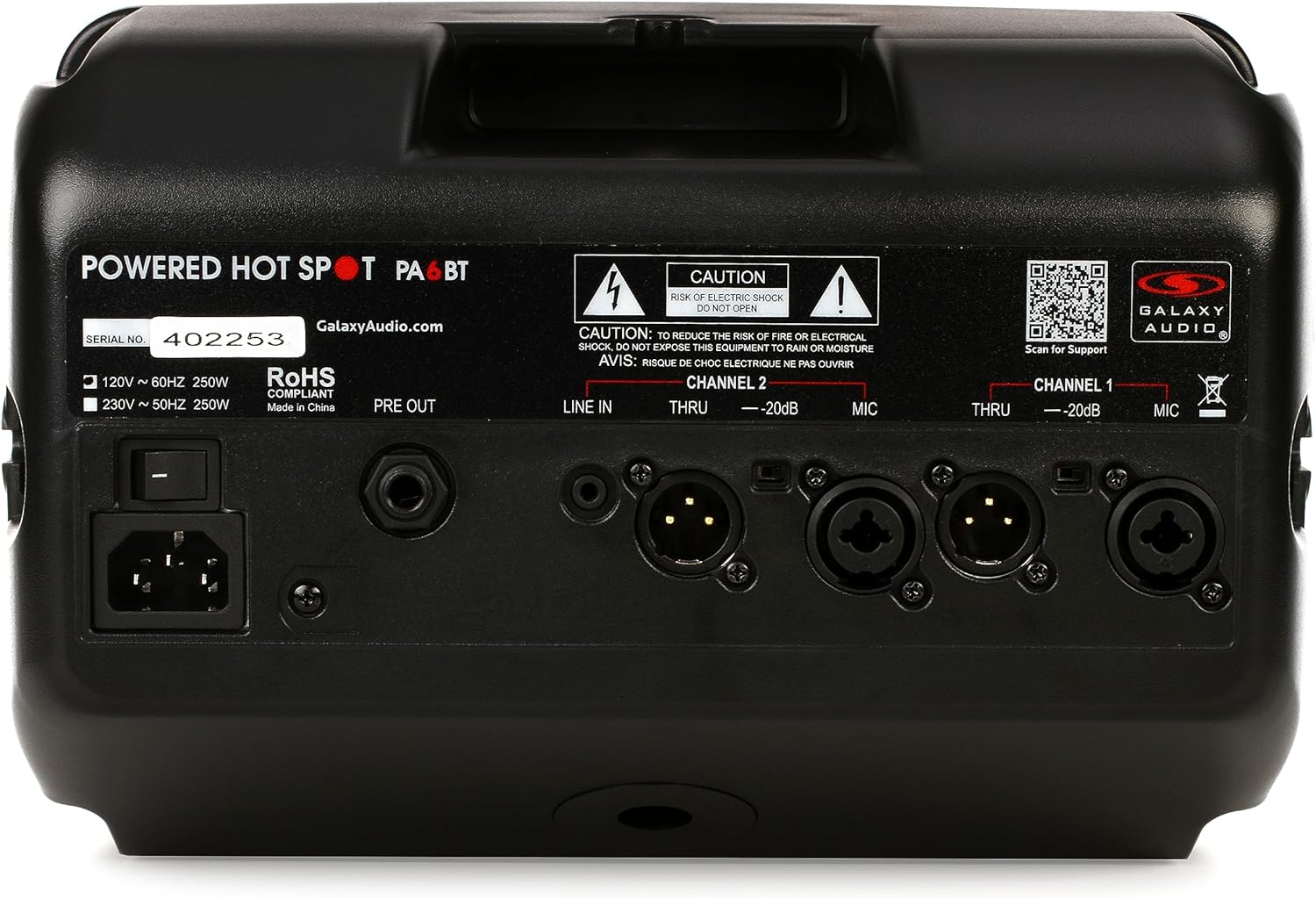
פיגורע 3: דערציען view of the Galaxy Audio PA6BT monitor, displaying the power input, serial number, and various audio input/output connections for Channel 1 and Channel 2.
- מאַכט סוויטש: טורנס די אַפּאַראַט אויף אָדער אַוועק.
- IEC Power Inlet: Connects the included IEC power cable to an AC power source.
- PRE OUT: Line-level output for sending the mixed signal to another powered speaker or a main PA system.
- Channel 2 Inputs:
- LINE IN (1/8"): Stereo or mono input for connecting devices like MP3 players, smartphones, or laptops.
- THRU (XLR): XLR pass-through for Channel 2, allowing the input signal to be sent to another device without processing.
- -20dB Pad (Switch): Reduces the input sensitivity by 20dB for high-level signals.
- MIC (XLR/1/4" Combo): Combo jack for connecting microphones (XLR) or line-level instruments (1/4").
- Channel 1 Inputs:
- THRU (XLR): XLR pass-through for Channel 1.
- -20dB Pad (Switch): Reduces the input sensitivity by 20dB for high-level signals.
- MIC (XLR/1/4" Combo): Combo jack for connecting microphones (XLR) or line-level instruments (1/4").
6. סעטאַפּ גייד
- ופשליסן די אַפּאַראַט: Carefully remove the PA6BT from its packaging and inspect for any signs of damage.
- אָרט:
- For personal monitoring, mount the PA6BT onto a standard microphone stand using the included MSA-1 stand adaptor. Ensure the stand is stable.
- Alternatively, place the unit on a stable, flat surface such as a table or stage floor.
- Initial Control Settings: Before connecting power, ensure all volume knobs (CHAN 1, CHAN 2, BT VOL) are turned completely counter-clockwise (minimum). Set the LOW, MID, and HI EQ knobs to their center (flat) positions.
- מאַכט קשר: Connect the supplied IEC power cable to the IEC inlet on the rear panel of the PA6BT, then plug the other end into a suitable AC power outlet.
- מאַכט אויף: Flip the Power Switch on the rear panel to the "ON" position. The PWR LED on the front panel should illuminate.
7. אַפּערייטינג ינסטרוקטיאָנס
7.1 פֿאַרבינדן אַודיאָ קוועלער
- Microphones/Instruments (XLR/1/4" Combo Jacks):
- Connect your microphone or instrument to either the Channel 1 or Channel 2 MIC input.
- If using a high-output source, engage the -20dB Pad switch for that channel to prevent input clipping.
- Slowly increase the corresponding CHAN 1 or CHAN 2 volume knob until the desired level is reached. Monitor the CLIP LED; if it flashes frequently, reduce the input volume or engage the -20dB pad.
- Line-Level Devices (1/8" LINE IN - Channel 2 only):
- Connect your smartphone, tablet, or other line-level audio device to the 1/8" LINE IN jack on Channel 2.
- Adjust the BT VOL knob to control the volume of this input.
7.2 Bluetooth Pairing and Operation
- Ensure the PA6BT is powered on.
- Activate Bluetooth on your audio device (e.g., smartphone, tablet).
- זוכן פֿאַר available Bluetooth devices. The PA6BT should appear as "Galaxy Audio PA6BT".
- Select "Galaxy Audio PA6BT" to pair. A confirmation tone may sound from the speaker.
- Once paired, play audio from your device. Adjust the BT VOL knob on the PA6BT to control the playback volume.
7.3 Using the Equalizer (EQ)
The LOW, MID, and HI knobs allow you to tailor the sound to your preference or acoustic environment:
- נידעריק: Adjusts the bass frequencies. Turn clockwise to boost bass, counter-clockwise to cut.
- מיטן: Adjusts the midrange frequencies. Turn clockwise to boost mids, counter-clockwise to cut. This is often used to enhance vocal clarity.
- הי: Adjusts the treble frequencies. Turn clockwise to boost highs, counter-clockwise to cut.
7.4 Compressor/Limiter
The PA6BT features a built-in 18dB compressor/limiter. This circuit automatically reduces the dynamic range of the audio signal, preventing sudden loud peaks from distorting the sound and protecting the speakers from damage. The COMP LED illuminates when the compressor/limiter is active.
7.5 XLR Pass-Through (THRU)
The XLR THRU outputs on both channels allow you to send the unprocessed input signal from that channel to another device, such as a main mixing console or another powered speaker. This is useful for creating a separate monitor mix without affecting the main house sound.
8. וישאַלט
- רייניקונג: ניצט אַ ווייכע, טרוקענע שטאָף צו רייניקן די אויסערלעכע זייט פון דעם אַפּאַראַט. ניצט נישט קיין פליסיקע רייניקונגס-מיטלען אדער סאָלווענטן, ווייל זיי קענען שאַטן די ענדיקונג אדער אינערלעכע קאָמפּאָנענטן.
- סטאָרידזש: When not in use for extended periods, store the PA6BT in a cool, dry place, away from direct sunlight and extreme temperatures.
- ווענטילאַטיאָן: פאַרזיכערן אַז די ווענטאַליישאַן אָופּאַנינגז זענען נישט אפגעשטעלט צו פאַרמייַדן אָוווערכיטינג.
- סערוויס: Refer all servicing to qualified service personnel. Do not attempt to open the unit or perform repairs yourself.
9. טראָובלעשאָאָטינג
| פּראָבלעם | מעגלעך סיבה | לייזונג |
|---|---|---|
| קיין מאַכט (PWR LED אויסגעלאָשן) | Power cable not connected; Power switch off; Power outlet faulty. | Ensure power cable is securely connected. Turn power switch ON. Test power outlet with another device. |
| קיין געזונט רעזולטאַט | Volume knobs too low; Input source not connected or muted; Incorrect input selected; Faulty cable. | Increase CHAN 1, CHAN 2, or BT VOL. Check input source connection and volume. Ensure correct input is used. Test with a different cable. |
| Distorted sound / CLIP LED flashing | Input signal too high; EQ settings extreme. | Reduce the volume of the input source. Engage the -20dB Pad switch for the affected channel. Adjust EQ knobs to a more neutral position. |
| בלועטאָאָטה איז נישט פּערינג | PA6BT not in pairing mode; Device too far; Interference; Previously paired with another device. | Ensure PA6BT is powered on. Move device closer. Turn off other Bluetooth devices. Forget PA6BT from your device's Bluetooth list and try pairing again. |
| צוריקקער (הוילנדיק גערויש) | Microphone too close to speaker; Microphone gain too high; Speaker pointed directly at microphone. | Reposition the microphone and speaker. Reduce microphone gain. Adjust EQ settings (especially MID/HI). |
10. ספּעסאַפאַקיישאַנז

Figure 4: Diagram showing the dimensions of the Galaxy Audio PA6BT monitor: 12 inches deep, 7 inches wide, and 12 inches high.
| שטריך | דעטאַל |
|---|---|
| מאָדעל | PA6BT |
| מאַכט רעזולטאַט | 170 וואטס |
| אָפטקייַט ענטפער | 80 הערץ - 18 קילאָהרץ |
| רעדנער טיפּ | 2-Way: 6.5" Neodymium Woofer, 1.5" Tweeter |
| ינפּוץ | Channel 1: XLR/1/4" Combo; Channel 2: XLR/1/4" Combo, 1/8" Line In |
| אַוטפּוץ | PRE OUT (Line Level), XLR THRU (Channel 1 & 2) |
| ווירעלעסס קאַנעקטיוויטי | בלועטאָאָטה |
| יקוואַליזיישאַן | 3-Band (Low, Mid, High) |
| Dynamic Processing | Built-in 18dB Compressor/Limiter |
| דימענשאַנז (H X W X D) | 12" x 7" x 12" (אומגעפער) |
| פּונקט וואָג | 8.21 פונט |
| אַרייַנגערעכנט קאַמפּאָונאַנץ | MSA-1 stand adaptor, IEC power cable |
| מאַכט מקור | קאָרדעד עלעקטריק |
| קאָליר | שוואַרץ |
11. וואָראַנטי און שטיצן
11.1 לימיטעד וואָראַנטי
The Galaxy Audio PA6BT is covered by a limited warranty. For specific terms, conditions, and duration of the warranty, please refer to the warranty card included with your product or visit the official Galaxy Audio webזייטל. האַלט דיין קויפן באַווייַז פֿאַר וואָראַנטי קליימז.
11.2 קונה שטיצן
For technical assistance, troubleshooting beyond this manual, or service inquiries, please contact Galaxy Audio customer support. You can find contact information and additional resources on the official Galaxy Audio webפּלאַץ:


