1. פּראָדוקט איבערview
The LinQ W735 is a versatile dynamic microphone designed for both wired and wireless operation. It features a durable metal construction, an internal shock mount, a hum-compensating coil, and a neodymium magnet. The microphone includes an on/off switch with a locking mechanism. For wireless use, it offers a range of up to 30 meters with its included receiver, which connects directly to a karaoke machine or amplifier's 6.5 mm jack input. Alternatively, a 3-meter wired connection is possible using the provided cable. The microphone is powered by AA batteries, which are included. It is designed to be insensitive to acoustic noise, boasts a high sound pressure level of over 150 dB SPL, and features a silent switch. Its cardioid polar pattern focuses on sound from the front, minimizing background noise.
1.1 פּעקל אינהאַלט
- LinQ W735 Dynamic Microphone
- Wireless Receiver (6.5 mm Jack)
- 3-meter Audio Cable (6.5 mm Jack to 6.5 mm Jack)
- AA Batteries (for microphone and receiver)

Image 1.1: LinQ W735 microphone, wireless receiver, and product packaging.
2. זיכערקייַט אינפֿאָרמאַציע
- Do not expose the microphone or receiver to water or excessive moisture.
- ויסמיידן דראַפּינג אָדער אונטערטעניק די מיטל צו שטאַרק ימפּאַקץ.
- Do not attempt to disassemble or modify the microphone or receiver. This will void the warranty.
- Use only the specified AA batteries. Ensure correct polarity when inserting batteries.
- אַרויסנעמען באַטעריעס אויב די דעוויס וועט נישט ווערן גענוצט פֿאַר אַ לענגערע צייט צו פאַרמייַדן ליקאַדזש.
- האַלטן באַטעריז אויס פון דערגרייכן פון קינדער.
3. פּראָדוקט פֿעיִקייטן
- צווייענדיק מאָדע אָפּעראַציע: שטיצט ביידע וויירלעס און ווייערד קאַנעקשאַנז.
- Unidirectional (Cardioid) Polar Pattern: Captures sound primarily from the front, reducing background noise.
- דוראַבאַל קאַנסטראַקשאַן: Features a metal microphone body for longevity.
- אינערלעכער שאָק בארג: Minimizes handling noise.
- Hum-Compensating Coil & Neodymium Magnet: Enhances audio clarity.
- On/Off Switch with Lock: Prevents accidental power changes.
- ווירעלעסס קייט: Up to 30 meters (line of sight).
- הויך SPL האַנדלינג: Capable of handling sound pressure levels over 150 dB.
- באַטאַרייע פּאַוערד: Uses AA batteries for convenience.
4. סעטאַפּ
4.1 באַטאַרייע ייַנמאָנטירונג
- מיקראָפאָן: Unscrew the bottom part of the microphone handle. Insert two AA batteries, ensuring correct polarity (+/-). Screw the handle back on securely.
- ווירעלעסס ופנעמער: Open the battery compartment on the receiver. Insert one AA battery, ensuring correct polarity (+/-). Close the compartment.
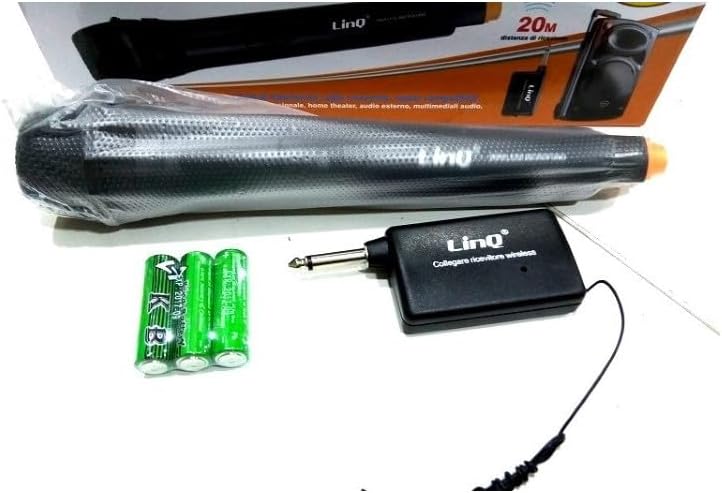
Image 4.1: LinQ W735 microphone, wireless receiver, audio cable, and AA batteries.
4.2 ווירעלעסס קאַנעקשאַן
- Ensure batteries are correctly installed in both the microphone and the wireless receiver.
- Insert the 6.5 mm jack of the wireless receiver directly into the microphone input of your amplifier, karaoke machine, or mixer.
- Turn on the wireless receiver.
- Slide the ON/OFF switch on the microphone to the 'ON' position.
- The microphone and receiver should automatically pair. Adjust the volume on your audio device as needed.
4.3 ווייערד קאַנעקשאַן
- Ensure batteries are installed in the microphone. The microphone requires power even in wired mode for optimal performance.
- Connect one end of the 3-meter audio cable to the microphone's output port.
- Connect the other end of the audio cable to the microphone input of your amplifier, karaoke machine, or mixer.
- Slide the ON/OFF switch on the microphone to the 'ON' position.
- Adjust the volume on your audio device as needed.
5. אַפּערייטינג ינסטרוקטיאָנס
5.1 פּאַוערינג אויף / אַוועק
To power on the microphone, slide the switch located on the microphone body to the 'ON' position. To power off, slide the switch to the 'OFF' position. The switch also features a 'LOCK' position to prevent accidental power changes during use.
5.2 באַניץ עצות
- Hold the microphone approximately 2-6 inches (5-15 cm) from your mouth for optimal sound capture.
- Point the top of the microphone directly towards the sound source.
- Avoid covering the microphone grille with your hand, as this can affect sound quality.
- When using wirelessly, ensure a clear line of sight between the microphone and the receiver for best performance and range.
- Adjust the volume on your connected audio device (amplifier, mixer) to achieve the desired sound level.
6. וישאַלט
- רייניקונג: Wipe the microphone body with a soft, dry cloth. Do not use liquid cleaners or abrasive materials.
- סטאָרידזש: האַלט דעם מיקראָפאָן און ופנעמער אין אַ קיל, טרוקן אָרט אַוועק פון דירעקט זונשייַן און עקסטרעמע טעמפּעראַטורן.
- באַטערי פאַרבייַט: Replace batteries when the sound quality degrades or the microphone/receiver fails to power on. Always replace all batteries at the same time.
7. טראָובלעשאָאָטינג
| פּראָבלעם | מעגלעך סיבה | לייזונג |
|---|---|---|
| No sound output (Wireless) | Microphone/receiver off; Low batteries; Receiver not connected; Out of range; Volume too low. | Ensure microphone and receiver are ON. Replace batteries. Connect receiver securely. Move closer to receiver. Increase volume on audio device. |
| No sound output (Wired) | Microphone off; Cable not connected; Volume too low. | Ensure microphone is ON. Connect cable securely. Increase volume on audio device. |
| Poor sound quality/Interference | Low batteries; Obstructions in wireless path; Other electronic interference; Incorrect microphone placement. | Replace batteries. Ensure clear line of sight. Move away from other electronic devices. Adjust microphone position. |
| מיקראָפאָן גייט נישט אָן | טויטע אדער נישט ריכטיק אריינגעשטעלטע באַטעריעס. | פאַרבייַטן באַטעריז מיט נייַ אָנעס, ינשורינג ריכטיק פּאָולעראַטי. |
8. ספּעסאַפאַקיישאַנז
| מאָדעל | W735 |
| טיפּ | דינאַמיש מיקראָפאָן |
| פּאָליאַר מוסטער | ונידירעקטיאָנאַל (קאַרדיאָיד) |
| אָפטקייַט ענטפער | 80 - 12,000 הערץ |
| סענסיטיוויטי | 1.5 mV/PA |
| נאָמינאַל ימפּידאַנס | 350 אָום |
| מינימום מאַסע ימפּידאַנס | 1000 אָום |
| מאַקסימום SPL | > 150 דב ספּל |
| קאַנעקטער טיפּ | 6.5 mm Jack (for receiver and wired cable) |
| ווירעלעסס ראַנגע | אַרויף צו 30 מעטער |
| מאַכט מקור | AA Batteries (2 for microphone, 1 for receiver) |
| דימענסיאָנס מיקראָפאָן | 48 רענטגענ 180 מם |
| מאַטעריאַל | Metal (microphone body), ABS Plastic (receiver) |
| רעקאָממענדעד ניצט | געזאַנג, קאַראַאָקע |
9. וואָראַנטי און שטיצן
פֿאַר וואָראַנטי אינפֿאָרמאַציע אָדער טעכנישע שטיצע, ביטע זען די דאָקומענטאַציע וואָס איז צוגעשטעלט געוואָרן ביים קויפן אָדער קאָנטאַקט דיין הענדלער. האַלט דיין באַווייַז פון קויפן פֿאַר קיין וואָראַנטי קליימז.


