הקדמה
This manual provides comprehensive instructions for the safe and effective use of your Winplus AC55925-80 3-in-1 Emergency Socket Power Bank. This device combines a compact power bank, a USB car charger, and an emergency glass-breaking tool. Please read this manual thoroughly before operation and retain it for future reference.
פּראָדוקט איבערview
The Winplus 3-in-1 Emergency Socket Power Bank is designed for convenience and safety, offering multiple functionalities in a compact form factor.

Figure 1: Winplus 3-in-1 Emergency Socket Power Bank with key features highlighted.
קאַמפּאָונאַנץ:
- Compact Power Bank: Provides portable power for charging devices.
- וסב מאַשין טשאַרדזשער: Plugs into a 12V car socket to charge devices and the power bank.
- Emergency Glass-Breaking Tool: Integrated for emergency situations.
- USB רעזולטאַט פּאָרט: For connecting charging cables to devices.
- מיקראָ וסב אַרייַנגאַנג פּאָרט: For charging the internal power bank.
- LED ינדיקאַטאָר: דיספּלייז טשאַרדזשינג סטאַטוס.

פיגורע 2: דעטאַילעד view of the device's ports.
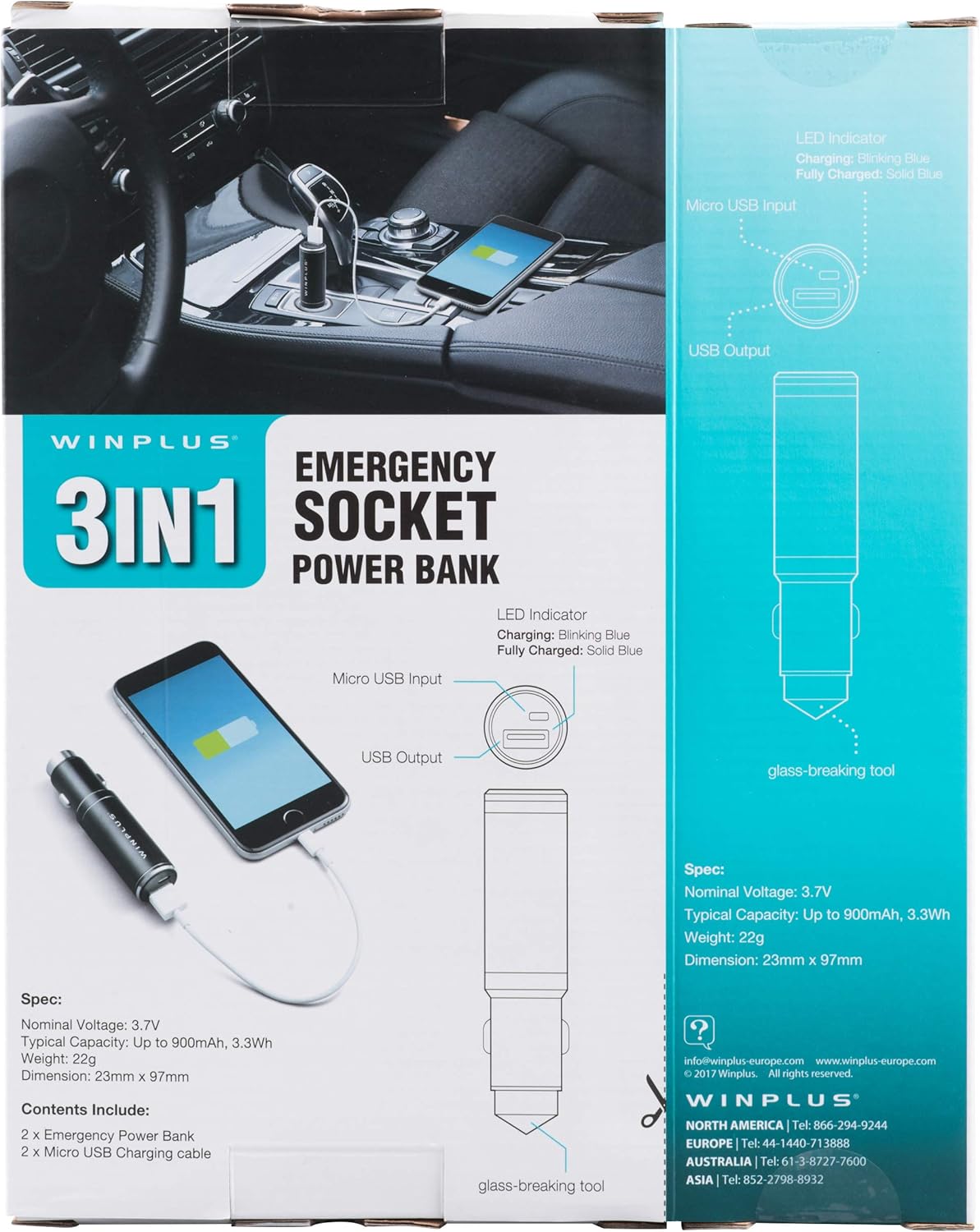
Figure 3: LED indicator status and glass-breaking tool location.
סעטאַפּ
ערשטע אויפלאדונג פון די פאוער באנק:
- Locate the Micro USB Input port on the device.
- Connect the provided Micro USB charging cable to the Micro USB Input port.
- Connect the other end of the USB cable to a standard USB power source (e.g., a computer USB port, a wall adapter, or the car's 12V socket when used as a car charger).
- The LED indicator will blink blue during charging.
- Once fully charged, the LED indicator will turn solid blue.
Note: It is recommended to fully charge the power bank before its first use.
אַפּערייטינג ינסטראַקשאַנז
ניצן ווי אַ פּאָרטאַטיוו מאַכט באַנק:
- Ensure the power bank is charged (solid blue LED indicator).
- Connect your device's charging cable to the USB Output port on the power bank.
- Connect the other end of the cable to your mobile device (smartphone, tablet, etc.).
- די פּאַוער באַנק וועט אויטאָמאַטיש אָנהייבן טשאַרדזשינג דיין מיטל.
Using as a USB Car Charger:
- Insert the Winplus 3-in-1 device into your vehicle's 12V accessory socket (cigarette lighter socket).
- Connect your device's charging cable to the USB Output port on the Winplus device.
- פאַרבינדן די אנדערע סוף פון די קאַבלע צו דיין רירעוודיק מיטל.
- Your device will begin charging. The internal power bank will also charge simultaneously if it is not full.
Using the Emergency Glass-Breaking Tool:
The emergency glass-breaking tool is located at the tip of the device, opposite the USB ports. This tool is intended for emergency use only to break vehicle side windows in situations where occupants are trapped.
- In an emergency, firmly press the tip of the tool against a corner of a side window.
- Apply steady pressure until the spring-loaded mechanism activates and shatters the glass.
- Once the glass is broken, carefully clear any remaining shards before exiting the vehicle.
ווארענונג: Use this tool only in genuine emergencies. Misuse can cause serious injury. Keep out of reach of children.
וישאַלט
- האַלט דאָס אַפּאַראַט טרוקן. פֿײַכטקייט קען שאַטן אינעווייניקסטע קרייזן.
- צי ניט ויסשטעלן צו עקסטרעם טעמפּעראַטורעס (הייס אָדער קאַלט).
- רייניקט דעם אַפּאַראַט מיט אַ ווייכן, טרוקענעם שטאָף. ניצט נישט קיין שאַרפע כעמיקאַלן אָדער אַברייסיוו רייניגער.
- סטאָר אין אַ קיל, טרוקן אָרט ווען ניט אין נוצן.
- ויסמיידן דראַפּינג אָדער אונטערטעניק די מיטל צו שטאַרק ימפּאַקץ.
טראָובלעשאָאָטינג
| פּראָבלעם | מעגלעך סיבה | לייזונג |
|---|---|---|
| מיטל ניט טשאַרדזשינג. | Power bank is depleted. דער קאַבל איז דעפעקטיוו. USB port is dirty or damaged. | ריטשאַרדזש די מאַכט באַנק. פרובירט אן אנדער טשאַרדזשינג קאַבל. Clean the USB ports carefully or try another port. |
| די LED אינדיקאַטאָר צינדט זיך נישט אָן. | Device is not connected to a power source. Device is fully charged (if solid blue). דער מיטל איז פאַלש. | Ensure proper connection to a power source. Check if it's already solid blue. קאָנטאַקט קונה שטיצן אויב ישוז אָנהאַלטן. |
| פּאַמעלעך טשאַרדזשינג. | Cable is not suitable. Power source is low current. Device being charged has high power requirements. | Use a high-quality charging cable. Connect to a higher current USB adapter. This device provides 2.1A output, which is standard for fast charging most phones. |
ספּעסאַפאַקיישאַנז
- מאָדעל: AC55925-80
- נאָמינאַל חלקtage: 3.6V
- טיפּיש קאַפּאַציטעט: Up to 2500 mAh, 9 Wh
- באַטאַרייע צעל זאַץ: ליטהיום פּאָלימער
- USB רעזולטאַט: 5V / 2.1A
- מיקראָ וסב אַרייַנשרייַב: 5V / 0.5A
- דימענסיעס: 23mm x 127mm (approximate)
- נומער וואָג: 510 g (for the 2-pack)
- קאַנעקטער טיפּ: Micro USB (Input), USB Type-A (Output)
זיכערקייַט אינפֿאָרמאַציע
- נישט צענעמען, עפענען אדער צורייסן די באַטעריע פּאַק.
- דו זאלסט נישט ויסשטעלן די באַטאַרייע צו היץ אָדער פייַער. ויסמיידן סטאָרידזש אין דירעקט זונשייַן.
- דו זאלסט נישט קורץ-קרייַז אַ באַטאַרייע פּאַק. דו זאלסט נישט קראָם באַטאַרייע פּאַקס צופאַל אין אַ קעסטל אָדער שופלאָד ווו זיי קען שאָרטקרייַז יעדער אנדערע אָדער זיין קורץ-סירקויטעד דורך אנדערע מעטאַל אַבדזשעקץ.
- דו זאלסט נישט אונטערטעניק באַטאַרייע פּאַקס צו מעטשאַניקאַל קלאַפּ.
- אין פאַל פון אַ באַטעריע וואָס ליקט, לאָזט נישט די פליסיקייט קומען אין קאָנטאַקט מיט דער הויט אָדער אויגן. אויב עס איז געווען קאָנטאַקט, וואַשט די אַפעקטירטע געגנט מיט אַ סך וואַסער און זוכט מעדיצינישע הילף.
- דו זאלסט נישט נוצן קיין טשאַרדזשער אנדערע ווי די ספּאַסיפיקלי צוגעשטעלט פֿאַר נוצן מיט די עקוויפּמענט.
- האַלטן באַטאַרייע פּאַקס אויס פון די דערגרייכן פון קינדער.
- זוכן מעדיציניש עצה מיד אויב אַ באַטאַרייע פּאַק איז סוואַלאָוד.
- שטענדיק קויפן די ריכטיק באַטאַרייע פּאַק פֿאַר די עקוויפּמענט.
- האַלט די באַטעריע פּאַקס ריין און טרוקן.
- דו זאלסט נישט לאָזן אַ באַטאַרייע אויף אַ לאַנג אָפּצאָל ווען נישט אין נוצן.
- אַוועקוואַרפן באַטעריע פּאַקס ריכטיק לויט די לאָקאַלע רעגולאַציעס.
וואָראַנטי און שטיצן
For warranty information or technical support, please contact Winplus North America Inc. directly.
- פאַבריקאַנט: Winplus North America Inc
- קאָנטאַקט אינפֿאָרמאַציע: Refer to product packaging or the official Winplus webזייטל פֿאַר די מערסט אַקטועלע שטיצע דעטאַלן.
You can also visit the Winplus webוועבזייטל פֿאַר אָפֿט געשטעלטע פֿראַגעס און נאָך פּראָדוקט אינפֿאָרמאַציע: www.winplus-europe.com


