הקדמה
א דאנק פארן קויפןasing the Trevi RR 501 BT Portable Bluetooth, USB, SD, MP3 Stereo Boombox. This manual provides essential information for the safe and efficient use of your new device. Please read these instructions carefully before operating the unit and retain them for future reference.
זיכערקייַט אינפֿאָרמאַציע
- דו זאלסט נישט ויסשטעלן דעם אַפּפּליאַנסע צו רעגן אָדער נעץ.
- דו זאלסט נישט פאַרשפּאַרן קיין ווענטאַליישאַן אָופּאַנינגז.
- פאַרזיכערן אַז די מאַכט שנור איז נישט פּינטשט אָדער געגאנגען אויף.
- נאָר נוצן אַטאַטשמאַנץ / אַקסעסעריז ספּעסיפיעד דורך דער פאַבריקאַנט.
- נעמט ארויס דעם עלעקטרישן אפּאַראַט בעת בליץ-שטורעמס אדער ווען מען ניצט עס נישט פאר לאנגע צייטן.
- אָפּשיקן אַלע סערוויסעס צו קוואַלאַפייד סערוויס פּערסאַנעל.
- נישט עפענען דעם אַפּאַראַט casinג; עס זענען נישטאָ קיין באַניצער-סערוויסאַבאַל טיילן אינעווייניק.
פּעקל אינהאַלט
ביטע קאָנטראָלירט אַז די פאלגענדע זאכן זענען אַרייַנגערעכנט אין דיין פּעקל:
- Trevi RR 501 BT Boombox Unit
- אַק מאַכט קאַבלע
- באַניצער מאַנואַל (דעם דאָקומענט)
פּראָדוקט איבערview
Familiarize yourself with the main components of your Trevi RR 501 BT Boombox.
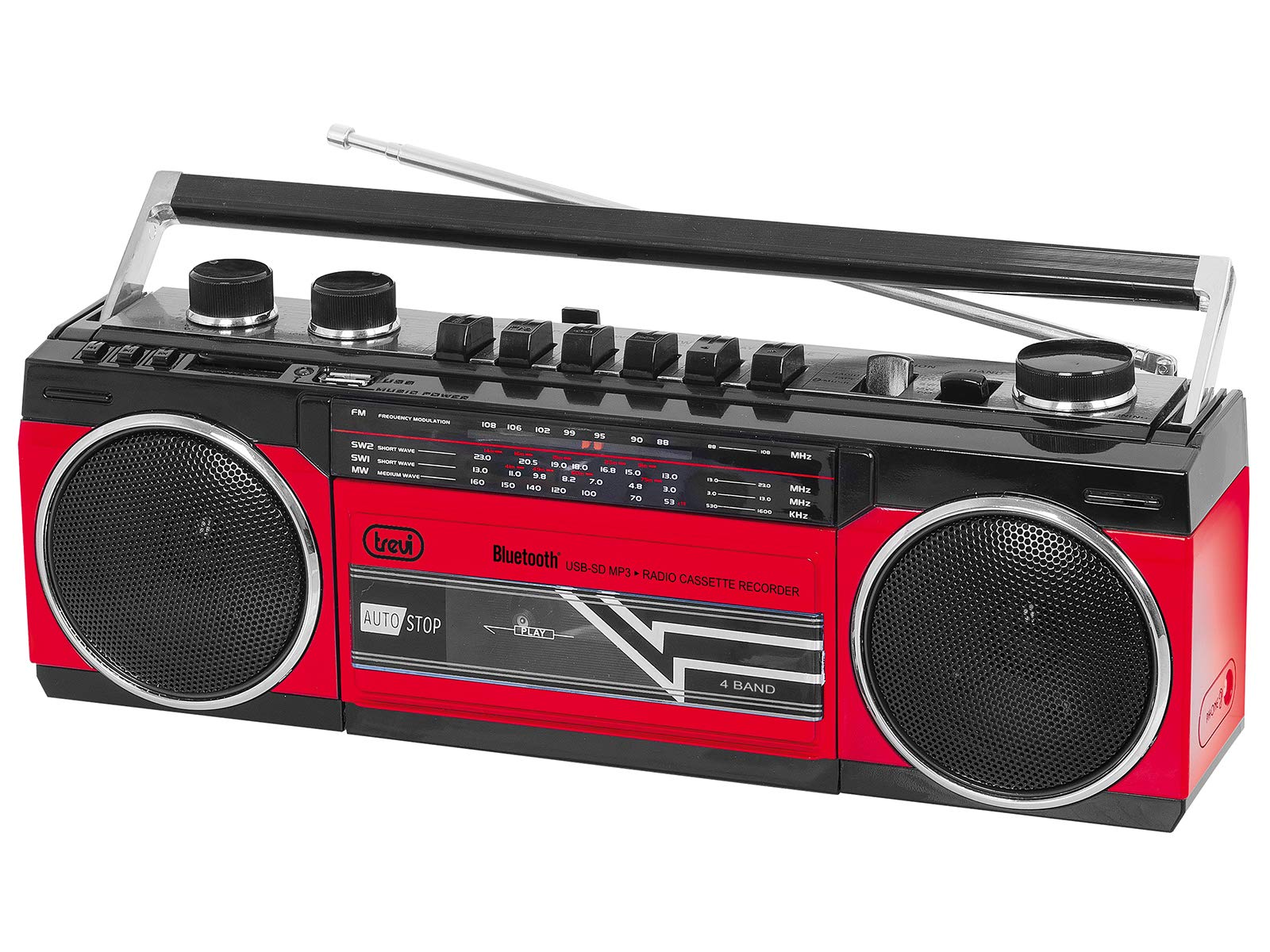
פיגורע 1: פראָנט view of the Trevi RR 501 BT Boombox, showing the dual speakers, control panel, and cassette deck.

פיגורע 2: אַנגגאַלד view of the Trevi RR 501 BT Boombox, highlighting the side profile און שעפּן.
שליסל קאַמפּאָונאַנץ:
- רעדנער: Two integrated stereo speakers.
- קאָנטראָל פּאַנעל: Buttons for playback, mode selection, and tuning.
- באַנד קנעפּל: אַדזשאַסטירט אַודיאָ אַרויסגאַנג לעוועל.
- טונינג קנעפּל: For radio frequency selection.
- מאָדע סעלעקטאָר: Switches between Radio, Bluetooth, USB, SD, and Cassette modes.
- קאַסעט דעק: For playing and recording audio cassettes.
- וסב פּאָרט: פֿאַר USB פלאַש דרייוו ווידערשפּיל.
- SD Card Slot: פֿאַר SD קאַרטל ווידערשפּיל.
- אַנטענע: Telescopic antenna for FM radio reception.
- מאַכט אַרייַנשרייַב: פֿאַר פֿאַרבינדן דעם AC מאַכט קאַבל.
- באַטערי אָפּטייל: (Located on the bottom/rear) For optional battery operation.
סעטאַפּ
מאַכט קשר:
- AC מאַכט: Insert the AC power cable into the AC input jack on the back of the unit, then plug the other end into a standard wall outlet.
- באַטעריע מאַכט (אָפּציאָנאַל): Open the battery compartment cover (usually on the bottom or rear). Insert the required number of D-size batteries (not included), ensuring correct polarity (+/-). Close the compartment cover securely.
Note: When using AC power, batteries are automatically disconnected. Remove batteries if the unit will not be used for an extended period.
אַפּערייטינג ינסטראַקשאַנז
מאַכט אויף / אַוועק:
To turn the unit on, rotate the באַנד קנעפּל clockwise until you hear a click. To turn off, rotate the באַנד קנעפּל counter-clockwise until it clicks off.
Radio Operation (FM):
- קער אויף די אַפּאַראַט.
- שטעלן די מאָדע סעלעקטאָר to "RADIO".
- פֿאַרלענגערט די טעלעסקאָפּישע אַנטענע פֿאַר אַן אָפּטימאַלן אָפּנאַם.
- דרייען די טונינג קנופּ to select your desired FM station.
- סטרויערן די באַנד קנעפּל to your preferred listening level.
בלועטאָאָטה קאַנעקשאַן:
- קער אויף די אַפּאַראַט.
- שטעלן די מאָדע סעלעקטאָר to "BT" (Bluetooth). The unit will enter pairing mode, indicated by a flashing LED.
- אויף אייער בלוטוט-פארשטארקטע דעווייס (למשל, סמאַרטפאָון, טאַבלעט), אַקטיווירט בלוטוט און זוכט פֿאַר פאַראַן דעווייסעס.
- Select "Trevi RR 501 BT" from the list of devices.
- Once paired, the LED indicator will stop flashing and remain solid. You can now play audio from your device through the boombox.
וסב / סד פּלייבאַק:
- קער אויף די אַפּאַראַט.
- אַרייַנלייגן אַ וסב בליץ פאָר אין די וסב פּאָרט אדער אן SD קארטל אין דעם סד קאָרט שפּעלטל. Ensure the media contains MP3 audio files.
- שטעלן די מאָדע סעלעקטאָר to "USB/SD". The unit will automatically begin playing the first compatible audio file.
- Use the playback control buttons (e.g., Play/Pause, Next, Previous) on the unit to manage your audio.
קאַסעט פּלייבאַק:
- קער אויף די אַפּאַראַט.
- דרוק די האַלטן / אַרויסוואַרפן button on the cassette deck to open the cassette compartment.
- Insert an audio cassette with the open edge facing upwards and the tape side facing you. Close the compartment door.
- שטעלן די מאָדע סעלעקטאָר to "TAPE".
- דרוק די שפּיל קנעפּל צו אָנהייבן פּלייבאַק.
- ניצן די ריוויינד און שנעל פאָרויס קנעפּלעך צו נאַוויגירן די טייפּ.
- דרוק האַלטן / אַרויסוואַרפן to stop playback and open the compartment.
Cassette Recording:
- Insert a blank cassette into the cassette deck.
- Select the desired audio source (Radio, Bluetooth, USB, SD) using the מאָדע סעלעקטאָר.
- Start playback of the source audio.
- דרוק די רעקאָרד button (usually red) on the cassette deck. The שפּיל דער קנעפּל וועט אויך אַקטיוויזירן. די רעקאָרדירונג וועט אָנהייבן.
- צו האַלטן רעקאָרדינג, דריקן די האַלטן / אַרויסוואַרפן קנעפּל.
וישאַלט
- רייניקונג: ניצט אַ ווייכע, טרוקענע שטאָף צו רייניקן די אויסערלעכע זייט פון דעם אַפּאַראַט. ניצט נישט קיין שרײַבנדיקע רייניגער אָדער סאָלווענטן.
- קאַסעטע דעק זאָרג: רייניקן די טייפּ קעפּ און די ראָולערס פון צייט צו צייט מיט אַ וואַטע שטעכל.ampמיט יסאָפּראָפּיל אַלקאָהאָל.
- סטאָרידזש: When not in use for extended periods, store the unit in a cool, dry place, away from direct sunlight and extreme temperatures. Remove batteries if applicable.
טראָובלעשאָאָטינג
| פּראָבלעם | מעגלעך סיבה | לייזונג |
|---|---|---|
| קיין מאַכט | שטראָם קאַבל נישט פארבונדן; באַטעריעס אויסגעשעפּט אָדער נישט ריכטיק אַרײַנגעשטעלט. | קאָנטראָלירט די AC מאַכט פֿאַרבינדונג; פאַרבייטן באַטעריעס אָדער זיכער מאַכן די ריכטיקע פּאָלאַריטעט. |
| נעבעך ראַדיאָ אָפּטראָג | אַנטענע נישט אויסגעשטרעקט; שוואַך סיגנאַל. | Fully extend the telescopic antenna; Reposition the unit for better signal. |
| בלועטאָאָטה איז נישט פּערינג | איינהייט נישט אין BT מאָדע; דעוויס צו ווייט; שוין פארבינדן מיט אן אנדער דעוויס. | Ensure mode is set to BT; Move device closer; Disconnect from other devices. |
| יו-עס-בי/עס-די שפילט נישט | Incorrect mode; Incompatible file פֿאָרמאַט; קאָרופּטירטע מעדיע. | Set mode to USB/SD; Ensure files are MP3; Try different USB/SD media. |
| קאַסעטע ווידערשפּיל פּראָבלעמען | Cassette inserted incorrectly; Tape heads dirty. | Re-insert cassette correctly; Clean tape heads and pinch rollers. |
ספּעסאַפאַקיישאַנז
| סאָרט | טרעווי |
| מאָדעל נומער | 0RR50102 |
| קאַנעקטיוויטי טעכנאָלאָגיע | בלועטאָאָטה, וסב |
| רעדנער טיפּ | סטערעאָ |
| דימענסיעס (L X W X H) | 50 X 50 X 28 סענטימעטער |
| מאַכט מקור | AC |
| פּונקט וואָג | 1.25 קילאָגראַמס |
| רעזולטאַט מאַכט | 6 וואטס |
| קאָליר | רויט |
| סטייל | רעטראָ |
וואָראַנטי און שטיצן
פֿאַר וואָראַנטי אינפֿאָרמאַציע און טעכנישע שטיצע, ביטע זען די וואָראַנטי קאַרטל וואָס איז אַרייַנגערעכנט מיט דיין פּראָדוקט אָדער באַזוכן די באַאַמטער Trevi וועבזייטל website. Information regarding spare parts availability and software updates is not provided in the product specifications.
ביטע באַהאַלטן אייער קויפן-באַווייַז פֿאַר יעדע וואָראַנטי-פאָדערונג.


