1. הקדמה
The MS8229 is an auto-ranging digital multimeter designed for professional and home use. It combines multiple measurement functions including AC/DC voltage and current, resistance, frequency, duty cycle, and capacitance. Additionally, it features built-in sensors for sound level, light (Lux), ambient temperature, and humidity, making it a versatile 5-in-1 testing instrument. Its large dual LCD display with backlight ensures clear readings in various conditions.

פיגורע 1.1: פראָנט view of the MS8229 Digital Multimeter, showing the display, rotary switch, and input jacks.
2. שליסל פֿעיִקייטן
- ווייַז: 4000 counts, large dual LCD with backlight.
- ינטעגראַטעד סענסאָרס: Built-in Sound Level Meter, Light Meter (Lux), Ambient Temperature, and Humidity Tester.
- Core Measurements: Tests AC/DC Voltage and Current, Resistance, Frequency, Duty Cycle, and Capacitance.
- Diode & Continuity: Diode Check and Continuity Test with audible buzzer (if resistance is less than 40 ohms).
- טעמפּעראַטור מעאַסורעמענט: Type K thermocouple contact temperature measurement.
- דאַטן פונקציעס: Data Hold and Relative Measurement.
- אָפּעראַציע: Auto Ranging / Selection.
- מאַכט ינדיקאַטאָר: נידעריקע באַטעריע אַרויסווייַז.
3. פּעקל אינהאַלט
ביים עפענען דעם פעקל, ביטע זיכער מאכן אז אלע זאכן וואס זענען אויסגערעכנט אונטן זענען דא און אין גוטן צושטאנד:
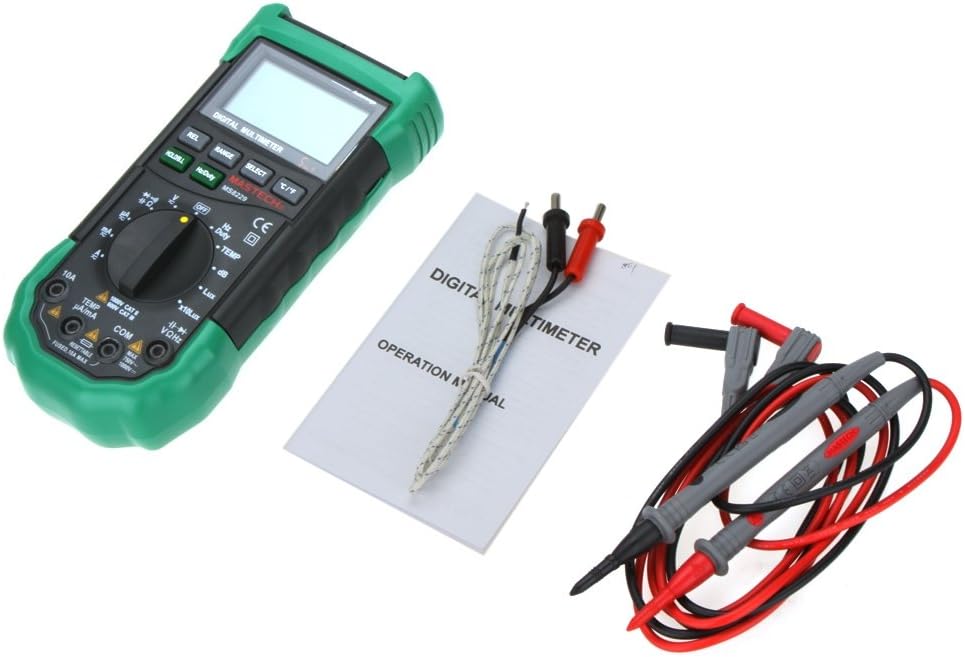
- 1 x MASTECH MS8229 Digital Multimeter
- 1 x Test Clip (Test Leads)
- 1 x Temperature Probe (Type K Thermocouple)
- 1 x ענגליש מאַנואַל

Figure 3.1: The MS8229 Multimeter shown with its included test leads, temperature probe, and user manual.
4. זיכערקייַט אינפֿאָרמאַציע
To ensure safe operation and service of the meter, follow these safety precautions:
- Always ensure the meter is in the correct function and range for the measurement being taken.
- דו זאלסט נישט צולייגן וואָלtage or current that exceeds the maximum rated input for the selected range.
- ניצן וואָרענען ווען ארבעטן מיט וואָלtagהעכער 30V AC RMS, 42V שפּיץ, אדער 60V DC. די וואַליומעןtagדאָס איז אַ ריזיקירן פון קלאַפּ.
- Before changing functions or ranges, disconnect the test leads from the circuit under test.
- קאָנטראָלירט די טעסט דראָטן פֿאַר צעבראָכענע איזאָלאַציע אָדער אויסגעשטעלט מעטאַל איידער נוצן. פאַרבייטן אויב צעבראָכן.
- ניצט נישט דעם מעטער אויב ער קוקט אויס צעבראכן אדער אויב דער קעסטל איז אפן.
- Replace the batteries as soon as the low battery indicator appears to ensure accurate readings.
- Adhere to all local and national safety codes.
5. סעטאַפּ
5.1 באַטאַרייע ייַנמאָנטירונג
The MS8229 requires three (3) 1.5V AAA batteries (not included) for operation.
- זיכער מאַכן אַז דער מעטער איז אויסגעלאָשן.
- געפינט דעם דעקל פון דעם באַטעריע אָפּטייל אויף דער הינטערשטער זייט פונעם מעטער.
- ניצט אַ שרויפנציהער צו לייזן די שרויף וואָס באַזיכערט די באַטאַרייע דעקל.
- אַראָפּנעמען די דעקל.
- Insert three AAA batteries, observing the correct polarity (+ and -) as indicated inside the compartment.
- פאַרבייַטן די באַטאַרייע דעקן און באַוואָרענען עס מיט די שרויף.
פיגורע 5.1: View of the battery compartment, showing the slots for three AAA batteries and the fuse location.
5.2 פֿאַרבינדן טעסט דראָטן
ריכטיקע פֿאַרבינדונג פֿון טעסט־לידער איז קריטיש פֿאַר גענויע און זיכערע מעסטונגען.
- פֿאַר רובֿ באַנדtage, resistance, frequency, capacitance, diode, and continuity measurements, insert the red test lead into the VΩHz דזשעק און די שווארצע טעסט דראָט אין די COM דזשאַק.
- פֿאַר קראַנט מעסטונגען (mA/µA), אַרײַנשטעקן דעם רויטן טעסט דראָט אין דעם TEMP µA/mA דזשעק און די שווארצע טעסט דראָט אין די COM דזשאַק.
- פֿאַר הויכע קראַנט מעסטונגען (10A), אַרײַנשטעקן די רויטע טעסט דראָט אין די 10 א דזשעק און די שווארצע טעסט דראָט אין די COM דזשאַק.
- For temperature measurements, connect the Type K thermocouple probe to the TEMP µA/mA און COM jacks, observing polarity if applicable.

Figure 5.2: The MS8229 Multimeter with red and black test leads properly inserted into the input jacks.
6. אַפּערייטינג ינסטרוקטיאָנס
The MS8229 features a rotary switch for function selection and several buttons for additional features.

Figure 6.1: The MS8229 Multimeter display showing typical readings for humidity and temperature, along with a main measurement.
6.1 ראָטאַרי סוויטש פונקציעס
Turn the rotary switch to select the desired measurement function:
- OFF: מאַכט אויס דעם מעטער.
- V~: AC Voltage מעזשערמאַנט.
- V-: DC Voltage מעזשערמאַנט.
- Ω: קעגנשטעל מעזשערמאַנט.
- Diode/Continuity: Diode test and Continuity test.
- הערץ/פליכט: Frequency and Duty Cycle measurement.
- טעמפּ: Temperature measurement using the Type K thermocouple.
- דב: Sound Level measurement.
- Lux / x10Lux: Light (Illumination) measurement.
- רה: Relative Humidity measurement.
- A~: AC Current measurement (400µA to 10A).
- צו-: DC Current measurement (400µA to 10A).
6.2 קנעפּל פאַנגקשאַנז
- HOLD/B.L: Press once to hold the current display reading. Press and hold to activate/deactivate the backlight.
- הערץ/פליכט: In Frequency/Duty Cycle mode, press to toggle between Hz and Duty Cycle display.
- REL: Activates relative measurement mode, displaying the difference between the current reading and a stored reference value.
- קייט: Manually selects the measurement range (overrides auto-ranging).
- אויסקלייַבן: Toggles between different functions within a single rotary switch position (e.g., AC/DC in voltage/current modes, Diode/Continuity).
- °C/°F: In Temperature mode, toggles between Celsius and Fahrenheit units.
6.3 Performing Measurements (Exampליי)
6.3.1 דק חלקtagE מעזשערמאַנט
- שטעלן די דריי באַשטימען צו V-.
- אַרייַנלייגן די רויט פּרובירן פירן אין די VΩHz דזשעק און די שווארצע טעסט דראָט אין די COM דזשאַק.
- פֿאַרבינדט די טעסט־לידער פּאַראַלעל צום גלייכשטראָם־וואָלוקטוםtagדי מקור אדער קאָמפּאָנענט וואָס דאַרף געמאָסטן ווערן.
- לייענען דעם חלקtagE ווערט אויף די אַרויסווייַזן.
6.3.2 קעגנשטעל מעזשערמאַנט
- זיכער מאַכן אַז די קרייַז אָדער קאָמפּאָנענט איז דעענערדזשייזד איידער איר מעסט די קעגנשטעל.
- שטעלן די דריי באַשטימען צו Ω.
- אַרייַנלייגן די רויט פּרובירן פירן אין די VΩHz דזשעק און די שווארצע טעסט דראָט אין די COM דזשאַק.
- Connect the test leads across the component whose resistance is to be measured.
- לייענען די קעגנשטעל ווערט אויף די אַרויסווייַזן.
6.3.3 טעמפּעראַטור מעזשערמאַנט
- שטעלן די דריי באַשטימען צו TEMP.
- Connect the Type K thermocouple probe to the TEMP µA/mA און COM דזשאַקס.
- Place the tip of the thermocouple probe on or near the object/area whose temperature is to be measured.
- דרוק די ° C / ° F קנעפּל צו באַשטימען צווישן סעלסיוס און פאַהרענהעיט.
- לייענט די טעמפּעראַטור ווערט אויף דעם עקראַן.
7. וישאַלט
7.1 רייניקונג
ווישן די פאַל מיט אַדamp cloth and mild detergent. Do not use abrasives or solvents. Keep the input terminals free of dirt or debris.
7.2 באַטערי פאַרבייַט
When the low battery indicator appears on the display, replace the batteries as described in Section 5.1. Prompt battery replacement ensures continued accuracy and proper operation.
7.3 קאָריק פאַרבייַט
The 10A input jack is protected by a resettable fuse. If the 10A current measurement function stops working, it indicates the fuse has tripped. Disconnect the meter from the circuit, turn it off, and wait a few moments for the fuse to reset. If the fuse continues to trip, check for short circuits or excessive current draw in your application.
7.4 סטאָרידזש
If the meter is not to be used for an extended period, remove the batteries to prevent leakage and damage to the meter.
8. טראָובלעשאָאָטינג
אויב דער מעטער אַרבעט נישט ריכטיק, קאָנטראָלירט די פאלגענדע:
- קיין דיספּלעי אָדער שוואַכע דיספּלעי: קאָנטראָלירן די ייַנמאָנטירונג פון די באַטאַרייע און פאַרבייַטן די באַטעריז אויב נייטיק.
- פאַלש רידינגז: Ensure the correct function and range are selected. Verify test lead connections. Check for damaged test leads.
- "OL" אדער איבערלאסטונג אינדיקאציע: The measured value exceeds the selected range. Switch to a higher range or ensure the input is within the meter's maximum specifications.
- קראַנט מעסטונג אַרבעט נישט: Check if the 10A fuse has tripped (see Section 7.3). Ensure test leads are connected to the correct current input jacks.
- Continuity Buzzer Not Sounding: Ensure the resistance is below 40 ohms for the buzzer to activate.
אויב פּראָבלעמס אָנהאַלטן, קאָנטאַקט קונה שטיצן.
9. ספּעסאַפאַקיישאַנז
| מעזשערמאַנט טיפּ | קייט / ווערט | אַקיעראַסי |
|---|---|---|
| DC VoltagE (DCV) | 400m/4/40/400/1000V | 0.7% + 2 |
| AC Voltage (ACV) | 400m/4/40/400V; 750V | 0.8%+3; 1%+3 |
| DC Current (DCA) | 400/4000µ/40m/400mA; 4/10A | 1.2%+3; 2.0%+10 |
| AC Current (ACA) | 400/4000µ/40m/400mA; 4/10A | 1.5%+5; 3.0%+10 |
| קעגנשטעל | 400/4K/40K/400K/4MΩ; 40MΩ | 1.2%+5; 2%+5 |
| קאַפּאַסיטאַנס | 40n/400n/4µ/40µ/100µF | 3.0% + 3 |
| אָפטקייַט | 10/100/1K/10K/100KHz | 2.0% + 5 |
| טעמפּעראַטור | -20 ~ 1000°C; 4 ~ 1832°F | 2.0% |
| רעלאטיוו הומידיטי (RH) | 20 צו 95% | 5.0% |
| ליכט (לוקס) | 4,000/40,000 Lux | 5.0% |
| געזונט מדרגה (dB) | 40 ~ 100דב | 3.5% |
| דייאָוד טעסט | יא | |
| קאָנטינויטי טעסטער | Buzzer if resistance < 40 ohms | |
| פליכט ציקל | 0.1% - 99.9% | 3.0% |
| מאַכט צושטעלן | 3 * 1.5V AAA batteries (not included) | |
| ויסמעסטונג | 195 * 92 * 55 מם | |
| פּראָדוקט וואָג | 390ג |
10. וואָראַנטי און שטיצן
This product is designed for reliability and performance. For any issues or inquiries not covered in this manual, please refer to your purchase documentation for warranty details or contact the retailer/manufacturer's customer support. Keep your purchase receipt as proof of purchase.


