1. הקדמה
This manual provides comprehensive instructions for the installation, operation, and maintenance of your UHPPOTE 4 Channel Color Quad System Video Splitter, Model UT-XYL-440. This device is designed to process and display video feeds from up to four CCTV cameras simultaneously on a single monitor, offering various display modes and control options for effective surveillance monitoring.
2. זיכערקייַט אינפֿאָרמאַציע
- זיכער מאַכן אַז די דעווייס איז געשטעלט אויף אַ סטאַביל, פלאַך ייבערפלאַך צו פאַרמייַדן אַקסאַדענטאַל פאלן.
- אַרבעטן די מיטל אין די ספּעסיפיעד וואַלtage range (DC 12V) using the provided power adapter.
- Avoid exposing the unit to moisture, rain, or extreme temperatures. This device is intended for indoor use only.
- נישט עפענען דעם סיasing or attempt to repair the unit yourself. Refer all servicing to qualified personnel.
- Maintain adequate ventilation around the unit to prevent overheating.
3. פּעקל אינהאַלט
ביטע באַשטעטיקן אַז אַלע זאכן זענען פאַראַן אין דיין פּעקל:
- UHPPOTE 4 Channel Color Quad System Video Splitter (UT-XYL-440)
- ינפראַרעד רימאָוט קאָנטראָל
- BNC Adapters (7 pieces)
- מאַכט אַדאַפּטער (DC 12V)

Image 3.1: UHPPOTE 4 Channel Color Quad System Video Splitter, remote control, and BNC adapters.
4. פּראָדוקט איבערview
Familiarize yourself with the components and controls of your video splitter.
4.1. פראָנט פּאַנעל
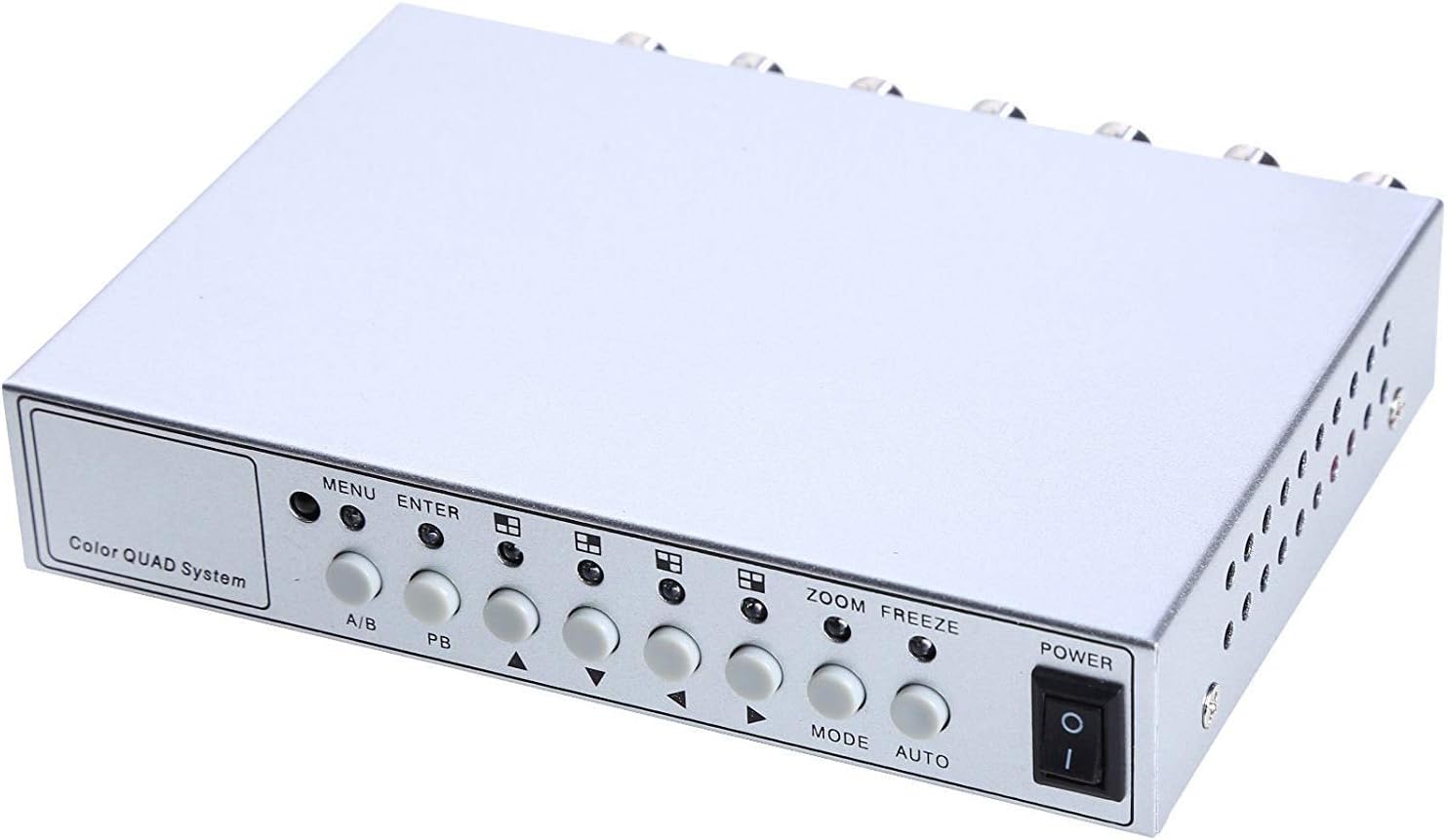
בילד 4.1: פראָנט פּאַנעל קאָנטראָלס און אינדיקאַטאָרן.
- מעניו: Accesses the on-screen display (OSD) menu for settings adjustment.
- אַרייַן: באַשטעטיקט אויסוואַלן אין די OSD מעניו.
- א/ב: Switches between different display modes or channels.
- פּב: Playback control (if connected to a VCR).
- Directional Arrows (Up/Down/Left/Right): נאַוויגירן דורך מעניו אָפּציעס און סטרויערן ווערטן.
- זאָאָם: Activates the digital zoom function.
- פרירן: Freezes the current video frame.
- DIRECTIONS: Cycles through various display modes (Quad, Full Screen, PIP, Dual Split).
- אָטאַמאַטיק: Activates the auto-sequence display mode.
- מאַכט: On/Off switch for the unit.
4.2. דערציען פּאַנעל

Image 4.2: Rear panel video input/output ports and power input.
- ווידעא 1-4: BNC inputs for connecting up to four CCTV cameras.
- VCR IN: BNC input for connecting a VCR or other recording device.
- VCR OUT: BNC output for connecting to a VCR or other recording device.
- מאָניטאָר: BNC output for connecting to a display monitor.
- DC 12V: Power input jack for the DC 12V power adapter.
4.3. רימאָוט קאָנטראָל

Image 4.3: Infrared remote control for convenient operation.
The remote control provides convenient access to all functions, mirroring the front panel controls and offering direct channel selection.
5. סעטאַפּ
Follow these steps to set up your UHPPOTE Video Splitter:
- פֿאַרבינדן קאַמעראַס: Connect your CCTV cameras to the ווידעא 1, ווידעא 2, ווידעא 3, און ווידעא 4 BNC input ports on the rear panel. Ensure secure connections.
- פֿאַרבינדן מאָניטאָר: Connect your display monitor to the מאָניטאָר BNC output port on the rear panel.
- Connect VCR (Optional): If you wish to record video, connect the VCR IN און VCR OUT BNC ports to your VCR or recording device.
- פאַרבינדן מאַכט: Insert the DC 12V power adapter into the DC 12V input jack on the rear panel, then plug the adapter into a standard electrical outlet.
- מאַכט אויף: דרוק די מאַכט button on the front panel or remote control to turn on the unit.
6. אַפּערייטינג ינסטרוקטיאָנס
6.1. מאַכט אויף / אויסגעלאשן
דרוק די מאַכט button on the front panel or the remote control to switch the unit on or off.
6.2. ווייַז מאָדעס
The unit supports various display configurations. Use the מאָדע button on the front panel or remote to cycle through them:
- QUAD Split Mode: Displays all four camera feeds simultaneously in a four-way split screen.
- גאַנץ פאַרשטעלן מאָדע: Displays a single camera feed in full screen. Use the directional arrows or number buttons (1-4) on the remote to select the desired camera.
- פּיפּ (בילד-אין-בילד) מאָדע: Displays one main camera feed with a smaller window of another camera feed. The position of the PIP window can often be adjusted via the menu.
- Dual Split Mode: Displays two camera feeds simultaneously (e.g., side-by-side or top-bottom).
- Auto Sequence Mode: Automatically cycles through full-screen views of each connected camera. Activate using the AUTO button on the front panel or remote.
6.3. מעניו נאַוויגאַציע און סעטטינגס
To access and adjust system settings:
- דרוק די MENU button on the front panel or remote control. The On-Screen Display (OSD) menu will appear.
- ניצן די אַרויף / אַראָפּ directional arrows to navigate between menu options.
- דרוק אַרייַן צו אויסקלייבן אַן אָפּציע אָדער אַרייַן אַ סוב-מעניו.
- ניצן די לינקס / רעכט directional arrows to adjust values (e.g., brightness, contrast) or change settings.
- דרוק MENU ווידער צו אַרויסגאַנג די מעניו.
שליסל סעטטינגס:
- ווידעא אַדזשאַסטמאַנץ: Adjust Brightness, Contrast, Saturation, Hue, and Sharpness for optimal image quality.
- סיסטעם פֿאָרמאַט: Select between NTSC (for North America, Japan, etc.) or PAL (for Europe, Asia, etc.) based on your region's video standard. Incorrect selection can lead to distorted or black and white images.
- Overlay Information: Configure display of Camera Title, Real Time and Date, and Alarm/Loss/Motion messages.
- Event Report: Review event logs and configure buzzer/relay output settings.
6.4. זום פונקציע
In full-screen mode, press the ZOOM button on the front panel or remote to activate digital zoom. Use the directional arrows to select the area to zoom in on.
6.5. Freeze Function
דרוק די פרירן (FRZ) button on the front panel or remote to pause the current video frame. Press it again to resume live video.
7. וישאַלט
- רייניקונג: ניצט אַ ווייכע, טרוקענע שטאָף צו רייניקן די אויסערלעכע זייט פון דעם אַפּאַראַט. ניצט נישט קיין פליסיקע אָדער אַעראָזאָל רייניגער.
- ווענטילאַטיאָן: Ensure the ventilation holes are not obstructed to prevent overheating.
- סטאָרידזש: אויב איר לייגט דאָס אַפּאַראַט אַוועק פֿאַר אַ לענגערע צייט, זאָלט איר עס אָפּשטעקן פֿון עלעקטריציטעט און עס אַוועקלייגן אין אַ קילן, טרוקענעם אָרט.
8. טראָובלעשאָאָטינג
| פּראָבלעם | מעגלעך סיבה | לייזונג |
|---|---|---|
| קיין ווידעא סיגנאַל אויף מאָניטאָר |
|
|
| Distorted, black & white, or rolling image |
|
|
| ווייַט קאָנטראָל נישט ארבעטן |
|
|
| Constant buzzing sound |
|
|
9. ספּעסאַפאַקיישאַנז
| שטריך | דעטאַל |
|---|---|
| מאָדעל נומער | UT-XYL-440 |
| ווידעא ינפּוץ | 4 BNC (for cameras), 1 BNC (VCR In) |
| ווידעא אַוטפּוץ | 1 BNC (Monitor), 1 BNC (VCR Out) |
| ווידעא האַכלאָטע | 720x480 (NTSC 60Hz), 720x576 (PAL 50Hz) |
| ווייַז מאָדעס | Quad Split, Full Screen, PIP, Dual Split, Auto Sequence |
| בילד אַדדזשוסטמענץ | ברייטנאַס, קאַנטראַסט, זעטיקונג, כיו, שאַרפּנאַס |
| ספּעציעלע פאַנגקשאַנז | Freeze Function, Zoom Function, Video Loss Detection, Motion Detection |
| מאַכט צושטעלן | DC 12V |
| פּונקט וואָג | 13.4 אונסעס (בעערעך 380 ג) |
| פּעקל דימענשאַנז | 8.54 x 6.06 x 2.4 אינטשעס (אומגעפער 21.7 x 15.4 x 6.1 ס״מ) |
| ווייַט באַטערי | 1 x CR2 battery (required) |
10. וואָראַנטי און שטיצן
UHPPOTE products are designed for reliability and performance. For warranty information, technical support, or service inquiries, please refer to the contact information provided with your purchase or visit the official UHPPOTE website. Please have your model number (UT-XYL-440) available when contacting support.


