הקדמה
This manual provides essential instructions for the installation, operation, and maintenance of your Yale YMG40 Digital Door Lock. Please read this manual thoroughly before installation and use to ensure proper function and security.
פּעקל אינהאַלט
באַשטעטיקן אַז אַלע קאָמפּאָנענטן זענען פאַראַן איידער איר הייבט אָן די אינסטאַלאַציע:
- Yale YMG40 Digital Door Lock (Front and Back Body)
- מאָרטייז שלאָס אַסעמבלי
- 2 מעכאנישע שליסלען
- Installation Hardware (screws, strike plate, etc.)
- באַניצער מאַנואַל (דעם דאָקומענט)
שליסל פֿעיִקייטן
- שטופּן-ציען שעפּן: Designed for convenient operation; push to enter, pull to exit.
- קייפל צוטריט מעטאָדן: Biometric fingerprint recognition, PIN code entry, and mechanical key override.
- Optional Connectivity: Compatible with Z-Wave and Bluetooth modules for smart home integration (modules sold separately).
- קול גייד: Provides audio prompts for setup and operation.
- Safe Handle Mechanism: Enhances security by preventing unauthorized entry.
- אָטאַמאַטיק לאַקינג: Configurable to automatically lock the door after closing.
- נויטפאַל אַקסעס: Low battery warning and external power terminal for emergency situations.
סעטאַפּ און ינסטאַלירונג
Professional installation is recommended for optimal performance and security. Ensure your door meets the following specifications:
- טיר גרעב: 40-75mm (wooden doors).
- טיר טיפּ: Suitable for both inswing and outswing doors.
ערשט סטעפּס:
- צוגרייטן די טיר: Ensure the door is properly prepped according to the provided template (if applicable) for the mortise lock and lock body.
- אינסטאַלירן מאָרטייז שלאָס: Insert the mortise lock into the door edge and secure it.
- Install Lock Bodies: Mount the front and back lock bodies, ensuring cables are correctly routed and connected.
- אַרייַנלייגן באַטעריז: Install the required batteries into the back body.
- ערשט פּראָגראַממינג: Follow the voice guide prompts to set up the master PIN code.
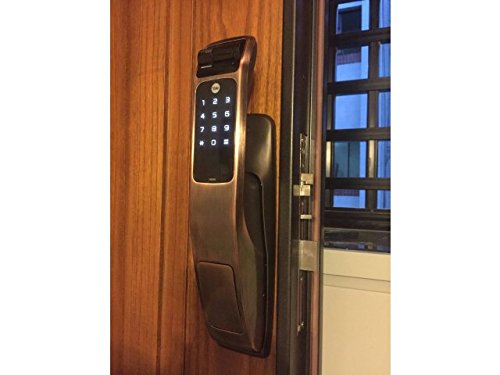
Image: Yale YMG40 Digital Door Lock installed on a wooden door, showing the sleek design and integration.
אַפּערייטינג ינסטראַקשאַנז
1. Accessing the Door
a. Fingerprint Access
The lock supports up to 20 different fingerprints. To unlock using a fingerprint:
- Place your registered finger on the fingerprint scanner.
- The lock will verify the fingerprint and unlock.
- Use the push-pull handle to open the door.
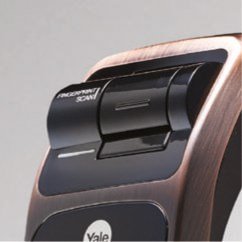
בילד: א דעטאַלירטע view of the fingerprint scan area on the Yale YMG40 lock.
b. PIN Code Access
The lock supports up to 30 different user codes. To unlock using a PIN code:
- דריק דעם קלאַוויאַטור צו עס אַקטיווירן.
- Enter your registered PIN code followed by the '*' or '#' button (refer to specific model instructions for exact key).
- The lock will verify the code and unlock.
- Use the push-pull handle to open the door.

בילד: פראָנט view of the Yale YMG40 Digital Door Lock, showcasing the illuminated keypad and push-pull handle.
c. Mechanical Key Override
In case of emergency or battery failure, the lock can be opened using the provided mechanical keys.
- Locate the mechanical key slot, typically hidden under a cover on the front body.
- Insert one of the 2 מעטשאַניקאַל שליסלען and turn to unlock.
- Use the push-pull handle to open the door.

בילד: א נאָענטע בילד view of the mechanical key override cylinder on the Yale YMG40 lock.
d. Push-Pull Handle Operation
The ergonomic push-pull handle simplifies door opening:
- פֿון אַרויס: After successful authentication (fingerprint, PIN, or key), simply שטופּן the handle down to open the door.
- פֿון אינעווייניק: פשוט ציען the handle down to open the door.
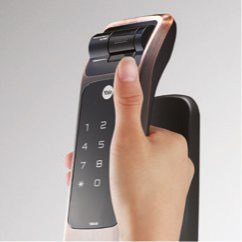
Image: A hand demonstrating the push-pull action of the Yale YMG40 door handle.
2. אָטאַמאַטיק לאַקינג
The YMG40 can be configured to automatically lock the door after it closes. Refer to the full programming guide for instructions on enabling or disabling this feature.
3. Optional Accessories (Z-Wave & Bluetooth)
The Yale YMG40 is compatible with optional Z-Wave and Bluetooth modules, allowing integration with smart home systems and remote control capabilities. These modules are sold separately. Consult the specific module's instructions for pairing and setup.
A remote control accessory is also available, utilizing wireless floating ID technology with a range of up to 50 meters.
וישאַלט
- באַטערי פאַרבייַט: The lock will provide a low battery warning. Replace all batteries promptly when this warning appears to ensure continuous operation.
- רייניקונג: Clean the lock's exterior with a soft, dry cloth. Avoid abrasive cleaners or solvents that could damage the finish or electronic components.
- פינגערפּרינט סענסאָר: Keep the fingerprint sensor clean and free of debris for accurate readings.
- מעטשאַניקאַל שליסל: Store the mechanical keys in a safe, accessible location outside the property for emergency use.
טראָובלעשאָאָטינג
- שלאָס ענטפֿערט נישט: Check battery levels. If batteries are depleted, use the mechanical key or connect a 9V battery to the emergency power terminal (if available on your model) to provide temporary power.
- פינגער-אפדרוק נישט דערקענט: זיכער מאַכן אַז אייער פינגער איז ריין און טרוקן. פּרוּווט ווידער רעגיסטרירן אייער פינגער-אָפּדרוק אויב די פּראָבלעמען בלייבן.
- PIN Code Not Working: Verify the correct PIN is being entered. Ensure the keypad is active before entering the code.
- Door Not Locking/Unlocking Properly: Check for any obstructions in the door frame or latch mechanism. Ensure the lock is properly aligned with the strike plate.
- Voice Guide Issues: Ensure the volume is set appropriately.
For persistent issues, consult the full product manual or contact Yale customer support.
ספּעסאַפאַקיישאַנז
| שטריך | דעטאַל |
|---|---|
| מאָדעל | YMG40 |
| לאַק טיפּ | Mortise Lock, Biometric |
| אַקסעס מעטהאָדס | Fingerprint, PIN Code, Mechanical Key |
| פינגערפּרינט קאַפּאַציטעט | Up to 20 different fingerprints |
| באַניצער קאָד קאַפּאַציטעט | Up to 30 different user codes |
| מעטשאַניקאַל קיז | 2 Keys included |
| Front Body Dimensions (D x W x H) | 67.6 מם X 76 מם X 359.1 מם |
| Back Body Dimensions (D x W x H) | 65.2 מם X 76 מם X 359.1 מם |
| טיר גרעב | 40-75mm (Wooden Doors) |
| מאַטעריאַל | ומבאַפלעקט שטאָל |
| Connectivity (Optional) | Z-Wave, Bluetooth |
| פּונקט וואָג | 1 קג |
שטיצן און וואָראַנטי
For technical assistance, warranty information, or service requests, please contact Yale customer support. Refer to your product packaging or the official Yale webפּלאַץ פֿאַר קאָנטאַקט דעטאַילס ספּעציפיש צו דיין געגנט.
Note: Installation charges may be extra and are typically not covered under product warranty.


