1. הקדמה
This manual provides essential instructions for the safe and effective operation of the GW Instek GPT-9903A Electrical Safety Tester. The GPT-9903A is a 3-in-1 model designed for performing AC withstanding, DC withstanding, and insulation resistance tests. It features a 500VA maximum power output and a high-efficiency PWM amplifier to ensure stable performance.
2. זיכערקייַט אינפֿאָרמאַציע
ווארענונג: דאָס אַפּאַראַט אַרבעט מיט הויך וואָלומעןtages that can be hazardous. Always follow safety precautions to prevent electric shock or injury.
- Ensure proper grounding of the instrument and the Device Under Test (DUT).
- Do not operate the tester in wet or damp באדינגונגען.
- שטענדיק אָפּשטעקן די מאַכט איידער איר מאַכט אָדער ענדערט קאַנעקשאַנז.
- דער רעזולטאַט וואָלtage is automatically cut off within 150 microseconds upon detection of an abnormal output voltage or current limit trip.
- The GPT-9903A automatically discharges the DUT after each test to eliminate residual voltage.
- Only qualified personnel should operate and maintain this equipment.
3. פּראָדוקט איבערview
3.1 שליסל פֿעיִקייטן
- 500VA AC Test Capacity.
- 240x64 Ice Blue Dot matrix LCD for clear display.
- Sweep Function for Device Under Test (DUT) characteristic analysis.
- Insulation resistance measurement up to 50GΩ.
- Manual/Auto Mode operation.
- Performs AC withstanding (AC 5kV/100mA), DC withstanding (DC 6kV/20mA), and insulation resistance (DC 50V - 1000V/50GΩ max.) tests.
3.2 פראָנט פּאַנעל קאָמפּאָנענטן
The front panel of the GPT-9903A is designed for intuitive operation. Refer to the image below for component identification.
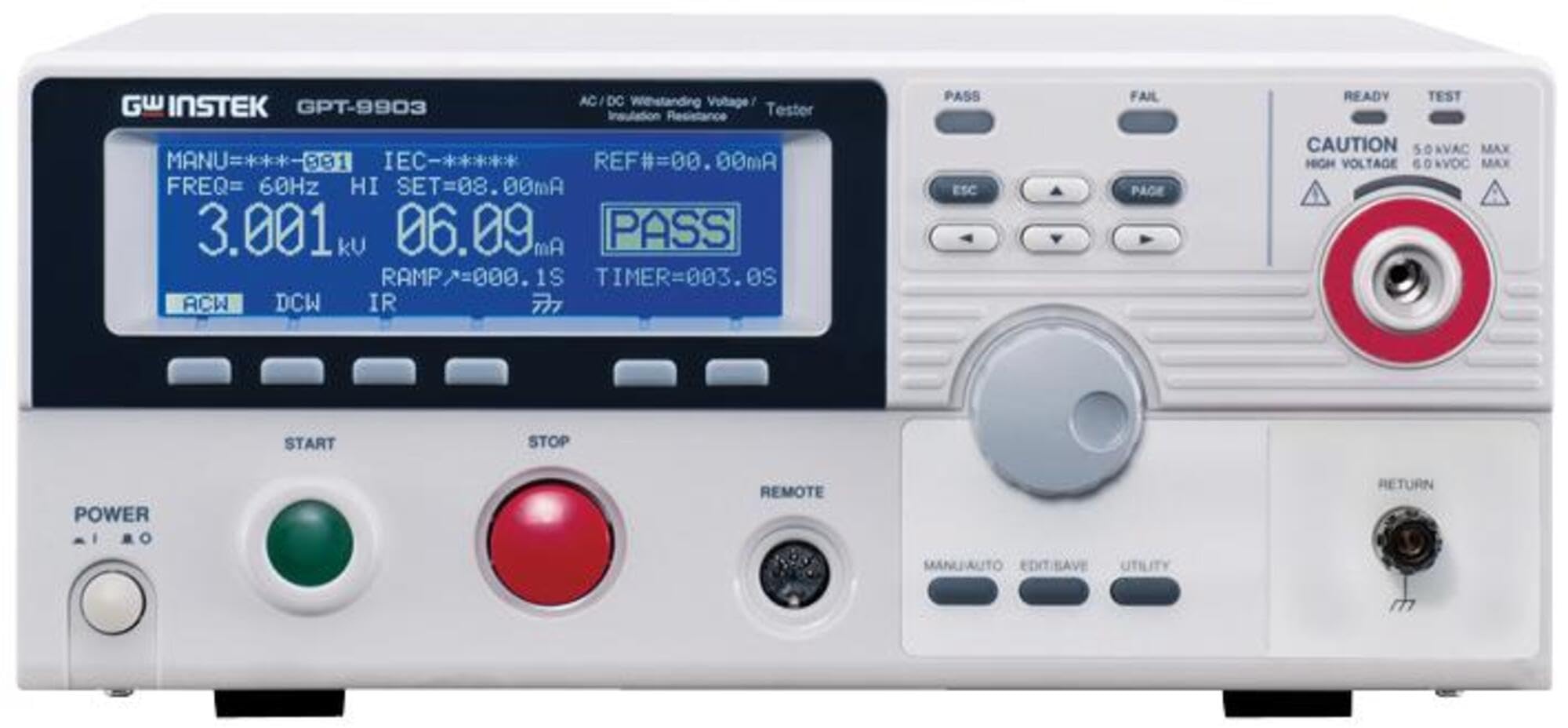
Figure 1: GW Instek GPT-9903A Front Panel. This image displays the front panel of the GPT-9903A. On the left, the "POWER" button is visible. Above it, the "GW INSTEK GPT-9903" branding is present. The large blue dot matrix LCD shows test parameters like "MANU=***-001", "FREQ= 60Hz", "HI SET=08.00mA", "3.001kV", "06.09mA", "PASS", "RAMP=000.1S", and "TIMER=003.0S", along with mode indicators "ACW", "DCW", "IR". Below the display are four function buttons. To the right of the display, there are "PASS" and "FAIL" indicators, navigation buttons (ESC, PAGE, arrow keys), and a rotary knob for adjustments. Further right, safety indicators "READY" and "TEST" are present, along with a "CAUTION" label indicating "5.0kVAC MAX" and "6.0kVDC MAX" and a high-voltage output terminal with a red ring. Below the display, large green "START" and red "STOP" buttons are prominent. A "REMOTE" port is also visible. Towards the bottom right, additional buttons for "MANU/AUTO", "EDIT/SAVE", and "UTILITY" are located, along with a "RETURN" terminal.
- מאַכט קנעפּל: Located on the bottom left, used to turn the unit on and off.
- LCD ווייַז: Central blue dot matrix display showing test parameters, results (PASS/FAIL), and current mode (ACW, DCW, IR).
- Function Buttons (below LCD): Context-sensitive buttons for menu navigation and parameter selection.
- Navigation/Control Buttons (right of LCD): Includes ESC, PAGE, and arrow keys for menu navigation and parameter adjustment.
- ראָטאַרי קנופּ: Used for fine-tuning parameter values.
- הויך חלקtage Output Terminal: Prominent terminal with a red ring, labeled with caution for high voltage.
- אָנהייב קנעפּל: Green button to initiate a test sequence.
- STOP קנעפּל: Red button to terminate a test sequence.
- REMOTE Port: פֿאַר פֿאַרבינדן עקסטערנע קאָנטראָל דעוויסעס.
- Mode/Utility Buttons: MANU/AUTO, EDIT/SAVE, UTILITY buttons for selecting operation modes and accessing settings.
- RETURN Terminal: Ground return terminal for the test circuit.
3.3 וואָס איז אין דער קעסטל
ביים אויספּאַקן, קאָנטראָלירט אַז די פאלגענדע זאכן זענען אַרייַנגערעכנט:
- GW Instek GPT-9903A Electrical Safety Tester
- וסב קאַבלע
- Power Cord (region specific)
- Test Leads (High Voltage Probe, Return Lead)
- באַניצער מאַנואַל (דעם דאָקומענט)
- Calibration Certificate (if applicable)
4. סעטאַפּ
- אָרט: Place the GPT-9903A on a stable, level surface with adequate ventilation. Ensure it is away from direct sunlight, excessive dust, and moisture.
- מאַכט קשר: Connect the provided power cord to the AC inlet on the rear panel of the tester and then to a grounded AC power outlet.
- גראָונדינג: Ensure the tester is properly grounded. The power cord provides grounding, but additional grounding may be required depending on the test setup.
- טעסט פירן קשר: פאַרבינדן די הויך וואָלtage test lead to the high voltage output terminal (red ring) and the return lead to the RETURN terminal on the front panel.
- DUT Connection: Connect the test leads to the Device Under Test (DUT) according to the specific test requirements and safety standards.
5. אַפּערייטינג ינסטרוקטיאָנס
5.1 מאַכט אויף / אַוועק
- מאַכט אויף: Press the "POWER" button on the front panel. The LCD display will illuminate, and the unit will perform a self-test.
- מאַכט אַוועק: Press the "POWER" button again. Ensure no test is in progress before powering off.
5.2 Selecting Test Modes
Use the function buttons below the LCD or the navigation keys to select between AC Withstanding (ACW), DC Withstanding (DCW), and Insulation Resistance (IR) test modes. The currently selected mode will be indicated on the display.
5.3 Setting Test Parameters
For each test mode, parameters such as test voltage, current limits (HI SET), ramp-up time (RAMP), and test duration (TIMER) must be configured.
- Press the appropriate function button or navigate to the parameter you wish to adjust.
- Use the rotary knob or arrow keys to change the value.
- Confirm the setting by pressing the appropriate button (e.g., ENTER or a function button).
5.4 פּערפאָרמינג אַ טעסט
- Ensure the DUT is correctly connected and all safety precautions are observed.
- Verify all test parameters are set according to the required standards.
- Press the green "START" button to initiate the test. The "TEST" indicator will illuminate.
- Monitor the display for real-time measurements and the final test result (PASS/FAIL).
- Upon completion, the GPT-9903A will automatically discharge the DUT.
- To stop a test prematurely, press the red "STOP" button.
5.5 סוויפּ פֿונקציע
The "Sweep" function allows for characteristic analysis of the DUT by displaying test results point by point over the testing period, forming a trace graph. This is useful for observing parameter responses to changes in applied voltage, current, or testing time. A movable marker on the graph allows for reading parameters at specific points of interest. Refer to the detailed programming guide for advanced use of the sweep function.
6. וישאַלט
- רייניקונג: Clean the exterior of the instrument with a soft, dry cloth. Do not use abrasive cleaners or solvents.
- קאליבראציע: Regular calibration by qualified service personnel is recommended to ensure accuracy and compliance with safety standards. Refer to the service manual for calibration procedures.
- סטאָרידזש: Store the tester in a clean, dry environment within the specified operating temperature and humidity ranges when not in use.
- Fuse Replacement: If the instrument fails to power on, check and replace the fuse on the rear panel if necessary. Ensure to use a fuse of the correct rating.
7. טראָובלעשאָאָטינג
| פּראָבלעם | מעגלעך סיבה | לייזונג |
|---|---|---|
| דער אַפּאַראַט טוט נישט מאַכט אויף. | No AC power; Blown fuse. | Check power cord connection and outlet. Replace fuse if necessary. |
| Test fails immediately. | Incorrect test parameters; Short circuit in DUT; Open circuit in test leads. | Verify parameter settings. Check DUT for faults. Inspect test leads for damage. |
| ומפּינקטלעך רידינגז. | Uncalibrated unit; Environmental interference. | Perform calibration. Ensure stable operating environment. |
| די דיספּלעי ווייזט אַ טעות מעלדונג. | Internal fault; Parameter out of range. | Refer to the detailed error code list in the full manual. Contact customer support if the issue persists. |
8. ספּעסאַפאַקיישאַנז
- מאָדעל נומער: GPT-9903A
- AC Withstanding Test: AC 5kV / 100mA
- DC Withstanding Test: DC 6kV / 20mA
- ינסאַליישאַן קעגנשטעל טעסט: DC 50V - 1000V / 50GΩ max.
- רעזולטאַט מאַכט: 500VA maximum
- ווייַז: 240x64 Ice Blue Dot matrix LCD
- דימענסיעס: אומגעפער 23.62 x 17.32 x 11.42 אינטשעס (פּאַקעט גרייס)
- וואָג: אומגעפער 57.98 פונט (פּאַקעט וואָג)
- פאַבריקאַנט: Instek
- ערשטער בנימצא: 1 פעברואר 2017
9. וואָראַנטי און שטיצן
For technical support, service, or warranty inquiries, please contact GW Instek customer support.
- קונה שטיצן: Refer to the official GW Instek webוועבזייטל אדער אייער קויפן דאקומענטאציע פאר קאנטאקט אינפארמאציע.
- שוץ פלענער: Extended protection plans may be available for purchase. Refer to your retailer for details on 3-Year or 4-Year protection plans.
- קערט: This product typically includes a 30-day easy return policy. Consult your seller for specific return procedures.


