הקדמה
The Geemarc Wake 'n' Shake Curve is an advanced alarm clock designed to provide effective wake-up solutions for individuals, including those with hearing difficulties or heavy sleepers. It combines an extra-loud alarm, a powerful vibrating shaker pad, and a bright flashing light. Additionally, it features a large digital display and a USB port for charging external devices.
פּעקל אינהאַלט
- Geemarc Wake 'n' Shake Curve Alarm Clock
- Vibrating Shaker Pad with cable
- מאַכט אַדאַפּטער
- באַניצער מאַנואַל (דעם דאָקומענט)
פּראָדוקט איבערview
Familiarize yourself with the various components of your Wake 'n' Shake Curve alarm clock.
פראָנט View

בילד: פראָנט view of the alarm clock, showing the large red digital display, the flashing light bar at the top, and the connected vibrating shaker pad on the left.

בילד: פראָנט view of the alarm clock, demonstrating a smartphone connected to the USB charging port on the back.
Top View (קאָנטראָל קנעפּלעך)

Image: Top panel of the alarm clock, displaying the control buttons: ▼ (Down), SET, Zz ☀ (Snooze/Light), AL (Alarm), and ▲ (Up).
זייַט View (Volume/Tone Control)

בילד: זייט view of the alarm clock, highlighting the rotating scroll wheel used for adjusting alarm volume and tone.
דערציען View (פּאָרטן)
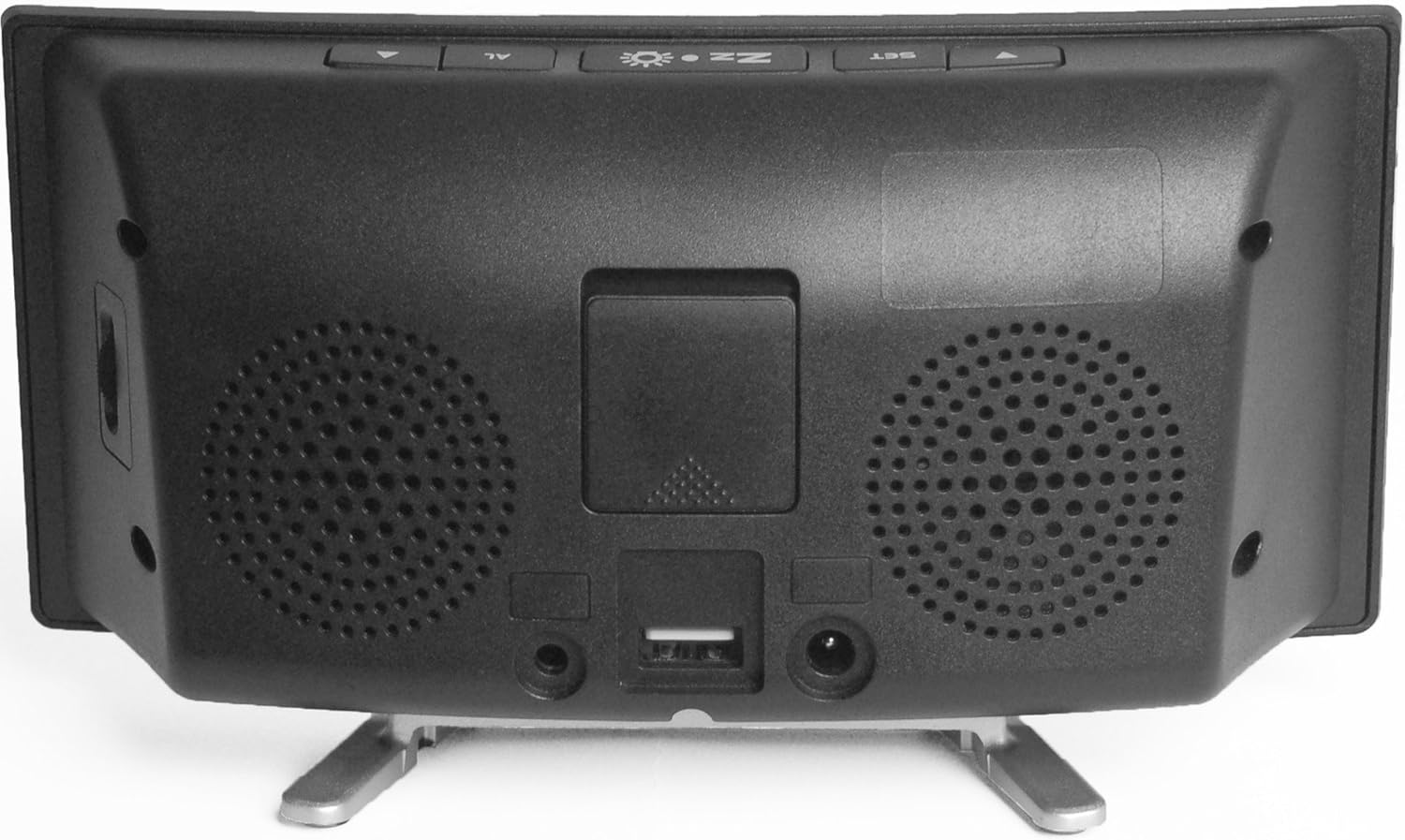
בילד: הינטערשטע view of the alarm clock, showing the power adapter input, the USB charging port, and the port for the vibrating shaker pad.
סעטאַפּ
- פאַרבינדן מאַכט: Plug the provided power adapter into the DC IN port on the back of the alarm clock, then plug the adapter into a standard wall outlet. The display will illuminate.
- Connect Vibrating Pad: Insert the cable of the vibrating shaker pad into the SHAKER port on the back of the alarm clock. Place the pad under your pillow or mattress for optimal vibration.
- Install Backup Battery (Optional): פֿאַר מאַכטtage backup, open the battery compartment on the back and insert a 9V battery (not included). This battery will maintain time settings during a power interruption but will not power the alarm functions.
אַפּערייטינג ינסטראַקשאַנז
באַשטעטיקן די צייט
- דריקן און האַלטן די שטעלן קנעפּל ביז די שעה ציפערן הייבן אן צו בלינקען.
- ניצן די ▲ (אַרויף) אָדער ▼ (Down) buttons to adjust the hour.
- דרוק שטעלן again to confirm the hour and move to the minute setting. The minute digits will flash.
- ניצן די ▲ (אַרויף) אָדער ▼ (Down) buttons to adjust the minutes.
- דרוק שטעלן נאכאמאל צו באשטעטיגן די מינוטן און ארויסגיין פון צייט איינשטעלונג מאָדע.
- צו בייטן צווישן 12-שעה און 24-שעה פֿאָרמאַט, דריק די שטעלן button once while the time is displayed (not flashing).
באַשטעטיקן די שרעק
- דריקן און האַלטן די AL button until the alarm hour digits begin to flash. An alarm icon will appear on the display.
- ניצן די ▲ (אַרויף) אָדער ▼ (Down) buttons to adjust the alarm hour.
- דרוק AL again to confirm the alarm hour and move to the alarm minute setting. The alarm minute digits will flash.
- ניצן די ▲ (אַרויף) אָדער ▼ (Down) buttons to adjust the alarm minutes.
- דרוק AL again to confirm the alarm minutes and exit alarm setting mode. The alarm icon will remain on the display, indicating the alarm is active.
- צו דעאַקטיווירן דעם אַלאַרם, דריק די AL button once while the time is displayed. The alarm icon will disappear. Press AL again to reactivate.
Adjusting Alarm Volume and Tone
On the side of the alarm clock, there are rotating knobs. One controls the alarm volume, and the other controls the alarm tone frequency. Adjust these to your preferred settings. The maximum alarm volume is approximately 95dB.
Selecting Alarm Modes
The Wake 'n' Shake Curve offers four distinct alarm modes. Press the AL button repeatedly (while the alarm is active but not sounding) to cycle through the modes, indicated by icons on the display:
- נאָר ווייבריישאַן: (Shaker icon) The vibrating pad will activate.
- Alarm Sound + Vibration: (Speaker + Shaker icons) The loud alarm sound and vibrating pad will activate.
- Flashing Light + Vibration: (Light + Shaker icons) The bright flashing light and vibrating pad will activate.
- All Three (Sound + Light + Vibration): (Speaker + Light + Shaker icons) All three wake-up methods will activate simultaneously.
סנאָאָזע פֿונקציע
ווען דער אַלאַרם קלינגט, דריק די גרויסע קנעפּל Zz ☀ (Snooze/Light) button on top of the clock to activate the snooze function. The alarm will pause and sound again after a set interval. The snooze duration is adjustable between 5 and 60 minutes. To adjust, press and hold the Zz ☀ button until the snooze time flashes, then use the ▲ (אַרויף) אָדער ▼ (Down) buttons to set the desired duration. Press Zz ☀ ווידער צו באַשטעטיקן.
אַדזשאַסטינג ווייַז ברייטנאַס
The display has three brightness levels. Press the Zz ☀ (Snooze/Light) button once (when the alarm is not sounding) to cycle through the brightness settings: High, Medium, Low.
וסב טשאַרדזשינג פּאָרט
A USB port is located on the back of the alarm clock. You can use this port to charge your smartphone or other USB-powered devices while the alarm clock is connected to power. This port provides standard USB charging output.
וישאַלט
- רייניקונג: ניצט אַ ווייכע, טרוקענע שטאָף צו רייניקן די ייבערפלאַך פון דעם וועקער זייגער. ניצט נישט פליסיקע רייניקונגסמיטלען אדער שברייענדע מאַטעריאַלן.
- סטאָרידזש: If storing the unit for an extended period, disconnect it from power and remove any backup battery. Store in a cool, dry place.
- ווייברייטינג פּאַד: Ensure the vibrating pad cable is not kinked or damaged.
טראָובלעשאָאָטינג
| פּראָבלעם | מעגלעך סיבה | לייזונג |
|---|---|---|
| די זייגער אַרויסווייַזונג איז אויסגעלאָשן. | קיין מאַכט קשר. | Ensure the power adapter is securely plugged into the clock and a working wall outlet. |
| Alarm does not sound/vibrate/flash. | Alarm is not set or deactivated. Incorrect alarm mode selected. | Verify the alarm time is set and the alarm icon is visible. Cycle through alarm modes using the AL button to select the desired wake-up method. Check alarm volume. |
| Vibrating pad not working. | Pad not connected or faulty. | Ensure the vibrating pad cable is fully inserted into the SHAKER port. Test with a different alarm mode. |
| Display shows 'PM' during AM hours. | This is a display characteristic. | The 'PM' indicator is a fixed part of the display and does not change for AM hours. The time displayed is accurate regardless of this indicator. |
| USB טשאַרדזשינג אַרבעט נישט. | די דעווייס איז נישט קאמפאטיבל אדער די קאבל איז דעפעקטיוו. | Ensure the alarm clock is powered. Try a different USB cable or device to confirm functionality. |
ספּעסאַפאַקיישאַנז
- סאָרט: Geemarc
- מאָדעל: JWNS_CURVE
- ווייַז טיפּ: Digital, Large Red LED
- אַלאַרם באַנד: אַרויף צו 95 דב
- Alarm Features: Extra Loud Alarm, Vibrating Shaker Pad, Bright Flashing Light
- שלאָף געדויער: Adjustable (5-60 minutes)
- ווייַז ברייטנאַס: 3 לעוועלס
- מאַכט מקור: קאָרדעד עלעקטריק
- באַקקופּ באַטאַרייע: Optional 9V (not included) for time retention during power cuts
- וסב טשאַרדזשינג פּאָרט: יא
- דימענסיעס: בעערעך 2.2 X 7.09 X 3.74 אינטשעס
- וואָג: אומגעפער 10.6 אונסעס (0.3 ק"ג)
וואָראַנטי און שטיצן
For warranty information and customer support, please refer to the documentation provided at the time of purchase or contact your retailer. You may also visit the official Geemarc webפּלאַץ פֿאַר ווייַטער הילף.


