1. הקדמה
This manual provides comprehensive instructions for the operation and maintenance of your MIDAS DM16 16 Input Analogue Live and Studio Mixer. The DM16 is designed for both live performance and studio recording environments, featuring award-winning MIDAS microphone preamplifiers and robust construction.
ביטע ליינט דעם מאַנואַל גרינטלעך איידער איר ניצט דעם מיטל צו ענשור ריכטיק נוצן און צו מאַקסאַמיזירן זיין לעבן.
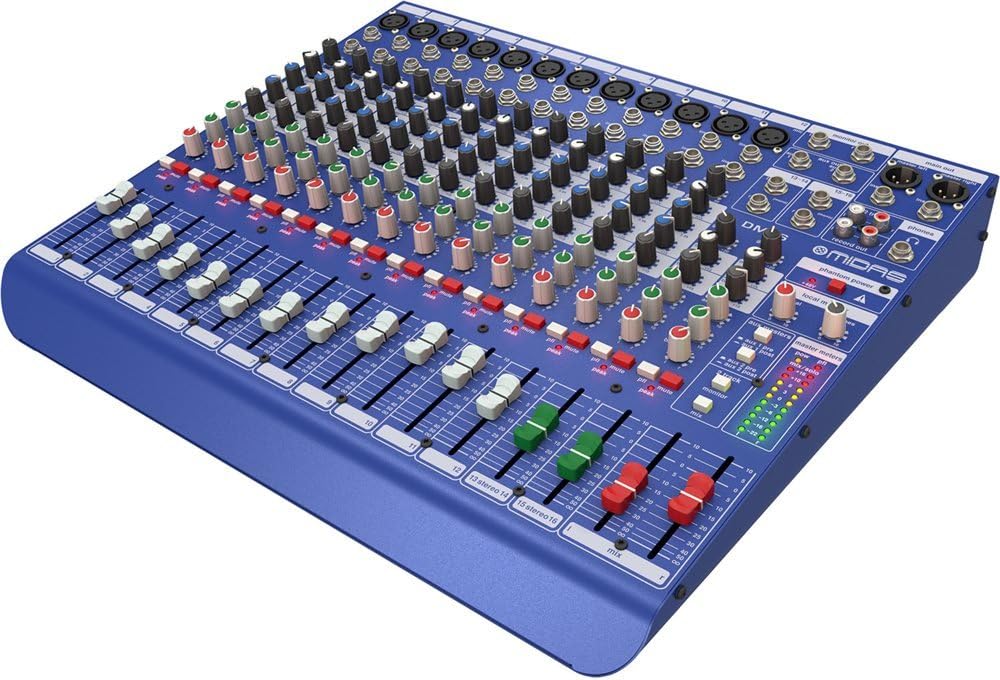
פיגור 1.1: פראָנט ווינקלעד view of the MIDAS DM16 mixer.
2. סעטאַפּ
2.1 אַנפּאַקינג און דורכקוק
Upon receiving your MIDAS DM16, carefully unpack the unit and inspect it for any signs of damage that may have occurred during transit. Retain the original packaging materials for future transport or storage.
אַרייַנגערעכנט אין די קעסטל:
- MIDAS DM16 16-ינפּוט אַנאַלאָג לייוו און סטודיאָ מיקסער
- מאַכט שנור
- באַניצער מאַנואַל (דעם דאָקומענט)
2.2 מאַכט קאַנעקשאַן
The DM16 operates on a standard AC power supply. Connect the provided power cord to the AC inlet on the rear panel of the mixer and then to a suitable power outlet. Ensure the power switch is in the 'Off' position before connecting to power.
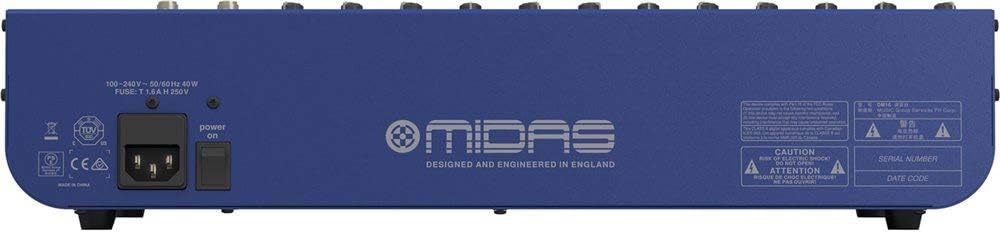
Figure 2.1: Rear panel of the MIDAS DM16 showing power input and warnings.
2.3 ינפּוט און רעזולטאַט קאַנעקשאַנז
The DM16 features a variety of input and output options for connecting microphones, instruments, and other audio devices.
- מיקראָפאָן ינפּוץ: 12 mono input channels with XLR connectors for microphones. These channels feature MIDAS microphone preampליפערז.
- שורה אַרייַנשרייַב: 2 electronically-balanced stereo line input channels on 1/4" TRS connectors for instruments or line-level devices.
- הויפּט אַוטפּוץ: פֿאַרבינדט זיך צו אייער הויפּט PA סיסטעם אָדער רעקאָרדינג צובינד.
- Aux Sends: For monitor mixes or effects sends.
- כעדפאָון רעזולטאַט: פֿאַר מאָניטאָרינג אַודיאָ.
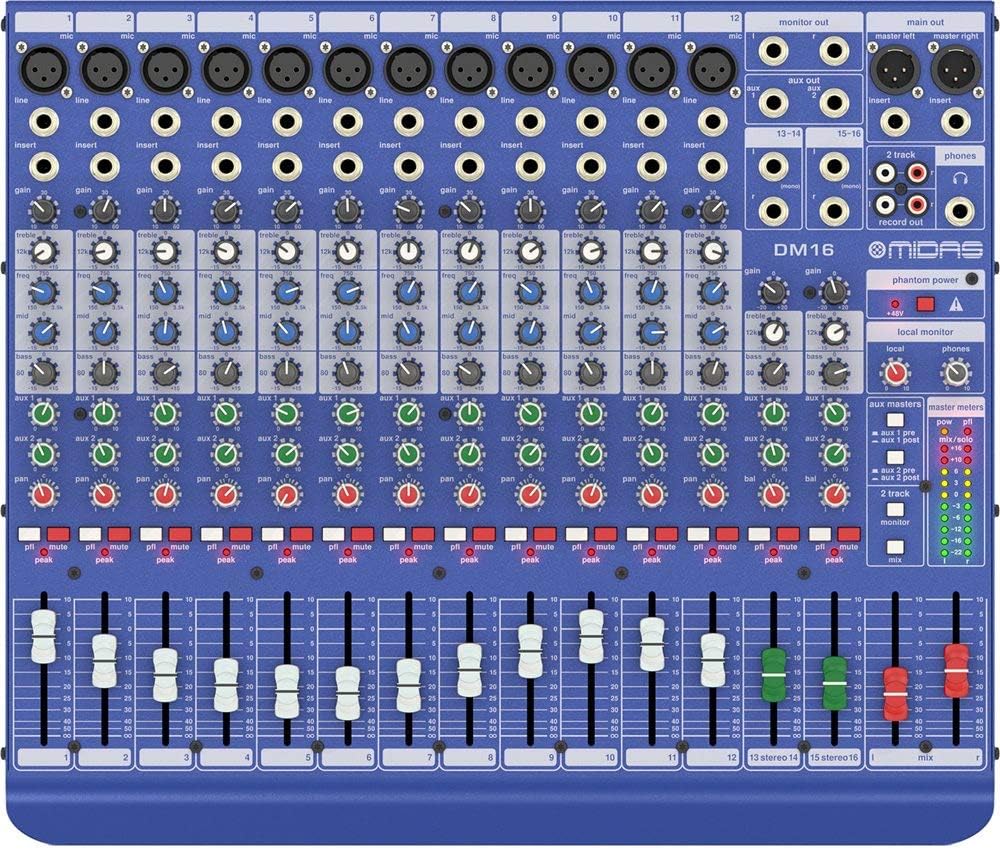
פיגורע 2.2: שפּיץ view of the MIDAS DM16 showing all input/output connections and controls.
3. אַפּערייטינג ינסטרוקטיאָנס
3.1 קאַנאַל קאָנטראָלס
Each mono input channel on the DM16 features the following controls:
- געווינען: Adjusts the input sensitivity for the microphone preampליפער.
- EQ: A 3-band equalizer with a swept mid-band for precise tone shaping.

פיגורע 3.1: דעטאַילעד view of the 3-band EQ section on a mono channel.
- AUX 1/2: Controls the level sent to the auxiliary outputs. These can be switched pre/post fader.

Figure 3.2: Aux masters section with pre/post fader switching.
- פּאַן: אַדזשאַסטירט די סטערעאָ פּאָזיציע פֿון דעם קאַנאַל.
- שטיל: Silences the channel.
- PEAK LED: Indicates when the input signal is clipping.
- פאַדער: Controls the output level of the channel to the main mix.

Figure 3.3: Channel faders for precise level control.
3.2 פאַנטאָם מאַכט
The DM16 provides +48V phantom power for condenser microphones. This is a global switch, meaning it applies to all microphone inputs simultaneously. Ensure all connections are made before activating phantom power to prevent damage to non-phantom powered devices.

Figure 3.4: Phantom power switch.
3.3 מאָניטאָרינג
Use the headphone output and monitor controls to listen to the main mix or specific auxiliary sends. The monitor section includes controls for local monitor and phones output levels.

Figure 3.5: Monitor and headphone controls.
4. וישאַלט
Proper maintenance ensures the longevity and optimal performance of your MIDAS DM16 mixer.
- רייניקונג: Use a soft, dry cloth to clean the exterior of the mixer. Avoid abrasive cleaners or solvents that could damage the finish or controls.
- שטויב שוץ: האַלט דעם מיקסער באַדעקט ווען ער איז נישט אין באַנוץ צו פאַרמייַדן שטויב אָנצאַמלונג, ספּעציעל אַרום פאַדערס און קנעפּלעך.
- ווענטילאַטיאָן: זיכערט גענוג לופט שטראָם אַרום דעם אַפּאַראַט צו פאַרמייַדן איבערהיצונג. פאַרשטאָפּט נישט די ווענטילאַציע עפענונגען.
- סטאָרידזש: Store the mixer in a cool, dry environment away from direct sunlight and extreme temperatures.
5. טראָובלעשאָאָטינג
This section addresses common issues you might encounter with your DM16 mixer.
- קיין מאַכט:
- Check if the power cord is securely connected to both the mixer and the power outlet.
- באַשטעטיקן אַז די מאַכט ווענטיל איז פאַנגקשאַנאַל.
- זיכער מאַכן אַז דער מאַכט קנעפּל אויף דער הינטערשטער פּאַנעל איז אין דער 'אויף' פּאָזיציע.
- קיין סאָונד רעזולטאַט:
- קאָנטראָלירט אַלע אינפוט און אַוטפּוט קאַבלע קאַנעקשאַנז.
- Ensure channel faders and the main mix fader are raised.
- Verify that the MUTE buttons on active channels are not engaged.
- Check the gain settings for each channel.
- Confirm that your connected speakers or monitoring system are powered on and functioning correctly.
- פאַרקרימט סאָונד:
- Reduce the GAIN setting on the input channel if the PEAK LED is frequently illuminating.
- Lower the output level of the connected source device.
- קוק נאָך דעפעקטיווע קייבלס.
- זשומען אדער גערויש:
- זיכער מאַכן אַז אַלע קייבלס זענען ריכטיק באַשיצט און אין גוטן צושטאַנד.
- קוקט איבער גראונד לופּס; פרובירט צו קאנעקטן אלע אודיא עקוויפמענט צו דער זעלבער פאוער סטריפּ.
- Keep audio cables away from power cables.
אויב איר טרעפט פראבלעמען וואָס ווערן נישט דאָ באַהאַנדלט, ביטע זעט די שטיצע אָפּטיילונג.
6. ספּעסאַפאַקיישאַנז
| שטריך | דעטאַל |
|---|---|
| פּראָדוקט טיפּ | אַנאַלאָג לייוו און סטודיאָ מיקסער |
| אַרייַנשרייַב טשאַננעלס | 16 (12 מאָנאָ, 2 סטערעאָ) |
| מיקראָפאָן פאַרampליפערז | Award-winning MIDAS preampליפערז |
| EQ on Mono Channels | 3-band with swept mid band |
| Aux שיקט | 2 (with pre/post fader switching) |
| מאַכט מקור | קאָרדעד עלעקטריק |
| פּונקט וואָג | 11.02 פונט (5.0 קג) |
| פּראָדוקט דימענשאַנז (L x W x H) | 17.24 X 14.57 X 3.74 אינטשעס (438 X 370 X 95 מם) |
| לאַנד פון אָריגין | כינע |
| מאָדעל נומער | DM16 |
| קאַנעקטיוויטי טעכנאָלאָגיע | אַגזיליערי |
7. וואָראַנטי און שטיצן
7.1 וואָראַנטי אינפֿאָרמאַציע
Your MIDAS DM16 mixer is covered by a limited warranty against defects in materials and workmanship. Please refer to the warranty card included with your product or visit the official MIDAS webזייטל פֿאַר דעטאַלירטע וואָראַנטי טערמינען און באדינגונגען.
באַמערקונג: The warranty may not cover damage caused by improper use, unauthorized modifications, or natural disasters.
7.2 קונה שטיצן
For technical assistance, troubleshooting, or service inquiries, please contact MIDAS customer support through their official webזייטל אדער די קאָנטאַקט אינפֿאָרמאַציע וואָס איז צוגעשטעלט אין אייער פּראָדוקט דאָקומענטאַציע.
אָנליין רעסורסן:
- Official MIDAS Webפּלאַץ: www.midasconsoles.com
- Product Support Page: (Specific link if available, otherwise general webפּלאַץ)
When contacting support, please have your product model number (DM16) and serial number ready.


