1. הקדמה
The Amkette Trubeats S50 is a versatile smart wireless Bluetooth speaker designed to enhance your audio experience. It features multiple connectivity options including Bluetooth, USB, Micro SD card, and AUX input, along with an integrated FM radio. The speaker also includes a digital clock with alarm functions and can be controlled via a dedicated smartphone application. Additionally, it can function as a power bank to charge your mobile devices.
2. פּעקל אינהאַלט
ביטע אָפּהאַקן דאָס קעסטל פֿאַר די פֿאָלגנדיקע זאַכן:
- Amkette Trubeats S50 Smart Wireless Bluetooth Speaker
- וסב טשאַרדזשינג קאַבלע
- AUX קאַבלע
- באַניצער מאַנואַל (דעם דאָקומענט)
3. פּראָדוקט איבערview
Familiarize yourself with the various parts and controls of your Amkette Trubeats S50 speaker.
3.1 פראָנט View

פיגורע 1: פראָנט view of the Amkette Trubeats S50 speaker, showing the speaker grille and LED display.
3.2 Top Control Panel

Figure 2: Labeled diagram of the Amkette Trubeats S50 speaker's top control buttons: Mode, Volume Down/Previous, Play/Pause/Answer Call, Volume Up/Next, Clock, and Microphone.
- מאָדע קנעפּל: Press to switch between Bluetooth, FM, AUX, USB, and Micro SD modes.
- K-/ Button: Press to decrease volume; long press for previous track/station.
- Play/Pause/Answer Call Button: Press to play/pause audio; press to answer/end calls.
- +/N Button: Press to increase volume; long press for next track/station.
- זייגער קנעפּל: Press to set time and alarms.
- מיקראָפאָן: פֿאַר הענט-פֿרײַ רופן.
3.3 Rear Ports and Switch

Figure 3: Labeled diagram of the Amkette Trubeats S50 speaker's rear ports: AUX, Micro SD, USB Host, USB DC, and On/Off switch.
- AUX אַרייַנשרייַב: פֿאַרבינדט עקסטערנע אַודיאָ דעוויסעס מיטן 3.5 מם AUX קאַבל.
- מיקראָ סד קאָרט שפּעלטל: אַרײַנשטעלן אַ מיקראָ SD קאַרטל פֿאַר אַודיאָ ווידערשפּיל.
- וסב האָסט פּאָרט: Insert a USB drive for audio playback or use as a power bank.
- USB DC Input: Connect the USB charging cable to power the speaker.
- אויף/אַוועק באַשטימען: Power the speaker on or off.
4. סעטאַפּ
4.1 אויפלאָדן דעם רעדנער
- Connect the small end of the USB charging cable to the USB DC Input port on the rear of the speaker.
- פֿאַרבינדט דעם גרויסן עק פֿון דעם USB טשאַרדזשינג קאַבל צו אַ USB מאַכט אַדאַפּטער (נישט אַרייַנגערעכנט) אָדער אַ קאָמפּיוטער'ס USB פּאָרט.
- דער LED אינדיקאַטאָר וועט ווײַזן דעם טשאַרדזשינג סטאַטוס. א פולע טשאַרדזשינג נעמט טיפּיש אַרום 4 שעה.
באַמערקונג: The speaker does not have a visible battery level indicator. It is recommended to charge fully before first use and when the battery is low.
4.2 פּאַוערינג אויף / אַוועק
- צו אנצינדן, גליטשט דעם ON/OFF באַשטימען on the rear of the speaker to the 'ON' position.
- צו אויסלעשן, גליטשט דעם ON/OFF באַשטימען to the 'OFF' position.
5. אַפּערייטינג ינסטרוקטיאָנס
5.1 בלועטאָאָטה פּערינג

Figure 4: Speaker in Bluetooth pairing mode, indicated by 'BT' on the display.
- Power on the speaker. It will automatically enter Bluetooth pairing mode, indicated by 'BT' flashing on the LED display.
- געבן בלועטאָאָטה אויף דיין סמאַרטפאָנע אָדער אנדערע מיטל.
- זוכן פֿאַר available devices and select "Amkette S50" from the list.
- Once paired, the speaker will emit a confirmation tone, and 'BT' will stop flashing.
- איר קענט איצט שפּילן אַודיאָ פֿון אייער דעווייס דורך דעם רעדנער.
5.2 ניצן AUX אריינגאנג

Figure 5: Speaker connected to a smartphone via AUX cable for wired audio playback.
- Connect one end of the 3.5mm AUX cable to the AUX ינפּוט port on the rear of the speaker.
- Connect the other end of the AUX cable to the audio output jack of your external device (e.g., smartphone, MP3 player, laptop).
- דרוק די מאָדע קנעפּל repeatedly until the speaker enters AUX mode.
- שפּילט אַודיאָ פֿון אייער פֿאַרבונדענעם מיטל.
5.3 Using USB/Micro SD Card
- אַרײַנשטעלן אַ USB דרייוו אין דעם וסב האָסט פּאָרט or a Micro SD card into the מיקראָ סד קאָרט שפּעלטל אויף די הינטן פון די רעדנער.
- פאַרזיכערן דיין אַודיאָ files (MP3 format recommended) are stored on the drive/card.
- דרוק די מאָדע קנעפּל repeatedly until the speaker enters USB or Micro SD mode. Playback will begin automatically.
- ניצן די K-/ און +/N קנעפּלעך פֿאַר טראַק נאַוויגאַציע און באַנד קאָנטראָל.
5.4 FM ראַדיאָ אָפּעראַציע

Figure 6: Speaker displaying FM frequency, with app control for station selection.
- דרוק די מאָדע קנעפּל repeatedly until the speaker enters FM radio mode.
- אַוטאָ סקאַן: אין FM מאָדע, דריק לאַנג די שפּיל / פּויזע קנעפּל צו אָנהייבן אַן אויטאָמאַטישן סקען פֿאַר פֿאַראַן FM סטאַנציעס. דער רעדנער וועט ראַטעווען דיטעקטירטע סטאַנציעס.
- מאַנואַל טונינג: ניצן די K-/ און +/N קנעפּלעך צו נאַוויגירן דורך געראטעוועט סטיישאַנז.
- For precise tuning and station management, use the Amkette Trubeats Smart Speaker App (see section 5.7).
5.5 Digital Clock and Alarm Setup

Figure 7: Speaker displaying the current time on its LED screen.
- באַשטעטיקן צייט: דריקן און האַלטן די זייגער קנעפּל. The hour display will flash. Use the K-/ און +/N קנעפּלעך צו סטרויערן די שעה. דריק די זייגער קנעפּל again to set minutes, and adjust with K-/ און +/N. דרוק זייגער קנעפּל נאך אמאל צו באשטעטיגן.
- באַשטעטיקן אַלאַרמס: דריקן קורץ אויף די זייגער קנעפּל to cycle through Alarm 1 and Alarm 2 settings. When an alarm time is displayed, long press the זייגער קנעפּל to enter alarm setting mode. Adjust hour and minute using K-/ און +/N, confirming each with a short press of the זייגער קנעפּל. You can also set the alarm source (FM/SD Card/USB) via the app.
5.6 ניצן ווי אַ פּאַוער באַנק
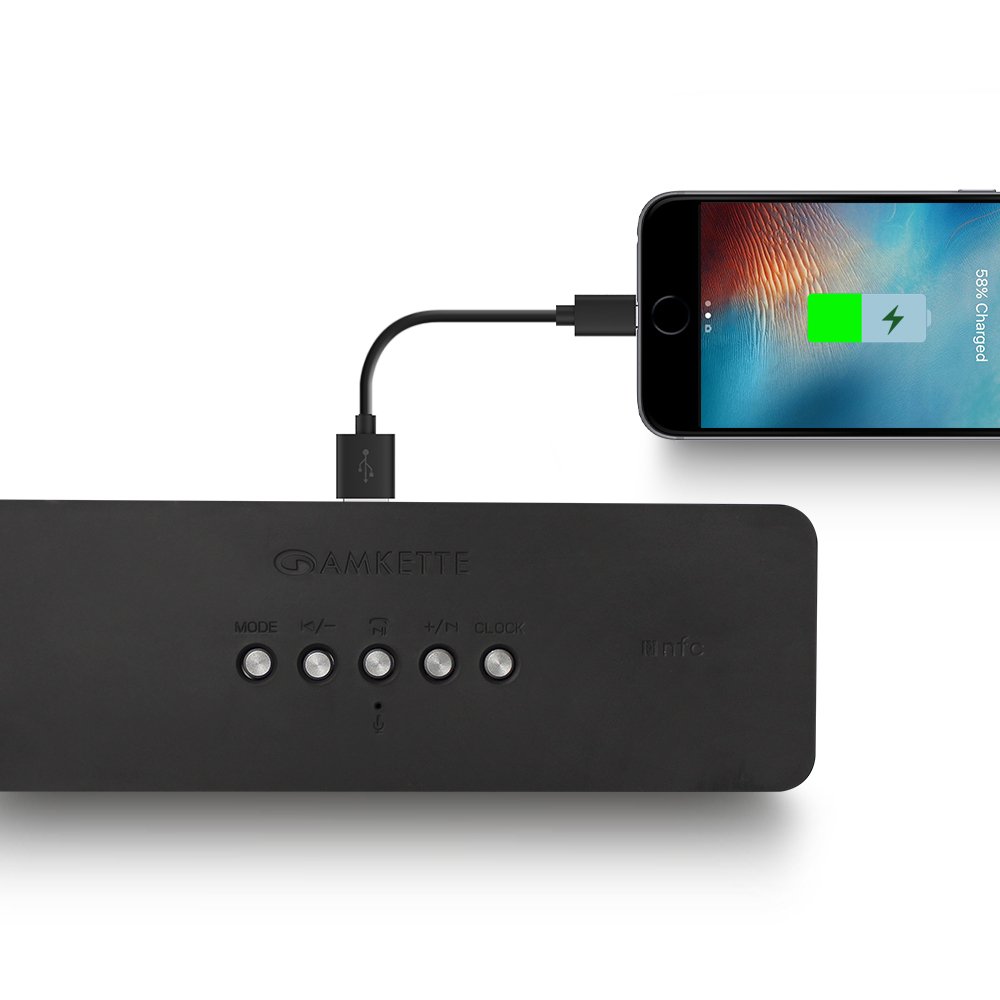
Figure 8: Speaker providing power to a smartphone through its USB Host port.
The Amkette Trubeats S50 can charge your smartphone or other USB-powered devices. Connect your device's charging cable to the וסב האָסט פּאָרט on the rear of the speaker. The speaker's internal battery will then supply power to your device.
5.7 App Control (Android Only)

Figure 9: Smartphone displaying the Amkette Trubeats Smart Speaker App interface.
For enhanced control, download the Amkette Trubeats Smart Speaker App from the Google Play Store (for Android phones). The app allows you to:
- וועקסל צווישן פֿאַרשידענע אַודיאָ מאָדעס.
- Control volume and track playback.
- Manage FM radio stations and perform precise tuning.
- Set and customize alarms, including alarm source.
Ensure your speaker is connected via Bluetooth to your smartphone for app functionality.
5.8 רופן האַנדלינג
When connected via Bluetooth to a smartphone, the speaker can be used for hands-free calling:
- ענטפער רופן: דרוק די Play/Pause/Answer Call Button אַמאָל.
- סוף רופן: דרוק די Play/Pause/Answer Call Button איין מאָל בעת אַ רוף.
- אָפּוואַרפן רופן: לאנג דריקן די Play/Pause/Answer Call Button.
6. וישאַלט
- האַלט דעם רעדנער אַוועק פון עקסטרעמע טעמפּעראַטורן, דירעקט זונשייַן און פייכטקייט.
- רייניקט דעם רעדנער מיט אַ ווייכן, טרוקענעם שטאָף. ניצט נישט קיין שרײַבנדיקע רייניגערס אדער סאָלווענטן.
- פֿאַרמײַדט צו לאָזן דעם רעדנער פאַלן אָדער אים אויסשטעלן צו שטאַרקע קלאַפּן.
- ווען נישט אין באַנוץ פֿאַר לענגערע פּעריאָדן, האַלט דעם רעדנער אין אַ קיל, טרוקן אָרט און לאָד עס אויף פּעריאָדיש צו האַלטן די באַטאַריע געזונט.
7. טראָובלעשאָאָטינג
| פּראָבלעם | מעגלעך סיבה | לייזונג |
|---|---|---|
| דער רעדנער גייט נישט אן. | באַטערי איז דיפּליטיד. | לאָדט דעם רעדנער גאָר אויף. |
| קיין קלאַנג פֿון רעדנער. | Volume is too low; incorrect mode selected; device not connected properly. | Increase speaker and source device volume. Ensure correct mode (Bluetooth, AUX, etc.) is selected. Reconnect the device. |
| בלועטאָאָטה פּערינג פיילז. | רעדנער נישט אין פּערינג מאָדע; דעווייס צו ווייט; שטערונג. | Ensure speaker is in pairing mode ('BT' flashing). Move device closer to speaker. Turn off other Bluetooth devices. |
| שלעכטע FM ראַדיאָ אָפּנאַם. | שוואַך סיגנאַל; סביבה־אינטערפערענץ. | Relocate the speaker to an area with better reception. Perform an auto-scan again. |
| App not connecting to speaker. | Bluetooth not connected; app issue. | Ensure speaker is paired via Bluetooth to your phone. Restart the app and try again. |
8. ספּעסאַפאַקיישאַנז
- מאָדעל: S50
- סאָרט: אַמקעטטע
- רעדנער טיפּ: Portable Bluetooth Speaker (Outdoor)
- קאַנעקטיוויטי: בלועטוט, יו-עס-בי, מיקרא עס-די, אוקס, עף-עם ראדיא
- ווירעלעסס קאָמוניקאַציע טעכנאָלאָגיע: בלועטאָאָטה
- קאָנטראָל אופֿן: Buttons, App (Android)
- אַודיאָ רעזולטאַט מאָדע: סטערעאָ
- אַודיאָ וואָסtage: 10 וואטס
- מאַכט מקור: באַטאַרייע פּאַוערד
- באַטאַרייע לעבן: ביז 12 שעה (דורכשניטלעך)
- טשאַרדזשינג צייט: בעערעך 4 שעה
- קאַמפּאַטאַבאַל דעוויסעס: Laptop, Mobile, Tablet
- דימענשאַנז (LxWxH): 26.7 X 10.9 X 7.9 סענטימעטער
- נומער וואָג: 703 גראַמז
- וואָטערפּרוף: יא
- מאַונטינג טיפּ: טאַבלעטאָפּ בארג
9. וואָראַנטי און שטיצן
The Amkette Trubeats S50 Smart Wireless Bluetooth Speaker comes with a 1 יאָר וואָראַנטי פֿון דעם קויפֿדאַטום. די וואָראַנטי דעקט פֿאַבריקאַציע־דעפֿעקטן אונטער נאָרמאַלן באַנוץ.
For warranty claims, technical assistance, or any other support inquiries, please contact Amkette customer support through their official webוועבזייטל אדער די קאָנטאַקט אינפֿאָרמאַציע וואָס איז צוגעשטעלט געוואָרן מיט אייערע קויף דאָקומענטאַציע.
ביטע באַהאַלטן אייער קויף קוויטל ווי אַ באַווייַז פון קויפן פֿאַר גאַראַנטיע צוועקן.


