הקדמה
This manual provides comprehensive instructions for the setup, operation, and maintenance of your GPX Digital AM/FM Clock Radio, model C224B. Please read this manual thoroughly before using the device to ensure proper functionality and to maximize your user experience. Keep this manual for future reference.
פּראָדוקט איבערview
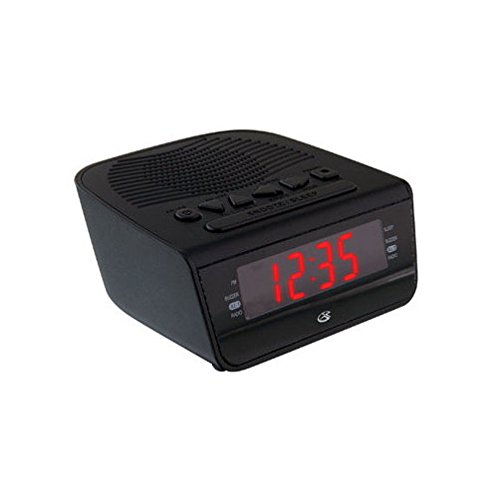
פיגורע 1: פראָנט view of the GPX Digital AM/FM Clock Radio. This image shows the compact black unit with its digital display and control buttons.
The GPX Digital AM/FM Clock Radio (C224B) is designed for reliable timekeeping and audio entertainment. Key features include a clear multi-display clock, AM/FM radio tuner, dual alarm functionality, and a battery backup option to ensure continuous operation during power interruptions. Its compact and modern design makes it suitable for various indoor settings.
סעטאַפּ
1. ונפּאַקקינג
Carefully remove the clock radio from its packaging. Ensure all components are present: the clock radio unit and the power adapter.
2. מאַכט קאַנעקשאַן
- Plug the power adapter into the DC input jack located on the back of the clock radio.
- Plug the other end of the power adapter into a standard wall outlet (AC 120V, 60Hz).
- The display will illuminate, indicating the unit is receiving power.
3. באַטעריע באַקאַפּ ינסטאַלירונג (אָפּציאָנעל)
פֿאַר באַקאַפּ מאַכט בעת אויסtages, install batteries (not included).
- געפינען די באַטאַרייע אָפּטייל אויף די דנאָ פון די אַפּאַראַט.
- עפענען די באַטאַרייע אָפּטייל דעקן.
- Insert the required batteries (e.g., 2 x AAA, check unit for specific type) according to the polarity markings (+ and -).
- פאַרמאַכן די באַטאַרייע אָפּטייל דעקן סיקיורלי.
באַמערקונג: Batteries are for backup only and will not power the display or radio functions continuously. They preserve time and alarm settings during a power interruption.
אַפּערייטינג ינסטראַקשאַנז
1. באַשטעטיקן די צייט
- דריקן און האַלטן די צייט שטעלן קנעפּל ביז דער עקראַן בלינקט.
- ניצן די שעה און מינוט קנעפּלעך צו סטרויערן די צייט.
- דרוק צייט שטעלן נאכאמאל צו באשטעטיגן און ארויסגיין פון צייט איינשטעלונג מאָדע.
2. שטעלן אַלאַרמס (אַלאַרם 1 און אַלאַרם 2)
This unit features dual alarms, allowing you to set two independent wake-up times.
- דריקן און האַלטן די שרעק 1 שטעלן (אָדער שרעק 2 שטעלן) button until the alarm time flashes.
- ניצן די שעה און מינוט buttons to adjust the desired alarm time.
- דרוק שרעק 1 שטעלן (אָדער שרעק 2 שטעלן) again to confirm the time.
- Immediately after confirming the time, use the שרעק מאָדע button to select the alarm source: באַזער or RADIO.
- The alarm icon (e.g., AL1 or AL2) will appear on the display, indicating the alarm is active.
To turn off an alarm, press the corresponding שרעק 1 אויף / אַוועק (אָדער שרעק 2 אויף / אַוועק) button. The alarm icon will disappear.
3. AM/FM ראַדיאָ אָפּעראַציע
- דרוק די ראַדיאָ אויף / אַוועק קנעפּל צו קער אויף די ראַדיאָ.
- דרוק די BAND קנעפּל צו באַשטימען צווישן AM און FM באַנדס.
- ניצן די TUNE + or ניגון - קנעפּלעך צו מאַנועל צושטעלן צו אַ געוואונטשענע סטאַנציע.
- To automatically scan for the next available station, press and hold TUNE + or ניגון - פֿאַר אַ ביסל סעקונדעס.
- סטרויערן די באַנד ניצן די VOLUME + or באַנד - קנעפּלעך.
- צו קער אַוועק די ראַדיאָ, דריקן די ראַדיאָ אויף / אַוועק קנעפּל ווידער.
4. שלאָף פונקציע
ווען אַן אַלאַרם קלינגט, דריק די SNOOZE קנעפל צו שטיל מאכן דעם אלארם צייטווייליג פאר בערך 9 מינוט. דער אלארם וועט ווידער קלינגען נאך דער דרימלען פעריאד.
5. שלאָפן פֿונקציע
די שלאָף פונקציע ערלויבט דעם ראַדיאָ צו שפּילן פֿאַר אַ באַשטימטע צייט איידער עס אויטאָמאַטיש אויסלעשט זיך.
- בשעת די ראַדיאָ שפּילט, דריק די שלאָף קנעפּל עטלעכע מאָל צו דורכגיין די פאַראַן שלאָף צייטן (למשל, 90, 60, 30, 15 מינוט, אויסגעלאָשן).
- דער ראַדיאָ וועט זיך אויטאָמאַטיש אויסלעשן נאָך דער אויסגעקליבענער צייט.
וישאַלט
1. רייניקונג
To clean the unit, wipe the exterior with a soft, slightly damp cloth. Do not use abrasive cleaners or solvents, as these may damage the finish. Ensure the unit is unplugged before cleaning.
2. באַטערי פאַרבייַט
If the battery backup function is not working, or if the unit loses time during a power outage, the backup batteries may need replacement. Follow the "Battery Backup Installation" steps in the Setup section to replace them.
טראָובלעשאָאָטינג
| פּראָבלעם | מעגלעך סיבה | לייזונג |
|---|---|---|
| דער אַפּאַראַט טוט נישט מאַכט אויף. | שטראָם אַדאַפּטער נישט פארבונדן אדער אַ דעפעקטיווע אַוטלעט. | זיכער מאַכן אַז דער מאַכט אַדאַפּטער איז זיכער אַרייַנגעשטעקט אין דער אַפּאַראַט און אין אַ אַרבעטנדיקער וואַנט אַוטלעט. פּרוּווט אַן אַנדער אַוטלעט. |
| דער אַלאַרם קלינגט נישט. | אַלאַרם נישט געשטעלט, אַלאַרם וואָלומען צו נידעריק, אָדער אַלאַרם אויסגעלאָשן. | Verify alarm time and source (buzzer/radio) are set correctly. Ensure alarm is activated (icon visible). Increase radio volume if alarm source is radio. |
| נעבעך ראַדיאָ אָפּטראָג. | שוואַכער סיגנאַל אָדער שטערונג. | Adjust the position of the unit or the antenna (if external). Move away from other electronic devices that may cause interference. |
| צייט/סעטינגס פארלוירן נאכן אויסשטרעקן דעם עלעקטרישן מאשיןtage. | באַקאַפּ באַטעריעס זענען טויט אָדער נישט אינסטאַלירט. | Install fresh backup batteries or replace existing ones. |
ספּעסאַפאַקיישאַנז
- מאָדעל: C224B
- מאַכט מקור: AC 120V, 60Hz (main); Battery Powered (backup)
- ווייַז טיפּ: געפירט דיגיטאַל ווייַז
- ראַדיאָ באַנדס: AM/FM
- דימענשאַנז (בעערעך): 5.12" ברייט x 5.12" הויך
- וואָג (בעערעך): 3 פונט
- קאָליר: שוואַרץ
- מאַטעריאַל: פּלאַסטיק
וואָראַנטי און שטיצן
For warranty information or technical support, please refer to the warranty card included with your product or visit the official GPX website. Do not attempt to repair this unit yourself, as this may void your warranty.
GPX Official Webפּלאַץ: www.gpx.com


