1. פּראָדוקט איבערview
The COMTEC ZDR-014 is a Full HD drive recorder equipped with GPS, designed to capture clear video footage of your journeys. It features continuous recording, impact-triggered recording, and manual recording functions to ensure critical moments are captured. Advanced features like HDR/WDR, night vision, and time-lapse recording enhance video quality and recording duration. The device also includes robust file protection and an SD card check function for data integrity.

Image: The COMTEC ZDR-014 Drive Recorder mounted on a car windshield, providing a clear view פון די וועג פאָרויס.
2. סעטאַפּ און ייַנמאָנטירונג
2.1 פּעקל אינהאַלט
- הויפּט אַפּאַראַט רענטגענ 1
- מאָונטינג קלאַמער רענטגענ 1
- Double-sided Tape for Bracket Fixing x 1
- Hex Wrench for Angle Adjustment x 1
- Degreasing Cleaner x 1
- Cigar Plug Power Cord x 1
- microSDHC Card (8GB) x 1
- Instruction Manual (with Warranty) x 1
2.2 מאַונטינג די מיטל
The ZDR-014 can be mounted on your car's windshield or dashboard. The built-in G-sensor automatically detects the device's orientation and inverts the recorded image accordingly.
- קלייַבן אַ אָרט: Select a position on the windshield or dashboard that does not obstruct the driver's view and allows for a clear recording angle.
- ריין די ייבערפלאַך: Use the provided degreasing cleaner to thoroughly clean the mounting surface. Ensure it is dry before proceeding.
- צוטשעפּען די בראַקאַץ: Apply the double-sided tape to the mounting bracket and firmly press the bracket onto the chosen surface. Hold for a few seconds to ensure adhesion.
- צוטשעפּען די הויפּט אַפּאַראַט: Slide the main unit onto the mounting bracket until it clicks into place.
- סטרויערן די ווינקל: Use the hex wrench to adjust the recording angle of the camera for optimal coverage.

Image: The COMTEC ZDR-014 mounted on a car windshield, displaying its screen and accessible controls.
2.3 מאַכט קאַנעקשאַן
Connect the provided cigar plug power cord to the drive recorder and then to your vehicle's cigar lighter socket. Ensure the connection is secure. For parking surveillance functionality, the optional HDROP-09 direct wiring cord is required.
2.4 microSDHC Card Insertion
Insert the included 8GB microSDHC card into the designated slot on the device. Ensure it is inserted correctly until it clicks. The device supports 4GB to 32GB Class 10 microSDHC cards.
3. אַפּערייטינג ינסטרוקטיאָנס
3.1 Basic Recording Functions
The ZDR-014 offers three primary recording modes:
- קעסיידערדיק רעקאָרדינג: The device automatically starts recording when the engine is turned ON (within approximately 1 second) and continues until the engine is turned OFF. Older footage is automatically overwritten when the recording limit is reached (default setting).
- אימפּאַקט רעקאָרדינג: The built-in G-sensor detects impacts. When an impact is detected, the device automatically saves the current, previous, or next file as protected impact recording data.
- מאַנואַל רעקאָרדינג: Press the designated switch on the device to manually initiate recording at any desired time. This footage is also saved as protected data.
3.2 Parking Surveillance Function (Optional)
To enable parking surveillance, connect the separately sold optional parking surveillance/direct wiring cord (HDROP-09). This function allows the device to:
- Detect impacts and record front and rear images even while parked.
- Perform continuous recording during parking.
- Save parking surveillance footage to a dedicated folder for easy identification.
באַמערקונג: Recording time may vary based on device settings and microSDHC card capacity. If the vehicle battery voltage drops below a set level during parking surveillance (within 30 minutes/1 hour/3 hours/6 hours/9 hours/12 hours), the device will automatically stop operation to protect the battery.
3.3 פארגעשריטענע רעקאָרדינג פֿעיִקייטן
- נאַכט זעאונג: Records relatively bright images even in low-light night parking situations. However, recording may not be bright in situations with absolutely no ambient light.
- צייט-לאַפּס רעקאָרדינג: Compresses still images recorded once per second into a short video, enabling longer recording durations.
- HDR/WDR: High Dynamic Range (HDR) and Wide Dynamic Range (WDR) functions ensure clear images by minimizing overexposure (whiteout) and underexposure (blackout), even in strong backlight or scenes with significant brightness differences.
- LED Traffic Light Compatibility: The device reliably records even with different power frequencies in Eastern and Western Japan, ensuring LED traffic lights are captured correctly.
3.4 Emergency Recording Stop Function
In the event of a significant impact (e.g., an accident), the device automatically stops recording. This prevents important footage from being unintentionally overwritten if the device is turned ON after moving the vehicle or during repairs. The impact detection sensitivity can be adjusted in 11 levels, including OFF.
3.5 Drive Support Function
The device can detect and notify you of sudden acceleration, sudden deceleration, and sudden steering maneuvers, promoting safer driving habits.
4. וישאַלט
4.1 microSDHC Card Management
- Reduced Formatting: The ZDR-014 uses a dedicated file system that significantly reduces SD card fragmentation compared to standard file systems (like FAT). This means you will need to format the microSDHC card less frequently.
- SD Card Check Function: Upon startup, the device checks the microSDHC card for damage. If damage is detected, an LED indicator will alert you, preventing missed recordings due to a faulty card.
- File שוץ: The dedicated file system is designed to minimize data corruption and maximize recovery chances even if power is suddenly cut off during an accident, protecting critical recorded data.
While the device reduces the need for frequent formatting, it is still recommended to periodically back up important footagאון פֿאָרמאַטירן די קאַרטל צו האַלטן די אָפּטימאַלע פאָרשטעלונג.
4.2 רייניקונג די מיטל
Use a soft, dry cloth to clean the device's exterior and lens. Avoid using abrasive cleaners or solvents, as they may damage the unit.
5. טראָובלעשאָאָטינג
5.1 פּראָסט ישוז און סאַלושאַנז
| פּראָבלעם | מעגלעך סיבה | לייזונג |
|---|---|---|
| די מיטל טוט נישט מאַכט אויף. | קיין מאַכט צושטעל; פרייַ פֿאַרבינדונג. | Check power cord connection to the device and cigar lighter. Ensure vehicle power is ON. |
| קיין רעקאָרדינג. | microSDHC card issue; card full; incorrect settings. | Check microSDHC card for damage (LED indicator). Format the card. Verify recording settings. |
| שלעכטע ווידעא קוואַליטעט ביינאכט. | Extremely low ambient light. | While night vision improves low-light recording, extremely dark environments may still result in limited visibility. Ensure the lens is clean. |
| דזשי-פי-עס באקומט נישט קיין סיגנאל. | פארמאכט view of sky; device interference. | ענשור אַז די מיטל האט אַ קלאָר view of the sky. Move away from other electronic devices that might cause interference. |
| Parking surveillance not working. | Optional cord not connected; low car battery voltage. | Ensure HDROP-09 is correctly installed. Check vehicle battery voltage. |
5.2 SD Card Error Indication
If the microSDHC card is damaged, the device's LED indicator will signal an abnormality upon startup. If this occurs, replace the microSDHC card with a new one.
6. ספּעסאַפאַקיישאַנז
6.1 אַפּאַראַט ספּעסאַפאַקיישאַנז
- ימאַגינג סענסאָר: 1/3-inch CMOS sensor
- עפעקטיוו פּיקסעלס: Max 2 million pixels
- אָביעקטיוו ווינקל: Horizontal 120°, Vertical 63° (Diagonal 145°)
- F-value: 1.8
- לענס מאַטעריאַל: גלאז
- Minimum Illuminance: 2 לוקס
6.2 פּראָדוקט ספּעסאַפאַקיישאַנז
- מאַכט וואָלtage: DC12V
- מאַקסימום קראַנט קאַנסאַמשאַן: 400 מאַ אָדער ווייניקער
- אַפּערייטינג טעמפּעראַטור קייט: -10 ℃ צו 60 ℃
- ראַם קורס: 29.1 / 19.1 / 9.1 fps (LED signal compatible)
- גפּס: אַרייַנגערעכנט
- רעקאָרדינג מעדיע: microSDHC card (8GB Class 10 included, supports 4GB-32GB Class 10)
- ג סענסער: Included (Adjustable from 0.1G to 1.0G in 0.1G increments)
- הויפּט אַפּאַראַט גרייס: 58(וו) × 57(ה) × 27(ד) מם
- הויפּט אַפּאַראַט וואָג: 89ג
- רעזאלוציע: 1920x1080 (פול HD)
- פאַרשטעלן גרייס: 2.3 אינטשעס
- Noise Countermeasures: Implemented to prevent interference with digital terrestrial broadcasting and GPS reception.
- אנדערע פאַנגקשאַנז: Audio recording, Date/time information recording, Drive support function (sudden acceleration/deceleration/steering detection).
7. וואָראַנטי און שטיצן
7.1 פּראָדוקט וואָראַנטי
The COMTEC ZDR-014 comes with a 1 יאָר פּראָדוקט וואָראַנטי from the date of purchase. This warranty covers manufacturing defects but excludes consumables (e.g., microSDHC card, double-sided tape).
7.2 Viewער ווייכווארג
א איבערגעגעבענע viewer software is available for download from the COMTEC official website. This software allows you to review recorded data on your computer, including video, audio, and G-sensor information. You can also convert recorded data into video or still images and save them to your computer.
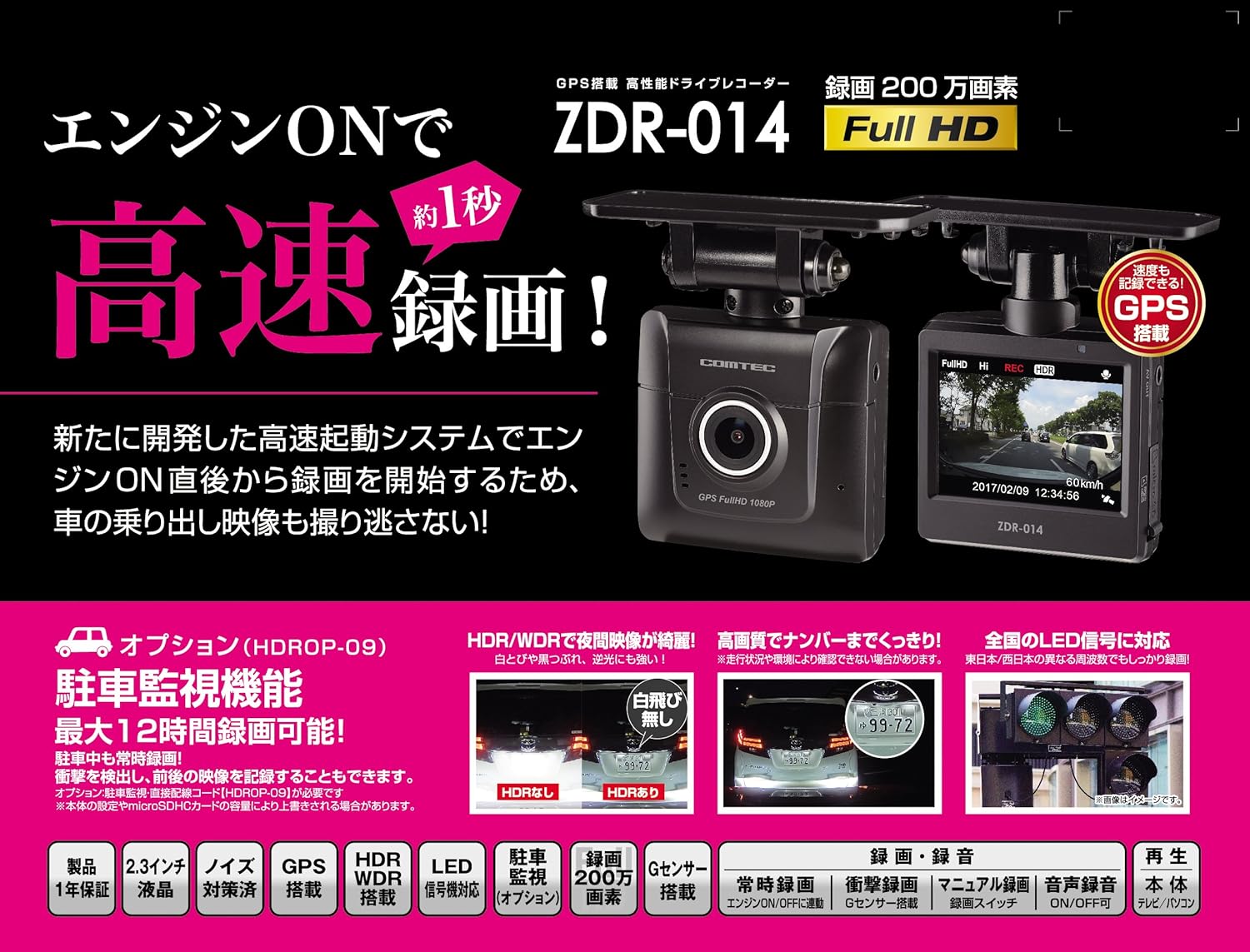
Image: Key features of the COMTEC ZDR-014, including Full HD recording, GPS, and rapid startup.
7.3 קונה שטיצן
For further assistance, technical support, or warranty claims, please refer to the contact information provided in your product's warranty card or visit the official COMTEC webפּלאַץ.


