1. הקדמה און פּראָדוקט איבערview
The zaMel ETERO RWS-211C/12V/N is a wireless surface-mounted radio switch designed for controlling up to four electrical devices. Its robust IP56 rating ensures protection against jet water, making it suitable for outdoor installations. This device offers a reliable control solution for various applications such as garage doors, pumps, lamps, and more, with an impressive outdoor range of up to 300 meters.
Utilizing Keeloq® coding technology from Microchip Technology USA, the RWS-211C/12V/N ensures secure and interference-free bidirectional transmission. Each transmission is dynamically re-encrypted, providing enhanced safety. Operating at a frequency of 433.92 MHz with low transmission power (<5mW), this radio switch does not require state approval.
2. שליסל פֿעיִקייטן
- Wireless surface-mounted switch for outdoor installation (IP56 rated).
- Controls up to 4 independent electrical devices.
- Extended outdoor range of up to 300 meters.
- Bidirectional, coded, and interference-free Keeloq® transmission.
- Maximum connection power: 2000 W.
- Load on one channel: 16 A / 250 V AC 4000 VA / AC1.
- אַפּערייטינג טעמפּעראַטור קייט: -20 °C צו +35 °C.
- Requires 12 V operating voltage.
3. פּראָדוקט קאָמפּאָנענטן און וויזשוואַלן

פיגורע 3.1: איבערview of the zaMel RWS-211C/12V/N Radio Switch system, showing the main receiver unit, detachable antenna, and the four-button remote control. The receiver unit features four output indicators (K1-K4) and a 12V AC/DC power indicator.
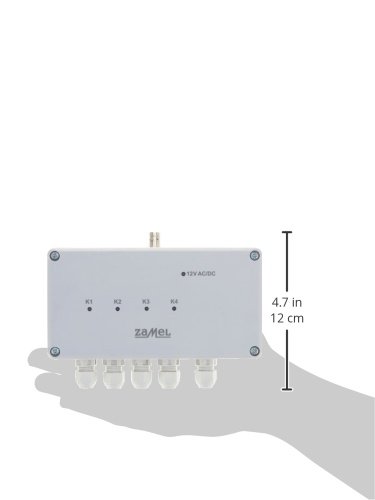
פיגורע 3.2: The zaMel RWS-211C/12V/N receiver unit shown held in a hand, illustrating its compact size and dimensions (approximately 4.7 inches or 12 cm in length). This view highlights the four cable glands at the bottom for secure wiring connections.

פיגורע 3.3: א דירעקטע פראָנט view of the zaMel RWS-211C/12V/N receiver unit and its accompanying remote control. This perspective clearly shows the "zaMel" branding on both devices, the four indicator LEDs (K1-K4) on the receiver, and the numbered buttons (1-4) on the remote.
4. סעטאַפּ און ייַנמאָנטירונג
Before beginning installation, ensure all power sources are disconnected to prevent electrical shock. It is recommended that installation be performed by a qualified electrician.
4.1 Mounting the Receiver Unit
- Choose a suitable outdoor location for the receiver unit, ensuring it is within range of the devices to be controlled and the remote control. The IP56 rating allows for outdoor exposure.
- Secure the receiver unit to a flat, stable surface using appropriate screws through the mounting holes located at the corners of the casing.
- Attach the provided antenna to the designated connector on the receiver unit. Ensure it is securely fastened for optimal signal reception.
4.2 וויירינג קאַנעקשאַנז
The RWS-211C/12V/N requires a 12V AC/DC operating voltage. Use the cable glands at the bottom of the unit for secure and waterproof cable entry.
- מאַכט צושטעלן: Connect a stable 12V AC/DC power supply to the designated terminals inside the receiver unit. Observe correct polarity if using DC.
- מיטל קאַנעקשאַנז: Connect the electrical devices (e.g., garage door opener, lamp, pump) to the respective output channels (K1, K2, K3, K4) within the receiver. Each channel can handle a load of up to 16 A / 250 V AC (4000 VA). Refer to the internal wiring diagram for specific terminal assignments.
- Ensure all connections are tight and properly insulated.
4.3 פּערינג די רימאָוט קאָנטראָל
The remote control typically comes pre-paired, but if re-pairing is necessary or if you are adding new remotes, follow the manufacturer's specific pairing procedure, which usually involves a button sequence on the receiver unit and the remote.
5. אַפּערייטינג ינסטרוקטיאָנס
Once installed and powered, the zaMel RWS-211C/12V/N is ready for operation using the provided remote control.
- The remote control features four numbered buttons (1, 2, 3, 4), each corresponding to one of the four output channels (K1, K2, K3, K4) on the receiver unit.
- Pressing a button on the remote will toggle the state of the corresponding output channel on the receiver. For example, if channel K1 is connected to a lamp, pressing button '1' on the remote will turn the lamp ON, and pressing it again will turn it OFF.
- The indicator LEDs (K1-K4) on the receiver unit will illuminate when their respective channels are active.
- זיכער מאַכן אַז די ווײַטקאָנטראָל האט פרישע באַטעריעס פֿאַר אָפּטימאַלער פאָרשטעלונג.
6. וישאַלט
The zaMel RWS-211C/12V/N is designed for durability and requires minimal maintenance.
- רייניקונג: Periodically wipe the exterior of the receiver unit and remote control with a soft, damp שטאָף. דו זאלסט נישט נוצן אַברייסיוו קלינערז אָדער סאָלוואַנץ.
- פֿאַרבינדונגען: Occasionally check all wired connections to ensure they remain secure and free from corrosion, especially in outdoor environments.
- באַטערי פאַרבייַט: Replace the remote control battery when its range decreases or it becomes unresponsive. Refer to the remote's specific instructions for battery type and replacement procedure.
- אַנטענע: Ensure the antenna remains upright and unobstructed for best signal performance.
7. טראָובלעשאָאָטינג
| פּראָבלעם | מעגלעך סיבה | לייזונג |
|---|---|---|
| Device does not respond to remote. |
|
|
| פאַרקלענערטע אַפּערייטינג קייט. |
|
|
| Receiver LEDs not illuminating. |
|
|
8. טעכניש ספּעסאַפאַקיישאַנז
| פּראָדוקט דימענשאַנז | 5.5 רענטגענ 8.2 רענטגענ 15.7 סענטימעטער; 560 ג |
| נומער מאָדעל נומער | RWS-211C/12V/N |
| אָפּעראַציע מאָדע | אנצינדן אויסלעשן |
| קראַנט רייטינג | 16 Amps |
| אַפּערייטינג וואָלtage | קסנומקסוו אַק / דק |
| קאָנטאַקט טיפּ | נאָרמאַללי עפֿן |
| קאַנעקטער טיפּ | קלאַמער |
| Maximum Connection Power | 2000 וו |
| Load per Channel | 16 A / 250 V AC 4000 VA / AC1 |
| אַפּערייטינג טעמפּעראַטור ראַנגע | -20°C צו +35°C |
| טראַנסמיסיע אָפטקייַט | 433.92 מהז |
| שוץ רייטינג | IP56 |
9. וואָראַנטי און שטיצן
For information regarding product warranty, please refer to the documentation included with your purchase or visit the official zaMel webזייטל. גאַראַנטיע טערמינען און באדינגונגען קענען זיין אַנדערש לויט געגנט.
Should you encounter any issues or require technical assistance, please contact zaMel customer support. Contact details are typically available on the manufacturer's webפּלאַץ אָדער אין די פּראָדוקט פּאַקקאַגינג.


