1. הקדמה
This manual provides detailed instructions for the safe and efficient operation of your ONKYO X-U6(B) CD Receiver System. Please read this manual thoroughly before using the product and retain it for future reference.
The ONKYO X-U6(B) is a versatile CD receiver system featuring NFC-compatible Bluetooth for easy wireless audio streaming from smartphones and tablets. It includes a USB terminal for digital connection with iPod/iPhone/iPad, ensuring high-quality playback with minimal signal degradation. The system also supports MP3 file playback from USB memory devices and offers a PC IN (USB Type-B) terminal for high-quality audio playback from your computer. An integrated FM tuner with Wide FM support (up to 95.0MHz) and a LINE IN terminal for external devices further enhance its media compatibility.
2. וויכטיק סאַפעטי אינפֿאָרמאַציע
- מאַכט מקור: פֿאַרבינדט דעם אַפּאַראַט נאָר צו דער ספּעציפֿישער מאַכט צושטעל.
- ווענטילאַטיאָן: זיכער מאַכן אַז עס איז דאָ גענוג ווענטילאַציע. נישט פֿאַרשטאָפּן די ווענטילאַציע עפענונגען.
- וואַסער און נעץ: שטעלט נישט אויס דעם אַפּאַראַט צו רעגן אָדער פייכטקייט. שטעלט נישט קיין זאכן אָנגעפילט מיט פליסיקייטן אויף דעם אַפּאַראַט.
- היץ: האַלט דעם אַפּאַראַט אַוועק פון היץ קוועלער ווי ראַדיאַטאָרן, היץ רעגיסטערס, אויוון, אָדער אַנדערע אַפּאַראַטן וואָס פּראָדוצירן היץ.
- רייניקונג: נעמט ארויס דעם אַפּאַראַט פֿון דער וואַנט־ווענטיל איידער איר רייניגט. ניצט אַ טרוקענעם שטאָף פֿאַר רייניגן.
- סערוויס: דו זאלסט נישט פּרווון צו דינען דעם פּראָדוקט זיך. קאָנטאַקט אַלע קוואַלאַפייד סערוויס פּערסאַנעל.
3. פּעקל אינהאַלט
באַשטעטיקן אַז אַלע זאכן זענען אַרייַנגערעכנט אין פּעקל:
- ONKYO X-U6(B) CD Receiver System (Main Unit)
- רעדנערס (2 איינהייטן)
- ווײַטקאָנטראָל (RC-893S)
- מאַכט שנור
- עפעם אַנטענע
- רעדנער קאַבלעס
- באַניצער מאַנואַל (דעם דאָקומענט)
4. סעטאַפּ
4.1 אַנפּאַקינג און פּלייסמאַנט
Carefully remove all components from the packaging. Place the main unit and speakers on a stable, flat surface. Ensure there is sufficient space around the unit for proper ventilation.

Figure 1: ONKYO X-U6(B) CD Receiver System (Main Unit and Speakers)
4.2 פֿאַרבינדן די רעדנערס
Connect the speaker cables to the corresponding speaker terminals on the main unit and the speakers. Ensure correct polarity (red to red, black to black) for optimal sound quality.
4.3 פֿאַרבינדן די FM אַנטענע
Connect the supplied FM antenna to the FM antenna terminal on the rear of the main unit for radio reception.
4.4 מאַכט קאַנעקשאַן
Connect the power cord to the AC inlet on the rear of the main unit, then plug the other end into a wall outlet.
4.5 General Setup Guide (Video)
Video 1: General setup guide for a micro CD stereo system. While not specific to the ONKYO X-U6(B), it demonstrates common connection procedures for similar devices.
5. אַפּערייטינג ינסטרוקטיאָנס
5.1 רימאָוט קאָנטראָל איבערview
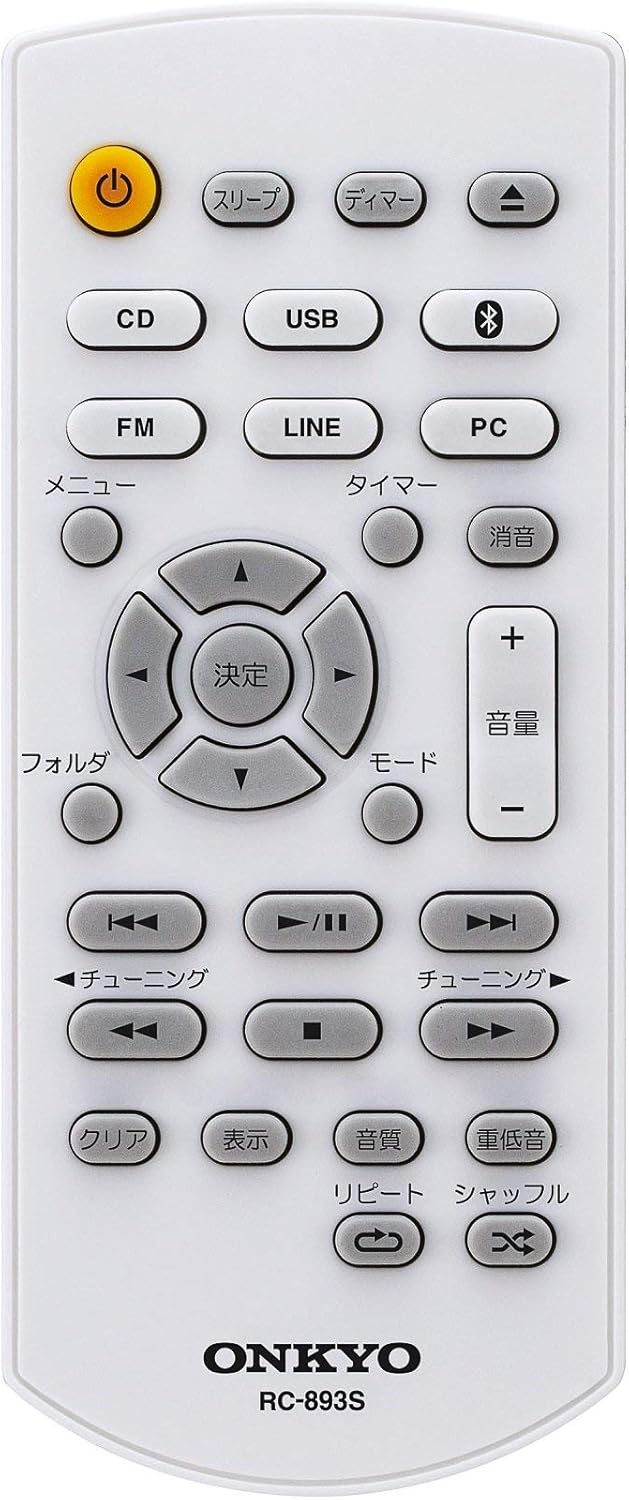
Figure 2: ONKYO RC-893S Remote Control
The remote control (RC-893S) provides full functionality for your CD Receiver System. Below is a description of its buttons:
- Power (ن): טורנס די אַפּאַראַט אויף אָדער אַוועק.
- Sleep (スリープ): שטעלט די שלאָף טייַמער.
- Dimmer (ディマー): אַדזשאַסץ אַרויסווייַזן ברייטנאַס.
- סידי: Selects CD input mode.
- וסב: Selects USB input mode.
- Bluetooth (Bluetooth icon): Selects Bluetooth input mode.
- עפעם: Selects FM tuner mode.
- פּאַס: Selects LINE IN input mode.
- פּיסי: Selects PC IN (USB DAC) input mode.
- Menu (メニュー): גייט אריין אין מעניו אָפּציעס.
- Timer (タイマー): Sets the timer function.
- Mute (消音): מאָט אָדער אַנמיוט די אַודיאָ.
- Volume (+/- 音量): אַדזשאַסץ די באַנד מדרגה.
- Directional Buttons (決定): Navigation and selection within menus.
- Folder (フォルダ): Navigates folders during USB/CD MP3 playback.
- Mode (モード): Changes playback mode.
- Tuning (チューニング): Adjusts radio frequency or track skipping.
- Play/Pause (▶/II): סטאַרץ אָדער פּאָזאַז פּלייבאַק.
- שטאָפּ (■): סטאַפּס פּלייבאַק.
- Clear (クリア): Clears settings or selections.
- Display (表示): ענדערונגען ווייַזן אינפֿאָרמאַציע.
- Sound Quality (音質): Adjusts sound settings.
- Bass (重低音): פֿאַרבעסערט באַס אַרויסגאַנג.
- Repeat (リピート): Repeats current track or album.
- Shuffle (シャッフル): שפּיל טראַקס אין טראַפ - סדר.
5.2 יקערדיק אָפּעראַטיאָנס
- מאַכט אויף / אַוועק: דרוק די מאַכט button on the remote or the main unit.
- באַנד אַדזשאַסטמאַנט: ניצן די באנד + or באַנד - buttons on the remote or the volume knob on the main unit.
- מקור סעלעקציע: Press the corresponding source button (CD, USB, Bluetooth, FM, LINE, PC) on the remote or the main unit.
5.3 סי פּלייבאַק
- דרוק די CD קנעפּל צו אויסקלייַבן קאָמפּאַקטדיסק מאָדע.
- Open the CD tray (if applicable, or insert disc into slot).
- Place a CD (or CD-R/RW with MP3 files) onto the tray with the label side up.
- Close the CD tray. Playback will start automatically or by pressing שפּיל / פּויזע.
5.4 יו-עס-בי פּלייבּעק
- Insert a USB memory device into the USB port on the front panel.
- דרוק די וסב קנעפּל צו אויסקלייַבן וסב מאָדע.
- די סיסטעם וועט לייענען די files. Use the directional buttons and אַרייַן to navigate and select MP3 files פֿאַר פּלייבאַק.
5.5 Bluetooth Connection (NFC)
- דרוק די בלועטאָאָטה button to select Bluetooth mode. The display will show "PAIRING".
- On your smartphone or tablet, enable Bluetooth and search for available devices. Select "ONKYO X-U6" from the list.
- For NFC-compatible devices, simply touch your device to the NFC logo on the ONKYO X-U6(B) to establish a connection.
- אַמאָל קאָננעקטעד, איר קענען סטרימינג אַודיאָ ווירעלעססלי פֿון דיין מיטל.
5.6 PC IN (USB DAC)
- Connect your computer to the PC IN (USB Type-B) terminal on the rear of the main unit using a USB cable.
- דרוק די PC button to select PC IN mode.
- On your computer, select the ONKYO X-U6(B) as the audio output device.
- Play audio from your computer, and it will be output through the system.
5.7 עפעם טונער
- דרוק די FM button to select FM tuner mode.
- ניצן די טונינג buttons to manually tune to a station or perform an auto-scan.
- The system supports Wide FM up to 95.0MHz.
5.8 שורה אין
- Connect an external audio device (e.g., TV, portable music player) to the LINE IN terminals on the rear of the main unit using an appropriate audio cable.
- דרוק די LINE button to select LINE IN mode.
- Play audio from the connected external device.
5.9 Reservation Timer Function
The system features a reservation timer function that automatically starts playback at a set time. Refer to the detailed instructions in the full manual for setting up the timer.
6. וישאַלט
6.1 רייניקונג די אַפּאַראַט
ווישט אָפּ די אויסערלעכע זייט פון דער אַפּאַראַט מיט אַ ווייכן, טרוקענעם שטאָף. ניצט נישט קיין שרײַבנדיקע רייניגער, וואַקסן אָדער סאָלווענטן, ווײַל זיי קענען שאַטן די ענדיקונג.
6.2 Speaker Care
Keep the speaker cones free from dust. Avoid touching the speaker cones directly.
7. טראָובלעשאָאָטינג
If you experience issues with your ONKYO X-U6(B) system, please refer to the following common solutions:
- קיין מאַכט: זיכער מאַכן אַז דער עלעקטרישער שנור איז זיכער פֿאַרבונדן סיי צום אַפּאַראַט און סיי צום וואַנט אַוטלעט. קאָנטראָלירט צי דער אַוטלעט אַרבעט.
- קיין קול: Check volume levels on both the system and the connected source device. Ensure speakers are correctly connected. Verify the correct input source is selected.
- בלועטאָאָטה קאַנעקשאַן ישוז: Ensure Bluetooth is enabled on your device and the system is in pairing mode. Try unpairing and re-pairing the device.
- CD ניט פּלייַינג: Ensure the CD is clean and inserted correctly. Try a different CD.
- שלעכטע FM אויפנעמונג: Adjust the position of the FM antenna. Check for local interference.
פֿאַר מער קאָמפּליצירטע פּראָבלעמען, ביטע קאָנטאַקטירט קונה שטיצע.
8. ספּעסאַפאַקיישאַנז
| שטריך | באַשרייַבונג |
|---|---|
| סאָרט | אָנקיאָ |
| מאָדעל נומער | X-U6(B) |
| קאָליר | שוואַרץ |
| טונער טיפּ | Wide FM |
| גאַנץ וסב פּאָרץ | 2 |
| Number of Speakers (ch) | 2 |
| אַודיאָ רעזולטאַט | 15 וואטס |
| ווירעלעסס קאַמפּאַטאַבילאַטי | בלועטאָאָטה |
| אַקסעססאָריעס | ווייַט קאָנטראָל |
| מעלדונג יאָר | 2016 |
| נעץ | ווייערד |
| מאַכט קאַנסאַמשאַן | 32 וו |
| פּראָדוקט דימענשאַנז (LxWxH) | 27.3 X 21.5 X 9.9 סענטימעטער |
| פּונקט וואָג | 1.9 קג |
| פּראָדוקט פֿעיִקייטן | פּשוט פּלאַן |
9. וואָראַנטי און שטיצן
9.1 וואָראַנטי אינפֿאָרמאַציע
This product comes with a standard manufacturer's warranty. Please refer to the warranty card included in your package for specific terms and conditions, including warranty period and coverage details.
9.2 קונה שטיצן
If you require further assistance or encounter issues not covered in this manual, please contact Onkyo customer support. Contact information can typically be found on the official Onkyo webוועבזייטל אדער אויף דער פּראָדוקט פּאַקאַדזשינג.


