1. הקדמה
This manual provides instructions for the proper use and maintenance of your Casio GX-12B Value Series Desk Top/Compact Desk Type Calculator. Please read this manual thoroughly before using the calculator to ensure optimal performance and longevity.
שליסל פֿעיִקייטן:
- Extra Large 12-Digit Display
- Two-Way Power (Solar and Battery)
- 2 Independent Memories
- Item Counter Function
- Mark-up PercentagE פונקציע
- Durable Plastic Keys
- Compact Desk Type Design
2. סעטאַפּ און מאַכט סופּפּלי
מאַכט מקור:
The Casio GX-12B calculator operates on a two-way power system, utilizing both solar power and a single LR44 button-cell battery. For optimal performance, ensure the solar panel is exposed to sufficient light. In low-light conditions, the battery automatically takes over.
ייַנמאָנטירונג / פאַרבייַט פון באַטאַרייע:
- זייט זיכער אז דער קאַלקולאַטאָר איז אויסגעלאָשן.
- געפינט דעם דעקל פונעם באַטעריע־אָפּטייל אויף דער הינטערשטער זייט פונעם קאַלקולאַטאָר.
- Using a small screwdriver, carefully remove the screw and open the battery compartment cover.
- Remove the old LR44 battery (if replacing) and insert a new LR44 battery with the positive (+) side facing up.
- פאַרבייַטן די דעקן פון די באַטאַרייע אָפּטייל און באַוואָרענען עס מיט די שרויף.
- דרוק די AC (All Clear) button to reset the calculator.
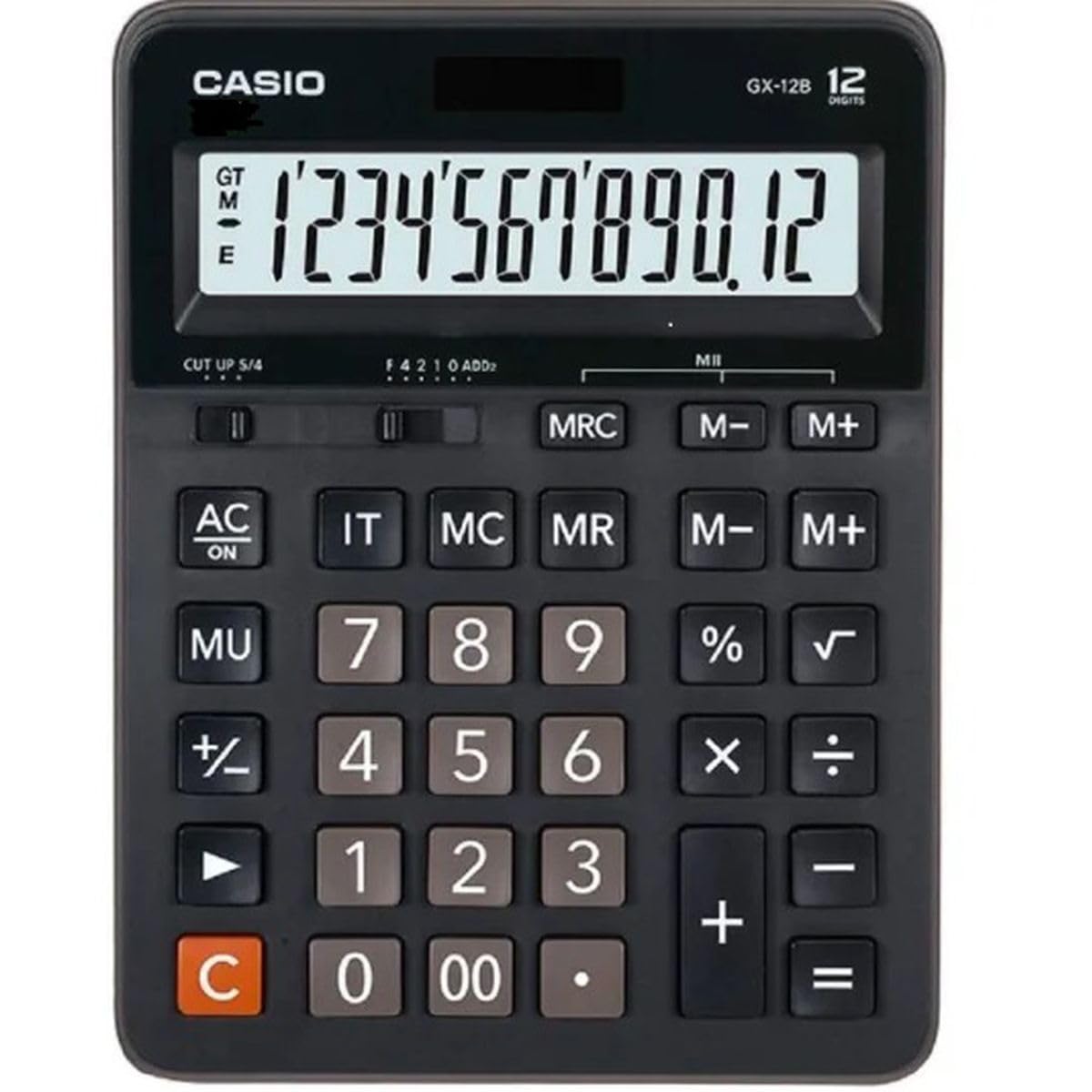
This image displays the Casio GX-12B calculator, highlighting its approximate length of 8.8 inches (22 cm) for scale. The calculator features a large display and clearly labeled keys.
3. יקערדיק אָפּעראַטיאָנס
Familiarize yourself with the key functions to perform calculations efficiently.
שליסל פאַנגקשאַנז איבערview:
- AC: All Clear. Clears all values and operations, resetting the calculator.
- C: Clear Entry. Clears the last entered number.
- + / - / × / ÷: Basic arithmetic operations.
- =: Executes the pending calculation.
- %: פּראָצענטtage key. Used for percentage calculations (e.g., 100 + 10% = 110).
- MU: Mark-up key. Used for profit margin calculations.
- M+: לייגט צו דעם אנגעוויזענעם ווערט צום זכרון.
- M-: נעמט ארויס דעם אנגעוויזענעם ווערט פון דער זכּרון.
- MRC: Memory Recall/Clear. Press once to recall the memory value. Press twice to clear the memory.
- IT: Item Counter. Counts the number of entries in a series of calculations.
Example Calculations:
- דערצו: צו רעכענען 123 + 456:
- דרוק AC
- אַרייַן 123
- דרוק +
- אַרייַן 456
- דרוק = (רעזולטאַט: 579)
- פּראָצענטtage: To add 10% to 200:
- דרוק AC
- אַרייַן 200
- דרוק +
- אַרייַן 10
- דרוק % (רעזולטאַט: 220)
- זכּרון פֿונקציע: To calculate (5 × 3) + (8 × 2):
- דרוק AC
- אַרייַן 5 × 3 M+ (15 is added to memory)
- אַרייַן 8 × 2 M+ (16 is added to memory)
- דרוק MRC (רעזולטאַט: 31)
- דרוק MRC ווידער צו אויסרייניקן דעם זכרון.
4. קער און וישאַלט
- רייניקונג: Wipe the calculator with a soft, dry cloth. For stubborn dirt, use a cloth lightly dampened with water and a mild detergent, then wipe dry immediately. Avoid using strong solvents or abrasive cleaners.
- סטאָרידזש: האַלט דעם קאַלקולאַטאָר אין אַ קיל, טרוקן אָרט אַוועק פון דירעקט זונשייַן און עקסטרעמע טעמפּעראַטורן.
- ויסמיידן פּראַל: Do not drop or subject the calculator to strong impacts, as this can damage internal components or the display.
- באַטאַרייע לעבן: If the display becomes dim or unresponsive, replace the LR44 battery.
5. טראָובלעשאָאָטינג
| פּראָבלעם | מעגלעך סיבה | לייזונג |
|---|---|---|
| דער עקראַן איז ליידיק אָדער טונקל. | נישט גענוג ליכט פאר זונ - פּאַנעל, אדער נידעריקע באַטעריע. | Move the calculator to a brighter area. Replace the LR44 battery if the issue persists. |
| פאַלשע רעכענונג רעזולטאַטן. | Incorrect key input, or memory not cleared. | דרוק AC to clear all operations and memory, then re-enter the calculation. Ensure correct order of operations. |
| די קנעפּלעך רעאַגירן נישט. | Low battery, or internal malfunction. | Replace the LR44 battery. If the problem continues, contact customer support. |
6. ספּעסאַפאַקיישאַנז
- מאָדעל: GX-12B
- ווייַז: 12-Digit Extra Large LCD
- מאַכט מקור: Two-Way Power (Solar and 1 x LR44 Battery)
- דימענשאַנז (L x W): בעערעך 20.8 סענטימעטער רענטגענ 15.9 סענטימעטער (8.2 אינטשעס רענטגענ 6.3 אינטשעס)
- וואָג: בעערעך 0.32 קג (0.7 לבס)
- מאַטעריאַל: פּלאַסטיק
- פאַנגקשאַנז: Basic arithmetic, Percentage, Mark-up, Memory (M+, M-, MRC), Item Counter
7. וואָראַנטי אינפֿאָרמאַציע
This Casio product is covered by a Limited Warranty. For specific terms, conditions, and duration of the warranty, please refer to the warranty card included with your purchase or visit the official Casio webזייטל. האַלט דיין קויפן באַווייַז פֿאַר וואָראַנטי קליימז.
8. קונה שטיצן
If you encounter any issues not covered in this manual or require further assistance, please contact Casio customer support. Contact details can typically be found on the official Casio webוועבזייטל אדער אויף דער פּראָדוקט פּאַקאַדזשינג.