1. פּראָדוקט איבערview
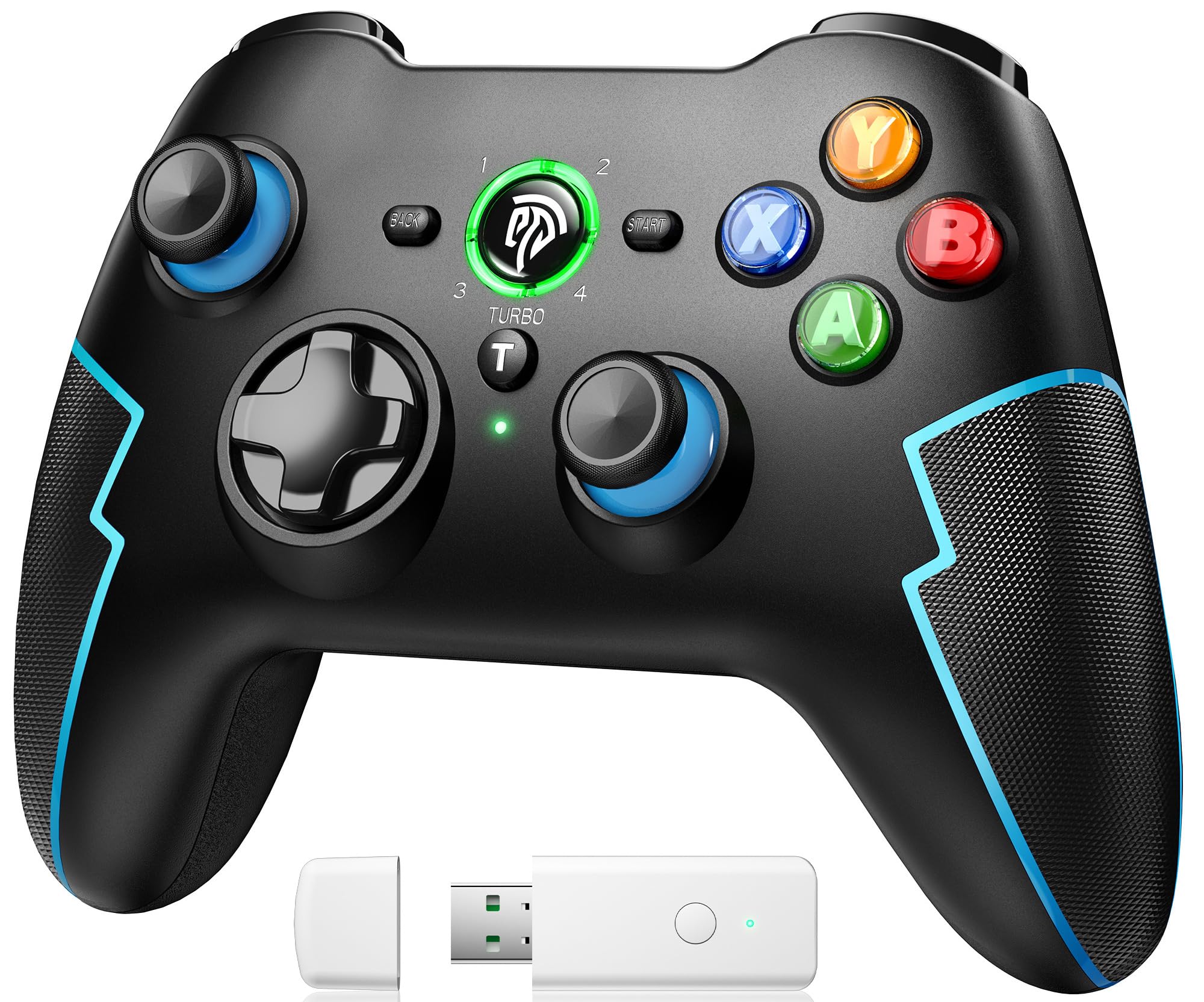
The EasySMX 9013PRO is a versatile wireless game controller designed for a superior gaming experience across multiple platforms. It features advanced Hall effect triggers, a customizable Turbo function, and dual vibration motors for immersive feedback. Its ergonomic design ensures comfort during extended gaming sessions.
שליסל פֿעיִקייטן:
- מולטי-פּלאַטפאָרם קאַמפּאַטאַבילאַטי: Supports PC, PS3, Nintendo Switch, Android TV Box, mobile phones, tablets, and laptops.
- דריי פֿאַרבינדונג מאָדעס: Offers flexible connectivity via Bluetooth, 2.4 GHz wireless dongle, or wired USB.
- High-Quality Hall Linear Triggers: Provides precise and responsive control with zero dead zones and a smooth, realistic feel, enhancing accuracy in various game genres.
- טורבאָ פונקציע: Customize the Turbo button for rapid-fire actions, reducing finger fatigue and giving a competitive edge in action and arcade games.
- דואַל ווייבריישאַן: Built-in dual electric motors deliver realistic haptic feedback, making in-game actions like slides and shots more immersive.
- קריקאָנלאָדלעך באַטערי: Equipped with a 600mAh rechargeable battery, offering up to 8 hours of continuous gameplay on a 2-hour charge. Includes an automatic power-off function to conserve energy.
- ערגאָנאָמיק פּלאַן: Asymmetrical joystick layout and a soft, non-slip grip area ensure optimal comfort and secure handling.

2. סעטאַפּ
2.1 טשאַרדזשינג די קאָנטראָללער
Before first use, fully charge the controller. Connect the provided USB cable to the controller's charging port and the other end to a USB power source (e.g., PC, USB wall adapter). The indicator lights will show charging status and turn solid when fully charged. A full charge takes approximately 2 hours.

2.2 קאַנעקשאַן מאָדעס
The EasySMX 9013PRO offers three ways to connect to your devices:
- 2.4 GHz Wireless (USB Dongle):
For PC, PS3, and Android TV Box. Insert the 2.4 GHz USB dongle into an available USB port on your device. The controller will automatically connect, providing an ultra-low latency gaming experience.

The controller connected via 2.4G wireless to a PC using the USB dongle. - בלועטאָאָטה קאַנעקשאַן:
Compatible with Nintendo Switch, mobile phones, tablets, and laptops. Enable Bluetooth on your device. On the controller, press and hold the היים button until the indicator lights flash rapidly, indicating pairing mode. Select "EasySMX 9013PRO" from your device's Bluetooth settings to connect.

The controller connected via Bluetooth to a Nintendo Switch console. - ווייערד קשר:
For PC, PS3, and Android TV. Connect the controller directly to your device using a USB cable. The controller will be recognized automatically.

The controller connected via wired USB to a PC setup.
3. אַפּערייטינג ינסטרוקטיאָנס
3.1 טורבאָ פונקציע
The Turbo function allows for rapid, continuous input of a button press. To activate, press and hold the TURBO button, then press the desired action button (e.g., A, B, X, Y). To deactivate, repeat the process.

3.2 דואַלע ווייבריישאַן
The controller features dual vibration motors that provide tactile feedback during gameplay. The intensity of the vibration can be adjusted to suit your preference. Refer to your device's or game's settings for vibration intensity adjustments, if available.

3.3 Hall Linear Triggers
The Hall effect linear triggers offer precise and smooth input, ideal for racing games where subtle acceleration and braking are crucial, or for action games requiring accurate skill deployment. These triggers provide a longer lifespan due to their non-contact electromagnetic induction mechanism.

3.4 פּראָגראַממאַבלע קנעפּלעך
The controller may feature programmable buttons (often located on the back) that allow you to map complex commands or frequently used actions for quick access. Refer to the specific instructions for programming these buttons, usually involving a 'Macro' button or a combination of button presses.

3.5 סקרעענשאָט פֿונקציע
For compatible devices like the Nintendo Switch, the controller includes a dedicated screenshot button to capture in-game moments. Press the screenshot button (often located near the HOME button) to save an image of your screen.

4. וישאַלט
- רייניקונג: ניצט אַ ווייכע, טרוקענע שטאָף צו רייניקן דעם קאָנטראָללער. פֿאַרמייַדט ניצן שטרענגע כעמיקאַלן אָדער אַברייסיוו מאַטעריאַלן.
- סטאָרידזש: האַלט דעם קאָנטראָללער אין אַ קיל, טרוקן אָרט אַוועק פון דירעקט זונשייַן און עקסטרעמע טעמפּעראַטורן.
- באַטערי זאָרגן: To prolong battery life, avoid fully discharging the controller frequently. Charge it regularly, even if not in use for extended periods. The automatic power-off feature helps conserve battery when idle.
- ויסמיידן פיזיש שעדיקן: Do not drop, disassemble, or apply excessive force to the controller.
5. טראָובלעשאָאָטינג
- קאָנטראָללער פֿאַרבינדט זיך נישט:
- מאַכן זיכער אַז די קאָנטראָללער איז טשאַרדזשינג.
- For 2.4 GHz, verify the USB dongle is properly inserted and recognized by the device.
- For Bluetooth, ensure Bluetooth is enabled on your device and the controller is in pairing mode. Try re-pairing.
- For wired, ensure the USB cable is securely connected to both the controller and the device.
- Restart both the controller and the device.
- Buttons or Joysticks Unresponsive/Drifting:
- זיכער מאַכן אַז דער קאָנטראָללער איז גאָר אויפגעלאָדן.
- Calibrate the joysticks and triggers through your device's system settings (e.g., Windows Control Panel for game controllers, Nintendo Switch system settings).
- Clean around the buttons and joysticks to remove any debris.
- קורץ באַטאַרייע לעבן:
- Ensure the controller is fully charged before use.
- Reduce vibration intensity if possible, as it consumes more power.
- The battery may degrade over time with extensive use.
- טורבאָ פונקציע אַרבעט נישט:
- זייט זיכער אז איר דריקט די TURBO button simultaneously with the desired action button.
- Some games or platforms may not fully support the Turbo function.
6. ספּעסאַפאַקיישאַנז
| שטריך | דעטאַל |
|---|---|
| סאָרט | EasySMX |
| מאָדעל נאָמען | EasySMX Wireless PC Controller |
| מאָדעל נומער | ESM-9013-Blue |
| יאָר פון מאָדעל | 2019 |
| פּראָדוקט דימענשאַנז | 18 X 8 X 13.5 סענטימעטער |
| פּראָדוקט וואָג | 310 ג |
| מאַכט מקור | קריקאָנלאָדלעך באַטאַרייע (600 מאַה) |
| קאַנעקטיוויטי טעכנאָלאָגיע | Wireless (2.4 GHz, Bluetooth), Wired |
| קאַמפּאַטאַבאַל אַפּערייטינג סיסטעמס | אַנדרויד, ווינדאָוז |
| קאַמפּאַטאַבאַל דעוויסעס | Smartphone, Video Game Console (PC, PS3, Switch, Android TV Box, Mobile, Tablet, Laptop) |
| ספּעציעלע פֿעיִקייטן | Ergonomic, Wireless, Multi-purpose, Hall Trigger, Turbo, Dual Vibration |
| נומער פון קנעפּלעך | 16 |
7. וואָראַנטי און שטיצן
For warranty information, technical support, or further assistance, please refer to the official EasySMX website or the documentation provided with your purchase. Keep your proof of purchase for warranty claims.
You can visit the EasySMX store on Amazon for more products and information: EasySMX Amazon Store


