פּראָדוקט איבערview
The AT&T EL52345 is an expandable cordless phone system featuring three handsets, an integrated digital answering system, and Caller ID/Call Waiting functionality. Designed for home or small office use, this system provides clear, interference-free communication using DECT 6.0 technology. The digital answering system offers up to 22 minutes of recording time, ensuring you never miss an important message. Each handset includes a backlit LCD screen for easy viewing of Caller ID entries and menu navigation.
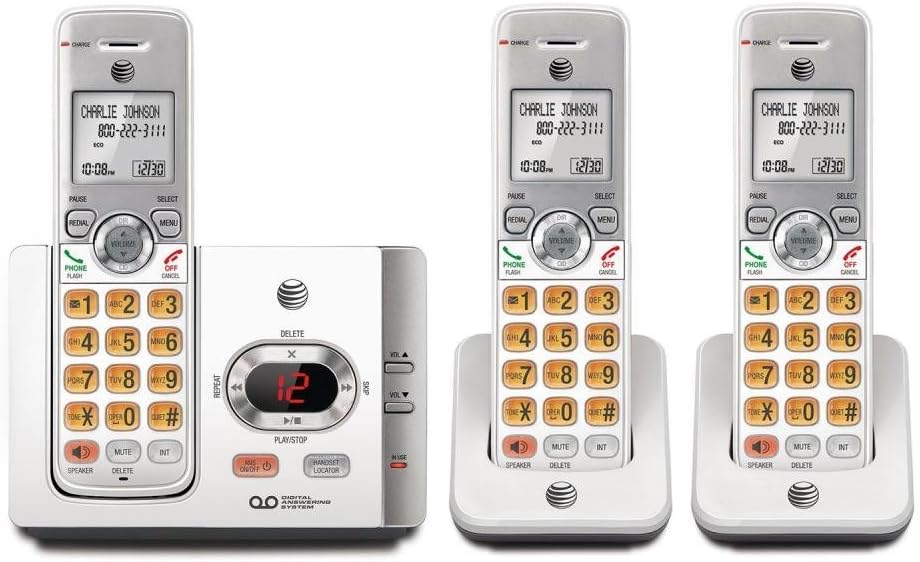
This image displays the complete AT&T EL52345 cordless phone system. It includes the main base unit with an integrated digital answering system, and three cordless handsets. Two of the handsets are shown in their individual charging cradles, while the third is docked in the main base unit. The handsets feature a backlit LCD screen, a full numeric keypad, and dedicated buttons for call functions, menu navigation, volume control, speakerphone, mute, and intercom. The main base unit has controls for the answering system, including message playback, skip, repeat, and volume adjustment, along with a message counter display.
סעטאַפּ גייד
Follow these steps to set up your AT&T EL52345 cordless phone system:
- ייַנמאָנטירונג פון באַטאַרייע: Open the battery compartment on each handset. Insert the supplied AAA batteries, ensuring correct polarity. Close the compartment cover.
- טשאַרדזשינג הענדסעטס: Place each handset in its respective charging cradle or the main base unit. The CHARGE indicator on the handset will illuminate. Allow at least 16 hours for the initial charge before first use.
- Connect Base Unit:
- פֿאַרבינדט איין עק פֿון דער טעלעפֿאָן ליניע שנור צום TEL LINE דזשעק אויף דער הינטערשטער זײַט פֿון דער באַזע אַפּאַראַט.
- פֿאַרבינדט דעם אַנדערן עק פֿון דער טעלעפֿאָן ליניע שנור צו אַ טעלעפֿאָן וואַנט דזשעק.
- שטעקט אריין דעם גרויסן עק פונעם מאַכט אַדאַפּטער אין אַן עלעקטרישן ווענטיל וואָס איז נישט קאָנטראָלירט דורך אַ וואַנט סוויטש.
- שטעקט אריין דעם קליינעם עק פונעם מאַכט אַדאַפּטער אין דעם POWER דזשעק אויף דער הינטערשטער זייט פונעם באַזע אַפּאַראַט.
- Handset Registration: Handsets are pre-registered to the base unit. If a handset displays "To register HS..." or similar, refer to the troubleshooting section for manual registration instructions.
- שטעלן דאַטע און צייט: After the initial charge, the handset will prompt you to set the date and time. Follow the on-screen instructions using the MENU and SELECT buttons.
אַפּערייטינג ינסטראַקשאַנז
מאַכן און באַקומען קאַללס
- צו מאַכן אַ רוף: דרוק טעלעפאָנירן / פלאַש or רעדנער, דערנאָך דרײַלט די נומער.
- צו ענטפֿערן אַ רוף: דרוק טעלעפאָנירן / פלאַש or רעדנער ווען דער טעלעפאָן קלינגט.
- צו ענדיקן אַ רוף: דרוק OFF/CANCEL or place the handset in the charging cradle.
- רעדיאַל: דרוק אָפּלייקענונג צו רופן די לעצט גערופענע נומער.
ענטפער סיסטעם
The digital answering system records messages when you are away or unable to answer calls.
- קער אויף / אַוועק: דרוק ANS אויף / אַוועק אויף די באַזע אַפּאַראַט.
- Message Playback: דרוק שפּיל / האַלטן on the base unit to listen to new messages.
- איבערשפרינגען מעסעדזש: בעשאַס פּלייבאַק, דריקן SKIP (right arrow) to skip to the next message.
- איבערחזרן מעסעדזש: בעשאַס פּלייבאַק, דריקן איבערחזרן (left arrow) to repeat the current message. Press twice to go to the previous message.
- Delete Message: בעשאַס פּלייבאַק, דריקן ויסמעקן אויף די באַזע אַפּאַראַט.
- סטרויערן באַנד: ניצן באַנד ▲ or VOL ▼ on the base unit to adjust playback volume.
קאַללער שייַן
The Caller ID feature displays the caller's name and number (if available) on the handset screen.
- Review רופן לאָג: דרוק CID on the handset to scroll through the call log.
- רוף צוריק: בשעת viewאריינגעבן א קאלער אידענטיפיצירן, דריקן טעלעפאָנירן / פלאַש צו רופן דעם נומער.
וישאַלט
- רייניקונג: רייניקט דעם טעלעפאָן און באַזע אַפּאַראַט מיט אַ ווייכן, לייכט נאַסן טוך.amp טוך. ניצט נישט רייניקונג שפרייען אדער שארף כעמיקאלן.
- באַטערי זאָרגן: To ensure optimal battery life, fully charge the handsets for 16 hours before first use. If the phone will not be used for an extended period, remove the batteries.
- אָרט: Place the base unit in a central location away from other electronic devices (e.g., microwaves, Wi-Fi routers) to minimize interference.
טראָובלעשאָאָטינג
| פּראָבלעם | לייזונג |
|---|---|
| קיין רעדל טאָן. | Ensure the telephone line cord is securely plugged into the base unit and the wall jack. Check if the power adapter is properly connected to the base unit and a working electrical outlet. |
| Handset displays "To register HS..." | To manually register a handset: Place the handset in the base unit. Press and hold the האַנדסעט לאָקאַטאָר button on the base unit for about 4 seconds until the IN USE light flashes. The handset will display "Registering..." and then "Handset Registered" when successful. |
| שלעכטע געזונט קוואַליטעט אָדער סטאַטיק. | Move the handset closer to the base unit. Ensure the base unit is not near other electronic devices that may cause interference. Check the telephone line cord for damage. |
| די האַנדסעט באַטעריע האַלט נישט קיין אָפּצאָל. | Ensure the handset is properly seated in the charging cradle. Clean the charging contacts on both the handset and cradle with a dry cloth. If the issue persists, the battery may need replacement. |
| ענטפֿער סיסטעם רעקאָרדירט נישט מעסעדזשעס. | זיכער מאַכן אַז די ענטפֿער־סיסטעם איז אָנגעצונדן. קאָנטראָלירט צי די זכּרון איז פֿול; אויסמעקן אַלטע מעסעדזשעס אויב נייטיק. |
ספּעסאַפאַקיישאַנז
| שטריך | דעטאַל |
|---|---|
| מאָדעל נומער | EL52345 |
| טיפּ פון טעלעפאָן | קאָרדלעסס |
| נומער פון כאַנדסעץ | 3 (עקספּאַנדאַבאַל) |
| ענטפער סיסטעם טיפּ | דיגיטאַל |
| רעקאָרדינג קאַפּאַציטעט | אַרויף צו 22 מינוט |
| קאַללער אידענטיפיקאַציע / רוף ווארטן | יא |
| טעכנאָלאָגיע | DECT 6.0 |
| באַטעריז פארלאנגט | 3 AAA batteries (per handset) |
| קאָליר | זילבער, ווייַס |
| מאַטעריאַל | פּלאַסטיק |
| Product Dimensions (Base Unit) | 11.1 X 6.9 X 5.5 אינטשעס |
| פּונקט וואָג | 1.3 פונט |
| קאַמפּאַטאַבאַל דעוויסעס | PSTN Networks |
שטיצן און וואָראַנטי
For further assistance, technical support, or warranty information regarding your AT&T EL52345 cordless phone system, please refer to the official AT&T product support channels. Typically, warranty details are provided with the product packaging or can be found on the manufacturer's official webפּלאַץ.
Note: No official product videos were provided in the source data for embedding in this manual.


