הקדמה
This manual provides essential information for the proper setup, operation, and maintenance of your Trimble GeoXT GeoExplorer Series Pocket PC, model 50950-20. Please read this manual thoroughly before using the device to ensure optimal performance and longevity.
וואָס איז אין די קעסטל
Upon unboxing your Trimble GeoXT GeoExplorer Series Pocket PC, please verify that all the following components are present:
- 1 x Trimble GeoXT GeoExplorer Series Terminal
- 1 x מאַשין טשאַרדזשער
- 1 רענטגענ באַטערי טשאַרדזשער
- 1 x Hard Case (for storage and transport)
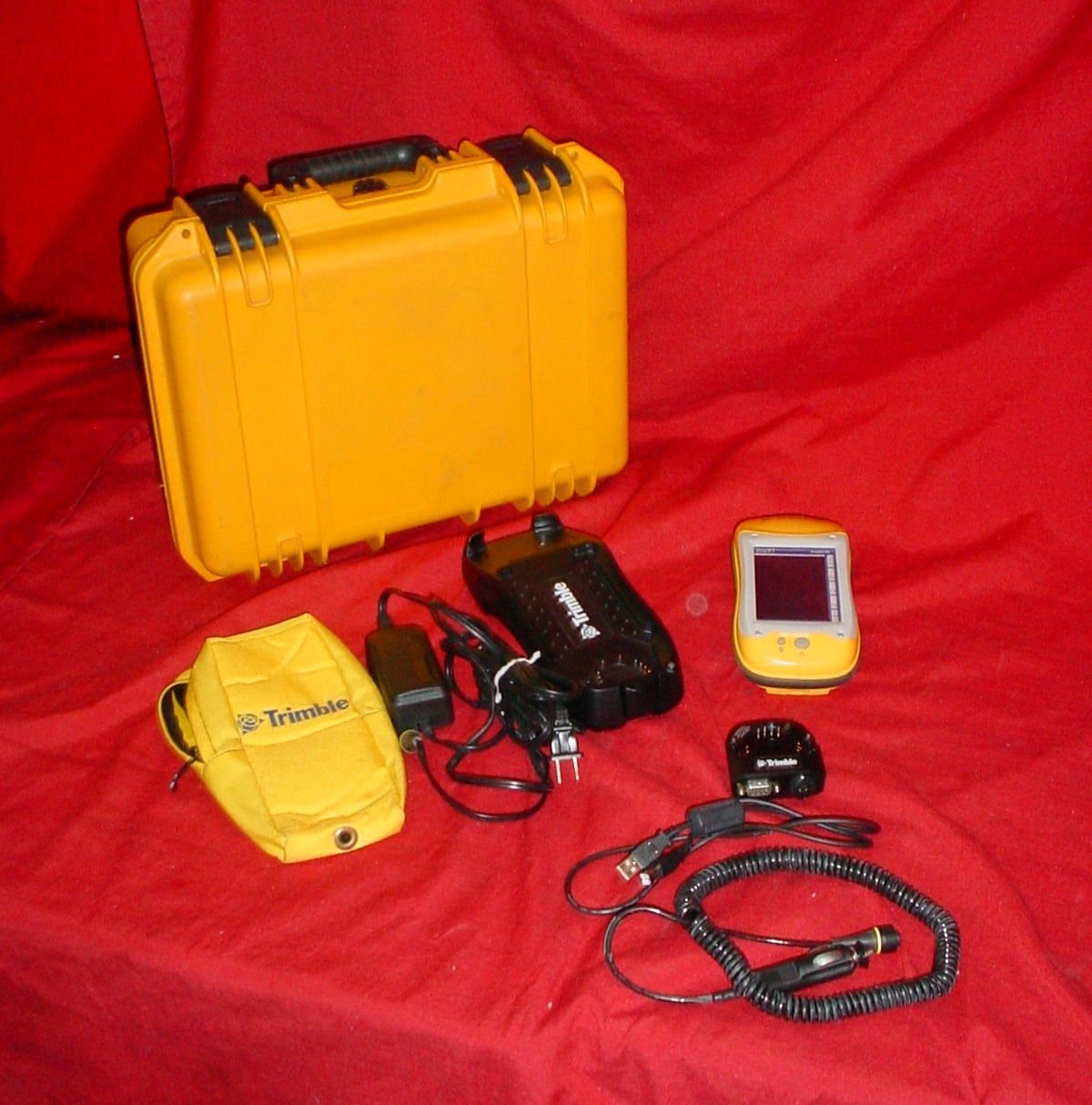
Image: The complete package contents of the Trimble GeoXT GeoExplorer Series Pocket PC, showing the yellow hard case, the black handheld device, a yellow soft pouch, various charging cables, and the yellow-cased display unit.
סעטאַפּ
1. ערשטע אויפלאָדונג
Before first use, fully charge the device's battery. Connect the battery charger to a power outlet and then to the Trimble GeoXT terminal. The charging indicator will typically show the charging status. A full charge ensures optimal battery life and performance.
2. מיטל מאַכט אויף / אויסגעלאשן
To power on the device, press and hold the power button located on the side or top of the unit until the screen illuminates. To power off, press and hold the power button again and follow the on-screen prompts to shut down.
3. פֿאַרבינדן זיך צו אַ קאָמפּיוטער (USB)
Use the provided USB cable to connect the Trimble GeoXT to a computer for data transfer or software updates. Ensure the necessary drivers are installed on your computer for proper recognition of the device.
אַפּערייטינג די מיטל
1. נאַוויגאַציע און צובינד
The Trimble GeoXT features a touch-sensitive screen and physical buttons for navigation. Familiarize yourself with the main menu and application icons. Use the stylus or your finger for precise input on the screen.
2. דזשי-פי-עס פונקציאָנאַליטעט
For accurate GPS readings, ensure the device has a clear view of the sky. Navigate to the GPS application to view satellite status and acquire position fixes. Refer to the specific software documentation for detailed instructions on data collection and mapping.
3. דאַטאַ מאַנאַגעמענט
Data collected on the device can be stored internally or on an external memory card (if supported). Regularly back up your data to a computer to prevent loss. Use the USB connection for efficient data transfer.
וישאַלט
1. רייניקונג
Wipe the device's screen and body with a soft, damp, lint-free cloth. Avoid using harsh chemicals or abrasive materials, which can damage the screen or casing. Ensure all ports are free of dust and debris.
2. באַטערי קער
To prolong battery life, avoid exposing the device to extreme temperatures. If the device will not be used for an extended period, store it with a partial charge (around 50%) and recharge it periodically.
3. סטאָרידזש
When not in use, store the Trimble GeoXT in its hard case to protect it from physical damage, dust, and moisture. Keep it in a cool, dry place.
טראָובלעשאָאָטינג
מיטל נישט פּאַוערינג אויף
- Ensure the battery is fully charged. Connect to the charger and wait a few minutes before attempting to power on.
- Check the power button for any physical damage or obstruction.
פּראָבלעמען מיט GPS סיגנאַל
- גיי אריבער צו אן אפענעם פלאץ מיט א קלארן view פון הימל, ווייט פון הויכע געביידעס אדער דיכטע בלעטער.
- Ensure the GPS antenna (if external) is properly connected.
Connectivity Problems (USB)
- פּרוּווט אַ אַנדערש וסב פּאָרט אויף דיין קאָמפּיוטער.
- זיכער מאַכן אַז דער USB קאַבל איז נישט געשעדיגט.
- Verify that the necessary device drivers are installed on your computer.
ספּעסאַפאַקיישאַנז
| שטריך | דעטאַל |
|---|---|
| מאָדעל נומער | 50950-20 |
| סאָרט | טרימבלע |
| קאַנעקטיוויטי טעכנאָלאָגיע | וסב |
| קאַנעקטער טיפּ | וסב טיפּ א |
| קאַמפּאַטאַבאַל דעוויסעס | Trimble GeoExplorer series devices |
| קאַמפּאַטאַבאַל טעלעפאָן מאָדעלס | Trimble GeoXT, GeoExplorer series |
| אַרייַנגערעכנט קאַמפּאָונאַנץ | 1 x TERMINAL, 1 x CAR CHARGER, 1 x BATTERY CHARGER |
| מאַכט מקור | באַטאַרייע פּאַוערד |
| אָפטקייַט ראַנגע | 50-60 הז |
| פּאָרטאַטיוו | יא |
וואָראַנטי און שטיצן
For detailed warranty information and technical support, please refer to the official Trimble website or contact Trimble customer service directly. Keep your purchase receipt as proof of purchase for warranty claims.
פאַבריקאַנט: טרימבל
ערשטער בנימצא: יולי 1, 2016


