1. פּראָדוקט איבערview
The Xiaomi Mi Bluetooth Speaker Mini (Model: XMYX02YM) is a compact and portable wireless speaker designed for high-quality audio playback. It features Bluetooth connectivity for seamless pairing with various devices and a durable, waterproof design for versatile use.
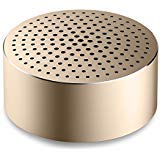
Image: The Xiaomi Mi Bluetooth Speaker Mini, a small, cylindrical black speaker with a mesh grille, showcasinג זײַן קאָמפּאַקטן דיזײַן.
2. סעטאַפּ
2.1 ונבאָקסינג
Carefully remove all components from the packaging. The box should contain the Mi Bluetooth Speaker Mini.
2.2 אויפלאָדן דעם רעדנער
The speaker is powered by an internal battery. Before first use, ensure the speaker is fully charged. Connect the appropriate charging cable (not included) to the speaker's charging port and to a compatible USB power source. The charging indicator light will provide status updates.
2.3 בלועטאָאָטה פּערינג
- מאַכט אויף: Press and hold the power button on the speaker until you hear an audible prompt or see the indicator light flash, indicating it is in pairing mode.
- אַקטאַווייט בלועטאָאָטה: On your device (smartphone, tablet, laptop, MP3 player), enable Bluetooth.
- אויסקלייבן רעדנער: In your device's Bluetooth settings, search for available devices. Select "Mi Bluetooth Speaker Mini" from the list.
- באַשטעטיקן קשר: Once paired, the speaker will provide an audible confirmation, and the indicator light will change to a steady state.
The speaker is now ready for audio playback.
3. אַפּערייטינג ינסטרוקטיאָנס
3.1 מאַכט אויף / אַוועק
- צו מאַכט אויף: דריק און האלט דעם מאַכט קנעפּל פֿאַר אַרום 2-3 סעקונדעס.
- צו מאַכט אַוועק: Press and hold the power button for approximately 3-4 seconds until the speaker powers down.
3.2 אַודיאָ ווידערשפּיל
After successful Bluetooth pairing, play audio from your connected device. The sound will be transmitted wirelessly to the Mi Bluetooth Speaker Mini. The speaker supports stereo audio output.
3.3 ריר קאָנטראָלס
The speaker features touch controls for basic functions. Refer to the specific touch areas on your speaker for volume adjustment, play/pause, and track navigation. (Specific touch control details may vary; consult product packaging or quick start guide for exact touch gestures).
3.4 אַגזיליערי ינפּוט
While primarily a Bluetooth speaker, the device may support an auxiliary audio input. If available, connect an audio cable (not included) from your device's audio output to the speaker's auxiliary input port for wired audio playback.
4. וישאַלט
4.1 רייניקונג
To clean the speaker, use a soft, dry, lint-free cloth. Do not use abrasive cleaners, solvents, or strong chemicals, as these can damage the speaker's surface or internal components.
4.2 וואַסער קעגנשטעל
The Xiaomi Mi Bluetooth Speaker Mini is waterproof. While it can withstand splashes and light exposure to water, it is not designed for prolonged submersion. Ensure all ports are securely closed before exposure to water. After exposure, dry the speaker thoroughly before charging or using it again.
4.3 סטאָרידזש
When not in use for extended periods, store the speaker in a cool, dry place away from direct sunlight and extreme temperatures. It is recommended to charge the speaker periodically to maintain battery health.
5. טראָובלעשאָאָטינג
- רעדנער גייט נישט אן: זיכער מאַכן אַז די באַטאַרייע איז אויפגעלאָדן. פֿאַרבינדט דעם רעדנער צו אַ מאַכט מקור און פּרוּווט ווידער.
- קען נישט צוזאמענשטעלן מיטן אפאראט:
- זיכער מאַכן אַז דער רעדנער איז אין פּערינג מאָדע (די אינדיקאַטאָר ליכט בלינקט).
- אויסלעשן און אנשטעלן בלועטוט אויף אייער דעווייס.
- ריקט דעם רעדנער נענטער צו אייער דעווייס.
- ויסמעקן פריערדיקע בלועטוט קאַנעקשאַנז אויף דיין מיטל און פּרוּווט ווידער צו פאַרבינדן.
- קיין געזונט בעשאַס פּלייבאַק:
- קאָנטראָלירט די וואָלומען לעוועלס אויף ביידע דעם רעדנער און אייער פֿאַרבונדענעם מיטל.
- זיכער מאַכן אַז דער רעדנער איז געראָטן צוגעפּאָרט און פארבונדן צו אייער מיטל.
- פרובירט צו שפּילן אַודיאָ פֿון אַן אַנדער אַפּליקאַציע אָדער מיטל.
- נעבעך אַודיאָ קוואַליטעט:
- זיכער מאַכן אַז עס זענען נישטאָ קיין שטערונגען צווישן דעם רעדנער און דיין דעווייס.
- גייט אַוועק פון קוועלער פון שטערונג (למשל, Wi-Fi ראָוטערס, אַנדערע בלועטוט דעוויסעס).
- קאָנטראָלירט די קוואַליטעט פֿון דער אַודיאָ מקור.
6. ספּעסאַפאַקיישאַנז
| שטריך | דעטאַל |
|---|---|
| מאָדעל | XMYX02YM |
| סאָרט | XIAOMI |
| רעדנער טיפּ | ביכערשאַנק (פּאָרטאַטיוו) |
| קאַנעקטיוויטי טעכנאָלאָגיע | בלועטוט, וויירלעס |
| ווירעלעסס קאָמוניקאַציע טעכנאָלאָגיע | בלועטאָאָטה |
| קאַמפּאַטאַבאַל דעוויסעס | לאַפּטאָפּ, MP3 שפּילער, סמאַרטפאָון, טאַבלעט |
| מאַכט מקור | באַטאַרייע פּאַוערד |
| קאָנטראָל מעטאָד | ריר |
| אַודיאָ רעזולטאַט מאָדע | סטערעאָ |
| אַודיאָ דרייווער טיפּ | דינאַמיש דרייווער |
| אַרומרינגלען סאָונד קאַנאַל קאַנפיגיעריישאַן | 2.1 |
| פּונקט וואָג | 59 ג |
| פּראָדוקט דימענשאַנז (LxWxH) | 0.43 x 0.43 x 0.2 ס״מ (4 x 4 x 2 מילימעטער) |
| קאָליר | שוואַרץ |
| וואָטערפּרוף | יא |
| באַטעריז פארלאנגט | Yes (Internal, rechargeable) |
| אַרייַנגערעכנט קאַמפּאָונאַנץ | Mi Bluetooth Speaker Mini |
| פאַבריקאַנט | Xiaomi Technology Inc. |
7. וואָראַנטי און שטיצן
For warranty information, please refer to the documentation included with your purchase or visit the official Xiaomi website. For technical support or service inquiries, please contact Xiaomi customer service through their official channels.


