1. הקדמה
This manual provides detailed instructions for the proper use, setup, and maintenance of your SimpTronic True Wireless Earbuds. Please read this manual thoroughly before using the product to ensure optimal performance and longevity.
2. פּראָדוקט איבערview
2.1 פּעקל אינהאַלט
- SimpTronic True Wireless Earbuds (Left and Right)
- טשאַרדזשינג קאַסע
- וסב טשאַרדזשינג קאַבלע
- באַניצער מאַנואַל
2.2 שליסל פֿעיִקייטן
- אמת ווירעלעסס סטערעאָ (TWS): Enjoy a completely cable-free audio experience.
- בלועטאָאָטה 5.0: Provides stable connectivity and efficient power consumption.
- HD Stereo Sound with Deep Bass: Customized 8mm speaker drivers deliver clear audio.
- וואָטערפּרוף (IPX6): Resistant to strong jets of water, suitable for sports and outdoor activities.
- Noise Cancelling Microphone: Enhances call clarity.
- עקסטענדעד שפּיל צייט: ביז 30 שעה פון גאַנץ שפּיל צייט מיט די טשאַרדזשינג קעסטל.
- איין-קנעפּל קאָנטראָל: Manage music, calls, and voice assistant with a single button on each earbud.
- 15-מעטער וויירלעסס ראַנגע: Strong signal for reliable connection.
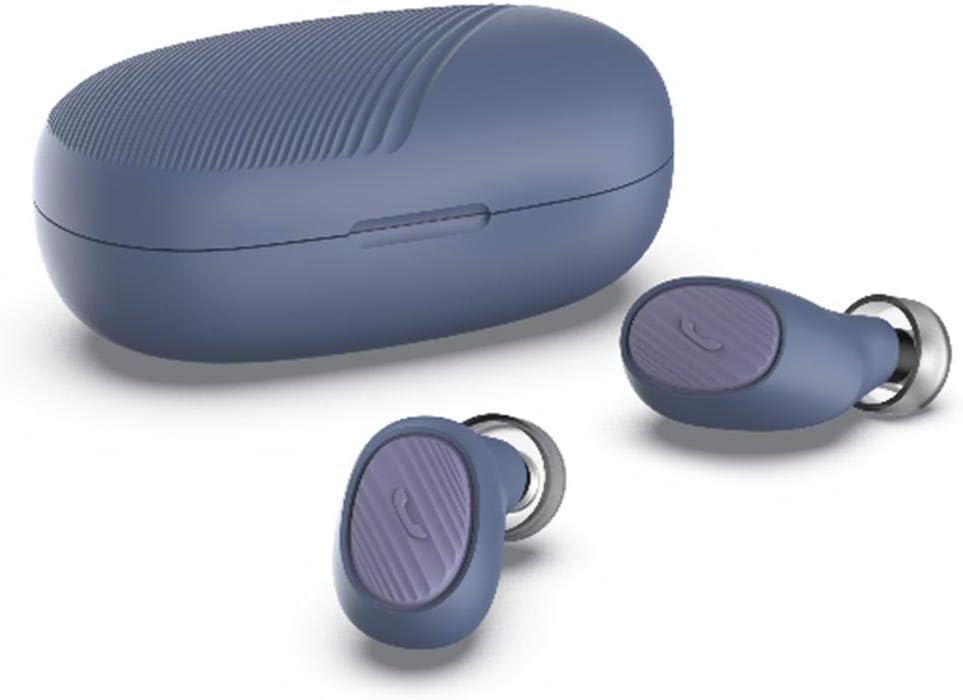
Image: SimpTronic True Wireless Earbuds and their charging case.
3. סעטאַפּ
3.1 אויפלאָדן די אויערקנעפּלעך און קעסטל
- טשאַרדזשינג די קאַסטן: Connect the provided USB charging cable to the charging port on the case and a USB power source. The indicator light on the case will show charging status.
- טשאַרדזשינג די עאַרבודז: Place the earbuds into their respective slots in the charging case. Ensure the charging contacts align. The earbuds will automatically begin charging. The indicator lights on the earbuds will show charging status and turn off when fully charged.
3.2 פּערינג מיט אַ מיטל
- מאַכט אויף: Take both earbuds out of the charging case. They will automatically power on and enter pairing mode. You may hear a voice prompt indicating pairing mode.
- אַקטאַווייט בלועטאָאָטה: אויף אייער סמאַרטפאָון אָדער אַנדער בלוטוט-ענייבאַלד מיטל, גייט צו די בלוטוט סעטטינגס און ענייבלט בלוטוט.
- אויסקלייַבן דיווייס: Look for "SimpTronic Earbuds" (or similar name) in the list of available devices and select it to connect.
- באַשטעטיקונג: Once connected, you will hear a voice prompt confirming the successful pairing. The earbud indicator lights may change or turn off.
באַמערקונג: די אויערקנעפּלעך וועלן זיך אויטאָמאַטיש ווידער פֿאַרבינדן צום לעצטן געפּאָרטן מיטל ווען מען נעמט זיי אַרויס פֿון קעסטל, אויב בלועטוט איז אַקטיוויזירט אויף דעם מיטל.

Image: Illustration showing an earbud with a strong signal icon (V5.0+EDR) connecting to a smartphone, indicating a 15-meter wireless range.
4. אַפּערייטינג ינסטרוקטיאָנס
4.1 One-Button Control Functions
Each earbud features a multi-function button for easy control of various functions:
- שפּיל / פּויזע מוזיק: דריק איין מאל דעם קנעפל אויף יעדן אויערקנעפל.
- ענטפֿערן / סוף רופן: Single press the button on either earbud during an incoming call or active call.
- אָפּוואַרפן רופן: דריק און האלט דעם קנעפּל אויף יעדן אויערקנעפל פאר 2 סעקונדעס בעת אן אנקומענדיקן רוף.
- ווייַטער ליד: Double press the button on the right earbud.
- פֿריִער ליד: Double press the button on the left earbud.
- באַנד אַרויף: Triple press the button on the right earbud.
- באַנד אַראָפּ: Triple press the button on the left earbud.
- אַקטיווירן שטימע אַסיסטאַנט (סירי/גוגל אַסיסטאַנט): Press and hold the button on either earbud for 2 seconds (when not on a call).

Image: Visual guide to the one-button control functions on the earbud, including volume, track navigation, call management, and voice assistant activation.
5. וישאַלט
5.1 רייניקונג
- ווישט אָפּ די אויערקנעפּלעך און די טשאַרדזשינג קעסטל מיט אַ ווייכן, טרוקענעם, לינט-פֿרייע שטאָף.
- דו זאלסט נישט נוצן האַרב קעמיקאַלז, רייניקונג סאָלוואַנץ אָדער שטאַרק דיטערדזשאַנץ.
- רייניקט די טשאַרדזשינג קאָנטאַקטן אויף ביידע די אויערן-קנעפּלעך און די קעסטל רעגולער צו ענשור געהעריק טשאַרדזשינג.
5.2 סטאָרידזש
- ווען נישט אין באַנוץ, לייגט די אויערן-קנעפּלעך אין זייער טשאַרדזשינג קעסטל צו באַשיצן זיי און האַלטן זיי טשאַרדזשד.
- האַלט דעם אַפּאַראַט אין אַ קיל, טרוקן אָרט, אַוועק פון עקסטרעמע טעמפּעראַטורן און דירעקט זונשייַן.

Image: The earbuds and charging case are shown on a wet surface, highlighting their IPX6 waterproof rating, indicating resistance to water splashes and sweat.
6. טראָובלעשאָאָטינג
If you encounter any issues with your SimpTronic True Wireless Earbuds, please refer to the following common solutions:
- קיין קול:
- מאַכן זיכער אַז די עאַרבודז זענען באפוילן.
- Check that the earbuds are properly paired with your device.
- אַדזשאַסטירן די באַנד אויף ביידע דיין מיטל און די אויערקנעפּלעך.
- Try restarting your device and reconnecting the earbuds.
- עאַרבודז ניט פּערינג:
- Make sure both earbuds are out of the charging case and powered on.
- אויסלעשן בלוטוט אויף אנדערע נירביי דעווייסעס צו פארמיידן אריינמישונג.
- פֿאַרגעסט דעם דעווייס פֿון אייער טעלעפֿאָן'ס בלועטוט ליסטע און פּרוּווט ווידער צו פאַרבינדן.
- זייט זיכער אז די אויערקנעפּלעך זענען גענוג אויפגעלאָדן.
- טשאַרדזשינג ישוז:
- באַשטעטיקן אַז דער טשאַרדזשינג קאַבל איז זיכער פארבונדן צו ביידע דעם קעסטל און די מאַכט מקור.
- זיכער מאַכן אַז די טשאַרדזשינג קאָנטאַקטן אויף די אויערקנעפּלעך און אינעווייניק פון די קעסטל זענען ריין און פריי פון שמוץ.
- Try using a different USB charging cable or power adapter.
- ינטערמיטאַנט קשר:
- Ensure you are within the 15-meter wireless range of your device.
- פֿאַרמײַדט פֿיזישע שטערונגען צווישן די אויערקנעפּלעך און אײַער אַפּאַראַט.
- מינימיזירן אריינמישונג פון אנדערע וויירלעס דעווייסעס.
7. ספּעסאַפאַקיישאַנז
| מאָדעל | TWS Mini Headset (B01GC4NC6G) |
| בלועטאָאָטה ווערסיע | 5.0 + עדר |
| ווירעלעסס ראַנגע | אַרויף צו 15 מעטער (49 פֿיס) |
| רעדנער דריווערס | 8mm customized drivers |
| וואָטערפּרוף רייטינג | IPX6 |
| גאַנץ פּלייַטימע | אַרויף צו 30 שעה (מיט טשאַרדזשינג פאַל) |
| עאַרבוד ווייט | אומגעפער 0.13 אונס (3.8 גראַם) פּער אויערקנעפּל |
| פּעקל דימענשאַנז | 8.5 X 6.5 X 1.1 אינטשעס |
| וואָג פון איינטעם (טאָטאַל) | 1.6 אונסעס |

בילד: דעטאַלירט view of an 8mm speaker driver, emphasizing the HD stereo sound capability.

Image: An earbud balanced on a fingertip, illustrating its lightweight design at 0.13 ounces (3.8 grams).
8. וואָראַנטי און שטיצן
SimpTronic is committed to providing high-quality products. Your purchase is backed by a 100% Satisfaction Guarantee.
For any product-related inquiries, technical support, or warranty claims, please contact the seller directly through your purchase platform. Provide your order number and a detailed description of the issue for prompt assistance.


