וויכטיק סאַפעטי אינסטרוקציעס
לייענען אַלע אינסטרוקציעס קערפאַלי איידער נוצן.
- Always unplug the fan from the power outlet before cleaning, servicing, or moving.
- שטעקט נישט אריין פינגער אדער קיין אנדערע אביעקטן דורך די גריל ווען דער פען ארבעט.
- דו זאלסט נישט אַרבעטן קיין פאָכער מיט אַ דאַמידזשד שנור אָדער צאַפּן. אַוועקוואַרפן פאָכער אָדער צוריקקומען צו אַן אָטערייזד סערוויס מעכירעס פֿאַר דורכקוק און / אָדער פאַרריכטן.
- דו זאלסט נישט לויפן שנור אונטער טעפּעך. דו זאלסט נישט דעקן די שנור מיט וואַרפן רוגס, ראַנערז אָדער ענלעך קאַווערינגז. צולייגן שנור אַוועק פון פאַרקער געגנט און ווו עס וועט נישט זיין טריפּט איבער.
- דו זאלסט נישט נוצן די פאָכער אין נאַס אָדער דamp לאָקאַציעס ווי קלאָזעטן אָדער וועש געביטן.
- די ווענטילאַטאָר איז בלויז געמאַכט פֿאַר נוצן אינעווייניק. נישט נוצן אינדרויסן.
- Keep the fan away from curtains, drapes, or any objects that may get caught in the fan blades.
- Supervise children when the fan is in use.
פּראָדוקט איבערview
The Optimus 18-inch High Velocity Industrial Floor Fan is designed to provide powerful air circulation in various indoor environments. Its robust construction and high-velocity motor make it suitable for workshops, garages, and large rooms.
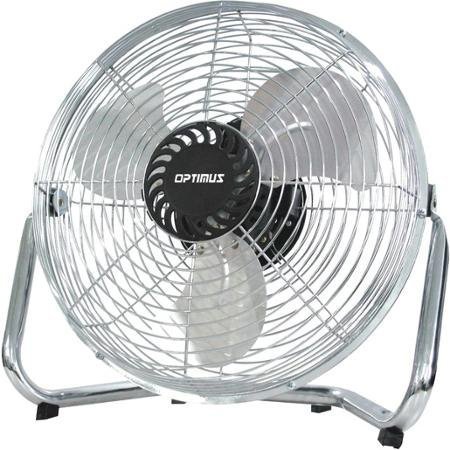
Image: Optimus 18-inch High Velocity Industrial Floor Fan. This image shows the fan with its silver metallic finish and sturdy floor stand.
שליסל פֿעיִקייטן:
- 18-inch diameter for wide air distribution.
- Industrial-grade high velocity airflow.
- Durable metallic finish.
- Floor standing design for stable placement.
- Multiple power levels for adjustable airflow.
סעטאַפּ אינסטרוקציעס
- ופשליסן די פאַן: Carefully remove the fan and all components from the packaging. Retain packaging for future storage or transport.
- Assemble the Floor Stand:
- Attach the fan head to the floor stand using the provided screws and tools. Ensure all connections are secure.
- Verify the fan head can pivot smoothly on the stand.
- אָרט: Place the fan on a firm, level surface. Ensure there is adequate space around the fan for proper air circulation and to prevent obstruction of the air intake/output. Keep the fan at least 3 feet away from walls or furniture.
- מאַכט קשר: Ensure the fan is in the "OFF" position before plugging it into a standard 120V AC electrical outlet.
אַפּערייטינג ינסטראַקשאַנז
This fan features push-button controls for easy operation. A remote control may also be included for convenience.
- מאַכט אויף / אַוועק: Locate the power button on the control panel. Press the button once to turn the fan ON. Press it again to turn the fan OFF.
- אַדזשאַסטינג פאַן ספּיד: The fan has 4 power levels. After turning the fan ON, repeatedly press the speed control button to cycle through the available speed settings (Low, Medium, High, Max). The fan will operate at the selected speed.
- אַדזשאַסטינג אַירפלאָוו ריכטונג: The fan head can be tilted manually to direct airflow upwards or downwards. Gently tilt the fan head to the desired angle. Do not force the fan head beyond its intended range of motion.
וישאַלט
Regular cleaning and maintenance will ensure optimal performance and extend the life of your fan.
- רייניקונג די פאָכער:
- שטענדיק ארויסנעמען דעם ווענטילאַטאָר פֿון דער מאַכט-מקור איידער איר רייניגט.
- ניצן אַ ווייך, דamp cloth to wipe the exterior surfaces of the fan. Do not use abrasive cleaners or harsh chemicals, as these may damage the finish.
- To clean the fan blades, carefully remove the front grille (if detachable, refer to assembly instructions for details). Wipe the blades with a soft cloth. Ensure the grille is securely reattached before operating the fan.
- זיכער מאַכן אַז אַלע טיילן זענען גאָר טרוקן איידער איר שטעקט צוריק אריין דעם ווענטילאַטאָר.
- סטאָרידזש: When not in use for extended periods, store the fan in a cool, dry place. It is recommended to store it in its original packaging to protect it from dust and damage.
טראָובלעשאָאָטינג
| פּראָבלעם | מעגלעך סיבה | לייזונג |
|---|---|---|
| דער ווענטילאַטאָר צינדט זיך נישט אָן. | Not plugged in; power outlet not working; fan switch is off. | Ensure fan is securely plugged into a working outlet. Check household fuse/circuit breaker. Press the power button to turn the fan on. |
| נידעריק לופט לויפן. | Fan speed set too low; obstructed intake/output; dirty blades. | Increase fan speed. Clear any obstructions. Clean fan blades and grilles as per maintenance instructions. |
| אומגעווענליך גערויש אדער ראַטלען. | Loose parts; fan not on a level surface; foreign object in blades. | Unplug the fan and check for any loose screws or components. Place the fan on a stable, level surface. Carefully inspect for and remove any foreign objects. |
ספּעסאַפאַקיישאַנז
| שטריך | דעטאַל |
|---|---|
| סאָרט | Optimus |
| מאָדעל נאָמען | הויך וועלאָסיטי |
| נומער מאָדעל נומער | 306c1b92-f36b-4ccc-ac62-2ad33d5c9efb |
| דיאַמעטער | 18 אינטשעס |
| קאָליר | זילבער |
| סטייל | ינדוסטריאַל |
| מאַכט מקור | קאָרדעד עלעקטריק |
| נומער פון מאַכט לעוועלס | 4 |
| קאָנטראָל מעטאָד | קנעפּל קאָנטראָל |
| דרינענדיק / דרויסנדיק באַניץ | דרינענדיק |
| אַרייַנגערעכנט קאַמפּאָונאַנץ | Floor Stand, Remote Control |
| באַשרייַבונג באגעגנט | OSHA |
וואָראַנטי און שטיצן
Optimus products are manufactured to high-quality standards. This product is covered by a limited warranty against defects in materials and workmanship from the date of purchase. Please refer to the warranty card included with your product for specific terms and conditions.
For technical support, troubleshooting assistance, or warranty claims, please contact Optimus customer service. Contact information can typically be found on the product packaging or the official Optimus webפּלאַץ.
ביטע באַהאַלטן אייער קויפן-באַווייַז פֿאַר גאַראַנטיע צוועקן.


