1. הקדמה
This manual provides essential instructions for the proper setup, operation, and maintenance of your YI YAS.1616.INT 4K Action Camera Kit. Please read this manual thoroughly before using the product to ensure optimal performance and safety. Keep this manual for future reference.
2. פּראָדוקט איבערview
2.1 קיט אינהאַלט
The YI YAS.1616.INT 4K Action Camera Kit includes the following components:
- YI 4K Action Camera
- YI Monopod
- בלועטאָאָטה רימאָוט
- קריקאָנלאָדלעך באַטערי
- וסב קאַבלע
- ינסטראַקשאַנז מאַנואַל

Image 2.1: Contents of the YI 4K Action Camera Kit.
2.2 אַפּאַראַט פֿעיִקייטן
The YI 4K Action Camera is designed for high-quality video and photo capture, featuring:
- 4K/30fps Video Recording: Captures video at 60mbps, offering 4 times the quality of standard 1080p.
- Advanced Imaging Hardware: Equipped with an Amarelle A9SE75 chip, Sony IMX377 image sensor, and 7-layer optical glass lenses with an F2.8 large aperture for enhanced light intake.
- 2.19" LCD Touchscreen: A 640 x 360 high-resolution display with Gorilla Glass Retina for easy previewing, shooting, and scratch resistance.
- לאנג באַטאַרייע לעבן: A 1400mAh 4.4V lithium-ion battery provides up to 120 minutes of 4K/30fps video recording on a single charge.
- עפעקטיוו קאָאָלינג סיסטעם: Prevents overheating during extended recording sessions.
- קאַנעקטיוויטי: Built-in Wi-Fi for smartphone app control and Bluetooth for remote control.
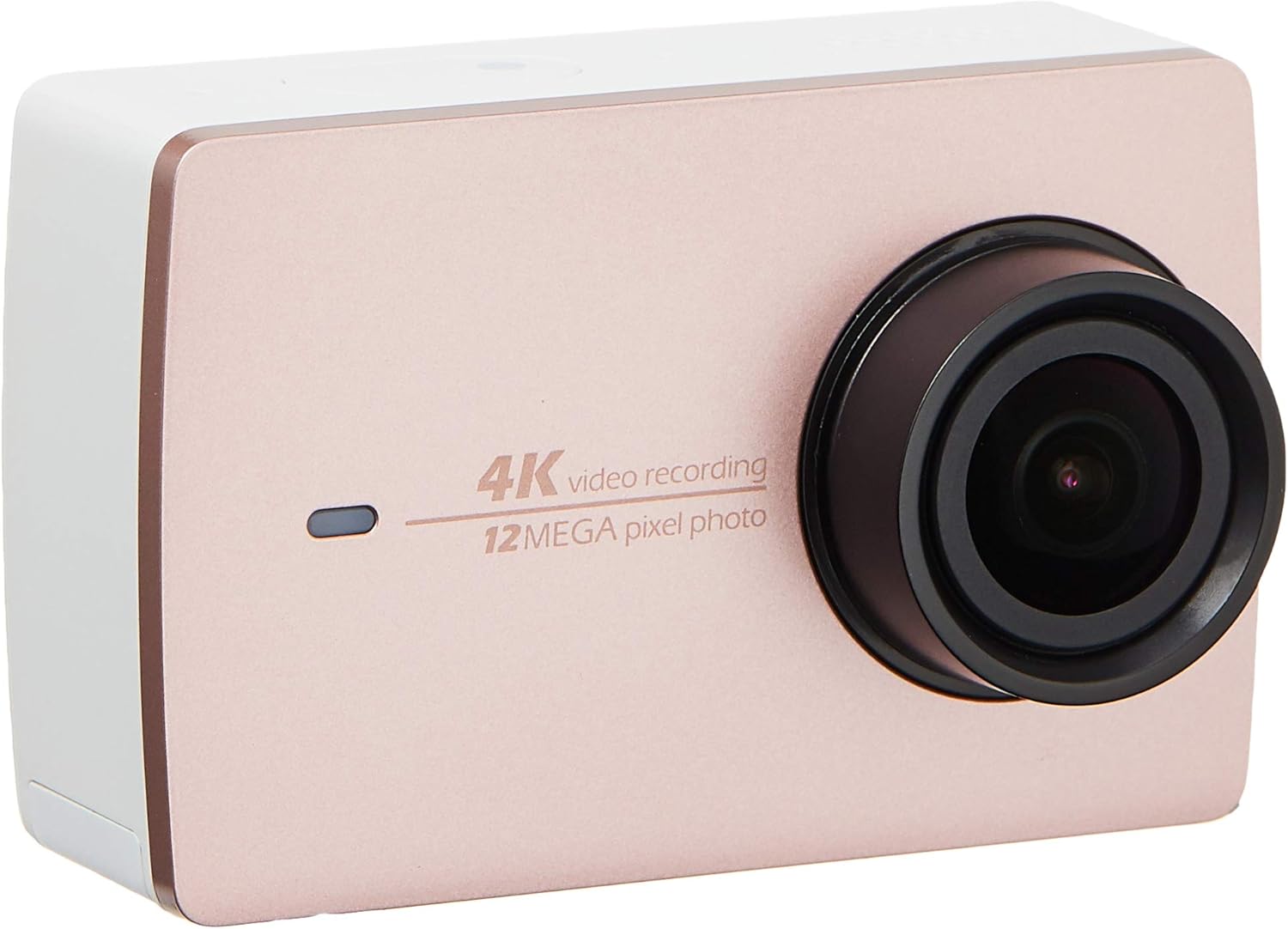
בילד 2.2: פראָנט view of the YI 4K Action Camera.
3. סעטאַפּ
3.1 באַטעריע אינסטאַלאַציע און טשאַרדזשינג
- געפֿינען די באַטאַרייע אָפּטייל אויף די אַפּאַראַט.
- Insert the 1400mAh lithium-ion battery, ensuring correct polarity.
- פאַרמאַכן די באַטאַרייע אָפּטייל סיקיורלי.
- Connect the camera to a power source using the provided USB cable for charging. The charging indicator will illuminate.
3.2 זכּרון קאָרט ינסטאַללאַטיאָן
The YI 4K Action Camera supports SDHC and SmartMedia flash memory types.
- עפענען די זיקאָרן קאָרט שפּעלטל דעקן.
- Insert a compatible memory card (not included) into the slot with the contacts facing the correct direction. Push until it clicks into place.
- נאָענט די זיקאָרן קאָרט שפּעלטל דעקן.
3.3 פּאַוערינג אויף / אַוועק
- צו מאַכט אויף: דריק און האלט דעם פּאַוער קנעפּל ביז דער עקראַן באַלויכטנט זיך.
- צו מאַכט אַוועק: דריק און האלט דעם פּאַוער קנעפּל ביז די קאַמעראַ שליסט זיך אויס.
3.4 Connecting the Bluetooth Remote
The included Bluetooth remote allows for convenient control of the camera.
- מאַכן זיכער אַז די אַפּאַראַט איז פּאַוערד אויף.
- Activate Bluetooth pairing mode on the camera via the settings menu.
- Follow the remote's instructions to enter pairing mode.
- Once paired, the remote can be used to switch between video and photo modes and trigger recording/capture.

Image 3.1: The YI Monopod, included in the kit.
4. אַפּערייטינג די קאַמעראַ
4.1 טאָוטשסקרין נאַוויגאַציע
The 2.19" LCD touchscreen provides intuitive control:
- לאַקכענען: Navigate through different modes (Video, Photo, Time-lapse, etc.) and settings.
- צאַפּן: Select options, adjust settings, or start/stop recording.
- Preview: View דיין געכאפטע פוtage and photos directly on the screen.
4.2 ווידעא רעקאָרדינג
- Select the Video mode on the touchscreen.
- Adjust video resolution (e.g., 4K/30fps) and other settings as desired.
- Press the Shutter button or tap the record icon on the screen to start recording.
- Press the Shutter button or tap the record icon again to stop recording.
4.3 פאָטאָ כאַפּן
- Select the Photo mode on the touchscreen.
- Adjust photo settings such as resolution, exposure, and white balance.
- Press the Shutter button or tap the capture icon on the screen to take a photo.
4.4 Wi-Fi קאָנעקטיוויטי און אַפּ באַניץ
The camera's built-in Wi-Fi allows connection to a smartphone app for remote control, live preview, און אינהאַלט פאַרוואַלטונג.
- Download the official YI Action Camera app from your device's app store.
- אַקטיווירן Wi-Fi אויף דער קאַמעראַ דורך די סעטטינגס מעניו.
- Connect your smartphone to the camera's Wi-Fi network (SSID and password displayed on camera screen).
- Open the YI Action Camera app to control the camera, view footage, און איבערפירן files.
5. וישאַלט
5.1 רייניקונג
- Use a soft, lint-free cloth to clean the camera body and touchscreen.
- For the lens, use a specialized lens cleaning cloth and solution. Avoid abrasive materials.
- זיכער מאַכן אַז אַלע פּאָרטן זענען פריי פון שטויב און דעבריס.
5.2 סטאָרידזש
- האַלט די קאַמעראַ אין אַ קיל, טרוקן אָרט אַוועק פון דירעקט זונשייַן און עקסטרעמע טעמפּעראַטורן.
- אַרויסנעמען די באַטאַרייע אויב איר סטאָרירט עס פֿאַר לענגערע צייטן צו פאַרמייַדן ליקאַדזש.
5.3 פירמוואַרע דערהייַנטיקונגען
Periodically check the official YI website or the YI Action Camera app for available firmware updates. Keeping your camera's firmware updated ensures optimal performance and access to new features.
6. טראָובלעשאָאָטינג
6.1 פּראָסט ישוז און סאַלושאַנז
- די אַפּאַראַט מאַכט נישט אויף: זיכער מאַכן אַז די באַטאַרייע איז גאָר אויפגעלאָדן און ריכטיק אַרײַנגעשטעלט.
- רעקאָרדינג סטאַפּס אומגעריכט: Check if the memory card has sufficient space or if it's a high-speed card suitable for 4K recording. Ensure the battery is not depleted.
- טאָוטשסקרין רעאַגירט נישט: Try restarting the camera. If the issue persists, ensure the screen is clean and dry.
- Bluetooth remote not connecting: Ensure both the camera and remote are in pairing mode and within range. Check the remote's battery.
- ווי-פי קשר ישוז: Verify the camera's Wi-Fi is enabled and your smartphone is connected to the correct network. Try restarting both devices.
For further assistance, refer to the official YI support resources.
7. ספּעסאַפאַקיישאַנז
| פאַבריקאַנט | YI |
| מאָדעל נומער | 90010 |
| פּראָדוקט דימענשאַנז | 6.6 X 3 X 4.3 סענטימעטער |
| וואָג | 96.39 ג |
| פאָטאָ סענסאָר טעכנאָלאָגיע | קמאָס |
| ווידעא קאַפּטורע רעסאָלוטיאָן | 4K |
| מאַקסימום פאָקאַל לענג | 1 |
| מאַקסימום עפענונג | 2.8 מילאַמיטערז |
| פלאַש זכּרון טיפּ | SDHC, SmartMedia |
| ווידעא קאַפּטורע פֿאָרמאַט | mp4 |
| שטיצט אַודיאָ פֿאָרמאַט | אַאַק, mp3 |
| פאַרשטעלן גרייס | 2.19 אינטשעס |
| קאַנעקטיוויטי טעכנאָלאָגיע | ווי-פי |

Image 7.1: YI 4K Action Camera with monopod, illustrating approximate dimensions.
8. וואָראַנטי און שטיצן
8.1 וואָראַנטי אינפֿאָרמאַציע
דער פּראָדוקט קומט מיט אַ 1 יאָר לאקאלע (סינגאַפּור) גאַראַנטיעביטע באַהאַלטן אייער קויפן-באַווייַז פֿאַר וואָראַנטי-קליימז. די וואָראַנטי דעקט פאַבריקאַציע-דעפעקטן אונטער נאָרמאַלע באַניץ-באַדינגונגען.
8.2 קונה שטיצן
For technical support, service, or warranty inquiries, please visit the official YI Technology website or contact their authorized service centers in Singapore. Contact information can typically be found on the product packaging or the official webפּלאַץ.