הקדמה
The Genius LuxeMate 100 is a cost-effective USB keyboard designed for comfortable and quiet typing. It features a flat profile, a German standard QWERTZ layout, and adjustable feet for ergonomic positioning. This manual provides essential information for setting up, operating, maintaining, and troubleshooting your keyboard.
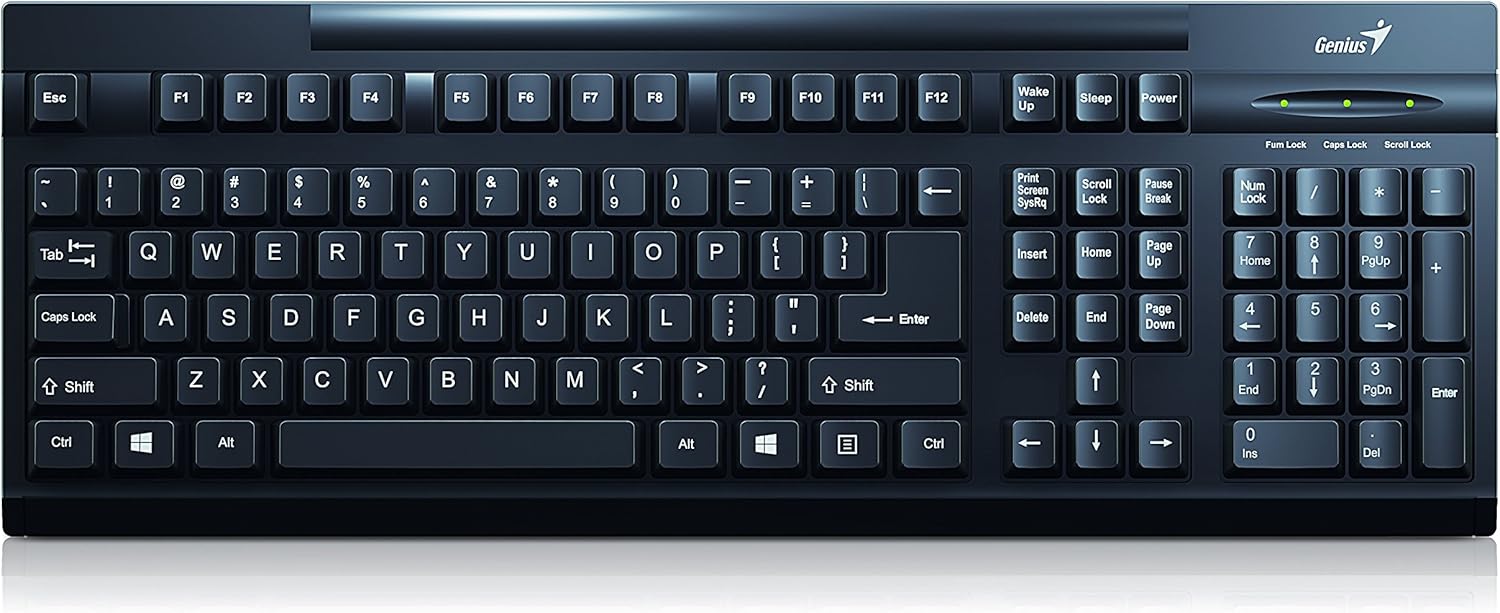
פיגורע 1: שפּיץ view of the Genius LuxeMate 100 Keyboard, showing the full German standard layout.
סעטאַפּ גייד
The LuxeMate 100 keyboard is designed for simple plug-and-play installation, requiring no additional software drivers. Follow these steps to connect your keyboard:
- זוכט אַ פאַראַן USB פּאָרט אויף אייער קאָמפּיוטער (דעסקטאַפּ פּיסי, לאַפּטאַפּ, אאז"וו).
- Insert the USB connector of the LuxeMate 100 keyboard firmly into the USB port.
- Your operating system (e.g., Windows) will automatically detect and install the necessary drivers. This process usually takes a few seconds.
- אַמאָל די אינסטאַלאַציע איז פֿאַרטיק, איז די קלאַוויאַטור גרייט פֿאַר באַנוץ.

פיגור 2: ווינקלדיק view of the keyboard, highlighting its compact design and USB connection point.
For improved typing comfort, you can adjust the keyboard's angle using the integrated feet located on the underside. Gently pull out the feet until they click into place to elevate the rear of the keyboard.

פיגורע 3: זייַט view of the keyboard with its adjustable feet extended, providing an ergonomic typing angle.
אַפּערייטינג ינסטראַקשאַנז
The LuxeMate 100 keyboard features a standard German QWERTZ layout, providing all essential keys for daily computing tasks. Its low-profile keys offer a comfortable and quiet typing experience.

פיגורע 4: נאָענט-אַרויף view of the keyboard keys, showing the German QWERTZ layout and keycap design.
שליסל פאַנגקשאַנז:
- Standard Alphanumeric Keys: Used for typing letters, numbers, and symbols.
- פונקציע קנעפּלעך (F1-F12): These keys perform various functions depending on the application or operating system.
- Windows Start Screen Button: Activates the Windows Start menu or screen.
- נומעריק קיפּאַד: Located on the right side, for efficient data entry. Ensure Num Lock is active (indicated by an LED light above the keypad).
- Caps Lock, Num Lock, Scroll Lock Indicators: LED lights above the numeric keypad indicate the status of these functions.
די קלאַוויאַטור'ס שלאַנק פּראָfile contributes to its lightweight design, making it easy to integrate into any workspace.

פיגור 5: זייט פּראָfile of the keyboard, illustrating its ultra-thin and slim design.
זאָרגן און וישאַלט
To ensure the longevity and optimal performance of your Genius LuxeMate 100 keyboard, follow these simple maintenance guidelines:
- רייניקונג: Regularly wipe the keyboard surface with a soft, dry, lint-free cloth. For stubborn dirt, slightly dampווייקט דעם שטאָף מיט וואַסער אָדער אַ מילדער, נישט-שרייַבנדיקער רייניקונג לייזונג. פֿאַרמייַדט איבעריקע פֿײַכטקייט.
- באַזייַטיקונג פון שטויב: ניצט קאמפרעסט לופט צו באזייטיגן שטויב און שמוץ פון צווישן די קנעפלעך.
- ויסמיידן ליקווידס: גיס נישט קיין פליסיקייטן אויף דער קלאַוויאַטור. אויב עס גייט אויס א פליס, זאָלט איר גלייך אָפּשטעקן די קלאַוויאַטור פֿון אייער קאָמפּיוטער און לאָזן עס גאָר טרוקן ווערן איידער איר עס ווידער פֿאַרבינדט.
- סטאָרידזש: ווען נישט אין באַנוץ פֿאַר לענגערע פּעריאָדן, זאָל מען האַלטן די קלאַוויאַטור אין אַ ריינער, טרוקענער סביבה, אַוועק פֿון דירעקטער זון און עקסטרעמע טעמפּעראַטורן.
- האַנדלינג: פֿאַרמײַדט צו לאָזן פֿאַלן די קלאַוויאַטור אָדער אויסשטעלן זי צו שטאַרקע קלאַפּן, ווײַל דאָס קען שעדיקן אינעווייניקסטע קאָמפּאָנענטן.
טראָובלעשאָאָטינג
If you encounter issues with your LuxeMate 100 keyboard, try the following troubleshooting steps:
- קלאַוויאַטור ניט ריספּאַנדינג:
- זייט זיכער אַז דער USB קאַבל איז זיכער אַרייַנגעשטעקט אין אַ אַרבעטנדיקן USB פּאָרט אויף אייער קאָמפּיוטער.
- פרובירט אריינצושטעקן די קלאַוויאַטור אין אַן אַנדער USB פּאָרט.
- ריסטאַרט דיין קאָמפּיוטער.
- Test the keyboard on another computer to determine if the issue is with the keyboard or your computer's setup.
- קנעפלעך ארבעטן נישט אדער קלעבן זיך אן:
- Check for any visible debris or foreign objects lodged under the keys. Use compressed air to clear them.
- Ensure the keyboard is clean and free from spills.
- Num Lock/Caps Lock/Scroll Lock Lights Not Working:
- Press the respective key (Num Lock, Caps Lock, Scroll Lock) to toggle its status. If the light does not change, refer to "Keyboard Not Responding" steps.
אויב די טריט לייזן נישט דעם פראבלעם, ביטע זעט די שטיצע סעקציע.
טעכניש ספּעסאַפאַקיישאַנז
| שטריך | באַשרייַבונג |
|---|---|
| סאָרט | זשעני |
| מאָדעל נומער | 31300725108 |
| קאַנעקטיוויטי טעכנאָלאָגיע | יו-עס-בי (יו-עס-בי-א) |
| קלאַוויאַטור אויסלייג | German Standard (QWERTZ) |
| Button Shape | קאָנקאַווע |
| קאָליר | שוואַרץ |
| דימענשאַנז (WxHxD) | 306 x 155 x 20 mm (as per description) / 34.9 x 18 x 3 cm (as per specifications) |
| וואָג | 320 ג |
| מאַטעריאַל | פּלאַסטיק |
| קאַמפּאַטאַבאַל דעוויסעס | לאַפּטאַפּ, פּיסי |
| אָפּערייטינג סיסטעם | Windows |
| פּעקל אינהאַלט | LuxeMate 100 Keyboard, Multi-lingual Quick Guide |
Note: Dimensions may vary slightly based on measurement method. The description states 306x155x20 MM, while specifications state 34.9x18x3 cm. Please refer to the product packaging for the most accurate dimensions.
וואָראַנטי און שטיצן
For warranty information and technical support regarding your Genius LuxeMate 100 keyboard, please refer to the documentation included with your product or visit the official Genius website. Contact details for customer service are typically provided in the quick guide or on the manufacturer's support page.
ווען איר קאָנטאַקטירט שטיצע, ביטע האַלט גרייט אייער פּראָדוקט מאָדעל נומער (31300725108) און קויף דעטאַלן.


