הקדמה
This manual provides instructions for the VINABTY N2QAYB000926 replacement remote control. This remote is designed to be compatible with various Panasonic Smart LED LCD TV models, including those in the AS520, AS530, AS630, ASU534, and AS680 series. It offers direct functionality without requiring complex programming or setup.
Compatible TV models include, but are not limited to: TC-39AS530U, TC-40AS520U, TC-L42E60, TC-42AS630U, TC-50AS530U, TC-50CX600, TC-50AS530UE, TC-50LE64, TC-L50E60, TC-50AS630U, TC-50ASU534, TC-55AS530U, TC-55AS530UE, TC-55AS680U, TC-32AS500C, TC-39AS500C, TC-60AS540C, TC-55AS540C, TC-55CX650U, TC-55CX800U, TC-55CX850U, TC-55ASU534, TC-L58E60, TC-58LE64, TC-60AS530U, TC-60CX650U, TC-60CX800U, TC-60AS530UE, TC-60AS640U, TC-60ASU534, TC-L65E60, TC-65CX650U, TC-65CX800U, TC-65CX850U.
סעטאַפּ
ייַנמאָנטירונג פון באַטאַרייע
The VINABTY N2QAYB000926 remote control operates on two AAA batteries (not included). No programming or pairing is required; simply insert the batteries to begin use.
- געפֿינען די באַטאַרייע אָפּטייל אויף די צוריק פון די ווייַט קאָנטראָל.
- רוקט דעם דעקל פונעם באַטעריע־אָפּטייל אַראָפּ צו עס עפֿענען.
- Insert two new AAA batteries, ensuring the positive (+) and negative (-) terminals align correctly with the markings inside the compartment.
- שטופּט צוריק דעם דעקל פון דעם באַטעריע־אָפּטייל ביז עס קליקט זיכער.

בילד: הינטערשטע view of the remote control with the battery cover removed, illustrating the correct orientation for AAA battery insertion.
After installing the batteries, the remote is ready for immediate use with your compatible Panasonic TV.
אַפּערייטינג ינסטראַקשאַנז
This section details the primary functions of the buttons on your VINABTY N2QAYB000926 remote control.
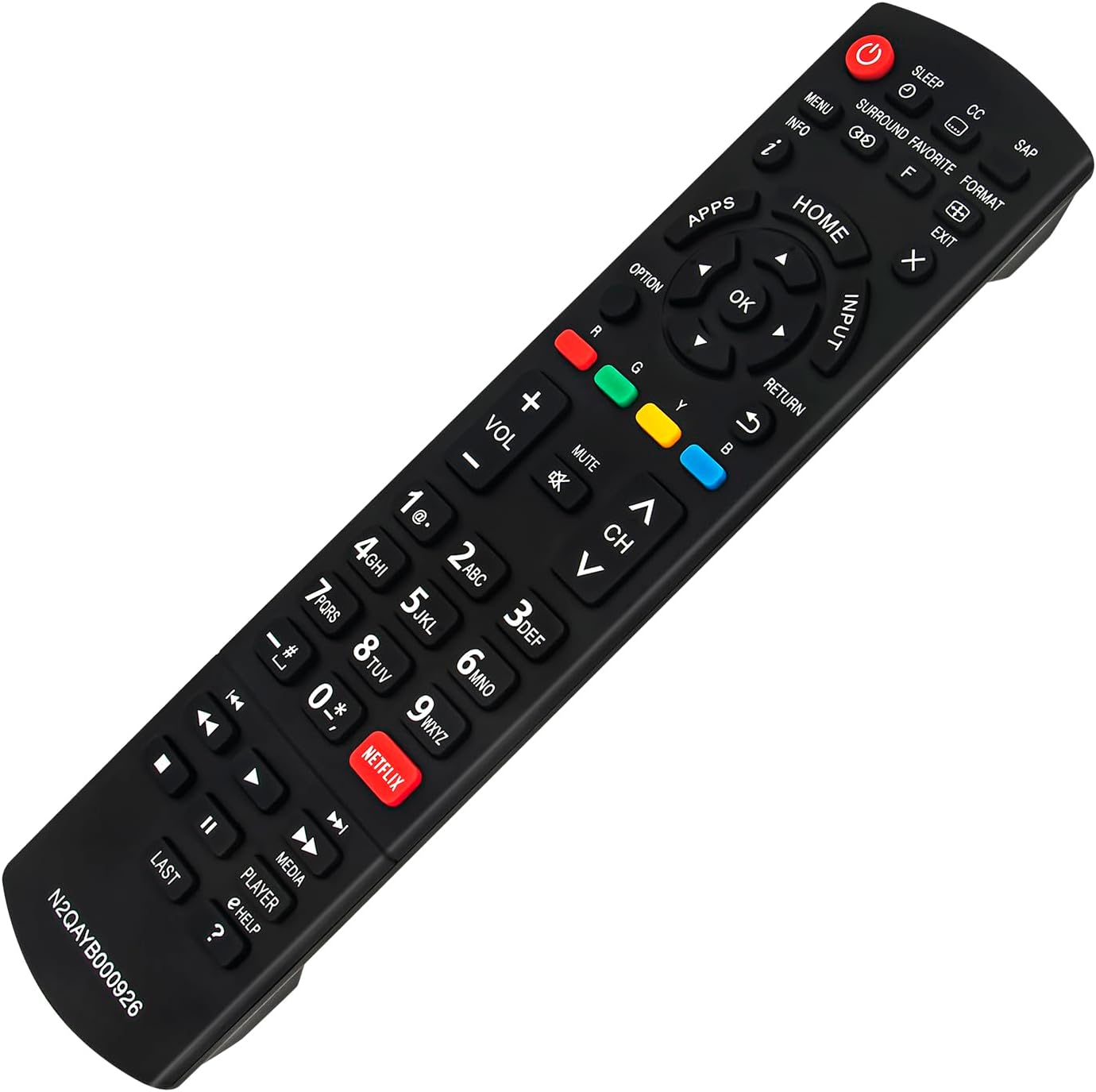
בילד: פראָנט view of the VINABTY N2QAYB000926 remote control, displaying its full button layout.
- מאַכט (●): צינדט אָן אָדער אויס דעם טעלעוויזאָר.
- שלאָף: Sets a timer for the TV to turn off automatically.
- פֿאַרמאַכטע אונטערשריפֿט (CC): Toggles closed captions on or off.
- SAP (צווייטיק אַודיאָ פּראָגראַם): Switches between available audio tracks.
- מעניו: גייט אריין אין דעם הויפּט מעניו פון דער טעלעוויזיע.
- אינפֿאָרמאַציע (i): Displays information about the current program or input.
- אַרומרינגלען: Activates or deactivates surround sound mode.
- Favorite (F): צוטריט צו באַליבטע קאַנאַלן אָדער אינהאַלט.
- פֿאָרמאַט: Changes the screen aspect ratio.
- אַרויסגאַנג (X): Exits menus or on-screen displays.
- אַפּפּס: Opens the TV's applications menu.
- היים: Navigates to the TV's home screen.
- אַרייַנשרייַב: Selects the input source (HDMI, AV, etc.).
- נאַוויגאַציע פּאַד (אַרויף, אַראָפּ, לינקס, רעכטס, גוט): גענוצט צו נאַוויגירן מעניוז און באַשטעטיקן סעלעקשאַנז.
- אָפּציע: ווײַזט קאָנטעקסט-סענסיטיווע אָפּציעס.
- צוריקקומען: גייט צוריק צום פריערדיקן עקראַן אָדער מעניו.
- קאָלירטע קנעפּלעך (רויט, גרין, געל, בלוי): Perform specific functions as indicated by on-screen prompts.
- באַנד (+/-): אַדזשאַסטירט די טעלעוויזיע באַנד.
- שטום: שטומט אדער אנשטומט דעם טעלעוויזיע אודיאָ.
- Channel (CH ^/v): טוישט קאַנאַלן אַרויף אָדער אַראָפּ.
- נומער פּאַד (0-9): גלייך אריינגעבן קאַנאַל נומערן.
- נעטפליקס: Direct access button for the Netflix application.
- Media Controls (Rewind, Play, Fast Forward, Stop, Pause, Skip Back, Skip Forward): קאָנטראָלירט מעדיע ווידערשפּיל.
- לעצטע: קערט זיך צוריק צום פריערדיגן viewעד קאַנאַל.
- שפּילער: Likely related to media player functions.
- Help (?): Accesses the TV's help function.
וישאַלט
כדי צו זיכער מאַכן די לאַנגלעבעניש און ריכטיקע פונקציאָנירן פון אייער ווייַט קאָנטראָל, פאָלגט די וישאַלט גיידליינז:
- רייניקונג: Wipe the remote control regularly with a soft, dry cloth. Do not use liquid cleaners, sprays, or abrasive materials, as these can damage the remote's surface or internal components.
- באַטערי פאַרבייַט: Replace batteries when the remote's response becomes sluggish or stops working. Always replace both batteries at the same time with new ones of the same type (AAA). Remove batteries if the remote will not be used for an extended period to prevent leakage.
- סטאָרידזש: Store the remote in a cool, dry place away from direct sunlight, extreme temperatures, and high humidity.
- האַנדלינג: Avoid dropping the remote control or subjecting it to strong impacts, which can cause internal damage.
טראָובלעשאָאָטינג
If you experience issues with your remote control, refer to the following common troubleshooting steps:
- ווייַט ניט ריספּאַנדינג:
- Check the batteries. Ensure they are inserted correctly with the correct polarity (+/-).
- פאַרבייַטן אַלטע באַטעריעס מיט נייַע AAA באַטעריעס.
- זיכער מאַכן אַז עס זענען נישטאָ קיין שטערונגען צווישן דער ווײַטקאָנטראָל און דעם טעלעוויזיע'ס אינפֿראַרעד סענסאָר.
- ריכט די ווײַטקאָנטראָל גלייך אויפן טעלעוויזאָר.
- ספּעציפֿישע קנעפּלעך אַרבעטן נישט:
- Clean the remote control, especially around the problematic buttons, to remove any dirt or debris that might be interfering with button presses.
- Verify that the button function is applicable to your specific TV model. Some buttons may have different or no functionality depending on the TV's features.
- Internet/Smart Features Button Behavior:
- Note that on some Panasonic TV models, the button labeled "Home" on this remote may function as the primary access point for smart features and internet applications, rather than a dedicated "Internet" button.
- The "Apps" button is designed to directly open the TV's application menu.
ספּעסאַפאַקיישאַנז
| מאָדעל נומער | N2QAYB000926 |
| סאָרט | VINABTY |
| קאַמפּאַטאַבאַל דעוויסעס | Panasonic Smart LED LCD TVs (AS520, AS530, AS630, ASU534, AS680 Series) |
| מאַכט מקור | 2 X AAA באַטעריז (ניט אַרייַנגערעכנט) |
| דימענשאַנז | 9 X 2 X 1 אינטשעס (בעערעך 22.86 X 5.08 X 2.54 סענטימעטער) |
| פּונקט וואָג | 2.89 אונסעס (בעערעך 81.9 גראַמז) |
| קאָליר | שוואַרץ |

Image: Remote control with indicated dimensions for length and width.
שטיצן
For further assistance or inquiries regarding your VINABTY N2QAYB000926 remote control, please contact the seller or manufacturer through your purchase platform. Provide your order details and the model number (N2QAYB000926) for efficient support.
