1. הקדמה
This manual provides instructions for the installation and operation of your GOTHAM 1237924 Rear View Camera Kit. This kit is designed to enhance vehicle safety by providing a clear view of the area behind your vehicle, aiding in parking and reversing maneuvers. It includes a waterproof camera and a 4.2-inch color LCD monitor with an anti-glare visor.

Image 1: The GOTHAM Rear View Camera Kit, showing the product packaging, 4.2-inch LCD monitor, and the compact rear view camera with its wiring.
2. זיכערקייַט אינפֿאָרמאַציע
Please read all safety instructions before installing and operating this product. Failure to follow these instructions may result in injury or damage to the product or vehicle.
- פאַכמאַן ינסטאַלירונג רעקאַמענדיד: אויב איר זענט נישט זיכער וועגן קיין טייל פון די ינסטאַלירונג פּראָצעס, קאָנסולטירט אַ קוואַליפיצירט אָטאָמאָביל טעכניקער.
- מאַכט מקור: Connect the system only to a 12V DC power source. Incorrect voltagעס קען שעדיקן דעם אַפּאַראַט.
- וויירינג: Ensure all wiring is properly insulated and secured to prevent short circuits or interference. Avoid routing cables near hot engine parts or sharp edges.
- וויזאַביליטי: שטערט נישט דעם דרייווער'ס view with the monitor. Mount it in a location that is easily visible but does not impede driving.
- וואַסער קעגנשטעל: The camera is water-resistant, but avoid submerging it or directing high-pressure water jets directly at it.
- פּאַרקינג הילף: This system is a parking aid and should not replace careful driving and direct observation. Always check your surroundings manually before reversing.
3. פּעקל אינהאַלט
באַשטעטיקן אַז אַלע קאָמפּאָנענטן זענען פאַראַן אין דער פּאַקעט:
- 4.2-inch Color LCD Monitor with Anti-Glare Visor
- דערציען View אַפּאַראַט מיט בארג
- ווידעא קאַבל (RCA)
- Power Cables for Monitor and Camera
- ינסטרוקטיאָן מאַנואַל (דעם דאָקומענט)

Image 2: All components of the GOTHAM Rear View Camera Kit, including the monitor, camera, and various cables, laid out on a white surface.
4. אויפשטעלן און אינסטאַלירן
Follow these steps for proper installation of your GOTHAM Rear View Camera Kit.
4.1. קאַמעראַ ינסטאַללאַטיאָן
- קלייַבן אַ מאַונטינג אָרט: The camera should be mounted at the rear of the vehicle, typically above the license plate or near the trunk handle, to provide a clear, unobstructed view. Refer to Image 4 for ideal placement suggestions.
- באַוואָרענען די אַפּאַראַט: Use the provided mount and screws to securely attach the camera to the chosen location. Ensure the camera is angled correctly for optimal viewing.
- Route Camera Cables: Carefully route the camera's video and power cables into the vehicle interior. Ensure cables are protected from moisture, heat, and moving parts.

Image 3: The compact GOTHAM rear view camera with its attached RCA video cable (yellow connector) and power cable (red connector).

Image 4: A diagram illustrating recommended external mounting positions for the rear view camera on a vehicle, typically near the license plate or bumper.
4.2. מאָניטאָר ינסטאַללאַטיאָן
- Mount the Monitor: Place the 4.2-inch LCD monitor on your dashboard or another suitable location that does not obstruct your view of the road. The monitor comes with a stand for easy placement.
- קאָננעקט ווידעא קאַבלע: Connect the yellow RCA video cable from the camera to the video input (AV1 or AV2) on the monitor.
- פאַרבינדן מאַכט: Connect the monitor's power cable to a 12V DC power source. For automatic activation, connect the camera's power cable to the vehicle's reverse light circuit. Connect the monitor's power cable to a switched 12V source or also to the reverse light circuit if you only want it on when reversing.
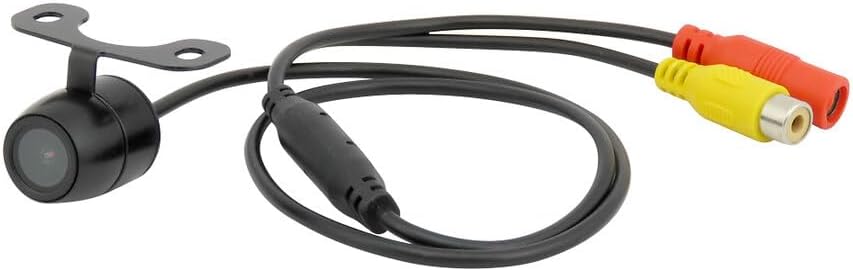
Image 5: The GOTHAM 4.2-inch LCD monitor, featuring an anti-glare visor and RCA input connectors for video and power.
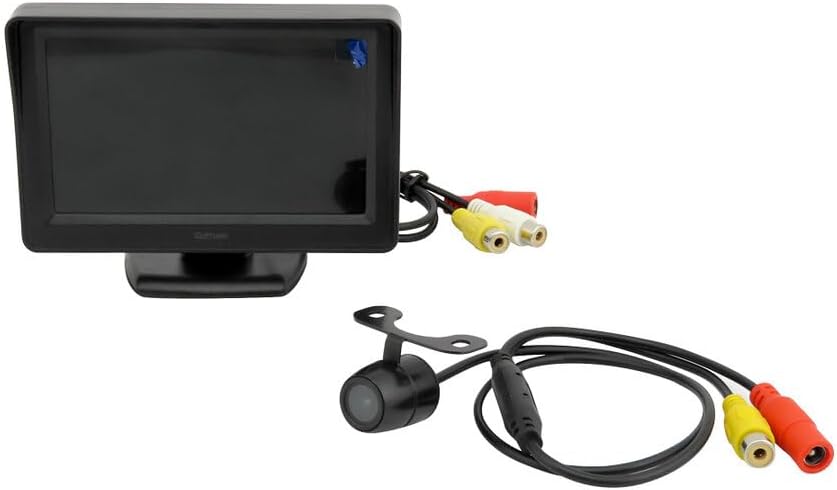
Image 6: The GOTHAM 4.2-inch LCD monitor and the rear view camera, shown together with their respective connection cables.
5. אַפּערייטינג ינסטרוקטיאָנס
Once installed, the GOTHAM Rear View Camera Kit operates simply:
- אָטאַמאַטיק אַקטאַוויישאַן: If wired to the reverse light circuit, the monitor will automatically display the camera feed when the vehicle is shifted into reverse gear.
- פּאַרקינג שורות: The camera provides colored parking assistance lines on the screen to help estimate distance and trajectory.
- מאָניטאָר ווייַז: The 4.2-inch color LCD provides a wide-angle, high-definition view. The anti-glare visor helps improve visibility in bright conditions.
6. וישאַלט
To ensure the longevity and optimal performance of your camera kit:
- רייניקונג פון די קאַמעראַ לינז: רעגולער רייניקט די קאַמעראַ לינז מיט אַ ווייכן, דamp שטאָף צו באַזייַטיקן שמוץ, שטויב אָדער וואַסער פלעקן וואָס קענען באַהאַלטן דעם viewפֿאַרמײַדן אַברייסיוו רייניגער.
- Cleaning the Monitor Screen: Use a soft, lint-free cloth to clean the LCD screen. Do not spray cleaning solutions directly onto the screen.
- טשעק קאַנעקשאַנז: קאָנטראָלירט פּעריִאָדיש אַלע קאַבלע פֿאַרבינדונגען צו זיכער מאַכן אַז זיי זענען זיכער און פֿרײַ פֿון קעראָוזשאַן אָדער שאָדן.
- וועטער שוץ: While the camera is water-resistant, extreme weather conditions (e.g., heavy snow, ice) may temporarily affect performance. Clear any obstructions from the lens before use.
7. טראָובלעשאָאָטינג
If you encounter issues with your GOTHAM Rear View Camera Kit, refer to the following common problems and solutions:
| פּראָבלעם | מעגלעך סיבה | לייזונג |
|---|---|---|
| קיין בילד אויף מאָניטאָר | No power to monitor or camera; Loose video cable connection; Faulty camera or monitor. | Check all power connections; Ensure video cable is securely plugged in; Test components if possible. |
| שלעכטע בילד קוואַליטעט (בלומען, פאַרקרימט) | Dirty camera lens; Loose video connection; Electrical interference. | Clean camera lens; Secure video cable; Reroute cables away from power sources if interference is suspected. |
| Monitor does not turn on automatically | Camera/monitor not wired to reverse light circuit; Faulty reverse light switch. | Verify wiring to reverse lights; Check reverse light functionality. |
8. ספּעסאַפאַקיישאַנז
אַפּאַראַט ספּעסאַפאַקיישאַנז:
- סענסאָר: קמאָס
- באלויכטונג: 0.01 לוקס
- עפעקטיוו פּיקסעלס: 720x576
- רעזאלוציע: 480 טעלעוויזיע לינעס
- Viewאין ווינקל: 170°
- Image Vision Area: 4.3x3.4מם
- ווידעא סיסטעם: PAL/NTSC
- מאַכט: דק 11-13V
- S/N פאַרהעלטעניש: >50 דב
- ווידעא רעזולטאַט: 1.0Vp-p, 75 Ohms
- וועטער קעגנשטעל: Water-resistant for all weather conditions
מאָניטאָר ספּעסאַפאַקיישאַנז:
- טיפּ: טפט לקד
- פאַרשטעלן גרייס: 4.2 אינטשעס
- רעזאלוציע: 480(W) RGB x 272(H)
- אַספּעקט פאַרהעלטעניש: 16:9
- ווידעא סיסטעם: PAL/NTSC
- ווידעא ינפּוט: 2 AV Inputs
- מאַכט צושטעלן: DC 12V
- קאַנסאַמשאַן: 1.3 וו
- אָפּצאָל קראַנט: 100 מאַ
9. וואָראַנטי & שטיצן
For warranty information and technical support, please refer to the documentation provided with your purchase or contact GOTHAM customer service. Specific warranty details may vary by region and retailer.
פאַבריקאַנט: גאָטהאַם
מאָדעל נומער: PARK/LCD-DIS-42+CAM/BK
ASIN: B01BKDA32K


