1. הקדמה
The AJA V2Analog is a compact, high-quality mini-converter designed to convert HD/SD-SDI signals to analog component or composite video. This device is engineered for professional video workflows, providing reliable signal conversion for various applications.
Its versatility allows for complete integration into any workflow, making it a valuable asset in any video production environment.

פיגורע 1: פראָנט און זייַט view of the AJA V2Analog Mini-Converter, highlighting input and output ports.
2. זיכערקייַט אינפֿאָרמאַציע
ביטע ליינט אלע זיכערהייט אינסטרוקציעס קערפול איידער איר ניצט דעם אפאראט. האלט דעם מאנואל פאר שפעטערדיגע רעפערענץ.
- שטעלט נישט אויס דעם אַפּאַראַט צו רעגן, פייכטקייט, אדער עקסטרעמע טעמפּעראַטורן.
- פאַרזיכערן געהעריק ווענאַליישאַן צו פאַרמייַדן אָוווערכיטינג.
- Use only the specified power supply (5-20 VDC).
- פֿאַרמײַדט צו לאָזן פאַלן אָדער אויסשטעלן דאָס אַפּאַראַט צו שווערע קלאַפּן.
- אָפּשיקן אַלע סערוויסעס צו קוואַלאַפייד סערוויס פּערסאַנעל.
3. סעטאַפּ און קאַנעקשאַנז
Follow these steps to set up your AJA V2Analog converter:
- מאַכט קשר: Connect the appropriate power supply (5-20 VDC) to the "POWER" input on the converter.
- SDI אַרייַנשרייַב: Connect your HD/SD-SDI source to the "SDI IN" BNC connector.
- אַנאַלאָג רעזולטאַט: Connect the Y/G, Pb/B, and Pr/R BNC outputs to your analog component or composite display/device. Ensure correct color component matching (Y/G for Luminance/Green, Pb/B for Blue Difference, Pr/R for Red Difference).
- USB פֿאַרבינדונג (אָפּציאָנעל): For firmware updates or configuration, connect a USB cable from the "USB" port on the converter to your computer.
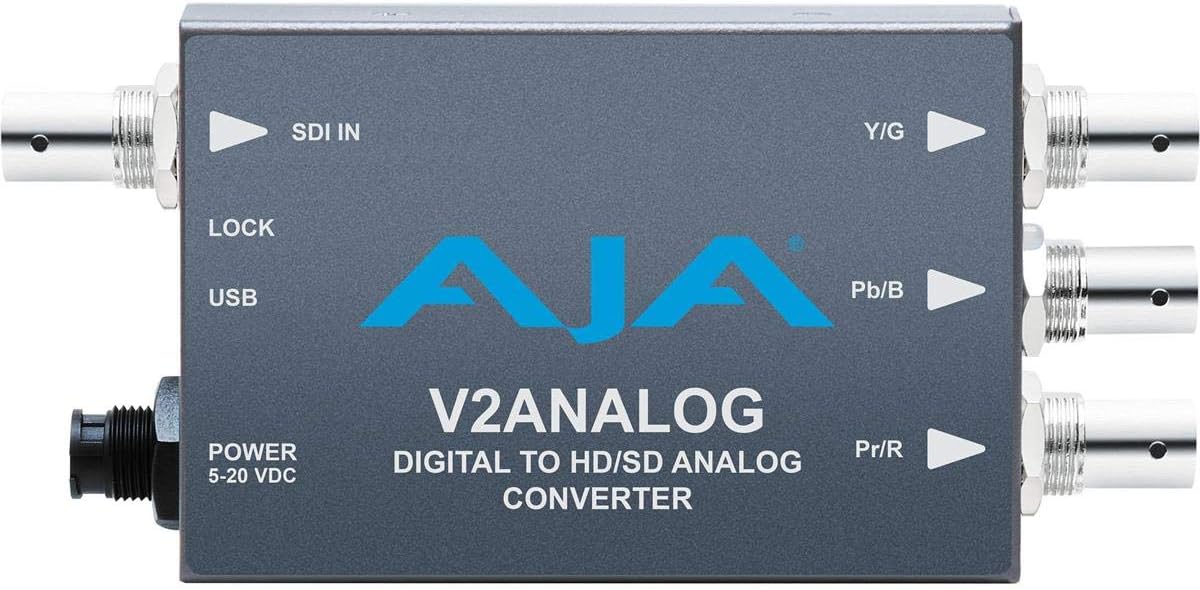
פיגורע 2: שפּיץ view of the AJA V2Analog Mini-Converter, illustrating port labels for connection.
4. אַפּערייטינג ינסטרוקטיאָנס
Once all connections are made, power on the device. The V2Analog will automatically detect the incoming SDI signal format and convert it to the appropriate analog output. The "LOCK" LED indicator will illuminate when a stable SDI signal is detected and locked.
4.1. Signal Compatibility
The V2Analog supports various HD and SD SDI formats. It is designed to convert these digital signals to standard analog component (YPbPr) or composite (CVBS) outputs.
4.2. Configuration (Advanced)
Advanced configuration options, such as output format selection or color space adjustments, may be available via AJA's Mini-Config software, accessible through the USB port. Refer to the AJA webזייטל פֿאַר די לעצטע ווייכווארג און דעטאַלירטע קאָנפיגוראַציע גיידס.
5. וישאַלט
The AJA V2Analog is designed for reliable operation with minimal maintenance. Follow these guidelines:
- רייניקונג: ניצט אַ ווייכע, טרוקענע שטאָף צו רייניקן די אויסערלעכע זייט פון דעם אַפּאַראַט. ניצט נישט קיין פליסיקע אָדער אַעראָזאָל רייניגער.
- Firmware דערהייַנטיקונגען: Periodically check the AJA website for firmware updates. Keeping the firmware current ensures optimal performance and compatibility.
- סטאָרידזש: ווען נישט אין באַנוץ פֿאַר לענגערע פּעריאָדן, זאָל מען דאָס אַפּאַראַט האַלטן אין אַ קיל, טרוקן אָרט, אַוועק פֿון דירעקטער זון און עקסטרעמע טעמפּעראַטורן.
6. טראָובלעשאָאָטינג
If you encounter issues with your V2Analog, refer to the following common problems and solutions:
| פּראָבלעם | מעגלעך סיבה | לייזונג |
|---|---|---|
| קיין ווידעא רעזולטאַט | No power; Incorrect SDI input; Incorrect analog output connection; No signal lock. | Check power supply; Verify SDI source is active and connected to "SDI IN"; Ensure Y/G, Pb/B, Pr/R are connected correctly to display; Check "LOCK" LED. |
| Distorted or colored video | Incorrect analog output format; Loose connections. | Ensure display is set to correct input type (component/composite); Tighten all BNC connections. |
| "LOCK" LED not illuminated | No valid SDI input signal. | Verify SDI source is active and sending a compatible signal. Check SDI cable integrity. |
If the problem persists, contact AJA Technical Support for further assistance.
7. ספּעסאַפאַקיישאַנז
| שטריך | דעטאַל |
|---|---|
| מאָדעל | V2ANALOG |
| סאָרט | AJA |
| אַרייַנשרייַב | HD/SD-SDI (BNC) |
| רעזולטאַט | Component (Y/G, Pb/B, Pr/R BNC), Composite (selectable) |
| צובינד טיפּ | USB, SDI, Component |
| מאַכט | 5-20 וודק |
| דימענסיעס (L X W X H) | 7.2 X 5.7 X 4.2 אינטשעס |
| וואָג | 1.35 פונט |
| UPC | 091131246023 |
8. שטיצן און וואָראַנטי
For technical support, product registration, or warranty information, please visit the official AJA webזייטל אדער קאנטאקט זייער קאסטומער סערוויס דעפארטמענט. ספעציפישע גאראנטיע באדינגונגען קענען זיין אנדערש לויט ראיאן און קויף דאטום.
AJA Webפּלאַץ: www.aja.com


