1. הקדמה
The CCEI DHG2 Anti-Frost Device is designed to protect your swimming pool's piping system from freezing during cold temperatures, ensuring the longevity of your installation. This device automatically circulates water when temperatures drop, preventing ice formation and potential damage to your pool infrastructure.
שליסל פֿעיִקייטן
- Automated winterization for peace of mind.
- Precise temperature measurement with a CTN probe.
- Easy integration with existing pool electrical systems.
- Digital temperature display for clear monitoring.
- Activates filtration when the temperature falls below a set threshold.
2. וויכטיק סאַפעטי אינסטרוקציעס
Please read and understand all safety instructions before installing or operating the CCEI DHG2 device. Failure to follow these instructions may result in electric shock, fire, or serious injury.
- די אינסטאַלאַציע מוז דורכגעפירט ווערן דורך אַ קוואַליפֿיצירטן עלעקטריקער אין לויט מיט אַלע לאָקאַלע און נאַציאָנאַלע עלעקטרישע קאָודן.
- Always disconnect the main power supply to the pool system before performing any installation, maintenance, or troubleshooting.
- Do not operate the device if it appears damaged or is malfunctioning. Contact qualified service personnel.
- Keep children and unauthorized persons away from the device during operation.
- Ensure the device is protected from direct weather exposure unless specifically rated for outdoor use.
3. פּעקל אינהאַלט
באַשטעטיקן אַז אַלע זאכן זענען פאַראַן און נישט געשעדיגט ביים אויספּאַקן:
- CCEI DHG2 Anti-Frost Device Control Box
- CTN Temperature Probe
- באַניצער מאַנואַל (דעם דאָקומענט)
4. סעטאַפּ און ייַנמאָנטירונג
The CCEI DHG2 device is designed for straightforward integration into your pool's electrical system. Proper installation is crucial for optimal performance and safety.
4.1 מאַונטינג די מיטל
Select a suitable location for mounting the DHG2 control box. This location should be protected from direct weather exposure (rain, direct sunlight) and easily accessible for operation and maintenance. Use appropriate fasteners to secure the unit to a stable surface.
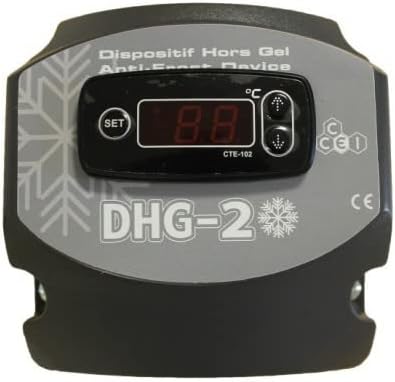
בילד: פראָנט view of the CCEI DHG2 Anti-Frost Device, showing the digital temperature display and control buttons.
4.2 עלעקטריקאַל קאַנעקשאַן
Connect the DHG2 anti-frost device to your main pool electrical panel. The device typically requires a dedicated power supply. Refer to the detailed wiring diagram provided inside the device cover for specific connection points and ensure all connections are secure and properly insulated. It is recommended to use appropriate conduit for wiring.
The CTN temperature probe must be installed in a location that accurately measures the pool water temperature, typically within the filtration circuit or a dedicated probe well. Ensure the probe is fully immersed in water for accurate readings.

Image: CCEI DHG2 Anti-Frost Device integrated into a swimming pool's filtration system, showing pipe connections.
5. אָפּעראַציע
5.1 ערשט מאַכט-אַרויף
Once installed and wired, switch on the main power supply to the DHG2 device. The digital display will illuminate, showing the current water temperature measured by the CTN probe.
5.2 Setting the Anti-Frost Threshold
The DHG2 allows you to set a specific temperature threshold. When the water temperature falls below this set point, the device will automatically activate the pool's filtration pump to circulate water and prevent freezing.
- Press the 'SET' button on the control panel. The display will show the currently programmed anti-frost activation temperature.
- Use the 'Up' and 'Down' arrow buttons to adjust the desired temperature threshold. A common setting is between 0°C and 3°C (32°F and 37.4°F).
- Press 'SET' again to confirm and save the new setting. The display will then revert to showing the current water temperature.
5.3 Forced Circulation Mode
The DHG2 may include a forced circulation mode, which can be manually activated. This mode ensures continuous water movement and increases pressure within the pipes, further lowering the freezing point of the water. This can be particularly useful during extreme cold snaps or for specific maintenance procedures.
Refer to the device's specific button layout for activating this mode, which is typically a dedicated button or a combination of existing buttons (e.g., holding an arrow button for a few seconds).
6. וישאַלט
Regular maintenance ensures the optimal performance and longevity of your CCEI DHG2 Anti-Frost Device.
- וויסואַל דורכקוק: Periodically inspect the device, wiring, and connections for any signs of wear, corrosion, or damage.
- רייניקונג: Keep the digital display and control buttons clean and free from dust or debris. Use a soft, dry cloth for cleaning.
- Probe Check: Ensure the CTN temperature probe is clean and properly positioned in the water for accurate readings. Remove any buildup that might affect its sensitivity.
- ווינטער סטאָרידזש (אויב אָנווענדלעך): If the device is removed for off-season storage, ensure it is stored in a dry, protected environment.
7. טראָובלעשאָאָטינג
This section provides solutions to common issues you might encounter with your DHG2 device.
| פּראָבלעם | מעגלעך סיבה | לייזונג |
|---|---|---|
| די מיטל איז נישט פּאַוערינג | קיין מאַכט צושטעלן | Check the circuit breaker and all electrical connections. Ensure the main power to the pool system is on. |
| פאַלש טעמפּעראַטור לייענען | Faulty or dirty probe, or probe not immersed | Clean or replace the CTN temperature probe. Ensure it is correctly installed and fully immersed in water. |
| Pool pump not activating when cold | Temperature above threshold, wiring issue, or pump malfunction | Verify the set temperature threshold. Check wiring connections to the pump. Test the pump independently to ensure it is functional. |
| Digital display shows an error code | Internal fault or sensor issue | Consult the specific error code in the full technical manual (if available) or contact CCEI customer support for assistance. |
If problems persist after attempting these solutions, please contact CCEI customer support or a qualified service technician.
8. טעכניש ספּעסאַפאַקיישאַנז
Below are the general technical specifications for the CCEI DHG2 Anti-Frost Device:
| שטריך | דעטאַל |
|---|---|
| מאָדעל | DHG2 |
| סאָרט | CCEI |
| דימענשאַנז (פּאַקקאַגינג) | 18.4 X 18.2 X 17.2 סענטימעטער |
| וואָג (פּאַקאַגינג) | 660 גראַמז |
| טעמפּעראַטור סענסאָר טיפּ | CTN (Negative Temperature Coefficient) |
| ווייַז טיפּ | דיגיטאַל |
| ערשטיק פֿונקציע | Automatic Anti-Frost Protection for Pool Systems |
באַמערקונג: ספּעסאַפאַקיישאַנז זענען אונטערטעניק צו טוישן אָן פריערדיק באַמערקן.
9. גאַראַנטיע און קונה שטיצע
The CCEI DHG2 Anti-Frost Device comes with a standard manufacturer's warranty. Please refer to your purchase documentation or the official CCEI website for specific warranty terms and conditions, including duration and coverage.
For technical assistance, troubleshooting beyond this manual, or warranty claims, please contact CCEI customer support through their official website or your local authorized distributor. Ensure you have your product model number (DHG2) and proof of purchase available when contacting support.


