1. הקדמה
א דאנק פארן קויפןasing the iPega PG-9023 Wireless Bluetooth Game Controller. This device is designed to enhance your mobile gaming experience by providing precise control and comfortable ergonomics. It features a telescopic stand to accommodate various smartphone and tablet sizes, offering broad compatibility with Android and iOS devices, as well as Windows PCs.
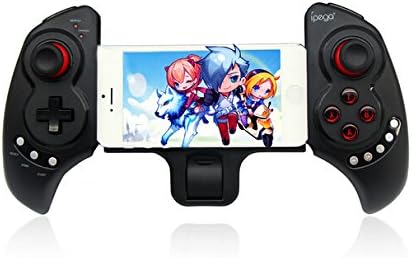
פיגורע 1.1: The iPega PG-9023 controller with a smartphone securely mounted in its telescopic holder, ready for gaming.
2. שליסל פֿעיִקייטן
- וויירלעס בלועטוט 3.0 קאָנעקטיוויטי: Provides a stable connection up to 8 meters (26 feet) without the need for drivers.
- Telescopic Stand: Adjustable holder supports smartphones and tablets from 5 to 10 inches in size.
- ברייט קאַמפּאַטאַבילאַטי: Supports Android 3.2+, iOS 4.3+, Windows 7/8, and Android TV Boxes with Bluetooth functionality.
- געבויט-אין קריקאָנלאָדלעך באַטערי: 380mAh lithium battery offers up to 20 hours of continuous play on a single charge.
- ערגאָנאָמיק פּלאַן: Engineered for comfortable and extended gaming sessions.
- עטלעכע אַפּערייטינג מאָדעס: Supports Gamepad Mode, Keyboard Mode, and Mouse Mode for versatile use.
3. פּעקל אינהאַלט
ביטע טשעק די פּאַקעט פֿאַר די פאלגענדע זאכן:
- iPega PG-9023 Wireless Bluetooth Game Controller
- וסב טשאַרדזשינג קאַבלע
- באַניצער מאַנואַל

פיגורע 3.1: The iPega PG-9023 controller, its USB charging cable, and the included user manual as found in the product packaging.
4. סעטאַפּ און קאַנעקשאַן
4.1 טשאַרדזשינג די קאָנטראָללער
Before first use, fully charge the controller. Connect the supplied USB cable to the controller's charging port and the other end to a USB power source (e.g., computer USB port, USB wall adapter). The LED indicator will show charging status and turn off when fully charged.
4.2 אײַנצושאַלטן און פֿאַרבינדן
The PG-9023 supports different modes for various operating systems. To enter pairing mode, press and hold the corresponding button combination until the LED indicator flashes rapidly.
- אַנדרויד גאַמעפּאַד מאָדע: דריקן און האַלטן "X" + "היים". The Gamepad LED will flash.
- Android Keyboard Mode: דריקן און האַלטן "A" + "HOME". The Keyboard LED will flash.
- Android Mouse Mode: דריקן און האַלטן "ב" + "היים". The Mouse LED will flash.
- iOS Gamepad Mode: דריקן און האַלטן "Y" + "היים". The Gamepad LED will flash.
Once the LED is flashing, enable Bluetooth on your device (smartphone, tablet, PC) and search for "PG-9023". Select it to pair. The LED will become solid when successfully connected.
4.3 אנשטעלן אייער אפאראט
The controller features a telescopic stand that can extend to securely hold your smartphone or tablet.
- Gently pull the two halves of the controller apart to extend the telescopic arm.
- Carefully place your smartphone or tablet into the holder, ensuring it is centered and secure. The holder supports devices from 5 to 10 inches.
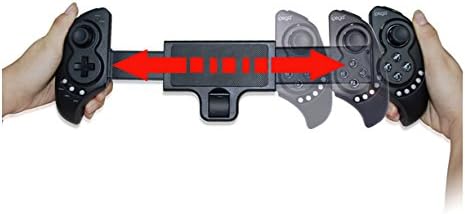
פיגורע 4.1: The telescopic mechanism of the iPega PG-9023, demonstrating how it expands to accommodate different device sizes.

פיגורע 4.2: The iPega PG-9023 controller holding a tablet, illustrating its capability to support larger devices for an immersive gaming experience.
5. אַפּערייטינג ינסטרוקטיאָנס
5.1 Game Compatibility
The iPega PG-9023 supports a wide range of games. Game compatibility may vary depending on the operating system and the game itself. Many games offer native gamepad support, while others may require mapping or specific modes.
- iOS Games: Compatible with games such as Gunman Clive, Helium Boy, League of Evil 1 & 2, Muffin Knight Free, Stardash, Temple Run, etc.
- Android Games: Compatible with games such as Wild Blood, Dungeon Hunter, Zombie, FC simulator, Shadow Gun, Riptide GP, etc.
- Mouse Mode Games: Suitable for games like Fruit Ninja, Flappy Bird, Angry Bird, Sky Force, etc., where touch or mouse input is primary.
5.2 Using Mouse Mode (Android Only)
In Android Mouse Mode (activated by "ב" + "היים"), the left analog stick controls the mouse cursor, and the A/B/X/Y buttons act as mouse clicks. This mode is useful for navigating menus or playing games that primarily rely on touch input.
5.3 מאַכט שפּאָרן מאָדע
The controller will automatically enter power-saving mode if it remains disconnected or inactive for a period of time. To reactivate, press the "היים" קנעפּל.
6. וישאַלט און קער
- האַלט דעם קאָנטראָללער טרוקן. פֿאַרמייַדט אויסשטעלונג צו פֿײַכטקייט אָדער פֿליסיקייטן.
- שטעלט נישט אויס דעם קאנטראלער צו עקסטרעמע טעמפעראטורן.
- רייניקט דעם קאָנטראָללער מיט אַ ווייכן, טרוקענעם שטאָף. ניצט נישט קיין שאַרפע כעמיקאַלן אדער אַברייסיוו רייניגער.
- סטאָר די קאָנטראָללער אין אַ קיל, טרוקן אָרט ווען ניט אין נוצן.
- פֿאַרמײַדט צו לאָזן פאַלן אָדער אויסשטעלן דעם קאָנטראָללער צו שטאַרקע קלאַפּן.
7. טראָובלעשאָאָטינג
7.1 קאָנטראָללער פֿאַרבינדט זיך נישט
- זיכער מאַכן אַז דער קאָנטראָללער איז גאָר אויפגעלאָדן.
- באַשטעטיקן אַז בלועטאָאָטה איז ענייבאַלד אויף דיין מיטל.
- Make sure the controller is in the correct pairing mode for your operating system (refer to Section 4.2).
- Forget "PG-9023" from your device's Bluetooth settings and attempt to re-pair.
- ריסטאַרט ביידע דעם קאָנטראָללער און דיין דעווייס.
7.2 Buttons or Joysticks Not Responding
- Ensure the controller is properly connected and in the correct operating mode for the game.
- Check if the game itself supports gamepad input. Some games may require specific settings or may not support external controllers.
- Try restarting the controller and the game application.
7.3 קורצע באַטעריע לעבן
- Ensure the controller is fully charged before use.
- The battery life can be affected by usage patterns and environmental factors.
- If the issue persists, the battery may be degrading.
8. ספּעסאַפאַקיישאַנז
| שטריך | דעטאַל |
|---|---|
| מאָדעל | PG-9023 |
| קאַנעקטיוויטי | בלועטאָאָטה 3.0 |
| ווירעלעסס ראַנגע | 6-8 מעטער (אומגעפער 20-26 פיס) |
| באַטאַרייע קאַפּאַציטעט | 380 מאַה ליטהיום באַטערי |
| שפּיל צייט | ביז 20 שעה (קאָנטיניואַס) |
| טשאַרדזשינג צייט | בעערעך 2 שעה |
| Supported Device Size | 5-10 inches (telescopic holder) |
| שטיצט אַס | Android 3.2+, iOS 4.3+, Win7/Win8, Android TV Box |
9. וואָראַנטי און שטיצן
This product is manufactured by iPega. For warranty information and technical support, please refer to the contact details provided with your purchase documentation or visit the official iPega webזייטל. האַלט דיין קויפן באַווייַז פֿאַר וואָראַנטי קליימז.
For further assistance, please contact your retailer or the manufacturer's customer service.


