1. הקדמה
This manual provides detailed instructions for the installation, operation, and maintenance of your JOOAN 770 HD 720P Wireless IP Camera. Please read this manual thoroughly before using the product to ensure proper functionality and to avoid damage. Keep this manual for future reference.
2. פּראָדוקט איבערview
2.1 פּעקל אינהאַלט
באַשטעטיקט אַז אַלע זאכן וואָס זענען אויסגערעכנט אונטן זענען אַרייַנגערעכנט אין אייער פּעקל. אויב עפּעס פעלנדיק אָדער צעבראָכן, ביטע קאָנטאַקטירט קונה שטיצע.
- JOOAN 770 HD 720P Wireless IP Camera (Note: Some variants may be 1080P or have internal model JA-C9E-U)
- מאַכט אַדאַפּטער
- וסב דאַטאַ קאַבלע
- מאָונטינג קלאַמער
- Screw Pack (for mounting)
- נעץ קאַבל (עטערנעט)
- באַניצער מאַנואַל (דעם דאָקומענט)

Image: Contents of the JOOAN 770 HD 720P Wireless IP Camera package, including the camera, power adapter, cables, and mounting hardware.
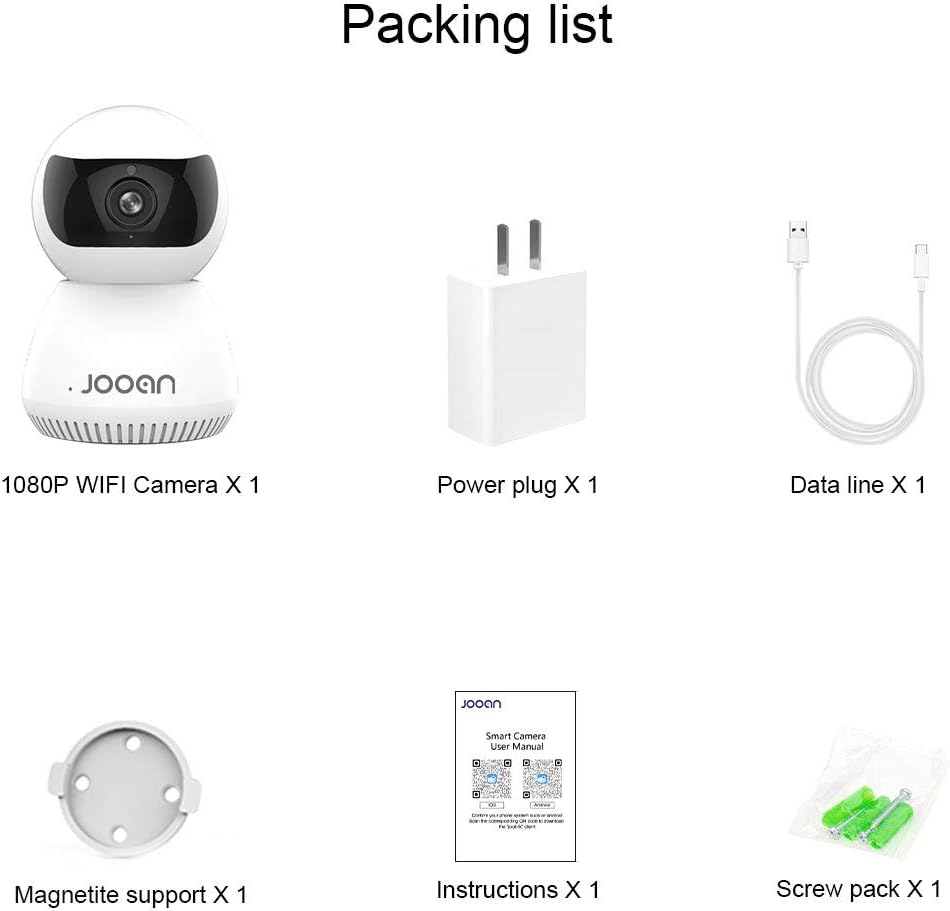
בילד: א דעטאַלירטע view of the packing list for a JOOAN WiFi Camera, showing a 1080P camera, power plug, data line, magnetite support, instructions, and screw pack.
2.2 שליסל פֿעיִקייטן
- HD ווידעא קוואַליטעט: Captures clear 720P high-definition video. (Note: Some models may support 1080P resolution).
- ווירעלעסס קאַנעקטיוויטי: Supports Wi-Fi for flexible placement and easy setup.
- פּאַן/טילט פאַנגקשאַנאַליטי: אָפפערט אַ ברייט viewing angle with 355° horizontal rotation and 100° vertical tilt, controllable via the companion application.
- צוויי-וועג אַודיאָ: אן איינגעבויטער מיקראָפאָן און רעדנער ערמעגלעכן קאָמוניקאַציע אין רעאַל-צייט.
- נאַכט זעאונג: Equipped with infrared LEDs for clear monitoring in low-light conditions, up to 35 feet.
- באַוועגונג דעטעקשאַן: Alerts users to detected movement within the camera's field of view.
- לאקאלע סטאָרידזש: Supports Micro SD cards up to 128GB for continuous or event-triggered recording.
- P2P Cloud Monitoring: Remote access and monitoring via smartphone (Android & iOS) and computer applications.
- עטהערנעט פּאָרט: Provides an option for wired network connection when Wi-Fi signal is unstable.

בילד: פראָנט view of the JOOAN 770 HD 720P Wireless IP Camera, showcasing its dome design and lens.

Image: A JOOAN camera with speech bubbles indicating two-way audio functionality, allowing communication between the camera's location and a remote user via a smartphone.

Image: A JOOAN camera in a nursery setting, illustrating its infrared night vision capability with red LEDs visible, providing clear monitoring in darkness.
3. סעטאַפּ אינסטרוקציעס
3.1 אויספּאַקן און ערשטע פּלאַצירונג
- קערפאַלי באַזייַטיקן אַלע קאַמפּאָונאַנץ פון די פּאַקקאַגינג.
- Choose a suitable location for your camera. Ensure it is within range of your Wi-Fi network or close to an Ethernet port.
- For optimal performance, place the camera on a stable, flat surface or mount it using the provided bracket and screws.
3.2 מאַכט אויף
- Connect the USB data cable to the camera's power input port.
- צאַפּן די מאַכט אַדאַפּטער אין אַ נאָרמאַל עלעקטריקאַל ווענטיל.
- The camera will power on, and an indicator light will illuminate, typically blinking to indicate readiness for setup.
3.3 Network Connection (Wi-Fi or Ethernet)
Your camera supports both wireless (Wi-Fi) and wired (Ethernet) connections.
Wi-Fi קאַנעקשאַן:
- Ensure your smartphone is connected to the 2.4GHz Wi-Fi network you intend to use for the camera. (5GHz networks are generally not supported).
- Proceed to section 3.4 for app installation and pairing, which will guide you through the Wi-Fi setup process.
עטהערנעט קשר:
- Connect one end of the provided network cable to the camera's Ethernet port.
- Connect the other end of the network cable to an available LAN port on your router or network switch.
- The camera will automatically attempt to establish a wired network connection.

בילד: הינטערשטע view of the JOOAN camera, highlighting the Ethernet port for wired network connectivity.
3.4 אַפּ אינסטאַלאַציע און דעווייס פּערינג
- Download the official companion application for JOOAN cameras from your smartphone's app store (e.g., Apple App Store for iOS, Google Play Store for Android). Refer to the quick start guide included in your package for the specific app name or QR code.
- Open the app and create a new user account, or log in if you already have one.
- Follow the in-app instructions to add a new device. This typically involves scanning a QR code on the camera, or selecting your camera model and following prompts for Wi-Fi configuration (entering your Wi-Fi password).
- Once successfully paired, the camera's indicator light will usually turn solid, and you will see the live video feed in the app.
4. אַפּערייטינג ינסטרוקטיאָנס
4.1 לעבן View
After successful pairing, open the companion app and select your camera from the device list to view the live video feed. You can switch between standard and high-definition viewing modes if available.
4.2 פּאַן און טילט קאָנטראָל
אויף די לייוו view screen within the app, use the directional controls (often a joystick-like interface or swipe gestures) to remotely adjust the camera's horizontal (pan) and vertical (tilt) angles. The camera supports 355° pan and 100° tilt.
4.3 צוויי-וועג אַודיאָ
צו ניצן די צוויי-וועג אודיאָ פֿונקציע, צאַפּן אויף דעם מיקראָפֿאָן בילדל אין דער אַפּ'ס לייוו view interface. Hold the button to speak, and release to listen. Ensure your phone's microphone permissions are granted to the app.
4.4 באַוועגונג דעטעקציע און וואָרענונגען
- נאַוויגירן צו די קאַמעראַ סעטטינגס אין דער אַפּ.
- Locate the "Motion Detection" or "Alarm Settings" option.
- Enable motion detection and configure sensitivity levels as desired.
- שטעלט אויף ווארענונג נאטיפיקאציעס (למשל, פוש נאטיפיקאציעס צו אייער טעלעפאן, אימעיל ווארענונגען) צו ווערן אינפארמירט ווען באוועגונג ווערט דעטעקטירט.
4.5 רעקאָרדינג און סטאָרידזש
Micro SD Card Recording:
- Insert a Micro SD card (up to 128GB, Class 10 or higher recommended) into the camera's SD card slot. Power off the camera before inserting or removing the card.
- In the app settings, format the SD card if prompted.
- Configure recording settings: continuous recording, motion-triggered recording, or scheduled recording.
- רעקאָרדעד פאָtagE קענען זיין viewed and downloaded directly from the app.
וואָלקן סטאָרידזש (אפציאָנעל):
The camera may offer optional cloud storage services. Refer to the app for details on subscription plans and activation.
5. וישאַלט
- רייניקונג: ניצט אַ ווייכע, טרוקענע שטאָף צו רייניקן די קאַמעראַ לינזע און קערפּער. פֿאַרמייַדט ניצן פליסיקע רייניגער אָדער שרײַבנדיקע מאַטעריאַלן.
- ווייכווארג דערהייַנטיקונגען: Regularly check the companion app for firmware updates. Keeping the camera's firmware updated ensures optimal performance and security.
- אָרט: Ensure the camera is not exposed to extreme temperatures, direct sunlight for prolonged periods, or excessive moisture.
- מאַכט ציקל: אויב די קאַמעראַ האָט פּראָבלעמען, פּרוּווט עס אַרויסצוציען פֿון דער מאַכט־מקור פֿאַר 10 סעקונדעס און דערנאָך עס צוריק אַרײַנשטעקן.
6. טראָובלעשאָאָטינג
די סעקציע באהאנדלט אלגעמיינע פראבלעמען וואס איר קענט באגעגענען. פאר מער קאמפליצירטע פראבלעמען, ביטע קאנטאקטירט קאסטומער סופארט.
| פּראָבלעם | מעגלעך סיבה | לייזונג |
|---|---|---|
| די קאַמעראַ קען זיך נישט פֿאַרבינדן צו Wi-Fi. | Incorrect Wi-Fi password; camera too far from router; 5GHz Wi-Fi network used; router firewall settings. | Verify Wi-Fi password. Move camera closer to router. Ensure you are using a 2.4GHz Wi-Fi network. Check router settings for any restrictions. |
| No live video feed. | Camera offline; poor network connection; app issue. | Check camera's power and network connection. Restart camera and router. Close and reopen the app. Ensure stable internet connection. |
| צוויי-וועג אודיאָ אַרבעט נישט. | מיקראָפאָן/רעדנער שטיל אין אַפּ; אַפּ פּערמישאַנז נישט געגעבן; נעץ לעטאַנסי. | Check audio settings in the app. Ensure the app has microphone permissions on your phone. Verify network stability. |
| באַוועגונג דעטעקשאַן אַלערץ נישט באקומען. | Motion detection disabled; notification settings incorrect; app running in background. | Enable motion detection in app settings. Check app notification permissions on your phone. Ensure the app is allowed to run in the background. |
| SD card not recording or recognized. | SD card not inserted correctly; card corrupted; unsupported card type/size; card not formatted. | Reinsert SD card. Try a different, compatible SD card (Max 128GB, Class 10). Format the SD card via the app. |
7. ספּעסאַפאַקיישאַנז
The following are the technical specifications for the JOOAN 770 HD 720P Wireless IP Camera:
| שטריך | דעטאַל |
|---|---|
| מאָדעל | 770 (Internal Model: JA-C9E-U) |
| ווידעא האַכלאָטע | 720P HD (Some variants may support 1080P) |
| קאַנעקטיוויטי | Wi-Fi (2.4GHz), עטערנעט |
| פּאַן / טילט קייט | האָריזאָנטאַל: 355°, ווערטיקאַל: 100° |
| מאַכט מקור | עלעקטריש מיט שנור, 5 וואלט |
| סטאָרידזש | מיקראָ סד קאָרט (מאַקס 128 גיגאבייט) |
| ספּעציעלע פֿעיִקייטן | Motion Sensor, Two-Way Audio, Infrared Night Vision |
| קאַמפּאַטאַבאַל דעוויסעס | Smartphone (Android & iOS), Tablet, Computer |
| מאַטעריאַל | מעטאַל |
| דימענשאַנז | בעערעך 20 X 15.2 X 13.8 סענטימעטער |
| וואָג | בעערעך 679.99 ג |

Image: The bottom of a JOOAN Smart Camera, displaying the model number JA-C9E-U and power specifications.
8. וואָראַנטי און שטיצן
JOOAN products are designed for reliability and performance. For warranty information, please refer to the warranty card included with your product or visit the official JOOAN website. If you encounter any issues or require technical assistance, please contact JOOAN customer support.
קאָנטאַקט אינפֿאָרמאַציע:
- סקיפּע: live:market_491
- בליצפּאָסט: wendy@qacctv.com


