1. הקדמה
This manual provides essential information for the safe and efficient installation, operation, and maintenance of the Legrand 048408 Room Controller IP 8Mod. Please read this manual thoroughly before attempting to install or operate the device. Keep this manual for future reference.
The Legrand 048408 is an IP-enabled room controller designed for integrated building management systems, offering control over various room functions. It features 8 modules for flexible configuration within a control panel.
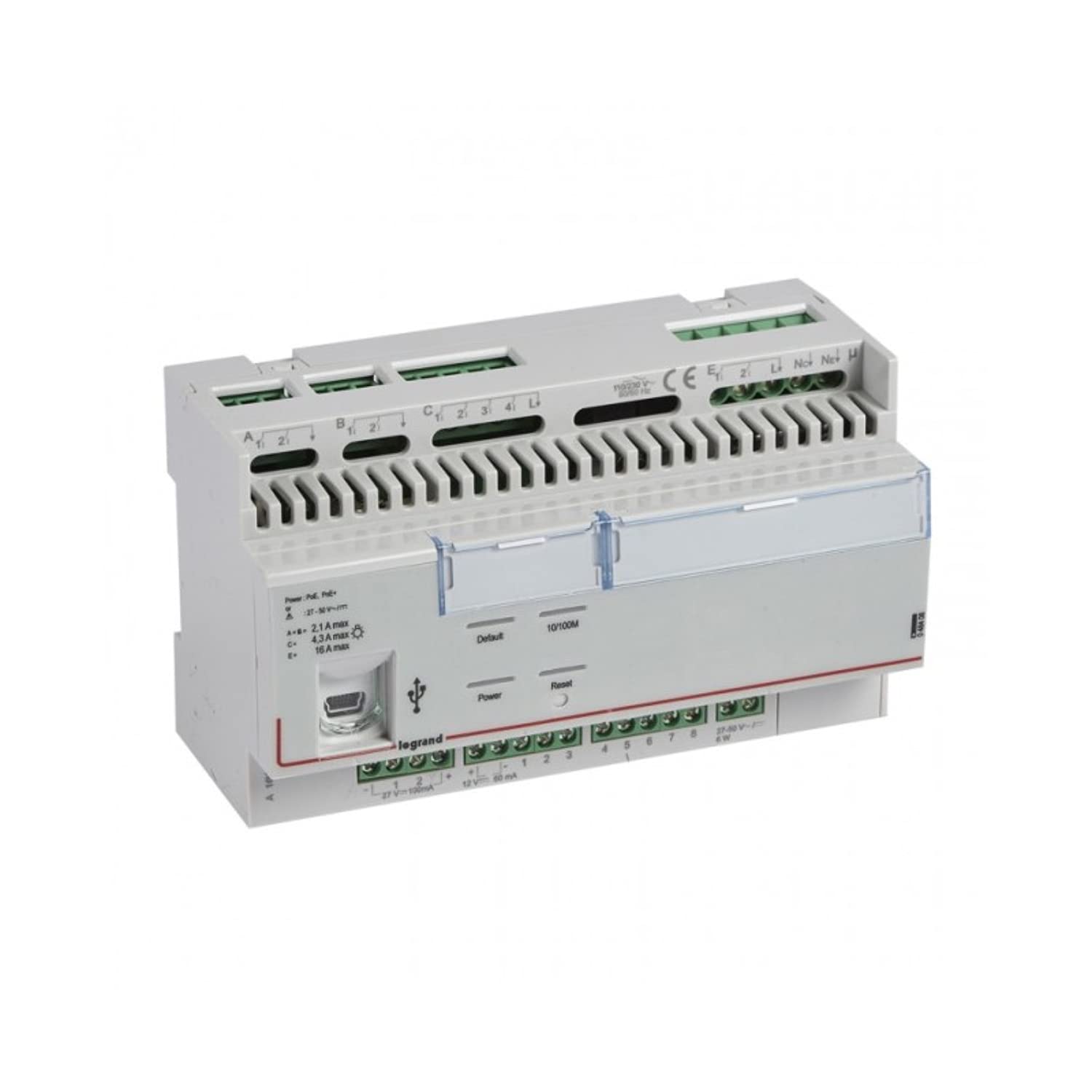
פיגורע 1: פראָנט view of the Legrand 048408 Room Controller IP 8Mod. This image shows the compact design of the 8-module device, typically installed in a control cabinet.
2. זיכערקייַט אינפֿאָרמאַציע
WARNING: Risk of electric shock. Installation and servicing must be performed by qualified personnel only. Disconnect power before installation or maintenance.
- שטענדיק פֿאָלגן די לאָקאַלע און נאַציאָנאַלע עלעקטרישע קאָודן.
- Ensure the power supply is disconnected before working on the device or its connections.
- דו זאלסט נישט ויסשטעלן די מיטל צו נעץ אָדער עקסטרעם טעמפּעראַטורעס.
- ניצט צוגעפאסטע פערזענלעכע שוץ-עקוויפּמענט (PPE) בעת דער אינסטאַלאַציע.
- באַשטעטיקן אַז אַלע וויירינג קאַנעקשאַנז זענען זיכער און ריכטיק איידער איר שטעלן די מאַכט.
3. סעטאַפּ און ייַנמאָנטירונג
The Legrand 048408 Room Controller is designed for DIN rail mounting within an electrical enclosure.
3.1. מאַונטינג
- Ensure the DIN rail is securely installed within the control panel.
- Align the controller's DIN rail clip with the rail.
- Press the controller firmly onto the DIN rail until it clicks into place.
3.2. וויירינג קאַנעקשאַנז
Refer to the wiring diagram provided with the product packaging for specific connection details. General steps include:
- מאַכט צושטעלן: Connect the appropriate power supply (e.g., 24V DC) to the designated terminals. Observe polarity.
- IP Network: Connect an Ethernet cable from your network switch or router to the RJ45 port on the controller.
- Module Connections: Connect external devices (e.g., sensors, actuators, lighting controls) to the 8 module terminals as per your system design. Ensure correct terminal assignments for inputs and outputs.
3.3. ערשטע אויפשטעל
- טשעק נאכאמאל אלע וויירינג פארבינדונגען פאר קארעקטקייט און זיכערהייט.
- Restore power to the control panel.
- Observe the status indicator LEDs on the controller. A solid green LED typically indicates normal operation.
4. אַפּערייטינג ינסטרוקטיאָנס
The Legrand 048408 Room Controller is primarily managed through a network interface or integrated building management software. Direct manual operation is limited to status indication.
4.1. סטאַטוס ינדיקאַטאָרס
- Power LED: Indicates power supply status. (e.g., Green = On, Off = No Power)
- נעץ LED: Indicates network connectivity and activity. (e.g., Solid Green = Connected, Blinking = Data Transfer)
- Module Status LEDs: Individual LEDs for each of the 8 modules may indicate their operational status or output state. Refer to the product's technical documentation for specific LED behavior.
4.2. נעטוואָרק קאָנפיגוראַטיאָן
Access the controller's web interface or use the provided configuration software to set up IP addresses, subnet masks, gateway, and other network parameters. Consult the Legrand software documentation for detailed instructions on network setup and device integration into your building management system.
5. וישאַלט
The Legrand 048408 Room Controller requires minimal maintenance. Regular checks ensure optimal performance and longevity.
- רייניקונג: Periodically clean the exterior of the device with a soft, dry cloth. Do not use abrasive cleaners or solvents. Ensure power is disconnected before cleaning.
- Firmware דערהייַנטיקונגען: Check the official Legrand website for available firmware updates. Follow the provided instructions carefully to update the device firmware, typically via the network interface.
- קשר טשעקס: Annually inspect all wiring connections for tightness and signs of wear or corrosion.
6. טראָובלעשאָאָטינג
די סעקציע גיט לייזונגען צו געוויינטלעכע פראבלעמען וואָס איר קענט באַגעגענען.
| פּראָבלעם | מעגלעך סיבה | לייזונג |
|---|---|---|
| מיטל טוט נישט אָנצינדן. | קיין מאַכט צושטעל; פאַלשע וויירינג; דעפעקטיווע מאַכט צושטעל. | קאָנטראָליר די מאַכט קאַנעקשאַנז און צושטעל וואָלומעןtage. Ensure polarity is correct. Test power supply. |
| קיין נעץ קאָנעקטיוויטי. | Ethernet cable disconnected or faulty; incorrect IP settings; network switch issue. | Verify Ethernet cable connection. Check network LED status. Confirm IP settings in the controller's configuration. Test network switch. |
| Module outputs not responding. | Incorrect wiring to external device; software configuration error; faulty module. | Check wiring to the external device. Review software configuration for the specific module. Contact support if module appears faulty. |
If the problem persists after attempting these solutions, contact Legrand technical support.
7. ספּעסאַפאַקיישאַנז
Technical specifications for the Legrand 048408 Room Controller IP 8Mod:
| שטריך | דעטאַל |
|---|---|
| מאָדעל נומער | 048408 |
| סאָרט | לעגראנד |
| פּראָדוקט דימענשאַנז | 1.97 X 7.87 X 3.15 אינטשעס |
| פּונקט וואָג | 2.2 pounds (approximately 1 Kilogram) |
| נומער פון מאָדולעס | 8 |
| מאַונטינג טיפּ | DIN רעלס |
| קאַנעקטיוויטי | IP (Ethernet) |
| באַטעריז פארלאנגט | ניין |
| ערשטער דאַטע בנימצא | יולי 23, 2022 |
8. וואָראַנטי און שטיצן
Legrand products are manufactured to high standards and are backed by a limited warranty. For specific warranty terms and conditions, please refer to the documentation included with your purchase or visit the official Legrand webפּלאַץ.
For technical assistance, troubleshooting beyond this manual, or warranty claims, please contact Legrand customer support:
- Webפּלאַץ: www.legrand.us (or your regional Legrand webפּלאַץ)
- קאָנטאַקט אינפֿאָרמאַציע: Refer to the "Contact Us" section on the Legrand webזייטל פֿאַר טעלעפאָן נומערן און אימעיל שטיצע.


