FORTINET FortiGate FG-600D Firewall User Manual
Model: FG-600D
1. הקדמה
The FortiGate FG-600D is a high-performance network security appliance designed for mid-sized to large enterprises. It provides advanced threat protection, deep visibility into network traffic, and flexible deployment options for campus, data center edge, and internal segments. This manual provides essential information for the proper installation, configuration, operation, and maintenance of your FortiGate FG-600D device.
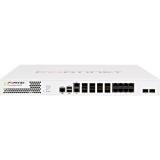
בילד 1.1: פראָנט view of the FortiGate FG-600D Firewall, showcasing its ports and indicators.
2. זיכערקייַט אינפֿאָרמאַציע
Please read all safety instructions carefully before installing or operating the FortiGate FG-600D. Failure to comply with these instructions may result in injury, damage to the device, or voiding the warranty.
- מאַכט: Use only the power supply provided with the device. Ensure the power source matches the voltagE באדערפענישן.
- ווענטילאַטיאָן: Do not block ventilation openings. Ensure adequate airflow around the device to prevent overheating.
- סוויווע: Operate the device in a clean, dry environment within the specified temperature and humidity ranges. Avoid direct sunlight, heat sources, and excessive dust.
- סערוויס: דו זאלסט נישט פּרווון צו דינען דעם מיטל זיך. אָפּשיקן אַלע סערוויסעס צו קוואַלאַפייד פּערסאַנעל.
- מאָונטינג: If rack-mounting, ensure the rack is stable and can support the device's weight (approximately 32 pounds).
3. פּעקל אינהאַלט
Verify that all items are present and in good condition upon unpacking your FortiGate FG-600D. If any items are missing or damaged, contact your vendor immediately.
- FortiGate FG-600D Appliance
- מאַכט קאַבלע (ס)
- Rack Mount Kit (if applicable)
- Console Cable (RJ45 to DB9)
- באַניצער גייד (דעם דאָקומענט)
- שנעל אָנהייב גייד
4. סעטאַפּ און ייַנמאָנטירונג
4.1 גשמיות ינסטאַלירונג
- געשטעל מאָונטינג: Securely mount the FortiGate FG-600D into a standard 19-inch equipment rack using the provided rack mount kit. Ensure proper weight distribution and ventilation.
- מאַכט קשר: Connect the power cable(s) to the appliance and a grounded electrical outlet.
- ערשטע איינשטראָם: Press the power button. Observe the system status LEDs for initial boot sequence.
4.2 נעץ קאַנעקשאַנז
The FortiGate FG-600D features multiple RJ45 interfaces for network connectivity. Connect your network cables to the appropriate ports based on your network design.
- WAN Ports: Connect to your Internet Service Provider (ISP) or upstream network.
- LAN Ports: Connect to your internal network segments.
- פאַרוואַלטונג פּאָרט: Use for initial configuration and management access.
4.3 ערשטיקע קאָנפיגוראַציע צוטריט
Access the FortiGate FG-600D for initial configuration via a console cable or a web בלעטערער.
- קאַנסאָול אַקסעס: Connect a console cable from your computer to the FortiGate's console port. Use a terminal emulator (e.g., PuTTY) with settings: 9600 baud, 8 data bits, no parity, 1 stop bit, no flow control.
- Web-based Manager: Once the device has an IP address configured (either manually via console or via DHCP), you can access the web-based manager by entering the device's IP address into a web בלעטערער.
5. אָפּעראַציע
The FortiGate FG-600D operates as a next-generation firewall, providing comprehensive security features. Its primary function is to inspect and control network traffic based on defined security policies.
5.1 Key Operational Aspects
- Policy Configuration: Define firewall policies to control traffic flow between different network interfaces and zones.
- אַפּליקאַציע קאָנטראָל: The FortiGate FG-600D can identify thousands of applications, including cloud applications, for deep inspection and granular control over network traffic.
- סאַקאָנע שוץ: Utilize features like Intrusion Prevention System (IPS), antivirus, web filtering, and anti-spam to protect against cyber threats.
- VPN: Configure Virtual Private Networks (VPNs) for secure remote access and site-to-site connectivity.
- Monitoring and Logging: Regularly monitor system logs, traffic logs, and security events to ensure optimal performance and detect potential issues.
For detailed configuration and advanced operational procedures, refer to the FortiGate Administration Guide available on the Fortinet support webפּלאַץ.
6. וישאַלט
Regular maintenance ensures the longevity and optimal performance of your FortiGate FG-600D.
- Firmware דערהייַנטיקונגען: Periodically check for and apply the latest firmware updates from Fortinet to ensure you have the most current security features and bug fixes.
- קאָנפיגוראַטיאָן באַקקופּ: Regularly back up your device configuration. This is crucial for disaster recovery.
- ענווייראָנמענטאַלע טשעקס: Ensure the operating environment remains within specified temperature and humidity ranges. Keep ventilation clear.
- גשמיות דורכקוק: Periodically inspect cables and connections for wear or damage.
7. טראָובלעשאָאָטינג
This section provides solutions to common issues you might encounter with your FortiGate FG-600D.
| פּראָבלעם | מעגלעך סיבה | לייזונג |
|---|---|---|
| די מיטל טוט נישט מאַכט אויף. | No power, faulty power cable, or power supply issue. | Check power cable connections. Ensure the power outlet is functional. Try a different power cable if available. |
| קענען ניט צוטריט web- באזירט פאַרוואַלטער. | Incorrect IP address, network connectivity issue, or browser problem. | Verify the device's IP address. Check network cable connections. Try clearing browser cache or using a different browser. Ensure your computer is on the same network segment or has a route to the FortiGate. |
| Network traffic not flowing as expected. | Incorrect firewall policies, routing issues, or interface configuration errors. | Review your firewall policies and routing tables. Check interface status and configuration. Use diagnostic tools available in the FortiGate CLI. |
If you continue to experience issues, consult the Fortinet support documentation or contact technical support.
8. ספּעסאַפאַקיישאַנז
| שטריך | דעטאַל |
|---|---|
| מאָדעל נומער | פג-600ד |
| סאָרט | FORTINET |
| צובינד טיפּ | RJ45 |
| נומער פון פּאָרץ | 8 |
| פּונקט וואָג | 32 פונט |
| פּעקל דימענשאַנז | 23 X 17 X 6.5 אינטשעס |
| ערשטער בנימצא טאָג | 17 נאוועמבער 2015 |
| UPC | 619587321387 , 712155581920 , 040232305542 |
9. וואָראַנטי און שטיצן
FORTINET products are backed by a limited warranty. For detailed warranty information, please refer to the warranty statement included with your product or visit the official Fortinet webפּלאַץ.
For technical support, documentation, and software downloads, please visit the Fortinet support portal. You can also find more information about FORTINET products by visiting the FORTINET Store on Amazon.


