הקדמה
This manual provides instructions for the HAVIT HV-KB366L RGB Backlit Mechanical Gaming Keyboard. This keyboard features blue mechanical switches, full anti-ghosting, and customizable RGB backlighting, designed for reliable performance.
סעטאַפּ אינסטרוקציעס
קאַנעקטינג די קלאַוויאַטור
- געפֿינען אַן בנימצא וסב פּאָרט אויף דיין קאָמפּיוטער.
- Connect the USB cable from the HAVIT HV-KB366L keyboard to the USB port on your computer.
- די קלאַוויאַטור איז פּלאַג-און-פּליי און זאָל ווערן אויטאָמאַטיש דערקענט דורך אייער אָפּערייטינג סיסטעם.
סיסטעם קאַמפּאַטאַבילאַטי
- Compatible with Windows 10 and other Windows operating systems.
- Mac OS supports 6-key rollover only.
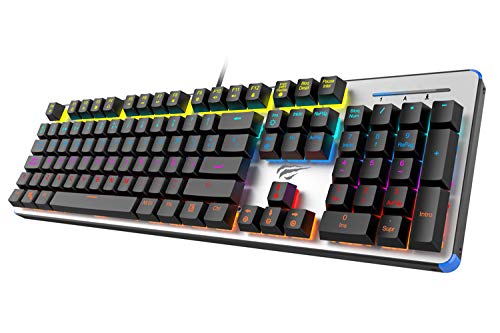
Figure 1: HAVIT HV-KB366L RGB Backlit Mechanical Gaming Keyboard. An overhead view פון דער קלאַוויאַטור, ווייַזןasing its full layout with RGB lighting on the keys and a white frame.
אַפּערייטינג ינסטראַקשאַנז
מעטשאַניקאַל דורכפֿאַל סוויטשיז
The keyboard is equipped with blue mechanical switches, providing tactile feedback and an audible click with each keystroke. This design is intended for precise input during typing and gaming.
Anti-Ghosting Feature
The full key anti-ghosting mechanism ensures that all key presses are registered accurately, even when multiple keys are pressed simultaneously. This feature is beneficial for fast-paced gaming.
באַקלייט אַדזשאַסטמאַנט
- To change the backlight color or mode, press the Fn שליסל גלײַכצײַטיק מיט דעם באַקלייט key. Repeated presses will cycle through available modes and colors.
- Marquee Mode: In 7-color backlit mode (non-breathing), press the באַקלייט key once to activate marquee mode. Press the באַקלייט key again to deactivate marquee mode and return to 7-color backlit mode.
- ברייטנאַס לעוועלס: The backlight offers 4 levels of brightness adjustment.
- אָטעמען ראַטע: The breathing effect has 10 adjustable levels.
וישאַלט
רייניקונג די קלאַוויאַטור
- אָפּשטעקן די קלאַוויאַטור פֿון אייער קאָמפּיוטער איידער איר רייניקט.
- ניצט אַ ווייכן, טרוקענעם שטאָף צו ווישן די ייבערפלאַך פון דער קלאַוויאַטור.
- פֿאַר שטויב און שמוץ צווישן שליסלען, ניצט קאָמפּרעסירטע לופט.
- פֿאַרמײַדט די נוצן פֿון שאַרפֿע כעמיקאַלן אָדער אַברייזיוו מאַטעריאַלן, ווײַל די קענען שעדיקן די ענדיקונג אָדער די קלאַוויאַטורן.
געווער
The keyboard features an aluminum top housing with a sanded finish and a metal base, contributing to its overall durability and stable performance.
טראָובלעשאָאָטינג
קלאַוויאַטור ניט ריספּאַנדינג
- זיכער מאַכן אַז דער USB קאַבל איז זיכער פארבונדן צו ביידע די קלאַוויאַטור און דעם קאָמפּיוטער.
- פרובירט צו קאנעקטן די קלאַוויאַטור צו אַן אַנדער USB פּאָרט אויף אייער קאָמפּיוטער.
- Test the keyboard on another computer to determine if the issue is with the keyboard or the computer's USB port.
Backlight Not Working or Incorrect
- Verify that the keyboard is properly connected and receiving power.
- דרוק Fn + Backlit key to cycle through backlight modes and ensure it is not turned off or set to a very low brightness.
- Refer to the "Backlight Adjustment" section for detailed instructions on changing modes and brightness.
ספּעסאַפאַקיישאַנז
| סאָרט | HAVIT |
| מאָדעל נומער | HV-KB366L |
| פאַבריקאַנט | HAVIT |
| פּראָדוקט דימענשאַנז | 50.5 X 17.6 X 6 סענטימעטער |
| פּונקט וואָג | 1.33 קג |
| קאַנעקטיוויטי טעכנאָלאָגיע | ווייערד (וסב) |
| קלאַוויאַטור באַשרייַבונג | גאַמינג מעטשאַניקאַל קיבאָרד |
| ספּעציעלע שטריך | RGB Backlit, Anti-Ghosting |
| ייַזנוואַרג פּלאַטפאָרמע | לאַפּטאַפּ, פּיסי |
| אָפּערייטינג סיסטעם | Windows 10 (and compatible), Mac OS (6-key rollover) |
| Voltage | 5 וואלטס |
| אַרייַנגערעכנט קאַמפּאָונאַנץ | וסב קאַבלע |
וואָראַנטי & שטיצן
וואָראַנטי אינפֿאָרמאַציע
Specific warranty details for the HAVIT HV-KB366L keyboard are not provided in the product data. Please refer to the product packaging or contact HAVIT directly for warranty terms and conditions.
קונה שטיצן
For technical assistance, troubleshooting, or further inquiries, please contact HAVIT customer support through their official webפּלאַץ אָדער די קאָנטאַקט אינפֿאָרמאַציע צוגעשטעלט מיט דיין קויפן.


