1. הקדמה
This manual provides detailed instructions for the safe and effective operation of the Meco 2250-HZ Auto Digital Clamp Meter. This device is designed for measuring various electrical parameters, including AC/DC voltage, AC current, frequency, continuity, and diode testing. Please read this manual thoroughly before use and retain it for future reference.
2. זיכערקייַט אינפֿאָרמאַציע
Always observe standard safety precautions when working with electrical circuits. Failure to do so may result in injury or damage to the meter. This meter is designed with over-voltage protection up to 200V DC and AC Peak. However, exercise caution.
- דו זאלסט נישט פּרווון צו מעסטן וואָלtagעס אדער שטראמען וואס איבערשטייגן די ספעציפישע מאקסימום לימיטן.
- Ensure the test leads are in good condition and properly connected before making measurements.
- Do not operate the meter if it appears damaged or if the battery cover is not securely closed.
- Avoid using the meter in wet environments or in the presence of explosive gases or dust.
- Always disconnect power to the circuit before connecting or disconnecting test leads, especially for current measurements.
3. פּראָדוקט איבערview
The Meco 2250-HZ Auto Digital Clamp Meter features a robust design for reliable performance. Familiarize yourself with the components shown below.
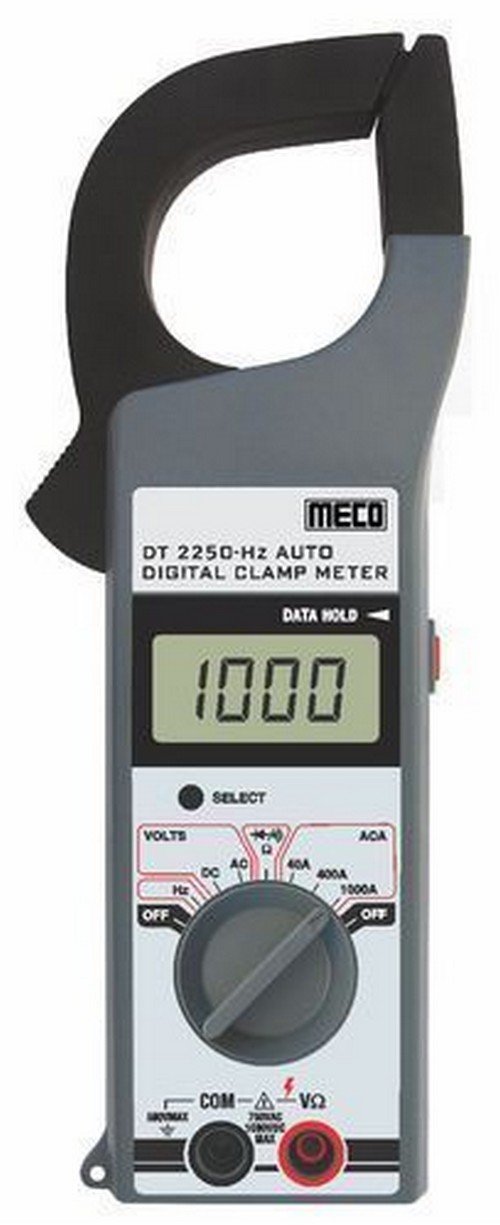
פיגורע 1: פראָנט view of the Meco 2250-HZ Auto Digital Clamp Meter. This image displays the clamp jaw at the top, the LCD screen showing '1000', the function dial, and the input terminals at the bottom. The 'SELECT' and 'DATA HOLD' buttons are visible next to the display.
שליסל קאַמפּאָונאַנץ:
- Clamp קין: געניצט פֿאַר ניט-קאָנטאַקט AC קראַנט מעסטונג.
- LCD ווייַז: 3¾ digit liquid crystal display with a maximum reading of 3999. Shows measurement values, polarity, overrange indication (OL or -OL), and low battery indication.
- פונקציע רעדל: Rotary switch to select measurement functions (OFF, Volts DC/AC, Hz, ACA 40A/400A/1000A).
- SELECT קנעפּל: Used to switch between DC and AC voltage modes, or other sub-functions within a dial setting.
- DATA HOLD Button: איינפֿרירט די איצטיקע לייענונג אויף דער אַרויסווייַזונג. דריק ווידער צו באַפֿרײַען.
- Input Terminals (COM, VΩ): פֿאַר פֿאַרבינדן טעסט דראָטן פֿאַר וואָלtage, קעגנשטעל, קאָנטינויִטעט, און דיאָד מעסטונגען.
4. סעטאַפּ
4.1 באַטאַרייע ייַנמאָנטירונג
The Meco 2250-HZ Auto Digital Clamp Meter requires batteries for operation. Batteries are not included with the product. To install or replace batteries:
- זיכער מאַכן אַז דער מעטער איז אויסגעלאָשן.
- געפינט די באַטעריע אָפּטייל אויף דער צוריקזייט פון דעם מעטער.
- ניצן אַ שרויפנ - ציער צו עפענען די באַטאַרייע אָפּטייל דעקן.
- Insert the required batteries, observing correct polarity (+ and -).
- פאַרבייַטן די דעקן פון די באַטאַרייע אָפּטייל און באַוואָרענען עס מיט די שרויף.
A low battery indication will appear on the display when the battery voltage is low, signaling the need for replacement.
5. אַפּערייטינג ינסטרוקטיאָנס
5.1 אַלגעמיינע אָפּעראַציע
- Turn the function dial to the desired measurement setting.
- Connect test leads to the appropriate input terminals (COM and VΩ) for voltage, resistance, continuity, or diode tests.
- פֿאַר קראַנט מעסטונגען, ניצט די clamp jaw around a single conductor.
- דרוק די אויסקלייַבן button to toggle between AC/DC modes or other sub-functions if available for the selected range.
- דרוק די דאַטן האַלטן קנעפּל צו איינפֿרירן די איצטיקע לייענונג אויף דער אַרויסווייַזונג. דריק ווידער צו לאָזן.
5.2 AC/DC VoltagE מעזשערמאַנט
- Set the function dial to the "VOLTS" position.
- Connect the black test lead to the COM terminal and the red test lead to the VΩ terminal.
- דרוק די אויסקלייַבן button to choose between AC or DC voltage measurement. The display will indicate "AC" or "DC".
- פֿאַרבינדט די טעסט־לידער פּאַראַלעל צום קרייז אָדער קאָמפּאָנענט וואָס ווערט געטעסט.
- לייענען דעם חלקtagE ווערט אויף די לקד אַרויסווייַזן.
5.3 AC קראַנט מעסטונג (Clamp)
- Set the function dial to the desired AC current range (40A, 400A, or 1000A).
- עפענען די קלamp קין דורך דריקן דעם טריגער.
- אַריינשליסן נאָר איין קאַנדאַקטער פֿון דעם קרייַז אין דער קל.amp קין. זיכער מאַכן אַז דער קין איז גאָר פֿאַרמאַכט.
- לייענט דעם AC קראַנט ווערט אויף דעם LCD דיספּלעי.
5.4 פרעקווענץ (הרץ) מעסטונג
- Set the function dial to the "Hz" position.
- Connect the black test lead to the COM terminal and the red test lead to the VΩ terminal.
- Connect the test leads in parallel to the circuit where frequency needs to be measured.
- Read the frequency value in Hertz (Hz) on the LCD display.
5.5 Audible Continuity Check
- Set the function dial to the continuity/diode symbol (often shared with resistance).
- Connect the black test lead to the COM terminal and the red test lead to the VΩ terminal.
- Touch the test probes across the component or circuit to be tested.
- אויב עס עקזיסטירט קאָנטינויִטעט (נידעריק קעגנשטעל), וועט דער מעטער ארויסגעבן אַן הערבאַרן ביפּ.
5.6 דייאָוד טעסט
- Set the function dial to the continuity/diode symbol.
- Connect the black test lead to the COM terminal and the red test lead to the VΩ terminal.
- Connect the red test lead to the anode of the diode and the black test lead to the cathode. The display will show the forward voltagאון קאַפּ.
- Reverse the test leads. The display should show "OL" (overload) for a good diode.
6. וישאַלט
6.1 רייניקונג
ווישט אויס דעם מעטער'ס קasinג מיט אַדamp cloth and a mild detergent. Do not use abrasives or solvents. Keep the display clean and dry.
6.2 באַטערי פאַרבייַט
Refer to Section 4.1 for battery installation and replacement instructions. Replace batteries promptly when the low battery indicator appears to ensure accurate readings.
7. טראָובלעשאָאָטינג
| פּראָבלעם | מעגלעך סיבה | לייזונג |
|---|---|---|
| דער מעטער גייט נישט אן. | טויטע אדער נישט ריכטיק אינסטאלירטע באַטעריעס. | קאָנטראָלירט די פּאָלאַריטעט פון די באַטעריעס און פאַרבייט די באַטעריעס אויב נייטיק. |
| "OL" or "-OL" displayed. | Overrange condition; measurement exceeds meter's range. | אויסקלייבן אַ העכערע קייט אָדער זיכער מאַכן אַז דער געמאָסטן ווערט איז אין די מעגלעכקייטן פון די מעטער. |
| ומפּינקטלעך רידינגז. | Low battery, poor test lead connection, or incorrect function selection. | Replace batteries, ensure secure connections, verify function dial setting. |
| No audible beep during continuity test. | אפענע קרייז אדער הויכע קעגנשטאנד. | Verify the circuit is closed and resistance is low enough for continuity. |
8. ספּעסאַפאַקיישאַנז
| שטריך | דעטאַל |
|---|---|
| ווייַז | 3¾ digit LCD, max reading 3999 |
| פּאָולעראַטי | Automatic, negative polarity indication |
| אָנווייַז פון אָוווערריינדזש | "OL" or "-OL" displayed |
| נול אַדזשאַסטמאַנט | אָטאַמאַטיק |
| באַטערי לעבן | 200 שעה טיפּיש |
| איבער וואָלtagE פּראַטעקשאַן | 200V DC and AC Peak |
| Audible Continuity Check | יא |
| דייאָוד טעסט | יא |
| נידעריק באַטערי ינדיקאַטיאָן | יא |
| פּונקט וואָג | 600 ג (1.32 פונט) |
| פּראָדוקט דימענשאַנז | 21 X 13 X 6 סענטימעטער |
| מאַטעריאַל | פּלאַסטיק |
| פאַבריקאַנט | Meco Instruments |
9. וואָראַנטי און שטיצן
For warranty information or technical support, please contact the retailer or the manufacturer, Meco Instruments, directly. Keep your purchase receipt as proof of purchase.


