1. הקדמה
א דאנק פארן קויפןasing the Marvo G904 6D Optical Wired Gaming Mouse. This manual provides essential information for the proper setup, operation, and maintenance of your new gaming mouse. Please read this manual thoroughly before use to ensure optimal performance and longevity of the product.
2. פּראָדוקט איבערview
The Marvo G904 is a high-performance 6D optical wired gaming mouse designed for precision and comfort. It features an AVago3050 sensor, adjustable DPI settings, and programmable buttons to enhance your gaming experience.

Figure 1: Marvo G904 Gaming Mouse with blue LED lighting, showcasing its ergonomic design and illuminated accents.

Figure 2: Marvo G904 Gaming Mouse displaying green LED lighting, indicating different lighting modes or DPI settings.
3. סעטאַפּ
Follow these steps to set up your Marvo G904 gaming mouse:
- אויספּאַקן די מויז: Carefully remove the mouse and any accessories from its packaging.
- פאַרבינדן צו קאָמפּיוטער: Plug the USB connector of the mouse into an available USB port on your computer. The mouse is plug-and-play for basic functionality.
- Install Driver (Optional for Advanced Features): For full functionality, including macro programming and advanced DPI settings, insert the provided CD driver into your computer's optical drive and follow the on-screen instructions to install the software. If your computer does not have an optical drive, please visit the official Marvo webפּלאַץ פֿאַר שאָפער דאַונלאָודז.

Figure 3: Marvo G904 Gaming Mouse packaging, which includes the driver CD.
4. אַפּערייטינג ינסטרוקטיאָנס
The Marvo G904 mouse features 6 buttons and adjustable DPI settings for versatile control.
4.1 קנעפּל פאַנגקשאַנז
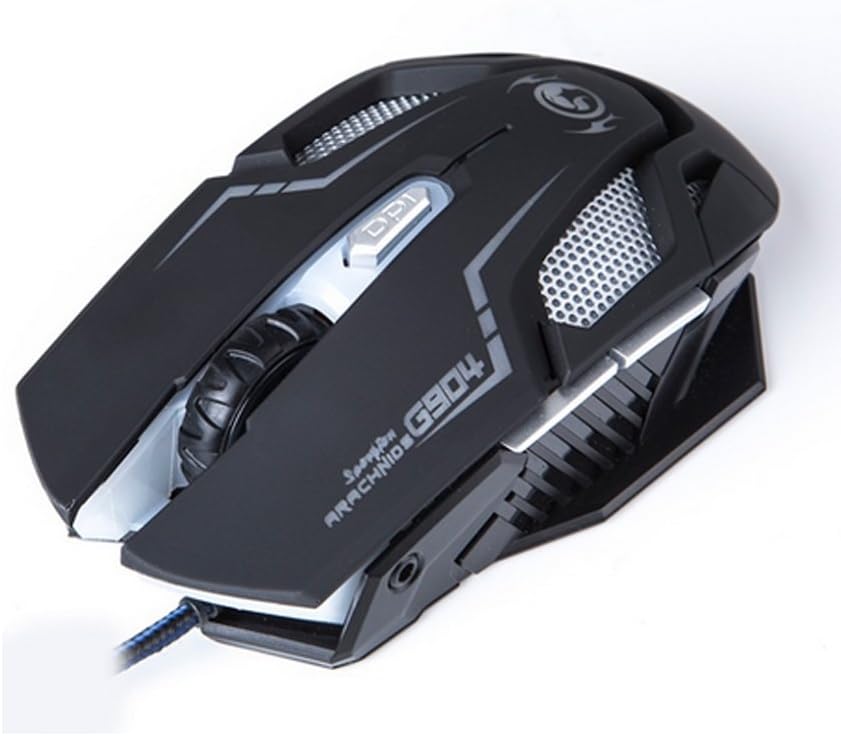
פיגורע 4: שפּיץ view of the Marvo G904 Gaming Mouse, highlighting the placement of its 6 buttons.
- לינקער קליק קנעפל: נאָרמאַלע ערשטיקע קליק פונקציע.
- רעכט קליק קנעפל: נאָרמאַלע צווייטיקע קליק פונקציע.
- סקראָל ראָד: Scrolls up/down. Can also be pressed for a middle click function.
- DPI שיפט קנעפּל: Cycles through DPI settings (1000, 2000, 3000, 4000).
- זייט קנעפּלעך (2): Typically function as 'Forward' and 'Back' in web בראַוזערז און file explorers. These can be programmed using the driver software.
4.2 דפּי אַדזשאַסטמאַנט
דרוק די DPI Shift Button (located behind the scroll wheel) to cycle through the available DPI settings: 1000, 2000, 3000, and 4000 DPI. Each DPI level may be indicated by a change in the mouse's LED lighting color or pattern, depending on the current light mode.
4.3 Macro Programming (with Light Mode)
Utilize the included CD driver software to customize button functions and create macros. The software also allows you to configure the mouse's LED lighting modes. Refer to the software's help section for detailed instructions on macro creation and light mode customization.
5. וישאַלט
געהעריגע אויפהאלטונג גאראנטירט די לאנגעוויטי און אפטימאלע פערפארמאנס פון אייער גיימינג מויז.
- רייניקונג: ניצט אַ ווייכע, טרוקענע שטאָף צו ווישן די ייבערפלאַך פון דער מויז. פֿאַר שווערע שמוץ, אַ ביסל ווייכער מאַכןampווישט דעם שטאָף מיט וואַסער אָדער אַ מילדער רייניקונג לייזונג. פֿאַרמייַדט ניצן שטרענגע כעמיקאַלן אָדער אַברייסיוו מאַטעריאַלן.
- סענסאָר זאָרגן: Keep the optical sensor on the bottom of the mouse clean and free from dust or debris. Use a cotton swab or compressed air if necessary.
- קאַבלע פאַרוואַלטונג: פֿאַרמײַדט שאַרפֿע בייגן אָדער איבערגעטריבענעם ציען דעם USB קאַבל כּדי צו פֿאַרמײַדן שאָדן.
- סטאָרידזש: ווען נישט אין באַנוץ, האַלט די מויז אין אַ ריינער, טרוקענער סביבה אַוועק פון עקסטרעמע טעמפּעראַטורן.
6. טראָובלעשאָאָטינג
If you encounter issues with your Marvo G904 mouse, refer to the following common problems and solutions:
| פּראָבלעם | לייזונג |
|---|---|
| מויז ענטפערט נישט. |
|
| די DPI סעטטינגס טוישן זיך נישט. |
|
| Buttons not functioning correctly. |
|
| Mouse cursor movement is erratic or jumpy. |
|
7. ספּעסאַפאַקיישאַנז
Detailed technical specifications for the Marvo G904 Gaming Mouse:

פיגורע 5: דנאָ view of the Marvo G904 Gaming Mouse, displaying model number, DPI range, and certification marks.
| שטריך | דעטאַל |
|---|---|
| מאָדעל | G904 |
| סענסאָר טיפּ | Optical (AVago3050) |
| דפּי סעטטינגס | 1000 / 2000 / 3000 / 4000 דפּי |
| קנעפּלעך | 6D (6 Buttons) |
| באריכט קורס | 1000 הז |
| שליסל דוראַביליטי | 10 מיליאָן קליקס |
| קאַבלע לענג | 1.5 מעטער |
| דימענסיעס (ל*ב*ה) | 143 * 76 * 42 מם |
| רייטאַד וואָלtage | 5V |
| רייטאַד קראַנט | 10 מאַ |
| קאַמפּאַטאַבילאַטי | PC |
| קאָליר | שוואַרץ |
8. וואָראַנטי און שטיצן
For warranty information and technical support, please refer to the documentation provided with your purchase or contact your retailer. You may also visit the official MARVO website for further assistance and updated driver software.


