הקדמה
Thank you for choosing the Altec Lansing iMW475 Mini Life Jacket Bluetooth Speaker. This speaker is designed for portability and durability, featuring a rugged, compact, waterproof, dustproof, and shockproof design. It also floats, making it ideal for outdoor and water-related activities. This manual provides essential information for setting up, operating, and maintaining your speaker.
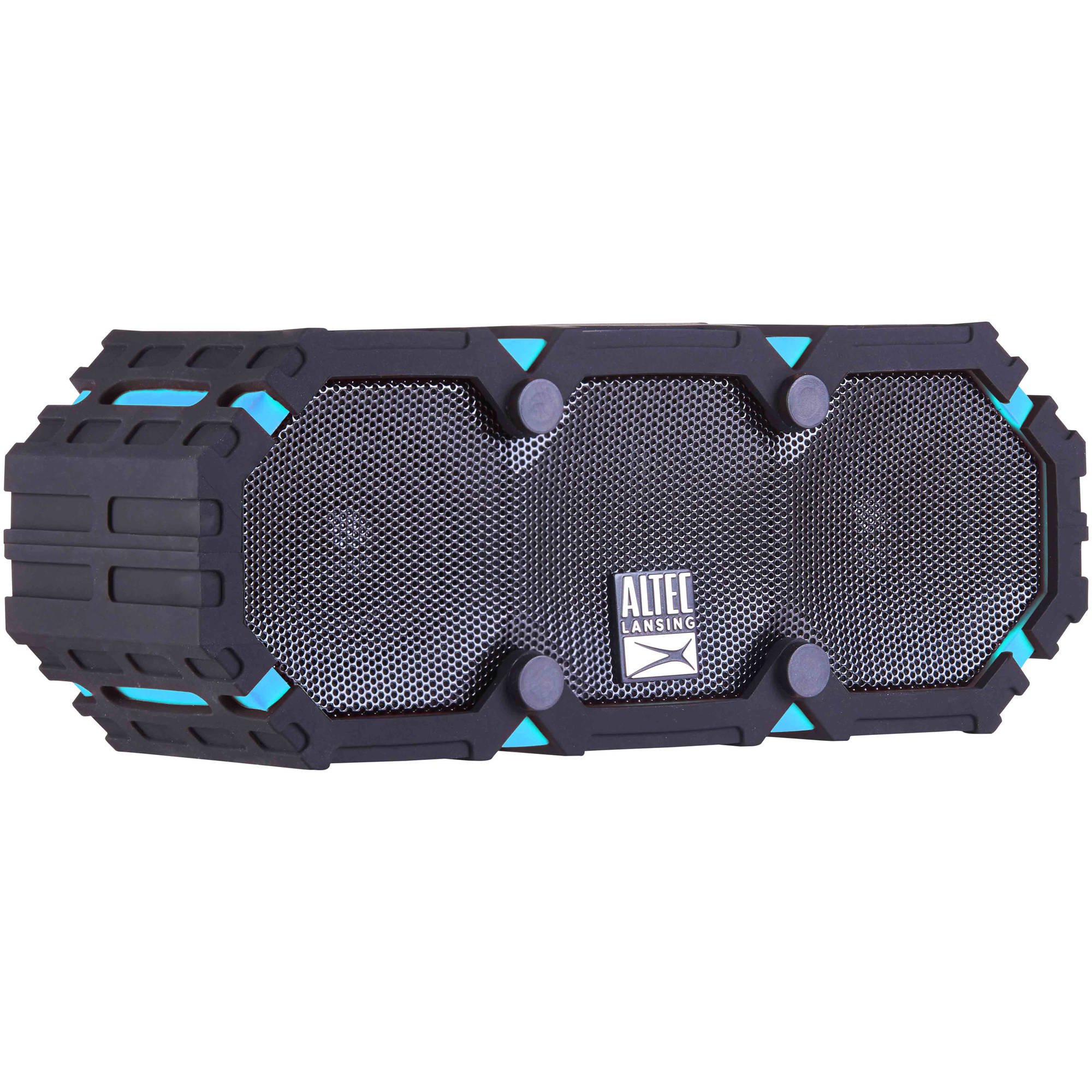
Image: The Altec Lansing iMW475 Mini Life Jacket Bluetooth Speaker, showcasing its compact, rugged design in black and blue.
פּעקל אינהאַלט
- Altec Lansing iMW475 Mini Life Jacket Bluetooth Speaker
- מאָונטינג קלאַמער
- USB Charging Cable (Note: Specific cable type not detailed in product data, typically Micro-USB or USB-C)
- Auxiliary Cable (Note: Not explicitly listed but common for such speakers)
- שנעל אָנהייב גייד (Not explicitly listed but common)
ביטע זיכער מאַכן אַז אַלע זאכן זענען פאַראַן איידער איר גייט ווייטער מיט דער סעטאַפּ.
קאָנטראָלס און ינדיקאַטאָרס
The speaker features intuitive controls for power, volume, and Bluetooth pairing. Specific button layouts may vary slightly, but common functions include:
- מאַכט קנעפּל: דריק און האלט אן צו אנצינדן אדער אויסלעשן דעם רעדנער.
- באַנד אַרויף/נעקסטע ליד קנעפּל: Press to increase volume. Hold to skip to the next track.
- באַנד אַראָפּ/פֿריִערדיקע ליד קנעפּל: Press to decrease volume. Hold to go to the previous track.
- שפּיל/פּויזע/רוף קנעפּל: Press to play or pause audio. Press to answer or end a phone call. Hold to activate voice assistant (if supported by your device).
- בלועטאָאָטה פּערינג קנעפּל: דריקן און האַלטן צו אַרייַן בלועטאָאָטה פּערינג מאָדע.
- LED ינדיקאַטאָר: Displays power status, charging status, and Bluetooth connection status.
Refer to the quick start guide included with your product for a detailed diagram of button placement.
סעטאַפּ
1. טשאַרדזשינג די ספּיקער
Before first use, fully charge your Altec Lansing iMW475 speaker. A full charge provides approximately 10 hours of battery life.
- Locate the charging port, usually protected by a waterproof flap.
- פֿאַרבינדט דעם צוגעשטעלטן USB טשאַרדזשינג קאַבל צום רעדנער'ס טשאַרדזשינג פּאָרט.
- פֿאַרבינדט דעם אַנדערן עק פֿונעם USB קאַבל צו אַ USB מאַכט אַדאַפּטער (נישט אַרייַנגערעכנט) אָדער אַ קאָמפּיוטער'ס USB פּאָרט.
- The LED indicator will show the charging status (e.g., solid red while charging, off or green when fully charged).
- אַמאָל גאָר אָנגעלאָדן, אָפּשטעקן דעם קאַבל און זיכער מאַכן אַז די וואַסערפּרוף לאַפּ איז זיכער פֿאַרמאַכט.
2. בלועטאָאָטה פּערינג
צו פֿאַרבינדן אייער רעדנער צו אַ בלוטוט-פֿאַרמעגלעכן מיטל:
- Ensure the speaker is charged and turned off.
- דריק און האלט דעם פּאַוער קנעפּל צו אנצינדן דעם רעדנער. דער LED אינדיקאַטאָר וועט בלינקען, וואָס ווײַזט אַז עס איז אין פּערינג מאָדע.
- On your mobile device (smartphone, tablet, laptop), go to the Bluetooth settings.
- זוכן פֿאַר available devices. You should see "iMW475" or a similar name in the list.
- Select "iMW475" to connect. The LED indicator will turn solid when successfully paired.
- A voice prompt may confirm "You are now connected."
- Once paired, the speaker will automatically connect to the last paired device when turned on, if the device is within range (up to 30 feet or 9.14 meters).
אַפּערייטינג ינסטראַקשאַנז
פּלייַינג אַודיאָ
- After successful Bluetooth pairing, open your preferred music application on your connected device.
- Start playing audio. The sound will be routed through your Altec Lansing iMW475 speaker.
- Use the Volume Up/Down buttons on the speaker or your connected device to adjust the audio level.
- דריק דעם שפּיל/פּויזע קנעפּל צו פּויזירן אָדער ווידער אָנהייבן שפּילן.
- Hold the Volume Up/Down buttons to skip tracks forward or backward.
הענט-פריי פאַך
The speaker features an onboard microphone for hands-free communication.
- When a call comes in, the music will pause, and you will hear a ringtone through the speaker.
- Press the Play/Pause/Call button once to answer the incoming call.
- Speak clearly into the speaker's microphone.
- To end the call, press the Play/Pause/Call button once again.
- To reject an incoming call, press and hold the Play/Pause/Call button.
ניצן די אַגזיליערי אַרייַנשרייַב
For devices without Bluetooth, you can connect via the auxiliary input.
- Locate the auxiliary input port, usually protected by a waterproof flap.
- Connect one end of a 3.5mm auxiliary cable (not included) to the speaker's AUX port.
- פאַרבינדן די אנדערע סוף צו די כעדפאָון דזשאַק פון דיין אַודיאָ מיטל.
- The speaker will automatically switch to AUX mode, or you may need to press the Mode button (if available).
- קאָנטראָליר ווידערשפּיל און באַנד פֿון דיין פֿאַרבונדענע אַודיאָ מיטל.
וישאַלט
- רייניקונג: ווישן די רעדנער מיט אַ ווייך, דamp שטאָף. דו זאלסט נישט נוצן אַברייסיוו קלינערז אָדער סאָלוואַנץ.
- וואָטערפּרוף קער: Ensure all port covers are securely closed before exposing the speaker to water to maintain its waterproof integrity. After exposure to saltwater or chlorinated water, rinse the speaker with fresh water and allow it to air dry completely.
- סטאָרידזש: האַלט דעם רעדנער אין אַ קיל, טרוקן אָרט אַוועק פון דירעקט זונשייַן און עקסטרעמע טעמפּעראַטורן.
- באַטערי זאָרגן: כדי צו פארלענגערן די לעבן פון די באַטעריע, זאָלט איר נישט אָפט אויסלאָדן די באַטעריע. לאָדט דעם רעדנער רעגולער אויף, אפילו אויב עס ווערט נישט גענוצט פאר לענגערע צייטן.
טראָובלעשאָאָטינג
| פּראָבלעם | לייזונג |
|---|---|
| דער רעדנער לאָזט זיך נישט אָנ. | Ensure the battery is charged. Connect the speaker to a power source using the USB charging cable. |
| קיין געזונט פון די רעדנער. |
|
| בלועטאָאָטה פּערינג פיילז. |
|
| Poor audio quality or distortion. |
|
ספּעסאַפאַקיישאַנז
- מאָדעל נאָמען: iMW475 Mini Life Jacket
- רעדנער טיפּ: דרויסנדיק
- ספּעציעלע פֿעיִקייטן: Waterproof, Dustproof, Shockproof, Floats
- קאַנעקטיוויטי: בלועטאָאָטה
- בלועטאָאָטה ראַנגע: אַרויף צו 30 פֿיס (9.14 מעטער)
- באַטאַרייע לעבן: אַרויף צו 10 שעה
- מאַכט מקור: Battery and AC (via USB charging)
- אַודיאָ רעזולטאַט מאָדע: סטערעאָ
- רעדנער מאַקסימום רעזולטאַט מאַכט: 10 וואטס
- קאָנטראָל אופֿן: שטימע, קנעפּלעך
- אַרייַנגערעכנט קאַמפּאָונאַנץ: מאָונטינג קלאַמער
- פּראָדוקט דימענשאַנז: 7 X 3 X 4.5 אינטשעס
- נומער וואָג: 1 פונט (16 אונסעס)
- וואַסער קעגנשטעל מדרגה: וואָטערפּרוף
- UPC: 021331205841
וואָראַנטי און שטיצן
Altec Lansing products are designed for reliability and performance. For specific warranty information regarding your iMW475 Mini Life Jacket Bluetooth Speaker, please refer to the warranty card included with your purchase or visit the official Altec Lansing webפּלאַץ.
For technical support, frequently asked questions, or to register your product, please visit the Altec Lansing support page or contact their customer service directly. Contact details are typically available on the manufacturer's webפּלאַץ.
Note: Warranty terms and conditions may vary by region and retailer. Keep your proof of purchase for warranty claims.


