הקדמה
This manual provides detailed instructions for the setup, operation, and maintenance of your Zebronic ZEB-250JP USB Vibration Game Pad. Please read this manual carefully before using the product to ensure proper functionality and longevity.
פּראָדוקט פֿעיִקייטן
- Dual vibration and shock function for immersive gaming.
- Ergonomic slip-proof handle design for comfortable grip.
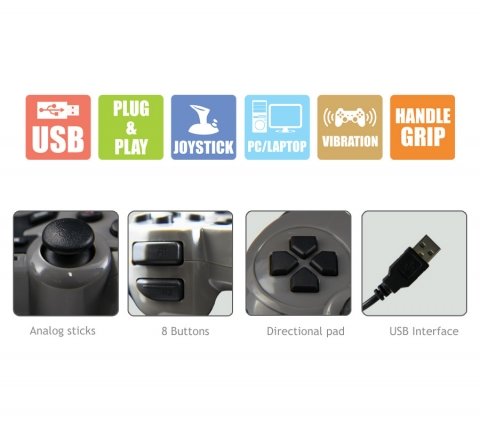
- Equipped with a directional pad, 8 fire buttons, and 2 analog sticks.
- Compatible with Windows XP, Vista, and Windows 7 operating systems.
- Supports both digital and analog modes.
פּעקל אינהאַלט
- Zebronic ZEB-250JP Game Pad
- Installation CD (for drivers, if required)
סעטאַפּ אינסטרוקציעס
- Connect the Game Pad: Locate an available USB port on your computer (Desktop or Laptop). Insert the USB connector of the ZEB-250JP Game Pad into the USB port. The device is designed for plug-and-play functionality.
- דרייווער ינסטאַלירונג: For optimal performance, especially on older operating systems like Windows XP or Vista, it is recommended to install the drivers from the provided installation CD. Insert the CD into your computer's optical drive and follow the on-screen instructions. For Windows 7 and newer, drivers may install automatically.
- סיסטעם קאַמפּאַטאַבילאַטי: Ensure your computer is running a compatible operating system (Windows XP, Vista, Windows 7).
אַפּערייטינג ינסטראַקשאַנז
קאָנטראָלס איבערview
- ריכטונגס-פאד (די-פאד): Used for directional movement or menu navigation.
- אנאַלאָג שטעקן: Two analog sticks provide 360-degree movement for finer control in games.
- Fire Buttons (8 buttons): Action buttons for in-game commands.
- ווייבריישאַן פֿונקציע: The game pad features dual vibration motors that provide tactile feedback during gameplay, enhancing immersion. This function is automatically activated by compatible games.
מאָדע סעלעקציע
The game pad supports both digital and analog modes. The mode can typically be switched using a dedicated button on the game pad (often labeled 'Mode' or 'Analog') or is automatically detected by the game. Refer to your game's settings for specific controller configurations.
וישאַלט
- Keep the game pad clean by wiping it with a soft, dry cloth.
- פֿאַרמײַדט אויסשטעלן דעם אַפּאַראַט צו עקסטרעמע טעמפּעראַטורן, דירעקטע זונשײַן, אָדער פֿײַכטקייט.
- דו זאלסט נישט נוצן האַרב קעמיקאַלז אָדער אַברייסיוו קלינערז.
- Store the game pad in a safe place when not in use to prevent damage to the cable or buttons.
טראָובלעשאָאָטינג
- Game Pad Not Detected:
- Ensure the USB cable is securely connected to both the game pad and the computer.
- Try connecting the game pad to a different USB port.
- ריסטאַרט דיין קאָמפּיוטער.
- Verify that the necessary drivers are installed from the provided CD or through Windows Update.
- Vibration Function Not Working:
- באַשטעטיקן אַז די שפּיל וואָס איר שפּילט שטיצט ווייבריישאַן פֿידבעק.
- Check the game's settings to ensure vibration is enabled.
- זיכער מאַכן אַז דרייווערס זענען ריכטיק אינסטאַלירט.
- Buttons or Analog Sticks Unresponsive:
- Test the game pad on another computer or in a different game to isolate the issue.
- Ensure the game pad is in the correct mode (digital/analog) for the game.
- Reinstall the device drivers.
ספּעסאַפאַקיישאַנז
| סאָרט | זעבראָניקס |
| מאָדעל | ZEB-250JP |
| קאַנעקטיוויטי טעכנאָלאָגיע | וסב |
| קאָנטראָללער טיפּ | גאַמעפּאַד |
| קאַמפּאַטאַבאַל דעוויסעס | Windows (Desktop, Laptop) |
| אַפּערייטינג סיסטעם שטיצן | Windows XP, Vista, Windows 7 |
| ספּעציעלע פֿעיִקייטן | Handle Grip, Joystick, Plug and Play, Vibration |
| פּראָדוקט דימענשאַנז | 24.1 X 18.3 X 6.4 סענטימעטער |
| פּונקט וואָג | 290 ג |
וואָראַנטי אינפֿאָרמאַציע
This product is covered by a standard manufacturer's warranty. Please refer to the warranty card included in your package or contact Zebronic's customer support for specific warranty terms and conditions. Keep your purchase receipt as proof of purchase.
שטיצן
For further assistance, technical support, or service inquiries, please visit the official Zebronics webזייטל אדער קאנטאקט זייער קאסטומער סערוויס דעפארטמענט. איר קענט געפינען מער אינפארמאציע און קאנטאקט דעטאלן אויף די Zebronics Store on Amazon.