1. הקדמה
This manual provides detailed instructions for the setup, operation, and maintenance of your EMOS E0114 Digital Thermometer and Hygrometer. This device accurately measures indoor temperature and humidity, and also functions as a quartz clock with an alarm, snooze feature, and date display. Please read this manual thoroughly before using the product to ensure correct operation and to prevent damage.
2. זיכערקייַט אינפֿאָרמאַציע
- האַלט דעם אַפּאַראַט אַוועק פון עקסטרעמע טעמפּעראַטורן, דירעקט זונשייַן און הויכער הומידיטי.
- דו זאלסט נישט ויסשטעלן די מיטל צו וואַסער אָדער אנדערע ליקווידס.
- פרובירט נישט צו צענעמען אדער מאדיפיצירן דעם אפאראט. דאס וועט בטל מאכן די גאראנטיע.
- אָפּזאָגן געוויינט באַטעריז ריספּאַנסאַבלי לויט די היגע רעגיאַליישאַנז.
- האַלטן באַטעריז אויס פון דערגרייכן פון קינדער.
3. פּעקל אינהאַלט
ביטע קאָנטראָלירט דעם אינהאַלט פֿון דער פּאַקעט בײַם אויספּאַקן:
- EMOS E0114 Digital Thermometer and Hygrometer
- באַניצער מאַנואַל
Note: 1 AA Mignon 1.5 V battery is required and not included in the package.

Figure 3.1: EMOS E0114 device in its retail packaging.
4. פּראָדוקט איבערview
Familiarize yourself with the components of your EMOS E0114 device.
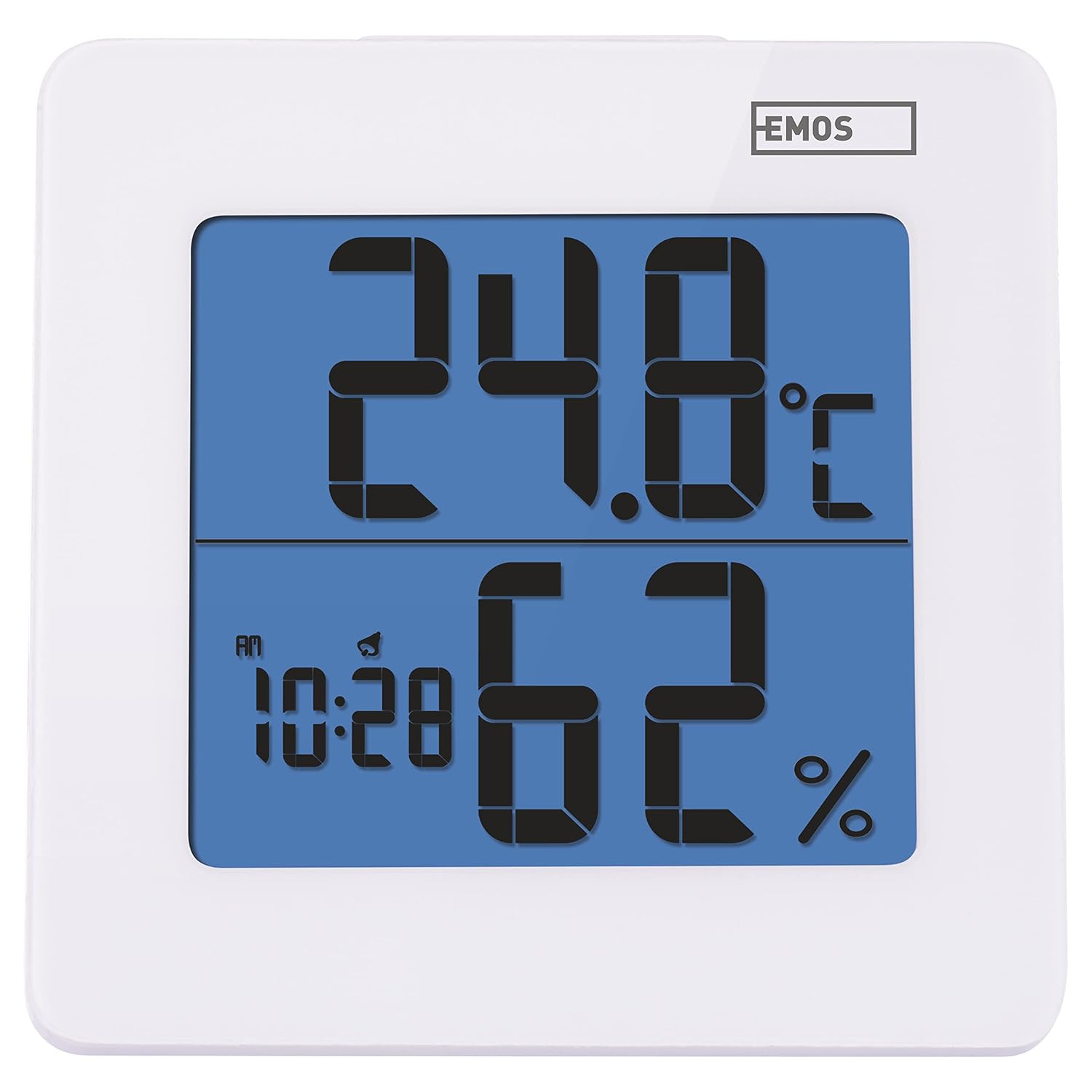
פיגורע 4.1: פראָנט view of the EMOS E0114 display, showing temperature, humidity, and time.

פיגורע 4.2: צוריק view of the EMOS E0114, highlighting the control buttons and battery compartment.
קאָנטראָל קנעפּלעך:
- DIRECTIONS: טוישט צווישן צייט-אויסשטעלונג, שרעק-אינסטאלירונג, און דאטום-אינסטאלירונג.
- אַרויף: Increases values during setting, activates/deactivates alarm.
- MEM: Displays maximum and minimum temperature/humidity records.
- C/F: טוישט צווישן צעלזיוס און פאַהרענהייט טעמפּעראַטור איינהייטן.
- באַשטעטיק: ריסטאַרט די מיטל צו פאַבריק דיפאָלץ.
- SNOOZE/LIGHT (Top Bar): Activates snooze function during alarm, illuminates the display backlight.
5. סעטאַפּ
5.1 באַטאַרייע ייַנמאָנטירונג
- געפינט די באַטעריע אָפּטייל אויף דער צוריקזייט פון דעם אַפּאַראַט (זעט בילד 4.2).
- עפענען די באַטאַרייע אָפּטייל דעקן.
- Insert one (1) AA Mignon 1.5 V battery, ensuring correct polarity (+/-).
- פאַרמאַכן די באַטאַרייע אָפּטייל דעקן סיקיורלי.
5.2 ערשט מאַכט אויף
Upon battery installation, the device will power on automatically and display the current time (default 12:00 AM), temperature, and humidity. The backlight will briefly illuminate.
6. אַפּערייטינג ינסטרוקטיאָנס
6.1 באַשטעטיקן צייט און דאַטע
- אין נאָרמאַל צייט אַרויסווייַזן מאָדע, דריקן די מאָדע דריקן דעם קנעפל איין מאל צו אריינגיין אין צייט איינשטעלונג מאָדע. די שעה ציפערן וועלן בלינקען.
- ניצן די UP קנעפּל צו סטרויערן די שעה.
- דרוק מאָדע again to set the minutes. The minute digits will flash. Use the UP קנעפּל צו סטרויערן די מינוט.
- דרוק מאָדע again to set the year. The year digits will flash. Use the UP קנעפּל צו סטרויערן די יאָר.
- פאָרזעצן דרינגלעך מאָדע to set the month and then the day, adjusting each with the UP קנעפּל.
- נאכדעם וואס איר שטעלט איין דעם טאג, דריקט מאָדע to exit setting mode and return to normal time display.
6.2 באַשטעטיקן די שרעק
- אין נאָרמאַל צייט אַרויסווייַזן מאָדע, דריקן די מאָדע button twice to enter alarm setting mode. The alarm time will be displayed, and the hour digits will flash.
- ניצן די UP קנעפּל צו סטרויערן די שרעק שעה.
- דרוק מאָדע again to set the alarm minutes. The minute digits will flash. Use the UP קנעפּל צו סטרויערן די אַלאַרם מינוטן.
- דרוק מאָדע צו פארלאזן דעם שרעק שטעל מאָדע.
- צו אַקטיווירן אָדער דעאַקטיווירן דעם אַלאַרם, דריק די UP button once in normal time display mode. An alarm icon will appear on the display when activated.
6.3 Using Snooze and Backlight
- ווען דער שרעק סאָונדס, דריקן די SNOOZE / LIGHT bar on top of the device to activate the snooze function. The alarm will pause for approximately 5 minutes and then sound again.
- To turn off the alarm completely, press any other button (MODE, UP, MEM, C/F) on the back of the device.
- דרוק די SNOOZE / LIGHT bar at any time to briefly illuminate the display backlight for better visibility in low light conditions.
6.4 וועקסלען טעמפּעראַטור איינהייטן (°C/°F)
אין נאָרמאַל אַרויסווייַזן מאָדע, דריקן די C / F button on the back of the device to toggle between Celsius (°C) and Fahrenheit (°F) temperature readings.
6.5 Viewing Maximum and Minimum Records
The device stores the maximum and minimum temperature and humidity values recorded since the last reset or battery change.
- דרוק די MEM button once to display the maximum recorded temperature and humidity.
- דרוק די MEM button again to display the minimum recorded temperature and humidity.
- דרוק MEM a third time to return to the current temperature and humidity display.
- To clear the maximum/minimum records, press and hold the MEM קנעפּל פֿאַר בעערעך 3 סעקונדעס בשעת viewביי די רעקאָרדס.
7. וישאַלט
7.1 רייניקונג
- ווישן די מיטל מיט אַ ווייך, טרוקן שטאָף.
- Do not use abrasive cleaners, solvents, or chemical agents, as these may damage the display or casing.
7.2 באַטערי פאַרבייַט
When the display becomes dim or the device stops functioning, it is time to replace the battery.
- עפענען די באַטאַרייע אָפּטייל דעקן אויף די צוריק פון די מיטל.
- אַרויסנעמען די אַלטע AA באַטאַרייע.
- Insert a new AA Mignon 1.5 V battery, observing correct polarity.
- נאָענט די דעקן פון די באַטאַרייע אָפּטייל.
- You may need to reset the time and date after battery replacement.
8. טראָובלעשאָאָטינג
| פּראָבלעם | מעגלעך סיבה | לייזונג |
|---|---|---|
| קיין דיספּלעי אָדער טונקעל דיספּלעי | נידעריגע אדער טויטע באַטעריע; אומרעכטע באַטעריע אינסטאַלאַציע. | Replace the battery with a new AA 1.5V battery. Ensure correct polarity. |
| אומרעכטע צייט/דאטום | Time/date not set correctly after battery installation or reset. | Follow instructions in Section 6.1 to set the time and date. |
| Temperature/humidity readings seem inaccurate | Device placed in an unsuitable location (e.g., near heat source, vent, direct sunlight). | Relocate the device to a stable indoor environment away from direct influences. Allow 30 minutes for readings to stabilize. |
| שרעק טוט נישט געזונט | Alarm is not activated. | Ensure the alarm icon is visible on the display (refer to Section 6.2). |
| אַפּאַראַט רעאַגירט נישט | צייטווייליגע עלעקטראָנישע פּראָבלעם. | דרוק די באַשטעטיק button on the back of the device using a thin object (e.g., paperclip). Note: This will clear all settings. |
9. ספּעסאַפאַקיישאַנז
- מאָדעל: E0114
- סאָרט: EMOS
- טעמפּעראַטור מעאַסורעמענט ראַנגע: 0 ° C צו +50 ° C (32 ° F צו 122 ° F)
- טעמפּעראַטור רעזאלוציע: 0.1 °C / 0.1 °F
- הומידיטי מעזשערמאַנט קייט: 20% צו 90% רעלאַטיוו הומידיטי (רה)
- הומידיטי רעזאלוציע: 1% רה
- זייגער: Quartz with 12/24 hour format
- שרעק: יא, מיט דער סנוז פונקציע
- ווייַז: באַקלייט לקד
- זכּרון פֿונקציע: מאַקס / מין טעמפּעראַטור און הומידיטי
- מאַכט צושטעלן: 1 x AA Mignon 1.5 V battery (not included)
- דימענשאַנז (L x W x H): 3.7 x 9.3 x 9.3 ס״מ (אומגעפער 1.46 x 3.66 x 3.66 אינטשעס)
- סקרין דימענשאַנז: 60 x 65 mm (approximately 2.36 x 2.56 inches)
- וואָג: 109 גראַם (אומגעפער 3.84 אונסעס)
- מאַונטינג טיפּ: Wall mountable (integrated stand)
- קאָליר: White (with blue display backlight)

Figure 9.1: Dimensions of the EMOS E0114 device.
10. וואָראַנטי און שטיצן
EMOS products are designed for reliability and performance. For warranty information or technical support, please refer to the warranty card included with your purchase or visit the official EMOS webזייטל. ביטע באַהאַלטן אייער קויפן באַווייַז פֿאַר קיין וואָראַנטי קליימז.


