הקדמה
The Logitech UE Boom is a 360-degree wireless Bluetooth speaker designed for portable audio. It features a durable, go-anywhere shape and is equipped with a water and stain resistant acoustic skin. This speaker allows for wireless music playback, phone calls, and can be paired with another UE Boom for stereo sound.

בילד: פראָנט view of the Logitech UE Boom Wireless Bluetooth Speaker in Northern Light color.
שליסל פֿעיִקייטן
- 360-גראַד געזונט: Delivers immersive audio in all directions.
- פּאָרטאַטיוו פּלאַן: Versatile, cylindrical shape for easy transport.
- Water and Stain Resistant: Features a colorful acoustic skin with plasma coating for durability against water and stains.
- ווירעלעסס קאַנעקטיוויטי: Connects via Bluetooth from up to 50 feet away. Easy pairing via NFC for compatible devices.
- Double Up Feature: Wirelessly connect two UE BOOM speakers in stereo using the UE BOOM app for enhanced sound.
- לאנג באַטאַרייע לעבן: Rechargeable battery provides up to 15 hours of playback.
- רעדנער טעלעפאן: Integrated crystal-clear speakerphone for calls.
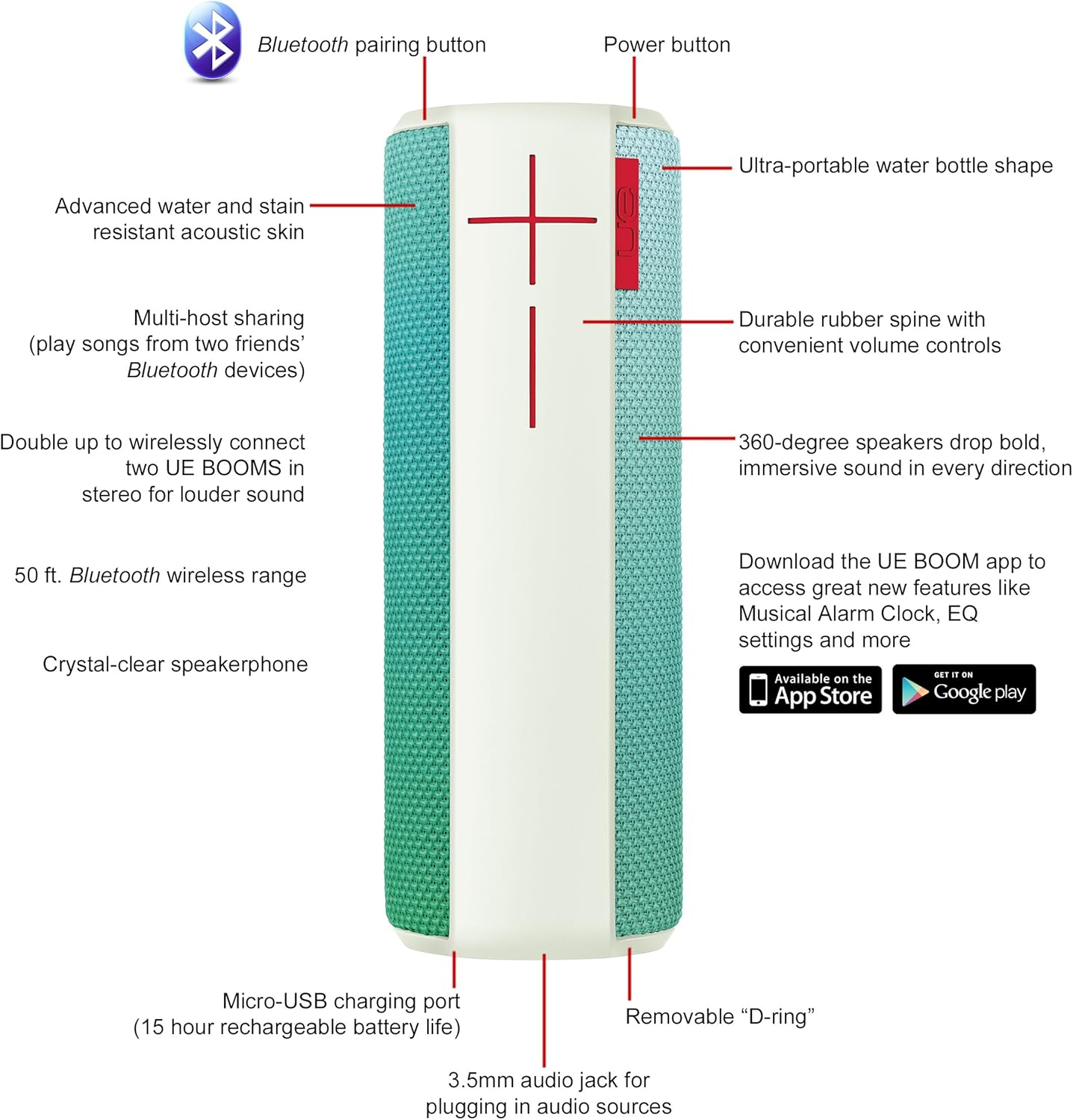
Image: Diagram highlighting key features and controls of the UE Boom speaker, including Bluetooth pairing button, power button, volume controls, micro-USB charging port, and 3.5mm audio jack.
סעטאַפּ
טשאַרדזשינג די רעדנער
Before initial use, fully charge your UE Boom speaker. Connect the provided micro-USB cable to the charging port located at the bottom of the speaker and plug the other end into a USB power source. The speaker's battery provides approximately 15 hours of playback on a full charge.
בלועטאָאָטה פּערינג
- Power on your UE Boom speaker by pressing the power button.
- Press and hold the Bluetooth pairing button (usually indicated by a Bluetooth icon) until you hear an audible tone and the LED indicator flashes rapidly.
- On your mobile device (smartphone or tablet), navigate to the Bluetooth settings.
- Select "UE Boom" from the list of available devices to pair.
- Once paired, you will hear a confirmation tone from the speaker.
For NFC-enabled devices, simply tap your device to the NFC area on the speaker for quick pairing.
אַפּערייטינג ינסטראַקשאַנז
יקערדיק קאָנטראָלס
- מאַכט קנעפּל: Located on the top of the speaker to turn it on or off.
- באנד קאָנטראָלס: Large '+' and '-' buttons on the side of the speaker adjust the volume.
- בלועטאָאָטה קנעפּל: הייבט אן בלועטוט פארינג מאָדע.
Using the UE BOOM App
Download the official UE BOOM app from your device's app store (available on App Store and Google Play) to unlock additional features:
- Musical Alarm Clock: Wake up to your favorite music.
- ווייַט אַקטאַוויישאַן: Turn your speaker on/off from your device.
- EQ סעטטינגס: קאַסטאַמייז די געזונט פּראָfile צו דיין ייבערהאַנט.
- טאָפּל אַרויף: Connect two UE BOOM speakers for a stereo sound experience.
רעדנערפאָון פאַנגקשאַנאַליטי
When connected to a smartphone, the UE Boom can be used as a speakerphone. Incoming calls will be routed through the speaker, allowing for hands-free communication.
וישאַלט
The UE Boom speaker features a water and stain resistant acoustic skin. To clean, gently wipe the speaker with a damp cloth. Avoid using harsh chemicals or abrasive cleaners. Ensure all ports are dry before charging or connecting other devices.
טראָובלעשאָאָטינג
- קיין מאַכט: Ensure the speaker is charged. Connect it to a power source using the micro-USB cable.
- קען נישט פארבינדן דורך בלועטוט:
- זיכער מאַכן אַז דער רעדנער איז אין פּערינג מאָדע (בלינקען LED).
- קאָנטראָלירן אַז בלועטאָאָטה איז ענייבאַלד אויף דיין מיטל.
- Move your device closer to the speaker (within 50 feet).
- פּרוּווט אָפּצופּאַרן און ווידער צופּאַרן דעם דעווייס.
- נידעריק באַנד אָדער פאַרקרימט געזונט:
- סטרויערן די באַנד אויף ביידע די רעדנער און דיין פארבונדן מיטל.
- מאַכן זיכער אַז די רעדנער איז גאָר באפוילן.
- Check for any obstructions around the speaker.
- אַפּ ניט קאַנעקטינג: Ensure the speaker is powered on and connected via Bluetooth to your device. Update the app to the latest version.
פּראָדוקט ספּעסאַפאַקיישאַנז
| מאָדעל נאָמען | Logitech UE Boom Wireless Bluetooth Speaker |
| מאָדעל נומער | 980-001023 |
| סאָרט | Logitech |
| קאָליר | Northern Light |
| רעדנער טיפּ | דרויסנדיק |
| קאַנעקטיוויטי טעכנאָלאָגיע | בלועטוט, וויירלעס |
| ווירעלעסס ראַנגע | אַרויף צו 50 פֿיס (15.24 מעטער) |
| מאַכט מקור | באַטאַרייע פּאַוערד (1 ליטהיום יאָן באַטאַרייע אַרייַנגערעכנט) |
| דורכשניטלעך באַטאַרייע לעבן | 15 שעה |
| וואַסער קעגנשטעל מדרגה | וואָטערפּרוף |
| פּונקט וואָג | 2.2 פונט |
| פּראָדוקט דימענשאַנז (LxWxH) | 2.6 X 2.6 X 7.1 אינטשעס |
| מאַטעריאַל | פּלאַסטיק |
| UPC | 097855112125 |
אפיציעלע פּראָדוקט ווידעאָ
ווידעא: אן איבערview of the Logitech UE Boom speaker's features, including 360-degree sound, water resistance, wireless connectivity, and the ability to pair two speakers for louder sound. This video demonstrates the speaker's durability and portability in various environments.
וואָראַנטי און שטיצן
The Logitech UE Boom Wireless Bluetooth Speaker comes with a Limited Warranty. For specific warranty details, please refer to the documentation included with your product or visit the official Logitech webפּלאַץ.
For technical support or customer service, you may contact Logitech at: 646-454-3200.


