1. הקדמה
א דאנק פארן קויפןasing the Intex IT-11500 SUF Multimedia Speaker system. This 2.0 channel speaker system is designed to provide high-quality audio for your entertainment needs. It features multiple connectivity options including AUX, USB, SD/MMC card playback, and a digital FM radio. The system also includes a cordless microphone for added versatility and a fully functional remote control for convenient operation. Please read this manual carefully before using the product to ensure proper setup and optimal performance.
2. פּעקל אינהאַלט
ביטע קאָנטראָלירט די אינהאַלט פון דער פּאַקעט ווען איר נעמט עס אויס. אויב עס פעלט עפּעס אָדער עס זענען צעבראָכן, קאָנטאַקטירט גלייך אייער הענדלער.
- Main Speaker Unit (Subwoofer)
- סאַטעליט רעדנערס (2 איינהייטן)
- Cordless Microphone
- ווייַט קאָנטראָל
- Audio Input Cable (AUX)
- מאַכט שנור
- באַניצער מאַנואַל
3. פּראָדוקט פֿעיִקייטן
- 2.0 Channel multimedia speaker with Cordless MIC
- AUX audio input compatible with DVD/PC/LCD TV
- MP3 playability with USB/SD/MMC
- Digital FM playability
- Fully function smart remote control
- געפירט אַרויסווייַזן
- Frequency Response : 50Hz - 20KHz
- S/N פאַרהעלטעניש: ≥ 60dB
- צעשיידונג: ≥ 40dB
- Bass Up/down : ±15dB
4. סעטאַפּ
4.1 אַנפּאַקינג און פּלייסמאַנט
Carefully remove all components from the packaging. Place the main speaker unit on a stable, flat surface. Position the satellite speakers to the left and right of your listening area for optimal stereo separation. Ensure adequate ventilation around the units.
4.2 קאַנעקטינג ספּיקערז
Connect the satellite speakers to the corresponding output jacks on the rear panel of the main speaker unit. Ensure the connections are secure.
4.3 Connecting Audio Source (AUX)
To connect an external audio device (e.g., DVD player, PC, TV), use the provided audio input cable. Insert one end into the AUX input jack on the main speaker unit and the other end into the audio output jack of your external device.
4.4 מאַכט קאַנעקשאַן
Connect the power cord to the AC power input on the rear of the main speaker unit, then plug the other end into a standard AC 200V ~ 240V / 50Hz power outlet.
4.5 ערשט מאַכט אויף
After all connections are made, switch on the power button located on the main speaker unit. The LED display will illuminate.
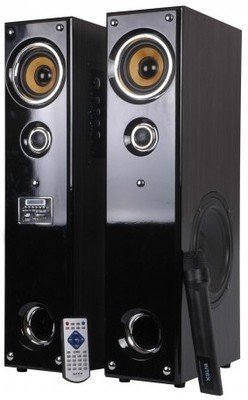
בילד: פראָנט view of the Intex IT-11500 SUF Multimedia Speaker, showing the main unit with control panel and LED display, and two satellite speakers.
5. אַפּערייטינג ינסטרוקטיאָנס
5.1 מאַכט אויף / אַוועק
דרוק די מאַכט קנעפּל אויף דער הויפּט אַפּאַראַט אָדער די ווײַטקאָנטראָל צו דרייען די סיסטעם אָן אָדער אויס.
5.2 מאָדע סעלעקציע
דרוק די מאָדע button on the main unit or remote control to cycle through available input modes: AUX, USB, SD/MMC, and FM.
5.3 באַנד קאָנטראָל
אַדזשאַסטירן די הויפּט באַנד מיט די באַנד +/- buttons on the main unit or remote control. Bass levels can be adjusted using the באַס +/- controls on the remote.
5.4 USB/SD/MMC Playback
Insert a USB drive or an SD/MMC card into the respective slot on the main unit. The system will automatically switch to USB/SD/MMC mode and begin playing compatible MP3 audio files. ניצן די שפּיל / פּויזע, PREV, און NEXT קנעפּלעך צו קאָנטראָלירן פּלייבאַק.
5.5 FM ראַדיאָ אָפּעראַציע
אין FM מאָדע, דריקן די יבערקוקן button on the remote control to automatically scan and save available FM stations. Use the PREV און NEXT קנעפּלעך צו נאַוויגירן דורך געראטעוועט סטיישאַנז.
5.6 Using the Cordless Microphone
Ensure the cordless microphone has fresh batteries. Turn on the microphone. The microphone's audio will be mixed with the main audio source. Adjust microphone volume if available on the main unit or remote.
5.7 רימאָוט קאָנטראָל פאַנגקשאַנז
The remote control provides full functionality for the speaker system. Refer to the diagram on the remote for specific button functions, including power, mode, volume, track control, FM scan, and bass adjustment.
6. וישאַלט
6.1 רייניקונג
Wipe the speaker surfaces with a soft, dry cloth. Do not use abrasive cleaners, waxes, or solvents as they may damage the finish. Ensure the unit is powered off and unplugged before cleaning.
6.2 סטאָרידזש
אויב איר לייגט דאָס אַפּאַראַט אַוועק פֿאַר אַ לענגערע צייט, נעמט עס אַרויס פֿון דער עלעקטרישער אַוטלעט און לייגט עס אַוועק אין אַ קיל, טרוקן אָרט, אַוועק פֿון דירעקטער זון און עקסטרעמע טעמפּעראַטורן.
6.3 זיכערקייַט פּריקאָשאַנז
- שטעלט נישט אויס דעם אַפּאַראַט צו וואַסער אָדער צו פיל פייכטקייט.
- Do not open the speaker casinג; עס זענען נישטאָ קיין באַניצער-סערוויסאַבאַל טיילן אינעווייניק.
- האַלטן אַוועק פון היץ קוואלן און דירעקט זונשייַן.
- פאַרזיכערן געהעריק ווענאַליישאַן צו פאַרמייַדן אָוווערכיטינג.
7. טראָובלעשאָאָטינג
| פּראָבלעם | מעגלעך סיבה | לייזונג |
|---|---|---|
| קיין מאַכט | שטראָם־קאַבל נישט פֿאַרבונדן; אַוטלעט דעפֿעקטיוו; שטראָם־שוואַלטער אויסגעלאָשן. | קאָנטראָלירט די פֿאַרבינדונג מיטן עלעקטרישן שנור; פּרוּווט אַן אַנדער אַוטלעט; מאַכט זיכער אַז די עלעקטרישע קנעפּל איז אָן. |
| קיין געזונט | Volume too low; Incorrect input mode; Audio cable loose/faulty; Mute activated. | Increase volume; Select correct input mode (AUX, USB, FM); Reconnect audio cable; Deactivate mute. |
| פאַרקרימט געזונט | Volume too high; Source audio quality poor; Speaker placement. | Reduce volume; Check audio source; Adjust speaker position. |
| ווייַט קאָנטראָל נישט ארבעטן | באַטעריעס אויסגעשעפּט; שטערונג צווישן ווײַטקאָנטראָל און אַפּאַראַט; ווײַטקאָנטראָל סענסאָר פֿאַרשטאָפּט. | Replace batteries; Remove obstructions; Ensure clear line of sight to sensor. |
| FM אויפנאמע שלעכט | שוואַך סיגנאַל; אַנטענע נישט אויסגעצויגן. | Adjust antenna position; Rescan for stations. |
8. ספּעסאַפאַקיישאַנז
| רעדנער טיפּ | מולטימעדיאַ |
| קאַנאַל קאַנפיגיעריישאַן | 2.0 |
| אָפטקייַט ענטפער | 50 הערץ - 20 כ"ץ |
| S/N פאַרהעלטעניש | ≥ 60דב |
| צעשיידונג | ≥ 40דב |
| באַס אַרויף/אַראָפּ | ±15דב |
| סענסיטיוויטי | <500mV |
| עפעם פרעקווענסי ופנעמער | 88MHz צו 108MHz |
| מאַכט צושטעלן | אַק 200 וו ~ 240 וו / 50 הז |
| קאַנעקטיוויטי טעכנאָלאָגיע | וסב |
| קאָנטראָל מעטאָד | ווייַט |
| פּונקט וואָג | 17 קג |
| מאָדעל נומער | 1112-1150-0 |
9. וואָראַנטי און שטיצן
For warranty information, please refer to the warranty card included with your product or contact your local Intex customer service. Keep your purchase receipt as proof of purchase. For technical support or service inquiries, please visit the official Intex webזייטל אדער קאנטאקט זייער קאסטומער שטיצע הילף-ליניע.
באַמערקונג: ספּעציפֿיקאַציעס קענען זיך ענדערן אָן פריערדיקן באַמערקן פֿאַר פּראָדוקט פֿאַרבעסערונג.


