1. הקדמה
This instruction manual provides essential information for the proper setup, operation, and maintenance of your Hach HQ411d Benchtop Meter package, which includes the PHC201 Gel pH Probe. Adhering to these guidelines will ensure accurate measurements and extend the lifespan of your equipment. Please read this manual thoroughly before initial use.
2. פּעקל אינהאַלט
Upon unpacking, verify that all components listed below are present and undamaged. If any items are missing or damaged, contact Hach customer support immediately.
- Hach HQ411d Benchtop Meter
- PHC201 Gel pH Probe
- Electrode Stand
- pH Buffer Solutions (typically pH 4, 7, and 10)
- pH Storage Solution
- מאַכט אַדאַפּטער
- וסב קאַבלע
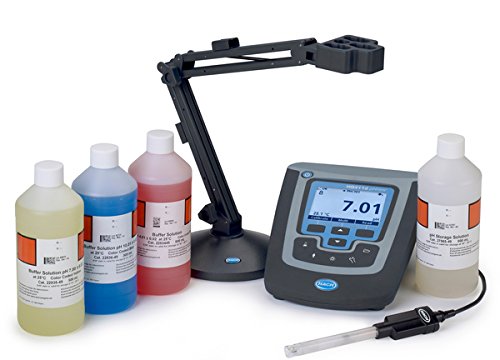
בילד 2.1: The Hach HQ411d Benchtop Meter package. This image displays the main HQ411d meter unit with its digital display showing a pH reading of 7.01 and a temperature of 25.1°C. To the left, an adjustable electrode stand is visible. A PHC201 Gel pH Probe is connected to the meter. Additionally, four bottles are shown: three containing colored pH buffer solutions (yellow for pH 7, blue for pH 4, and red for pH 10) and one containing clear pH storage solution.
3. שליסל פֿעיִקייטן
The Hach HQ411d Benchtop Meter offers several features designed for reliable and user-friendly pH measurement:
- Intuitive user interface for straightforward operation and accurate results.
- IntelliCAL smart probes store all calibration data directly within the probe, ensuring measurement integrity.
- Ultra-bright screen with a large font size for enhanced readability of measurements.
- Internal USB ports for convenient data transfer and connectivity.
- This convenient kit includes all necessary components to begin testing immediately.
4. סעטאַפּ
Follow these steps for initial setup of your Hach HQ411d Benchtop Meter.
- אַנפּאַק און דורכקוק: Carefully remove all components from the packaging. Inspect each item for any signs of damage. Retain packaging materials for future transport or storage.
- Connecting the Electrode Stand: Assemble the electrode stand according to its specific instructions. Position it securely next to the meter.
- Connecting the PHC201 Gel pH Probe: Connect the PHC201 Gel pH Probe to the designated port on the Hach HQ411d meter. Ensure the connection is secure.
- מאַכט אויף: Connect the power adapter to the meter and then to a suitable power outlet. Press the power button to turn on the meter.
- ערשט קאַלאַבריישאַן: Before first use, and regularly thereafter, calibrate the pH probe using the provided buffer solutions (pH 4, 7, and 10). Refer to Section 5.2 for detailed calibration procedures.
5. אַפּערייטינג ינסטרוקטיאָנס
This section outlines the basic procedures for taking measurements and calibrating your meter.
5.1. Basic Measurement Procedure
- Prepare the Probe: If the probe has been stored dry or in storage solution, rinse it thoroughly with deionized water.
- Immerse the Probe: Carefully immerse the PHC201 Gel pH Probe into the sample solution, ensuring the sensing bulb and junction are fully submerged.
- Stabilize Reading: Allow sufficient time for the reading on the meter's display to stabilize. The meter will typically indicate when the reading is stable.
- רעקאָרד מעסטונג: Once stable, record the pH and temperature readings displayed on the screen.
- Rinse and Store: After measurement, rinse the probe with deionized water and return it to its storage solution or follow maintenance guidelines.
5.2. קאַליבראַציע פּראָצעדור
Regular calibration is crucial for accurate pH measurements. The HQ411d meter uses IntelliCAL smart probes, which store calibration data.
- Prepare Buffer Solutions: Ensure buffer solutions (pH 4, 7, 10) are at the same temperature as your samples for best accuracy.
- Access Calibration Menu: Navigate to the calibration menu on the HQ411d meter using the interface buttons.
- First Buffer Point (pH 7): Rinse the probe with deionized water, then immerse it in the pH 7 buffer solution. Follow the on-screen prompts to accept the reading.
- Second Buffer Point (pH 4 or pH 10): Rinse the probe again. Immerse it in either the pH 4 or pH 10 buffer solution, depending on your expected sample range. Follow prompts to accept.
- Third Buffer Point (Optional): For wider range accuracy, rinse and immerse the probe in the remaining buffer solution (pH 4 or pH 10).
- גאַנץ קאַלאַבריישאַן: Confirm and save the calibration. The meter will display calibration results.
5.3. דאַטאַ מאַנאַגעמענט
The HQ411d meter features internal USB ports for data transfer. Consult the meter's on-screen menu or the full Hach user manual for specific instructions on logging data and transferring it to a computer.
6. וישאַלט
Proper maintenance ensures the longevity and accuracy of your Hach HQ411d system.
- Probe Care and Storage: Always store the PHC201 Gel pH Probe in its designated storage solution when not in use. Never store the probe dry. Rinse the probe with deionized water before and after each use.
- מעטער רייניקונג: Clean the exterior of the HQ411d meter with a soft, damp cloth. Avoid abrasive cleaners or solvents. Ensure no liquids enter the meter's ports.
- Buffer Solution Handling: Always use fresh buffer solutions for calibration. Do not reuse buffer solutions, as their pH can change over time due to contamination or CO2 absorption. Store buffer solutions according to their labels.
- Electrode Stand: Keep the electrode stand clean and free of chemical residues.
7. טראָובלעשאָאָטינג
This section addresses common issues you might encounter with your Hach HQ411d Benchtop Meter.
| פּראָבלעם | מעגלעך סיבה | לייזונג |
|---|---|---|
| ומפּינקטלעך רידינגז | Probe not calibrated; contaminated buffer solutions; dirty probe; expired probe. | Perform a fresh calibration; use new buffer solutions; clean the probe; replace the probe if necessary. |
| קיין מאַכט | Power adapter disconnected; faulty power outlet; meter malfunction. | Check power connections; try a different outlet; contact Hach support. |
| לאַנגזאַמע רעאַקציע צייט | Probe dehydration; clogged junction; low sample טעמפּעראַטור. | Rehydrate probe in storage solution; clean probe junction; allow sample to reach room temperature. |
| "Probe Error" Message | Probe not connected properly; damaged probe; meter issue. | Ensure probe is securely connected; inspect probe for damage; restart meter; contact Hach support. |
8. ספּעסאַפאַקיישאַנז
Key specifications for the Hach HQ411d Benchtop Meter and PHC201 Gel pH Probe package.
| באַשרייַבונג | ווערט |
|---|---|
| נומער מאָדעל נומער | 8507560 |
| פאַבריקאַנט | HACH |
| פּעקל דימענשאַנז | 20 X 20 X 20 אינטשעס |
| פּעקל וואָג | 20 פונט |
| ערשטער בנימצא טאָג | 16טן דעצעמבער 2014 |
| ASIN | B00R3EGTHO |
9. וואָראַנטי און שטיצן
Specific warranty details for the Hach HQ411d Benchtop Meter and PHC201 Gel pH Probe are not provided in this document. For warranty information, technical support, or service inquiries, please contact Hach customer service directly or visit the official Hach website. Ensure you have your product model number (HQ411d, 8507560) and purchase date available when contacting support.


