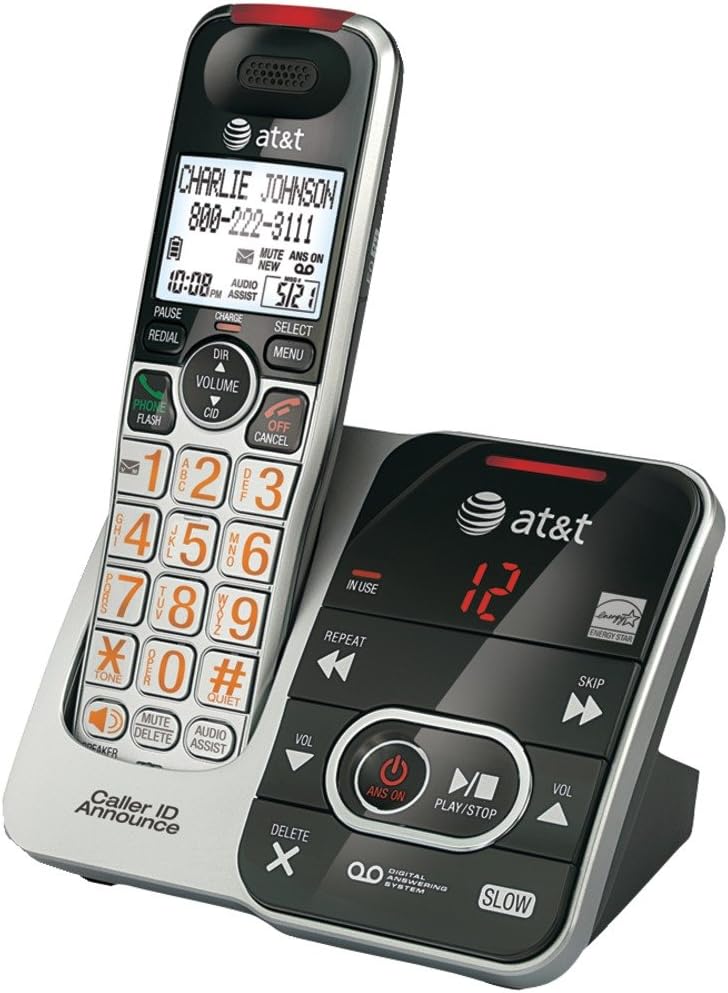
This manual provides instructions for the AT&T CRL32102 DECT 6.0 Expandable Cordless Phone with Answering System and Caller ID/Call Waiting. Please read this manual thoroughly before operating your new telephone to ensure proper use and to maximize its features.
Image Description: A silver and black AT&T CRL32102 cordless phone handset is shown resting in its matching base unit. The handset features a large display, a numeric keypad with large orange characters, and various function buttons. The base unit includes controls for the digital answering system, such as play/stop, skip, repeat, and volume, along with an "IN USE" indicator and a message counter displaying "12". The AT&T logo is visible on both the handset and the base.
ערשט סעטאַפּ
ייַנמאָנטירונג פון באַטאַרייע
Install the supplied battery pack into the handset battery compartment. Ensure correct polarity by aligning the connectors. Close the battery compartment cover securely.
טשאַרדזשינג די כאַנדסעט
Place the handset in the telephone base or charger with the display facing up. The אָפּצאָל light on the handset will illuminate, indicating proper placement. Allow 16 hours for the battery to fully charge before first use to ensure optimal battery performance.
פֿאַרבינדן די טעלעפֿאָן באַזע
Connect the small end of the power adapter to the power jack on the back of the telephone base. Plug the large end into an electrical outlet that is not controlled by a wall switch.
Connect one end of the telephone line cord to the TEL LINE jack on the back of the telephone base. Plug the other end into a telephone wall jack. If you have DSL internet service, a DSL filter (not included) may be required.
אַפּערייטינג דיין טעלעפאָן
מאַכן אַ רוף
דרוק טעלעפאָנירן / פלאַש or any dial pad key. Enter the phone number using the numeric keypad. The call will connect automatically.
ענטפֿערן אַ רוף
ווען דער טעלעפאָן רינגס, דריקן טעלעפאָנירן / פלאַש or any dial pad key to answer the incoming call.
ענדיקן אַ רוף
דרוק OFF/CANCEL or place the handset in the telephone base to end an active call.
אַדזשאַסטינג באַנד
בעשאַס אַ רופן, דריקן באַנד▲ (ארויף פײַל) אדער ▼ (down arrow) on the handset to adjust the earpiece volume to your preferred level.
שטום פֿונקציע
בעשאַס אַ רופן, דריקן שטום to mute the microphone. This allows you to speak privately without the other party hearing you. Press שטום again to unmute the microphone.
רעדיאַל
דרוק אָפּלייקענונג צו view the last 10 dialed numbers. Use the DIR (directory) navigation keys to scroll through the list. Press טעלעפאָנירן / פלאַש צו רופן דעם אויסגעקליבן נומער.
ענטפער סיסטעם
The digital answering system can record up to 15 minutes of messages, memos, and announcements.
To turn the answering system ON/OFF, press ANS ON אויף די טעלעפאָן באַזע.
צו שפּילן אַרטיקלען, דריקן שפּיל / האַלטן אויף די טעלעפאָן באַזע.
To skip a message, press SKIP בעשאַס אָנזאָג פּלייבאַק.
To repeat a message, press איבערחזרן during message playback. Press twice to play the previous message.
To delete a message, press ויסמעקן while the message is playing.
וישאַלט
רייניקונג
Clean the telephone and base with a soft, slightly damp cloth. Do not use cleaning sprays or liquid cleaners as they may damage the finish or internal components.
באַטערי קער
To maintain the life of the battery, periodically fully discharge the handset battery by leaving it off the charger until it runs out of power. Then, fully recharge it for 16 hours. This helps to recondition the battery and extend its lifespan.
טראָובלעשאָאָטינג
If you experience difficulty with your telephone, please try the following suggestions. For more detailed troubleshooting, refer to the full user manual or AT&T support.
קיין רעדל טאָן
Ensure the telephone line cord is securely plugged into the telephone base and the wall jack.
Check if the power adapter is properly connected to the telephone base and a working electrical outlet.
If you have multiple phones, try unplugging others to see if the issue is with a specific phone or line.
Handset Does Not Charge
Ensure the handset is correctly placed in the base. The אָפּצאָל light on the handset should be on.
Clean the charging contacts on the handset and base with a soft, dry cloth to remove any dust or debris.
Verify that the power adapter for the base is securely plugged in.
נעבעך געזונט קוואַליטעט
Move the handset closer to the telephone base to improve signal strength.
Avoid placing the phone near other electrical appliances, metal objects, or large electronic devices that may cause interference.
Check for interference from other DECT 6.0 devices or Wi-Fi routers.
פּראָדוקט ספּעסאַפאַקיישאַנז
שטריך
דעטאַל
ASIN
B00OZ55DTY
סאָרט
AT&T
קאָליר
שוואַרץ, זילבער
טיפּ פון טעלעפאָן
קאָרדלעסס
מאַכט מקור
קאָרדעד עלעקטריק
דיאַלער טיפּ
איין קיפּאַד
ענטפער סיסטעם טיפּ
דיגיטאַל
קאַמפּאַטאַבאַל דעוויסעס
AT&T cordless headset 2
רעקאָרדינג קאַפּאַציטעט
קסנומקס מינוט
קאָנפֿערענץ רוף מעגלעכקייט
יקערדיק
מולטיליין אפעראציע
איין-ליניע אָפּעראַציע
ערשטער דאַטע בנימצא
3 מאי 2016
קונה שטיצן
For further assistance, technical support, or warranty information, please visit the official AT&T support website or refer to the contact information provided with your product packaging. You can also find FAQs and additional resources online.
AT&T Smart Call Blocker DL72119 User Guide Guide to using the AT&T Smart Call Blocker feature on DL72119/DL72219/DL72319/DL72419/DL72519/DL72539/DL72549 DECT 6.0 cordless telephones. Learn how to screen robocalls and unwanted calls, set up allow and block lists, and manage call screening preferences.
AT&T Smart Call Blocker CL82219/CL82229/CL82319/CL82419/CL82519 User Guide User guide for the AT&T Smart Call Blocker feature on DECT 6.0 cordless telephone systems. Learn to filter robocalls, manage call lists (Directory, Allow, Block, Star Name), and configure screening profiles like 'Screen Robot' and 'Screen Unknown'.
AT&T DECT 6.0 Cordless Telephone Quick Start Guide - CL82115 Series Quick start guide for the AT&T DECT 6.0 cordless telephone and answering system (CL82115/CL82215/CL82315/CL82415/CL82465/CL82515). Learn about setup, features like Caller ID, Answering System, Bluetooth, and Smart Call Blocker.