1. זיכערקייַט אינפֿאָרמאַציע
ביטע ליינט און פארשטייט אלע אינסטרוקציעס איידער איר שטעלט עס צונויף און ניצט עס. אויב איר פאלגט נישט די אינסטרוקציעס, קען דאס פירן צו א שאדן אדער פראדוקט שאדן.
- Use this desk on a level floor only to ensure stability.
- Do not climb or stand on the desk. It is not designed to support human weight.
- דער פּראָדוקט איז בדעה בלויז פֿאַר רעזידענטשאַל נוצן.
- The maximum weight capacity for this desk is 50 לבס (22.68 קג)נישט איבערשרייטן דעם לימיט.
- האַלט קליינע טיילן און פּאַקאַדזשינג מאַטעריאַלן אַוועק פון קינדער.
2. פּראָדוקט איבערview
The Furinno Simplistic A Frame Computer Desk is designed for functionality and space efficiency, featuring a sturdy A-frame structure and a built-in desk hutch for storage.
שליסל פֿעיִקייטן:
- Simple and stylish A-frame design.
- Constructed from durable particle board.
- Integrated desk hutch for stationery and small item storage.
- Compact size suitable for various room types.
פּראָדוקט דימענשאַנז:

Image: A detailed diagram illustrating the width, depth, and height of the desk, including the hutch and lower shelf measurements.
- Overall Dimensions (D x W x H): 16.5" x 31.61" x 35.59" (41.9 ס״מ x 80.3 ס״מ x 90.4 ס״מ)
- טאַבלעטאָפּ גרעב: 19 מם
- נומער וואָג: 25 לבס (11.34 קג)
3. אַסעמבלי אינסטרוקציעס
איידער איר אָנהייבן:
- Unpack all components and verify against the parts list (not provided in this document, refer to your product packaging).
- Ensure you have the recommended tools: a hammer and a screwdriver.
- Assembly is recommended for 1 מענטש.
- צוזאַמענשטעלן אויף אַ ווייכער, ריינער ייבערפלאַך צו פאַרמייַדן קראַצן.
שריט-דורך-סטעפּ אַסעמבלי:
Follow the numbered steps provided in your product's physical instruction manual for detailed diagrams and part identification. The general sequence involves:
- Attach the Side Frames: Secure the A-frame side supports to the main desk panels using the provided screws. Ensure all connections are firm but do not overtighten to avoid damaging the material.
- Install the Lower Shelf: Connect the bottom shelf panel between the A-frame supports. Verify alignment before fully tightening screws.
- Assemble the Desk Hutch: Attach the hutch panels to form the upper storage unit.
- Mount the Hutch to the Desktop: Secure the assembled hutch onto the main desktop surface.
- לעצט טייטנינג: Once all parts are in place and aligned, carefully tighten all screws to ensure stability.

Image: The fully assembled Furinno Simplistic A Frame Computer Desk, showcasing its black frame and French oak grey surfaces.

Image: The desk in a home office setting, featuring a laptop and mouse, demonstrating its compact size and functionality.
4. אַפּערייטינג ינסטרוקטיאָנס
פּלאַצירונג און באַניץ:
- Place the desk against a wall or in a corner for optimal stability and space utilization.
- Utilize the main desktop for your computer, laptop, or writing tasks.
- The integrated hutch provides convenient storage for small office supplies, books, or decorative items.
- The lower shelf can be used for additional storage, such as a printer, books, or a small basket for miscellaneous items.
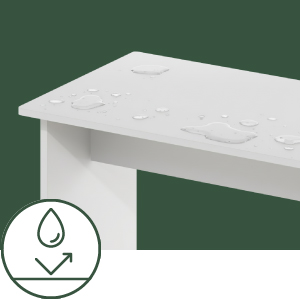
Image: An icon illustrating the multi-purpose storage capabilities of the desk hutch.
וואָג קאַפּאַציטעט:
The desk is designed to support a maximum weight of 50 לבס (22.68 קג) distributed evenly across its surfaces. Avoid placing excessively heavy items on any single point or exceeding the total weight limit.
5. וישאַלט
רייניקונג און זאָרגן:
- ווישט די טיש־פלאַכן מיט אַדamp שטאָף.
- Avoid using harsh chemicals, abrasive cleaners, or furniture polish that may damage the laminated finish.
- Regularly check and tighten all screws to maintain stability.
- Protect the surface from direct heat, moisture, and sharp objects to prevent damage.
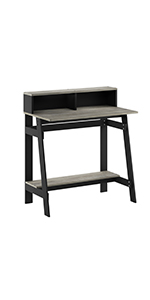
Image: An icon representing the water-resistant properties of the desk surface.

Image: An icon representing the scratch-resistant properties of the desk surface.
6. טראָובלעשאָאָטינג
אויב איר טרעפט פּראָבלעמען בעת פֿאַרזאַמלונג אָדער באַניץ, באַטראַכט די פֿאָלגנדיקע געוויינטלעכע לייזונגען:
- וואַבלינג: Ensure all screws are securely tightened. Verify that the desk is placed on a flat, even surface. If necessary, use furniture levelers (not included) under the legs.
- Misaligned Parts/Screws: Double-check that you are using the correct parts for each step as indicated in the manual. If pre-drilled holes appear misaligned, gently adjust the panels to achieve the best fit before tightening. Avoid forcing screws, which can damage the material.
- פעלנדיק ייַזנוואַרג: If any hardware is missing, contact Furinno customer support for assistance.
- דאַמידזשד פּאַרץ: If any parts arrived damaged, do not proceed with assembly. Contact Furinno customer support for replacement parts.
7. ספּעסאַפאַקיישאַנז
| סאָרט | פורנאָן |
| מאָדעל נומער | 14054BK/GYW |
| מאָדעל נאָמען | Simplistic A Frame |
| קאָליר | Black/French Oak Grey |
| סטייל | A-frame Design |
| מאַטעריאַל | אינזשענירטע האָלץ (פּאַרטיקל ברעט) |
| ענדיקן טיפּ | לאַמינאַטעד |
| פּראָדוקט דימענשאַנז (ד רענטגענ וו רענטגענ ה) | 16.5" x 31.61" x 35.59" (41.9 ס״מ x 80.3 ס״מ x 90.4 ס״מ) |
| פּונקט וואָג | 25 לבס (11.34 קג) |
| מאַקסימום וואָג רעקאָממענדאַטיאָן | 50 לבס (22.68 קג) |
| פארלאנגט אַסעמבלי | יא |
| רעקאָממענדעד נומער פון מענטשן פֿאַר אַסעמבלי | 1 |
| מכשירים רעקאָמענדירט פֿאַר פֿאַרזאַמלונג | האַמער, שרויפנציהער |
| סטאָרידזש אָפּציעס | שרייַבטיש האַטש |
8. וואָראַנטי און שטיצן
פאַבריקאַנט ס וואָראַנטי:
דער פּראָדוקט קומט מיט אַ 1-יאָר לימיטעד פאַבריקאַנט ס וואָראַנטי. די וואָראַנטי קאָווערס חסרונות אין מאַטעריאַלס און ווערקמאַנשיפּ אונטער נאָרמאַל נוצן.
קונה שטיצן:
For any questions, missing parts, damaged components, or warranty claims, please contact Furinno customer support. Refer to the contact information provided in your product packaging or on the official Furinno webפּלאַץ.


