1. הקדמה
This manual provides detailed instructions for the proper use, setup, and maintenance of your Genius HS-920BT Bluetooth Headset. Please read this manual thoroughly before using the device to ensure optimal performance and longevity.
The Genius HS-920BT is a versatile Bluetooth headset designed for wireless audio streaming and hands-free communication with compatible devices such as smartphones, tablets, and PCs.
2. פּעקל אינהאַלט
באַשטעטיקן אַז אַלע זאכן זענען פאַראַן אין דיין פּעקל:
- Genius HS-920BT Bluetooth Headset
- וסב טשאַרדזשינג קאַבלע
- Multi-language User Manual (this document)
3. פּראָדוקט איבערview
The HS-920BT headset features an adjustable headband and comfortable earcups, integrating controls for audio playback and call management.
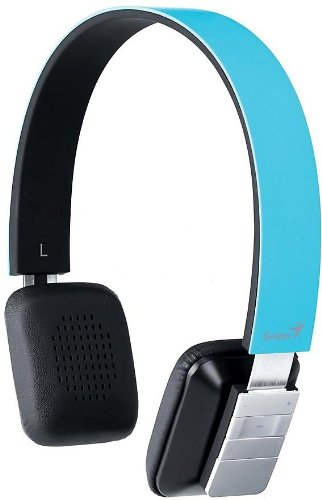
Figure 1: Genius HS-920BT Bluetooth Headset (Blue)
This image displays the Genius HS-920BT Bluetooth Headset in blue, viewed from an angle, highlighting its adjustable headband and earcup design.
שליסל פֿעיִקייטן:
- Wireless Bluetooth connectivity for audio and calls (A2DP support)
- Integrated rechargeable Lithium-Ion battery
- געבויט-אין מיקראָפאָן פֿאַר הענט-פריי קאָמוניקאַציע
- On-ear controls for volume adjustment, track skipping (AVRCP support)
- אַדזשאַסטאַבאַל כעדבאַנד פֿאַר באַקוועם פּאַסיק
- 40 mm driver units for clear sound
4. סעטאַפּ
4.1 אויפלאָדן דעם כעדסעט
Before initial use, fully charge the headset. Use the provided USB charging cable.
- פֿאַרבינדט דעם קלענערן עק פֿונעם USB טשאַרדזשינג קאַבל צום טשאַרדזשינג פּאָרט אויף דעם כעדסעט.
- פֿאַרבינדט דעם גרעסערן עק פֿונעם USB קאַבל צו אַ USB פּאָרט מיט אַ שטאַרקן מאַכט (למשל, קאָמפּיוטער, USB וואַנט אַדאַפּטער).
- The LED indicator on the headset will illuminate during charging and change color or turn off when fully charged. Refer to the headset's LED behavior for specific indications.
א פולע אויפלאדונג נעמט געווענליך בערך 2-3 שעה.
4.2 פּאָרן מיט אַ בלועטוט מיטל
To use the HS-920BT wirelessly, you must pair it with your Bluetooth-enabled device.
- מאַכט אויף: Press and hold the Power button on the headset until the LED indicator flashes, usually alternating blue and red, indicating pairing mode.
- אַקטאַווייט בלועטאָאָטה: On your smartphone, tablet, or PC, enable Bluetooth functionality.
- זוכן פֿאַר מכשירים: In your device's Bluetooth settings, search for available devices. The headset should appear as "HS-920BT".
- אויסקלייבן און פארבינדן: Select "HS-920BT" from the list. If prompted for a passcode, enter "0000" (four zeros).
- באַשטעטיקונג: Once paired, the headset's LED indicator will typically flash blue slowly, and your device will confirm the connection.
The headset will automatically attempt to reconnect to the last paired device when powered on, if that device's Bluetooth is active and within range.
5. אַפּערייטינג ינסטרוקטיאָנס
The HS-920BT features intuitive controls located on the earcup.

Figure 2: Earcup Controls of HS-920BT
This image shows a close-up of the right earcup of the Genius HS-920BT Bluetooth Headset, detailing the control buttons for power, volume, and track navigation.
5.1 מאַכט אויף / אַוועק
- מאַכט אויף: דריק און האלט דעם פּאַוער קנעפּל פֿאַר אַרום 3 סעקונדעס ביז די LED אינדיקאַטאָר בלינקט בלוי.
- מאַכט אַוועק: דריק און האלט דעם פּאַוער קנעפּל פֿאַר אַרום 3 סעקונדעס ביז דער LED אינדיקאַטאָר גייט אויס.
5.2 מוזיק פּלייבאַק
- שפּיל / פּויזע: דריקן די שפּיל / פּויזע קנעפּל אַמאָל.
- ווייַטער שפּור: Press the "Next Track" button (usually marked with a forward arrow).
- פֿריִערדיקע שפּור: Press the "Previous Track" button (usually marked with a backward arrow).
5.3 רוף פאַרוואַלטונג
- ענטפֿערן / סוף רופן: Press the Multi-function button (often the same as Play/Pause) once during an incoming call to answer, or once during a call to end it.
- אָפּוואַרפן רופן: דריק און האלט דעם מולטי-פונקציע קנעפל פאר בערך 2 סעקונדעס בעת אן אנקומענדיקן רוף.
- ריאַל די לעצטע נומער: דריקט צוויי מאָל דעם מולטי-פונקציע קנעפּל ווען איר זענט נישט אויף אַ רוף.
5.4 באַנד קאָנטראָל
- פאַרגרעסערן באַנד: דריק דעם "Volume Up" קנעפל (+).
- פאַרמינערן באנד: דריק דעם באַנד אַראָפּ קנעפּל (-).
6. וישאַלט
Proper care ensures the longevity of your headset.
- רייניקונג: ניצט אַ ווייכע, טרוקענע שטאָף צו רייניקן די כעדסעט. ניצט נישט קיין שרײַבנדיקע רייניגערס אדער סאָלווענטן.
- סטאָרידזש: האַלט די כעדסעט אין אַ קיל, טרוקן אָרט אַוועק פון דירעקט זונשייַן און עקסטרעמע טעמפּעראַטורן.
- באַטערי זאָרגן: To preserve battery life, avoid fully discharging the battery frequently. Charge the headset regularly, even if not in use for extended periods.
- וואַסער ויסשטעלן: די כעדסעט איז נישט וואַסערפּרוף. פֿאַרמייַדט אויסשטעלונג צו וואַסער אָדער איבעריקע פֿײַכטקייט.
7. טראָובלעשאָאָטינג
If you encounter issues with your HS-920BT headset, refer to the following common solutions:
| פּראָבלעם | מעגלעך לייזונג |
|---|---|
| כעדסעט גייט נישט אן. | Ensure the battery is charged. Connect the headset to a power source using the USB cable. |
| Cannot pair the headset with a device. |
|
| קיין קלאַנג אָדער נידעריקע וואָלומען. |
|
| די קוואַליטעט פון די רופן איז שלעכט. |
|
8. ספּעסאַפאַקיישאַנז
| מאָדעל נאָמען: | הס-920בט |
| ווירעלעסס טעכנאָלאָגיע: | בלועטאָאָטה |
| דרייווער וניץ: | 40 מם |
| באַטערי: | Built-in Rechargeable Lithium-Ion |
| קאָנטראָל טיפּ: | Volume Control, Track Navigation, Call Management |
| מיקראָפאָן: | געבויט-אין |
| שטיצט פּראָfiles: | A2DP, AVRCP |
| ייַזנוואַרג פּלאַטפאָרמע: | פּיסי, סמאַרטפאָון, טאַבלעט |
| נומער וואָג: | 110 גראַמז |
| דימענשאַנז (LxWxH): | 13.6 X 17.3 X 2.9 סענטימעטער |
9. וואָראַנטי און שטיצן
For warranty information and technical support, please refer to the warranty card included with your product or visit the official Genius webזייטל. האַלט אייער קויף קוויטל ווי אַ באַווייַז פון קויפן.
For further assistance, you may contact Genius customer service through their official channels.


