הקדמה
This manual provides comprehensive instructions for the setup, operation, and maintenance of your Genius SW-2.1 355 Speaker System. Please read this manual thoroughly before using the product to ensure proper functionality and to maximize your listening experience.
זיכערקייַט אינפֿאָרמאַציע
היט די פאלגענדע זיכערהייט מיטלען צו פאַרמייַדן שעדיקן צו די מיטל אָדער שאָדן צו זיך:
- שטעלט נישט אויס די רעדנערס צו וואַסער אָדער פייכטקייט.
- פֿאַרמײַדט צו שטעלן די רעדנערס לעבן היץ־קוואַלן אָדער אין דירעקטער זון.
- זאָרגט פֿאַר געהעריקע ווענטילאַציע אַרום דעם סאַבוווּפער צו פֿאַרמייַדן איבערהיצונג.
- ניצן בלויז די מאַכט אַדאַפּטער סאַפּלייד מיט די אַפּאַראַט.
- פרובירט נישט צו עפענען אדער פאררעכטן דעם איינהייט אליין. לאָזט איבער אלע סערוויסעס צו קוואַליפֿיצירטע פּערסאָנעל.
- האַלטן אויס פון דערגרייכן פון קינדער.
פּעקל אינהאַלט
באַשטעטיקן אַז אַלע זאכן זענען פאַראַן אין פּעקל:
- 1 x Subwoofer unit
- 2 רענטגענ סאַטעליט ספּיקערז
- 1 x Audio input cable (3.5mm stereo jack)
- 1 X מאַכט אַדאַפּטער
- 1 x באַניצער מאַנואַל (דאָס דאָקומענט)
פּראָדוקט איבערview
The Genius SW-2.1 355 Speaker System consists of a subwoofer and two satellite speakers designed to deliver clear audio and powerful bass for your multimedia needs.
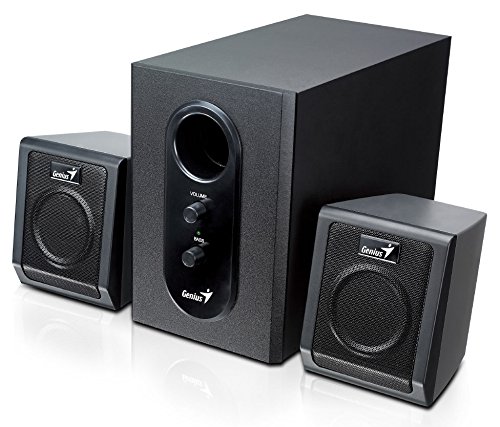
This image displays the Genius SW-2.1 355 Speaker System. It features a central, larger subwoofer unit with volume and bass control knobs on its front panel, and two smaller satellite speakers positioned on either side. All components are black.
קאַמפּאָונאַנץ:
- סובוואָאָפער: The main unit housing the bass driver and control panel.
- סאַטעליט רעדנערס: Two compact speakers for mid-range and high-frequency audio.
- קאָנטראָל פּאַנעל: Located on the subwoofer, featuring Volume and Bass adjustment knobs.
סעטאַפּ
- פּאַזישאַנינג ספּיקערז: Place the subwoofer on the floor or a sturdy surface. Position the satellite speakers on either side of your listening area, facing towards you for optimal stereo separation.
- פֿאַרבינדן סאַטעליט רעדנערס: Connect the cables from the two satellite speakers to the corresponding output jacks on the rear of the subwoofer unit. Ensure a secure connection.
- פֿאַרבינדן אַודיאָ מקור: Connect one end of the 3.5mm audio input cable to the "Audio In" jack on the subwoofer. Connect the other end to the audio output jack (e.g., headphone jack) of your computer, MP3 player, smartphone, or other audio source.
- קאַנעקטינג מאַכט: Plug the power adapter into the DC input jack on the subwoofer. Then, plug the power adapter into a standard electrical outlet.
- מאַכט אויף: Turn on the speaker system using the power switch, usually integrated with the volume knob.
אָפּעראַציע
- מאַכט אויף / אַוועק און באַנד קאָנטראָל: The main knob on the subwoofer controls both power and overall volume. Rotate clockwise to turn on and increase volume; rotate counter-clockwise to decrease volume and turn off.
- באַס אַדזשאַסטמאַנט: Use the "Bass" knob on the subwoofer to adjust the level of low-frequency sound. Rotate clockwise to increase bass, and counter-clockwise to decrease it, according to your preference.
- אַודיאָ מקור באַנד: For optimal sound quality, set the volume on your audio source (computer, phone, etc.) to about 75% and then use the speaker system's volume control for fine adjustments.
וישאַלט
- רייניקונג: Use a soft, dry cloth to clean the surfaces of the speakers. Do not use liquid cleaners or abrasive materials.
- סטאָרידזש: אויב איר לייגט די רעדנערס אויף פאר א לענגערע צייט, שטעלט זיי אפ פון עלעקטריציטעט און לייגט זיי אויף אין א קילן, טרוקענעם ארט.
- קאַבלע פאַרוואַלטונג: Ensure cables are not tangled or pinched to prevent damage.
טראָובלעשאָאָטינג
| פּראָבלעם | מעגלעך סיבה | לייזונג |
|---|---|---|
| קיין געזונט |
|
|
| פאַרקרימט געזונט |
|
|
| שוואַך באַס |
|
|
ספּעסאַפאַקיישאַנז
| שטריך | דעטאַל |
|---|---|
| מאָדעל נאָמען | SW-2.1 355 |
| רעדנער טיפּ | 2.1 Channel Multimedia Speaker System (Bookshelf, Satellite, Subwoofer) |
| גאַנץ רעזולטאַט מאַכט | 10 Watts RMS (5W Subwoofer + 2.5W x 2 Satellites) |
| מאַטעריאַל | Wood (Subwoofer) |
| קאַנעקטיוויטי טעכנאָלאָגיע | מיט אַ דראָט (3.5 מ״מ אַודיאָ אַרייַנגאַנג) |
| קאַמפּאַטאַבאַל דעוויסעס | MP3 Player, Personal Computer, Smartphones, Tablets, Televisions |
| קאָנטראָלס | באַנד, באַס |
| מאַכט מקור | DC |
| פּונקט וואָג | 2.78 קג |
| פּעקל דימענשאַנז | 39.6 X 25 X 18.4 סענטימעטער |
וואָראַנטי און שטיצן
Genius products are designed for reliability and performance. For information regarding warranty coverage, technical support, or service inquiries, please refer to the warranty card included with your product or visit the official Genius webזייטל. האַלט אייער קויף קוויטל ווי אַ באַווייַז פון קויפן.


