1. הקדמה
This manual provides detailed instructions for the installation, operation, and maintenance of your ASUS X99-DELUXE motherboard. The ASUS X99-DELUXE is an ATX motherboard designed for high-performance computing, supporting Intel LGA 2011-3 processors and DDR4 memory.

פיגור 1: פון אויבן אַראָפּ view of the ASUS X99-DELUXE Motherboard, showing the CPU socket, RAM slots, and heatsinks.
2. שליסל פֿעיִקייטן
- ASUS OC Socket: Designed to enhance 8-core CPU and DDR4 performance beyond standard X99 expectations.
- DDR4 זכּרון שטיצן: Features a special memory overclocking design, supporting DDR4 memory speeds up to 3200MHz (O.C.).
- Dual M.2 X4 Support: Provides two M.2 slots with PCIe 3.0 x4 interface, enabling data transfer speeds up to 32Gb/s for compatible NVMe SSDs.
- Fan Extension Card: Includes an extension card for advanced PC cooling management.
- 5-וועג אָפּטימיזאַציע: Utilizes Dual Intelligent Processors 5 for system optimization, including performance tuning, power saving, digital power control, and fan control.
- UEFI BIOS: Features a media-acclaimed Unified Extensible Firmware Interface (UEFI) BIOS for intuitive system configuration.
- SATA Express: Supports SATA Express for storage speeds up to 10Gb/s.
3. סעטאַפּ און ייַנמאָנטירונג
איידער איר הייבט אן די אינסטאַלאַציע, זאָרגט אַז אייער סיסטעם איז אויסגעלאָשן און אָפּגעטיילט פֿון דער מאַכט-מקור. האַלט אָן די מוטערבאָרד ביי די ברעגן צו פֿאַרמייַדן סטאַטישע אָפּלאָד.
3.1. CPU Installation (LGA 2011-3 Socket)
- פֿאָרזיכטיק עפֿנט דעם CPU סאָקעט ריטענשאַן מעקאַניזאַם.
- Align the triangular mark on the CPU with the corresponding mark on the socket.
- לייגט פֿאָרזיכטיק אַרײַן די סי־פּי־יו אין דער סאָקעט אָן עס צווינגען.
- Close the retention mechanism to secure the CPU. Ensure no pins are bent during this process.

פיגור 2: ווינקלדיק view of the ASUS X99-DELUXE Motherboard, highlighting the LGA 2011-3 CPU socket.
3.2. זכּרון (DDR4) אינסטאַלאַציע
The motherboard supports DDR4 memory modules. Refer to the motherboard manual for specific memory configurations and supported speeds.
- עפֿנט די קליפּס ביי ביידע עקן פֿון דעם DIMM סלאָט.
- גלייכט אויס דעם קערב אויפן DDR4 זכּרון מאָדול מיטן שליסל אין דעם DIMM סלאָט.
- שטעקט אריין דעם מאָדול פעסט אין דעם שפּאַלט ביז די קליפס קלאַפּן זיך איין אין פּלאַץ.
3.3. Storage Device Installation (M.2, SATA)
Install M.2 SSDs into the dedicated M.2 slots and SATA drives to the SATA ports. The motherboard supports SATA 3 (6Gb/s) and SATA Express.
3.4. קאַנעקטינג פּעריפעראַלס
Connect your display, keyboard, mouse, and other peripherals to the rear I/O panel. The motherboard provides various USB ports, Ethernet ports, and audio jacks.
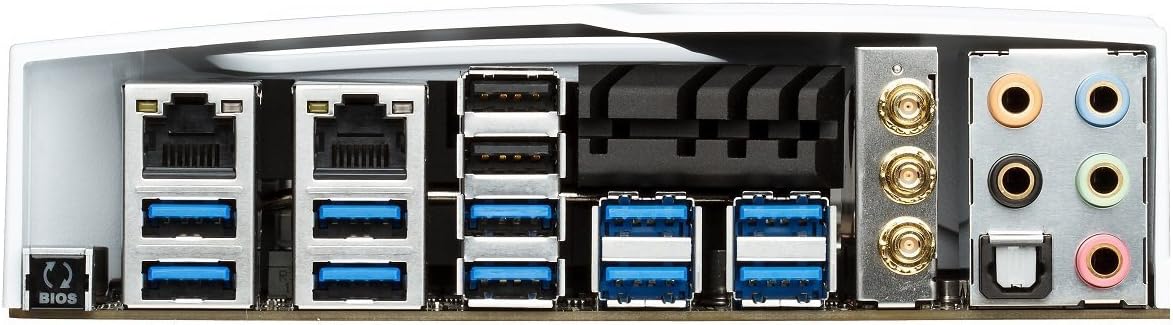
Figure 3: Rear I/O panel of the ASUS X99-DELUXE Motherboard, showing USB ports, Ethernet, and audio jacks.
4. אַפּערייטינג ינסטרוקטיאָנס
4.1. UEFI BIOS Configuration
The UEFI BIOS allows you to configure system settings, boot options, and hardware parameters. To enter the BIOS, press the DEL שליסל בעת סיסטעם סטאַרטאַפּ.
- EZ מאָדע: Provides a simplified interface for basic settings.
- אַוואַנסירטע מאָדע: Offers comprehensive control over all motherboard features, including overclocking and fan control.
4.2. דרייווער ינסטאַלירונג
After installing your operating system (e.g., Windows XP, as listed in specifications, and newer OS versions), install the necessary drivers for the motherboard chipset, audio, network, and other integrated components. These are typically provided on a support DVD or available for download from the ASUS webפּלאַץ.
4.3. 5-Way Optimization
The 5-Way Optimization feature, accessible through ASUS software, automatically tunes your system for optimal performance, power efficiency, digital power delivery, and fan acoustics based on your usage. It is recommended to manage overclocking and fan settings directly within the BIOS for more precise control.
5. וישאַלט
רעגולערע אויפהאלטונג העלפט זיכער מאכן די לאנגעוויטי און סטאבילע אפעראציע פון אייער מאדערבאארד.
- באַזייַטיקונג פון שטויב: רייניקן פּעריִאָדיש שטויב פֿון די מאַדערבאָרד און קיל קאָמפּאָנענטן מיט קאָמפּרעסירטע לופֿט. זיכער מאַכן אַז די סיסטעם איז אויסגעלאָשן און נישט אַרויסגעשטעקט פֿון דער פּלאַטע איידער איר רייניקט.
- קשר טשעקס: Verify that all cables and components are securely seated.
- בייאָוס דערהייַנטיקונגען: קוק די ASUS שטיצע website for the latest BIOS updates to improve compatibility and performance. Follow update instructions carefully.
6. טראָובלעשאָאָטינג
If you encounter issues with your ASUS X99-DELUXE motherboard, consider the following troubleshooting steps:
- קיין מאַכט / קיין שטיוול:
- זיכער מאַכן אַז אַלע מאַכט קייבאַלז (24-פּין ATX, 8-פּין CPU) זענען זיכער פארבונדן.
- Verify the power supply unit (PSU) is functioning correctly.
- קאָנטראָלירט די פֿאַרבינדונג פֿון דער פֿראָנט־פּאַנעל צום מאַכט־סוויטש צום מאַדערבאָרד.
- קיין ווייַז:
- Confirm the graphics card is properly seated in its PCIe slot and has adequate power.
- זיכער מאַכן אַז דער מאָניטאָר קאַבל איז זיכער פארבונדן צו דער גראַפיקס קאַרטל.
- פּרובירט מיט אַן אַנדערן דיספּליי קאַבל אָדער מאָניטאָר אויב מעגלעך.
- סיסטעם אינסטאביליטעט/קראכן:
- קאָנטראָלירט די ראַם מאָדולן צו זען צי זיי זענען ריכטיק אַוועקגעזעצט; פּרוּווט זיי ווידער אַרײַנצוזעצן אָדער טעסטן איין מאָדול אין אַ מאָל.
- Ensure CPU cooler is correctly installed and making good contact with the CPU. Monitor CPU temperatures.
- באַשטעטיק די בייאָוס סעטטינגס צו די פעליקייַט.
- Bent CPU Socket Pins:
Bent pins in the CPU socket can cause severe system malfunctions or prevent booting. This type of damage is typically not covered under warranty. Exercise extreme caution during CPU installation to avoid bending pins.
7. ספּעסאַפאַקיישאַנז
| קאַטעגאָריע | באַשרייַבונג |
|---|---|
| סאָרט | ASUS |
| מאָדעל נאָמען | X99-DELUXE |
| קפּו סאָקקעט | LGA 2011-3 |
| קאָמפּאַטיבלע פּראַסעסאָרן | Intel Core i7 (LGA 2011-3) |
| טשיפּסעט טיפּ | Intel X99 |
| ראַם זכּרון טעכנאָלאָגיע | דדר4 |
| זכּרון זייגער ספּיד | Up to 3200 MHz (O.C.) |
| זכּרון סלאָץ בנימצא | 8 |
| ראַם זכּרון מאַקסימום גרייס | 64 גיגאבייט |
| graphics קאָרט צובינד | PCI Express |
| Total PCIe Ports | 5 |
| גאַנץ SATA פּאָרץ | 8 |
| סיסטעם באַס סטאַנדאַרט געשטיצט | SATA 3 |
| וסב 2.0 פּאָרץ | 2 (internal headers, total ports may vary) |
| גאַנץ וסב פּאָרץ | Various (including USB 3.0 on rear I/O) |
| נומער פון עטהערנעט פּאָרטן | 1 (Dual Gigabit LAN) |
| הויפּט מאַכט קאַנעקטער טיפּ | 24-Pin ATX |
| קאַמפּאַטאַבאַל דעוויסעס | פערזענלעכע קאָמפּיוטער |
| פּלאַטפאָרמע | Windows XP (and newer OS versions) |
| פּונקט וואָג | 4.44 פונט (אומגעפער 2.01 ק"ג) |
8. וואָראַנטי און שטיצן
פֿאַר וואָראַנטי אינפֿאָרמאַציע און טעכנישע שטיצע, ביטע זען די באַאַמטער ASUS website or contact ASUS customer service. Keep your proof of purchase for warranty claims.
ASUS שטיצן Webפּלאַץ: https://www.asus.com/support/
Note: Damage resulting from improper installation, misuse, or unauthorized modifications may void your product warranty.


