1. סעטאַפּ
This section guides you through the initial setup of your NEC VY24G/D-9 laptop.
1.1 אויספּאַקן און ערשטע דורכקוק
נעמט פֿאָרזיכטיק אַרויס אַלע קאָמפּאָנענטן פֿון דער פּאַקעט. באַשטעטיקט אַז די פֿאָלגנדיקע זאַכן זענען פֿאַראַן:
- NEC VY24G/D-9 Laptop
- אַק אַדאַפּטער און מאַכט שנור
- Recovery CD
- Any additional software CDs (e.g., WinDVD, Roxio Creator)
Inspect the laptop and accessories for any visible damage. Note that the exterior casing and LCD screen may have minor cosmetic scratches from previous use, which do not affect functionality.
1.2 קאַנעקטינג די אַק אַדאַפּטער
Before first use, connect the AC adapter to the laptop and a power outlet to charge the battery and provide power.
- Plug the DC output connector of the AC adapter into the power input port on the side of the laptop.
- פאַרבינדן די מאַכט שנור צו די אַק אַדאַפּטער.
- צאַפּן די אנדערע סוף פון די מאַכט שנור אין אַ גראָונדעד עלעקטריקאַל ווענטיל.
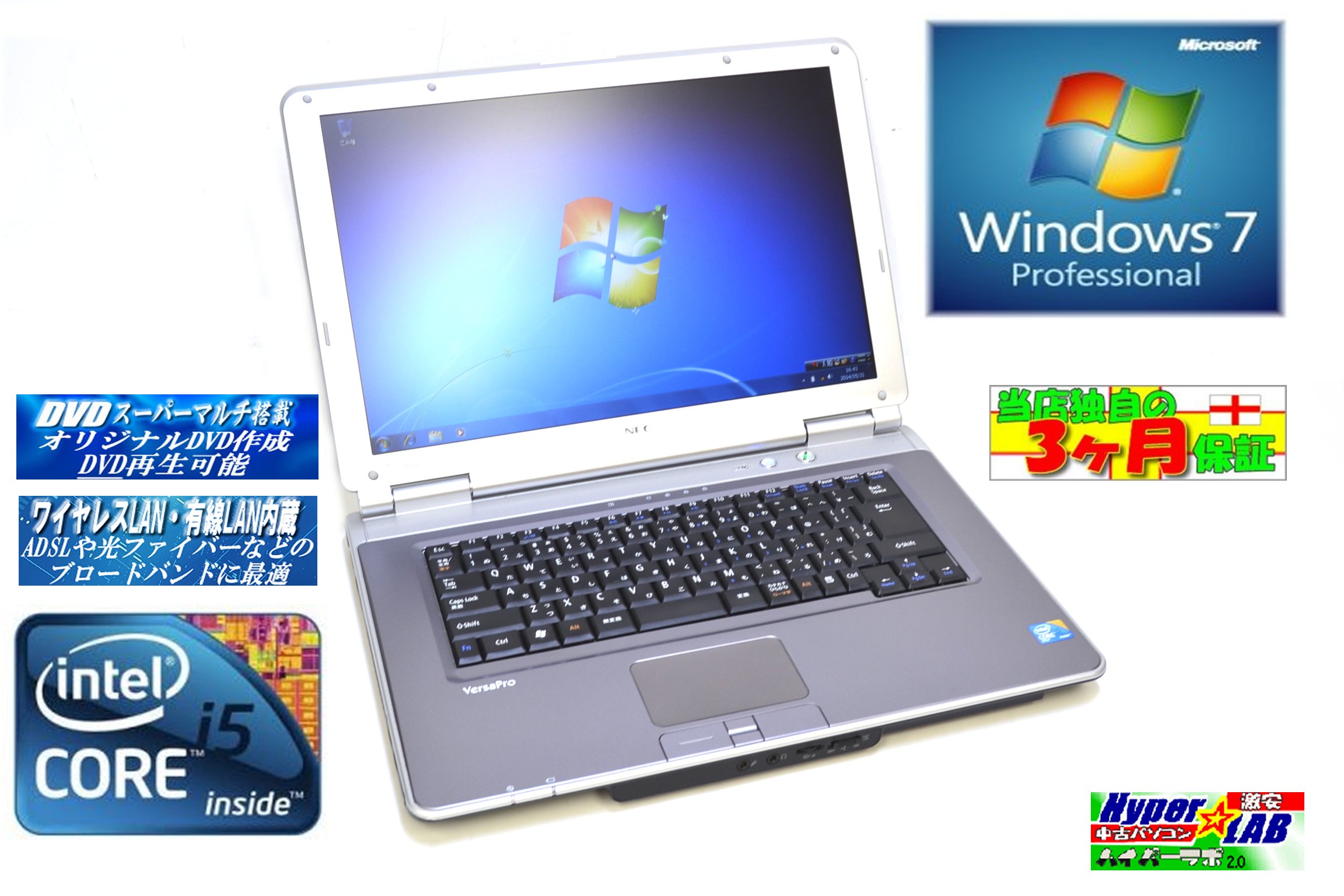
Image 1.1: The NEC VY24G/D-9 laptop shown with its AC adapter and included software/recovery CDs. The laptop is silver with a black base, and the AC adapter is a black rectangular unit with a power cord.
1.3 ערשטע איינשטראָם און אָפּערירן סיסטעם סעטאַפּ
Press the power button to turn on the laptop. The system comes with Windows 7 Professional 32-bit pre-installed. Follow the on-screen prompts to complete the initial operating system setup, which may include setting up user accounts, time zone, and network connections.
2. אַפּערייטינג ינסטרוקטיאָנס
This section covers the basic operation of your NEC VY24G/D-9 laptop.
2.1 מאַכט אויף / אַוועק
- צו מאַכט אויף: דריק דעם מאַכט קנעפּל וואָס געפינט זיך אויף דעם לאַפּטאַפּ.
- צו פאַרמאַכן אַראָפּ: Click the Start button in Windows, then select "Shut Down."
- צו ריסטאַרט: Click the Start button, then select "Restart."
- צו שלאפן: Click the Start button, then select "Sleep."
2.2 Using the DVD Multi Drive
The laptop is equipped with a DVD Multi optical drive for reading and writing CDs and DVDs.
- דריקן די אַרויסוואַרפן קנעפּל אויף די אָפּטיש פאָר צו עפֿענען דעם טאַץ.
- Place a CD or DVD onto the tray with the label side facing up.
- שטופּן דעם טאַץ צוריק אין דעם לאַפּטאַפּ ביז עס קליקט זיך צו.
- The operating system will typically detect the disc automatically.
2.3 קאַנעקטינג צו אַ נעץ
The laptop supports both wired and wireless network connections.
- ווייערד לאַן: Connect an Ethernet cable to the LAN port on the side of the laptop.
- Wireless LAN (802.11bgn): Use the Windows network settings to connect to available Wi-Fi networks. Ensure the wireless adapter is enabled (check for a physical switch or function key combination if Wi-Fi is not detected).
2.4 Using USB Ports and PC Card Slot
The laptop features multiple USB 2.0 ports and a PC Card slot for connecting external devices.
- וסב 2.0 פּאָרץ (x5): פֿאַרבינדט USB דעוויסעס ווי מײַז, קלאַוויאַטורן, עקסטערנע האַרט דרייווז, אָדער בליץ דרייווז.
- PC Card Slot (x1): Insert compatible PC Cards for expanded functionality, such as additional network adapters or storage.

בילד 2.1: א זייט view of the NEC VY24G/D-9 laptop, illustrating the arrangement of its various ports, including USB, LAN, and potentially VGA or serial ports.
3. וישאַלט
געהעריגע אויפהאלטונג גאראנטירט די לאנגעוויטי און אפטימאלע פערפארמאנס פון אייער לעפטאפ.
3.1 רייניקן דעם לאַפּטאָפּ
- עקסטעריע: ניצן אַ ווייך, לינט-פֿרייַ שטאָף אַ ביסל דampגעוואשן מיט וואַסער אָדער אַ מילדער רייניקונג לייזונג. פֿאַרמייַדן שטרענגע כעמיקאַליעס.
- פאַרשטעלן: ניצט אַ מיקראָפיבער שטאָף ספּעציעל דיזיינד פֿאַר עלעקטראָנישע סקרינז. שפּריצט נישט פליסיקייט גלייך אויף דעם עקראַן.
- קלאַוויאַטור: ניצט קאמפרעסט לופט צו באזייטיגן שטויב און שמוץ פון צווישן די קנעפלעך.
3.2 ווייכווארג דערהייַנטיקונגען
Regularly check for and install updates for Windows 7 Professional and any installed applications to ensure security and performance.
3.3 באַטערי קער
To maximize battery life, avoid extreme temperatures and allow the battery to discharge partially before recharging. If storing the laptop for an extended period, ensure the battery is charged to about 50%.
4. טראָובלעשאָאָטינג
די סעקציע גיט לייזונגען צו געוויינטלעכע פראבלעמען וואָס איר קענט באַגעגענען.
4.1 לאַפּטאָפּ גייט נישט אָן
- זיכער מאַכן אַז דער AC אַדאַפּטער איז זיכער פארבונדן צו ביידע דעם לאַפּטאַפּ און אַ אַרבעטנדיקן עלעקטרישן ווענטיל.
- באַשטעטיקן אַז די עלעקטרישע אַוטלעט אַרבעט דורך אַרײַנשטעקן אַן אַנדער דעוויס.
- אויב איר ניצט באַטעריע-קראַפט, זאָרגט אַז די באַטעריע איז אויפֿגעלאָדן.
4.2 קיין אַרויסווייַזונג אויף דעם עקראַן
- קוק אויב דער לאַפּטאַפּ איז אנגעצונדן.
- Adjust the screen brightness using the function keys (Fn + brightness keys).
- Connect an external monitor to determine if the issue is with the laptop's internal display.
4.3 נעץ קאָנעקטיוויטי פּראָבלעמען
- ווייערד: Ensure the Ethernet cable is properly connected and the network router/modem is working.
- ווירעלעסס: Verify that Wi-Fi is enabled and you are connecting to the correct network with the correct password. Restart your router/modem.
4.4 סיסטעם רעקאָווערי
If the operating system becomes unstable or corrupted, you can use the provided Recovery CD to restore the system to its factory settings. Refer to the instructions included with the Recovery CD for detailed steps.
5. ספּעסאַפאַקיישאַנז
Detailed technical specifications for the NEC VY24G/D-9 laptop.
| שטריך | באַשרייַבונג |
|---|---|
| סאָרט | NEC |
| מאָדעל נאָמען | VY24G/D-9 (VersaPro VY24G/D-9) |
| פאַרשטעלן גרייס | 15.4 אינטשעס |
| האַכלאָטע | 1280 X 800 |
| קפּו סאָרט | ינטעל |
| קפּו טיפּ | Core i5 (520M) |
| קפּו ספּיד | 2.4 גהז |
| פּראַסעסער גראף | 1 |
| באַראַן גרייס | 2 גיגאבייט |
| הדד קאַפּאַציטעט | 160 גיגאבייט |
| הדד צובינד | סיריאַל אַטאַ |
| אָפּטיש דרייוו | DVD Multi |
| ווירעלעסס טיפּ | 802.11bgn |
| ווייערד לאַן | יא |
| וסב פּאָרץ | וסב 2.0 רענטגענ 5 |
| פּיסי קאַרד שפּעלטל | x 1 |
| אָפּערייטינג סיסטעם | Windows 7 Professional (32-ביסל) |
| ייַזנוואַרג פּלאַטפאָרמע | PC |
6. וואָראַנטי & שטיצן
This section provides information regarding the product warranty and how to obtain support.
6.1 פּראָדוקט וואָראַנטי
This NEC VY24G/D-9 laptop comes with a 3-חודש וואָראַנטי from the date of purchase. This warranty covers manufacturing defects and hardware malfunctions under normal use. It does not cover damage caused by misuse, accidents, unauthorized modifications, or normal wear and tear.
6.2 טעכניש שטיצן
For technical assistance or warranty claims, please contact your retailer or the authorized NEC service center. Have your purchase receipt and the laptop's serial number ready when contacting support.


