1. הקדמה
This manual provides essential information for the safe and efficient operation of your InFocus IN2126a WXGA Network Projector. Please read this manual thoroughly before using the projector and retain it for future reference. The InFocus IN2126a is designed for versatile use in various environments, offering high brightness and network capabilities.
2. זיכערקייַט אינפֿאָרמאַציע
באַמערקט די פאלגענדע זיכערהייט מיטלען צו פאַרמייַדן שעדיקן צו די פּראָיעקטאָר און ענשור באַניצער זיכערהייט:
- בלאָקירט נישט די ווענטילאַציע עפענונגען. זאָרגט פֿאַר גענוג לופט־פֿלוס אַרום דעם פּראָיעקטאָר.
- קוק נישט גלייך אריין אין די פּראָיעקטאָר לינז ווען די לamp איז אָן. די העלע ליכט קען שאַטן די אויגן.
- Avoid placing the projector in direct sunlight, near heat sources, or in environments with high humidity or excessive dust.
- ניצט נאָר דעם עלעקטרישן שנור וואָס ווערט צוגעשטעלט מיטן פּראָיעקטאָר.
- איבערגעבן אלע סערוויסינג צו קוואַליפֿיצירטע סערוויס פּערסאָנעל. פּרוּווט נישט צו עפֿענען אָדער פאַרריכטן דעם פּראָיעקטאָר אַליין.
3. פּראָדוקט איבערview
Familiarize yourself with the components and features of your InFocus IN2126a projector.
3.1 פּראָיעקטאָר קאָמפּאָנענטן
פיגור 1: פראָנט-זייט view of the InFocus IN2126a projector, showing the lens and ventilation.

פיגורע 2: זייַט view of the InFocus IN2126a projector, highlighting the ventilation grilles.
3.2 דערציען פּאַנעל קאַנעקשאַנז
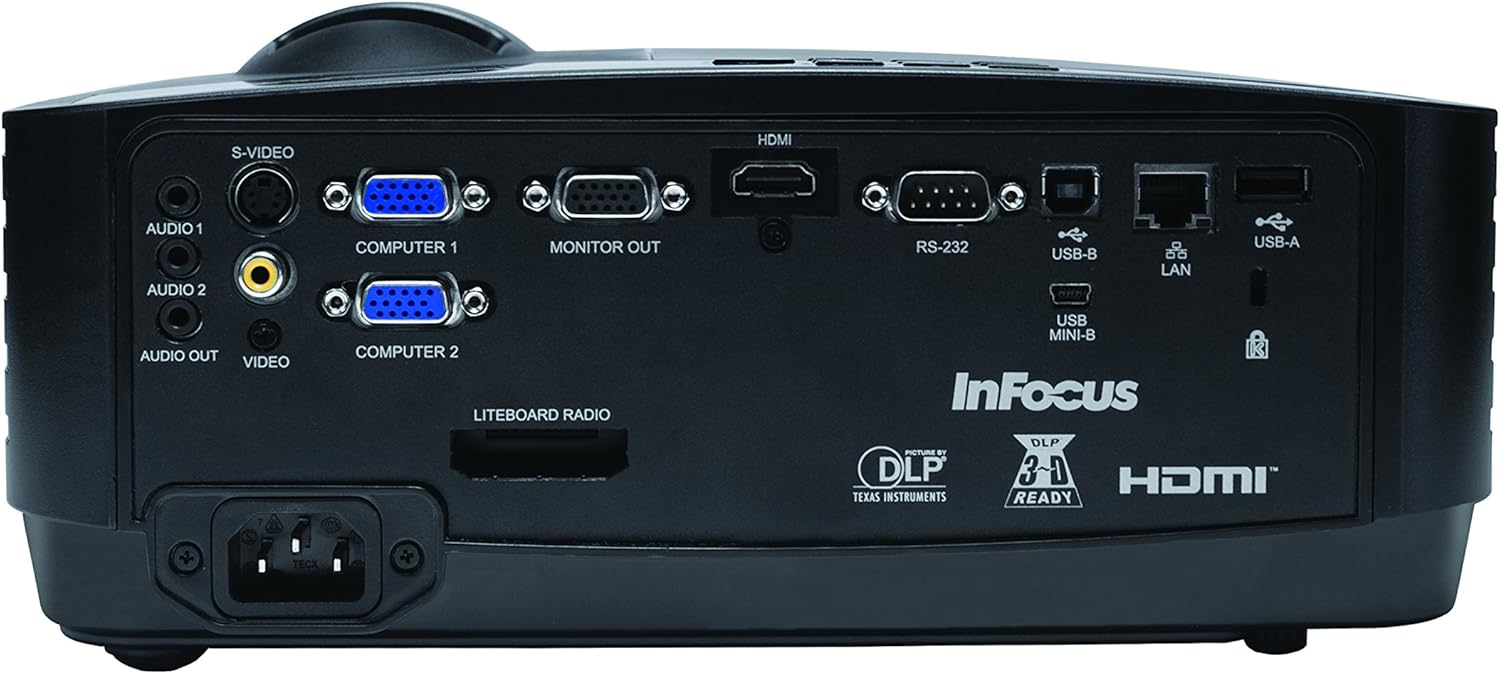
The rear panel provides various input and output ports for connecting external devices.
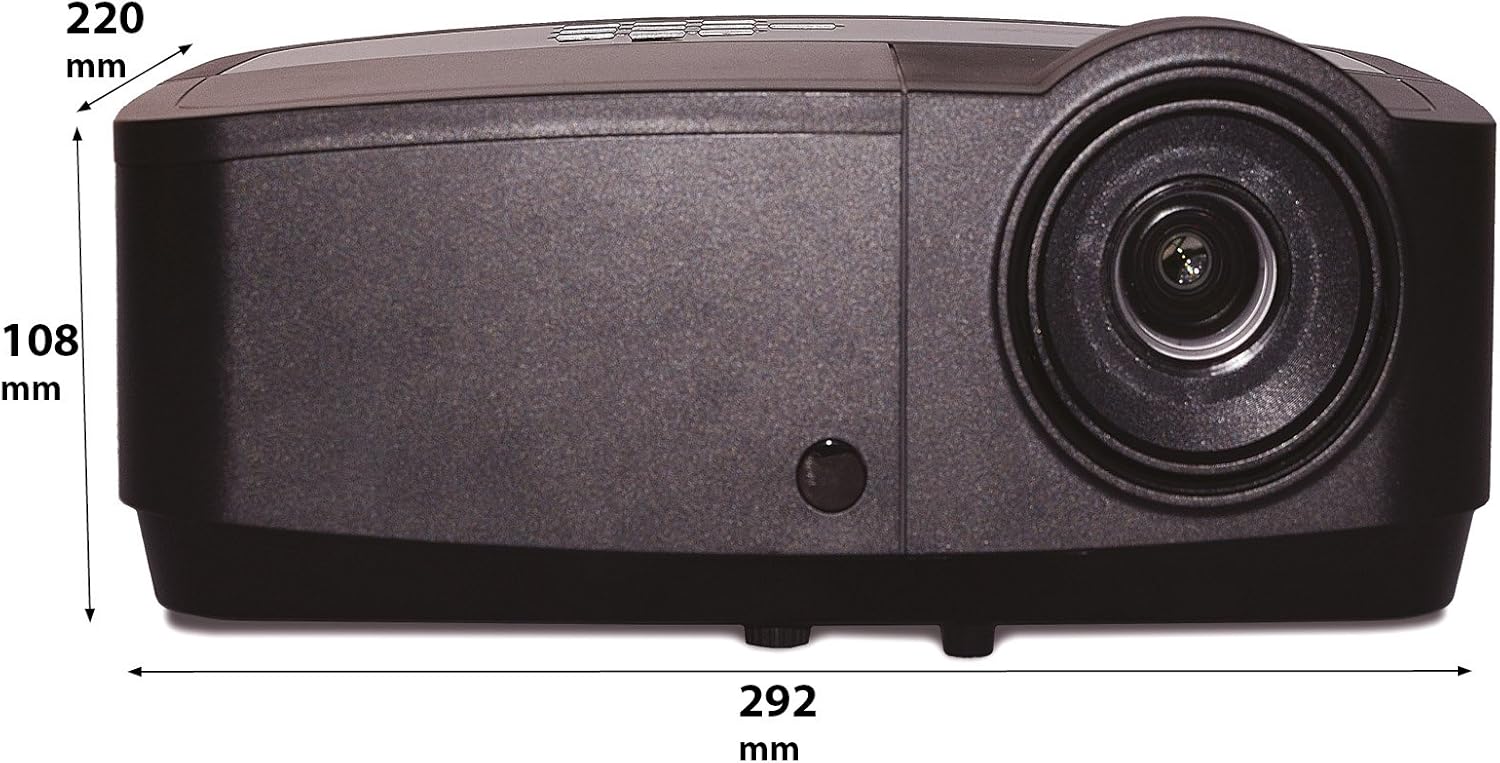
Figure 3: Rear panel of the InFocus IN2126a projector, displaying various connectivity ports including HDMI, VGA, USB, and LAN.
- הדמי: פֿאַר דיגיטאַל ווידעא און אַודיאָ אַרייַנגאַנג.
- COMPUTER 1 / COMPUTER 2 (VGA): פֿאַר אַנאַלאָג ווידעאָ אַרייַנגאַנג פֿון קאָמפּיוטערס.
- MONITOR OUT (VGA): For connecting an external monitor.
- USB-B / USB Mini-B: For service or specific USB functions.
- USB-A: For connecting USB devices, such as a wireless adapter.
- לאַן (RJ45): פֿאַר נעץ קאָנעקטיוויטי.
- רס -232: פֿאַר סעריעל קאָנטראָל.
- AUDIO 1 / AUDIO 2 (RCA): פֿאַר אַודיאָ אַרייַנשרייַב.
- אַודיאָ אויס: פֿאַר פֿאַרבינדן עקסטערנע אַודיאָ סיסטעמען.
- VIDEO (RCA): For composite video input.
- S-VIDEO: For S-Video input.
- מאַכט ינלעט: פֿאַר פֿאַרבינדן דעם עלעקטרישן שנור.
3.3 אויבערשטע פּאַנעל קאָנטראָלס
The top panel features controls for basic projector functions and image adjustments.

Figure 4: Top panel of the InFocus IN2126a projector, showing the control buttons and focus/zoom rings.
- מאַכט קנעפּל: טורנס די פּראַדזשעקטער אויף אָדער אַוועק.
- מעניו/אויסגאַנג קנעפּל: גייט אריין אין אדער גייט ארויס פון דעם אויף-סקרין דיספלעי (OSD) מעניו.
- נאַוויגאַציע קנעפּלעך (אַרויף, אַראָפּ, לינקס, רעכטס): נאַוויגירט דורך מעניו אָפּציעס.
- אַרייַן קנעפּל: באַשטעטיקט אויסוואַלן אין מעניו.
- מקור קנעפּל: סאַלעקץ אַרייַנשרייַב קוואלן.
- Blank Button: Temporarily blanks the screen.
- אַוטאָ קנעפּל: אויטאָמאַטיש אַדזשאַסטיד בילד סעטטינגס.
- פאָקוס רינג: אַדזשאַסטירט בילד שאַרפֿקייט.
- פארגרעסער רינג: אַדזשאַסטירט בילד גרייס.
3.4 דימענשאַנז
Understanding the physical dimensions is important for installation and placement.

Figure 5: Diagram illustrating the dimensions of the InFocus IN2126a projector (292mm length, 220mm width, 108mm height).
4. סעטאַפּ
4.1 פּראָיעקטאָר פּלאַצירונג
Place the projector on a stable, flat surface or mount it securely. Ensure the projector is positioned at an appropriate distance from the screen to achieve the desired image size. Maintain sufficient space around the projector for proper ventilation.
4.2 קאַנעקטינג דעוויסעס
- מאַכט קשר: Connect the power cord to the projector's power inlet and then to a grounded electrical outlet.
- ווידעא מקור:
- For digital sources (e.g., Blu-ray player, laptop), use an HDMI cable to connect to the HDMI port.
- For analog computer sources, use a VGA cable to connect to the COMPUTER 1 or COMPUTER 2 port.
- For other video sources, use the appropriate S-VIDEO or VIDEO (RCA) connections.
- אַודיאָ מקור: If your video source does not transmit audio via HDMI, connect audio cables to the AUDIO 1 or AUDIO 2 ports.
- נעץ קאַנעקשאַן: For wired network access, connect an Ethernet cable to the LAN port.
- ווירעלעסס קאַנעקטיוויטי: If using a compatible wireless adapter (sold separately), insert it into the USB-A port.
4.3 פּאַוערינג אויף / אַוועק
- צו מאַכט אויף: Press the Power button on the projector's top panel or the remote control. The power indicator light will illuminate.
- צו מאַכט אַוועק: Press the Power button again. The projector will enter a cooling cycle before shutting down completely. Do not unplug the projector during the cooling cycle.
5. אפערירן דעם פּראָיעקטאָר
5.1 מקור סעלעקציע
After powering on, the projector may automatically detect an active input source. If not, or to switch sources:
- דרוק די מקור קנעפּל אויף די פּראַדזשעקטער אָדער ווייַט קאָנטראָל.
- Use the navigation buttons to highlight the desired input source (e.g., HDMI, Computer 1, Video).
- דרוק אַרייַן צו אויסקלייַבן דעם מקור.
5.2 בילד אַדזשאַסטמאַנט
- פאָקוס: דרייען די פאָקוס ring on the projector lens until the image appears sharp and clear.
- פארגרעסער: דרייען די פארגרעסער ring on the projector lens to adjust the image size to fit your screen.
- Keystone Correction: If the image appears trapezoidal, use the keystone correction feature in the OSD menu to square the image.
5.3 אויף-סקרין ווייַז (אָסד) מעניו
The OSD menu allows you to configure various projector settings.
- דרוק די מעניו קנעפּל צו עפענען דעם OSD מעניו.
- ניצן די אַרויף / אַראָפּ navigation buttons to select a menu category.
- ניצן די לינקס / רעכט navigation buttons to adjust settings or enter sub-menus.
- דרוק אַרייַן צו באַשטעטיקן ענדערונגען.
- דרוק אַרויסגאַנג צו פֿאַרמאַכן דעם OSD מעניו.
5.4 ווירעלעסס קאַנעקטיוויטי
The IN2126a is wireless-ready. To enable wireless display, a compatible InFocus wireless adapter (sold separately) must be connected to the USB-A port. Refer to the wireless adapter's specific instructions for setup and connection procedures.
5.5 3D פונקציאָנאַליטעט
דער פּראָיעקטאָר שטיצט 3D אינהאַלט. צו view 3D content, you will need a compatible 3D source, 3D glasses, and appropriate 3D content. Refer to the projector's OSD menu for 3D settings and ensure your source device is configured for 3D output.
6. וישאַלט
רעגולערע אויפהאלטונג גאראנטירט אפטימאלע פאָרשטעלונג און פארלענגערט די לעבן פון אייער פּראָיעקטאָר.
6.1 לamp פאַרבייַט
די פּראַדזשעקטער לamp has a limited lifespan (approximately 4000 hours). When the lamp indicator illuminates or the image brightness significantly decreases, the lamp needs replacement. Always use an authorized InFocus replacement lampזעט דעם פולן סערוויס מאַנואַל פֿאַר דעטאַלירטע אינפֿאָרמאַציע.amp replacement instructions or contact customer support.
6.2 פילטער רייניקונג
Dust accumulation on the air filter can impede airflow and cause overheating. Regularly clean the air filter to maintain proper ventilation. Turn off and unplug the projector before cleaning. Use a soft brush or vacuum cleaner to remove dust from the filter cover.
6.3 אַלגעמיינע רייניקונג
- פּראָיעקטאָר Casing: ניצן אַ ווייך, לינט-פֿרייַ שטאָף דampגעוואַשן מיט אַ מילדן, נישט-שלייפֿנדיקן רייניגער. ניצט נישט קיין שאַרפֿע כעמיקאַלן.
- לענס: Use a lens cleaning cloth and specialized lens cleaning solution. Avoid touching the lens surface with your fingers.
7. טראָובלעשאָאָטינג
אויב איר טרעפט פּראָבלעמען מיט אייער פּראָיעקטאָר, זעט די פאלגענדע געוויינטלעכע פּראָבלעמען און לייזונגען:
| פּראָבלעם | מעגלעך סיבה | לייזונג |
|---|---|---|
| קיין בילד אויף פאַרשטעלן | אומרעכטע אינפוט מקור אויסגעקליבן; לויזע קאבל פארבינדונג; פראיעקטאר אין סטענדביי מאָדע. | Verify input source; Check all cable connections; Press power button to wake from standby. |
| די בילד איז בלערי | פאָקוס נישט אַדזשאַסטיד; פּראָיעקטאָר צו נאָענט/ווייט פֿון עקראַן. | Adjust the focus ring; Reposition the projector and adjust zoom. |
| בילד איז טראַפּעזאָידאַל | פּראָיעקטאָר נישט פּערפּענדיקולאַר צום עקראַן. | ניצט קיסטאָון קערעקשאַן אין די OSD מעניו. |
| קיין אַודיאָ | Audio cables not connected; Volume too low; Muted. | Check audio cable connections; Adjust volume; Unmute projector. |
| פּראָיעקטאָר איבערהייצט זיך און שליסט זיך אויס | פארשטאפטע ווענטילאציע; שמוציגע לופט פילטער. | Ensure clear airflow around projector; Clean the air filter. |
For more detailed troubleshooting, consult the complete user manual or contact InFocus customer support.
8. ספּעסאַפאַקיישאַנז
Key technical specifications for the InFocus IN2126a WXGA Network Projector:
- מאָדעל נאָמען: IN2126a
- ווייַז טיפּ: DLP
- געבוירן רעזאלוציע: 1280 X 800 (WXGA)
- ברייטקייט: 3500 לומענס
- קאַנטראַסט פאַרהעלטעניש: 15000:1
- קאָליר רעפּראָדוקציע: 1.07 Billion Colors (30-bit)
- ליכט מקור אַפּערייטינג לעבן: 4000 שעה
- קאַנעקטיוויטי טעכנאָלאָגיע: Wireless-ready, HDMI 1.4, VGA (x2), USB (Type-A, Mini-B, Type-B), LAN (RJ45), RS-232, Audio In (x2), Audio Out, Video (RCA), S-Video
- ספּעציעלע פֿעיִקייטן: 3D-Ready, Network Projector
- פאָרם פאַקטאָר: פּאָרטאַטיוו
- מאַונטינג טיפּ: טאַבלעטאָפּ בארג
- נומער וואָג: 7.1 פונט
9. וואָראַנטי און שטיצן
For information regarding your product's warranty, please refer to the warranty card included with your purchase or visit the official InFocus website. For technical support, service, or to purchase accessories, please contact InFocus customer service through their official channels.


