הקדמה
This manual provides essential information for the safe and efficient operation of your InFocus IN124a XGA Wireless-Ready Projector. Please read this manual thoroughly before using the projector and retain it for future reference. This projector is designed for displaying content with XGA (1024 x 768) native resolution, offering 3500 lumens of brightness and a 15000:1 contrast ratio.
זיכערקייַט אינפֿאָרמאַציע
- עלעקטריקאַל זיכערקייַט: Always connect the projector to a grounded power outlet. Do not use damaged power cords. Disconnect power before cleaning or servicing.
- היץ און ווענטאַליישאַן: Ensure adequate ventilation around the projector. Do not block ventilation openings. Avoid placing the projector near heat sources.
- Lamp זיכערקייַט: די פּראַדזשעקטער לamp operates at high temperatures and pressures. Allow the projector to cool down before moving or replacing the lamp. Do not look directly into the lens when the lamp איז אויף.
- האַנדלינג: באַהאַנדלט דעם פּראָיעקטאָר מיט פֿאָרזיכט. פֿאַרמײַדט אים צו לאָזן פֿאַלן אָדער אים אויסשטעלן צו שטאַרקע קלאַפּן.
- נעץ: שטעלט נישט אויס דעם פּראָיעקטאָר צו רעגן, פייכטקייט, אדער איבערגעטריבענע הומידיטי.
פּעקל אינהאַלט
באַשטעטיקן אַז אַלע זאכן זענען פאַראַן אין פּעקל:
- InFocus IN124a Projector
- HDMI קאַבלע
- ווגאַ קאַבלע
- מאַכט שנור
- Remote Control (not explicitly listed but standard)
- Optional USB adapter for wireless connectivity (if purchased separately)
פּראָדוקט איבערview
Familiarize yourself with the physical components and connections of your InFocus IN124a projector.

This image displays the rear panel of the InFocus IN124a projector, highlighting various connectivity options including HDMI, VGA (Computer 1 and 2), Monitor Out, S-Video, Video, Audio In (1 and 2), Audio Out, RS-232, USB-B, USB Mini-B, and USB-A ports. The power input is located on the lower left.

The top panel of the InFocus IN124a projector is shown, featuring the control buttons for power, menu navigation (up, down, left, right, enter), source selection, blank screen function, and indicators for temperature and lamp status. The focus and zoom adjustment rings are also visible.

א פראנט view of the InFocus IN124a projector, showing the main projection lens and the power indicator light. The focus and zoom rings are visible near the lens.

דאָס בילד ווײַזט אַ זײַט view of the InFocus IN124a projector, emphasizing the ventilation grilles designed for heat dissipation, crucial for maintaining optimal operating temperature.
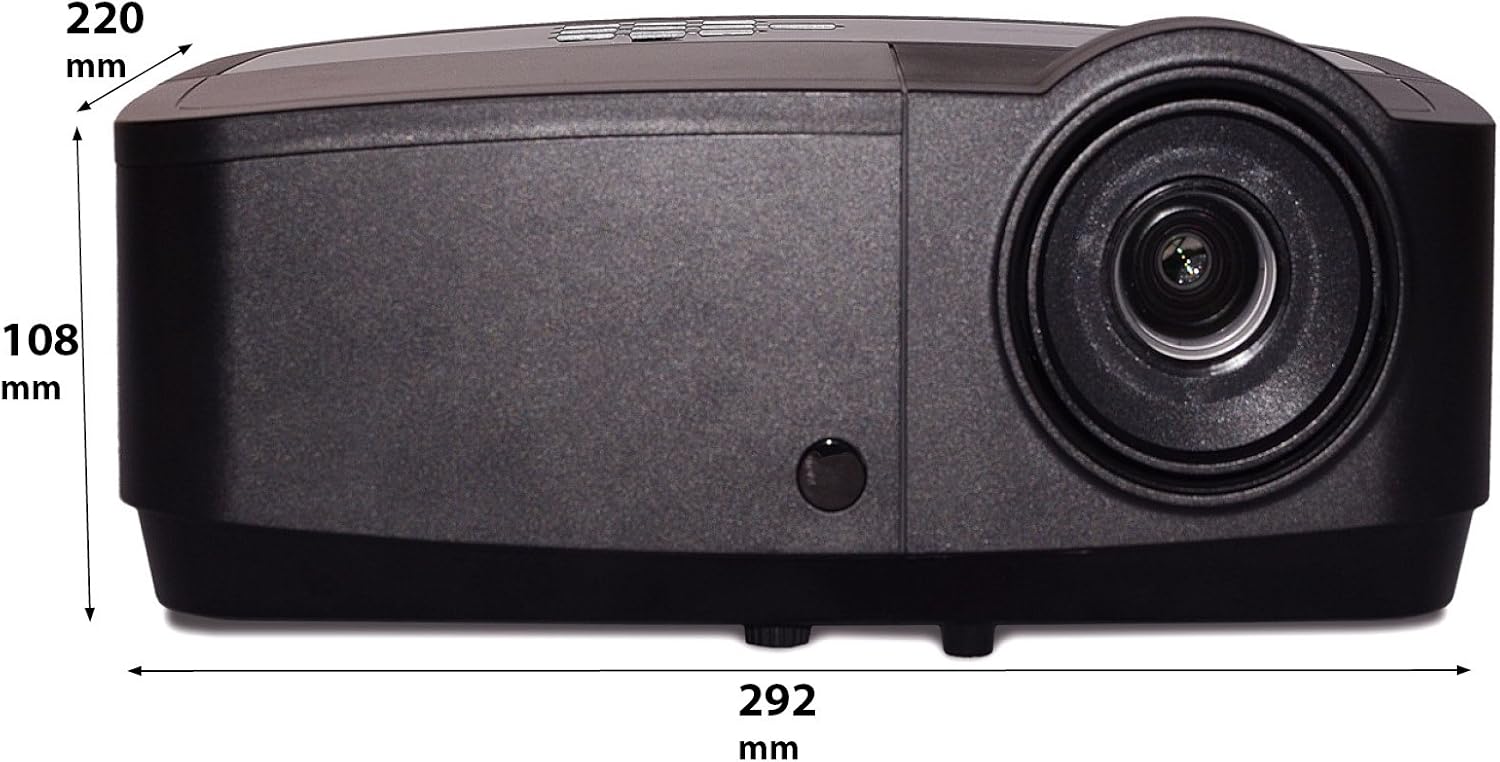
דאָס בילד ווײַזט אַ זײַטיקן פּראָfile of the InFocus IN124a projector, illustrating its physical dimensions: approximately 292 mm in length, 108 mm in height, and 220 mm in width.
סעטאַפּ
קסנומקס. פּלאַסעמענט
Position the projector on a stable, flat surface or mount it securely. Ensure the projector is at an appropriate distance from the screen to achieve the desired image size. Avoid direct sunlight or strong ambient light on the screen for optimal viewing.
2. קאַנעקטינג מאַכט
- פֿאַרבינדט דעם עלעקטרישן שנור צום פּראָיעקטאָר'ס עלעקטרישן אַרייַנגאַנג.
- צאַפּן די אנדערע סוף פון די מאַכט שנור אין אַ גראָונדעד עלעקטריקאַל ווענטיל.
3. Connecting Video Sources
The IN124a offers multiple connectivity options:
- הדמי: Connect an HDMI cable from your source device (e.g., laptop, Blu-ray player) to the HDMI port on the projector.
- VGA (קאָמפּיוטער 1/2): Use a VGA cable to connect your computer to either the 'COMPUTER 1' or 'COMPUTER 2' port.
- S-Video/Video: For older devices, connect S-Video or composite video cables to the respective ports.
- וסב: The USB-A port can be used for displaying content directly from a USB drive. The USB-B port supports USB display functionality.
- אַודיאָ: Connect external audio sources to 'AUDIO 1' or 'AUDIO 2' inputs, and use 'AUDIO OUT' for external speakers if needed.
4. Wireless Setup (Optional)
For wireless connectivity, an optional USB adapter is required. Insert the wireless USB adapter into the designated USB port on the projector. Refer to the adapter's specific instructions for software installation and connection procedures on your source device.
אַפּערייטינג
1. פּאָווערינג אויף / אויסגעלאשן
- מאַכט אויף: Press the 'Power' button on the projector's control panel or remote control. The power indicator light will turn steady blue.
- מאַכט אַוועק: Press the 'Power' button again. A confirmation message may appear. Press 'Power' a second time to confirm shutdown. The fan will continue to run briefly to cool the lamp before shutting down completely.
2. אַדזשאַסטירן בילד
- פאָקוס: Rotate the focus ring around the lens until the image appears sharp and clear.
- פארגרעסער: Rotate the zoom ring around the lens to adjust the image size without moving the projector.
- Keystone Correction: אויב דאס בילד קוקט אויס טראַפּעזאָידאַל, ניצט די קיסטאָון קערעקשאַן פונקציע אין דעם פּראָיעקטאָר'ס מעניו צו קוואַדראַטירן דאס בילד.
3. מקור סעלעקציע
Press the 'Source' button on the control panel or remote control repeatedly to cycle through available input sources (HDMI, Computer 1, Computer 2, S-Video, Video, USB). The projector will automatically detect an active signal.
4. מעניו נאַוויגאַציע
Press the 'Menu' button to access the On-Screen Display (OSD) menu. Use the arrow buttons to navigate through options and 'Enter' to select. Press 'Menu' or 'Exit' to close the OSD.
5. 3 ד מאָדע
The InFocus IN124a is 3D-Ready. To utilize 3D functionality, you will need compatible 3D content, a 3D-capable source device, and active 3D glasses. Refer to your 3D source device's manual for specific setup instructions. The projector will automatically detect a 3D signal when available.
וישאַלט
1. לamp פאַרבייַט
די פּראַדזשעקטער לamp has a lifespan of up to 7,000 hours. When the lamp life is nearing its end, a warning message may appear, or the lamp indicator light will illuminate. Only replace the lamp with an authorized InFocus replacement lamp. Always allow the projector to cool completely before attempting lamp פאַרבייַט.
2. רייניקונג
- פּראָיעקטאָר Casing: ניצן אַ ווייך, לינט-פֿרייַ שטאָף דampגעוואַשן מיט אַ מילדן, נישט-שלייפֿנדיקן רייניגער. ניצט נישט קיין שאַרפֿע כעמיקאַלן.
- לענס: Gently wipe the lens with a lens cleaning cloth or lens tissue. Avoid touching the lens surface with your fingers.
- לופט ווענט: Periodically check and clean the air vents to prevent dust buildup, which can lead to overheating. Use a soft brush or compressed air to clear obstructions.
טראָובלעשאָאָטינג
אויב איר טרעפט פּראָבלעמען מיט אייער פּראָיעקטאָר, זעט די פאלגענדע געוויינטלעכע פּראָבלעמען און לייזונגען:
| פּראָבלעם | מעגלעך סיבה | לייזונג |
|---|---|---|
| קיין בילד געוויזן | Power not connected; Incorrect input source; Source device not active. | Check power connection; Select correct input source; Ensure source device is on and outputting signal. |
| בילד איז פארשוואומען אדער נישט אין פאָקוס | Lens focus not adjusted; Projector too close/far from screen. | Adjust the focus ring on the lens; Adjust projector distance or use zoom ring. |
| ווייַט קאָנטראָל נישט ארבעטן | Batteries depleted; Obstruction between remote and projector; Remote sensor blocked. | Replace batteries; Remove obstructions; Ensure remote sensor on projector is clear. |
| פּראָיעקטאָר איבערהייצט זיך און שליסט זיך אויס | Blocked ventilation; Dusty air filter. | Ensure vents are clear; Clean air filter (if applicable) and vents. |
ספּעסאַפאַקיישאַנז
| שטריך | באַשרייַבונג |
|---|---|
| געבוירן האַכלאָטע | XGA (1024 X 768) |
| ברייטנאַס | 3500 לומענס |
| קאַנטראַסט פאַרהעלטעניש | 15000:1 |
| Lamp לעבן | אַרויף צו 7,000 שעה (עקאָ מאָדע) |
| קאַנעקטיוויטי טעכנאָלאָגיע | Wireless (with optional adapter), HDMI, USB video |
| ספּעציעלע שטריך | 3 ד-גרייט |
| פּראָדוקט דימענשאַנז | 14.25 X 12 X 7.75 אינטשעס (36.2 X 30.5 X 19.7 סענטימעטער) |
| פּונקט וואָג | 5.4 פונט (2.45 קג) |
| רעקאָממענדעד ניצט | דרינענדיק / דרויסנדיק |
וואָראַנטי און שטיצן
For warranty information and technical support, please refer to the warranty card included with your product or visit the official InFocus webזייטל. האַלט אייער קויף קוויטל ווי אַ באַווייַז פון קויפן פֿאַר וואָראַנטי קליימז.