1. הקדמה
This manual provides detailed instructions for the installation, operation, and maintenance of your Axis P1355 Surveillance/Network Camera. The Axis P13 series offers high-performance fixed cameras designed for both indoor and outdoor surveillance, delivering superb image quality with H.264 compression. These models support HDTV 720p/1080p video and are equipped with features like Wide Dynamic Range and Day/Night functionality for clear imaging in various lighting conditions. Specific models within the P13 series, including HDTV 720p, incorporate Axis Lightfinder technology for enhanced low-light sensitivity, while HDTV 1080p and 5-megapixel cameras feature P-iris control for optimized depth of field and lens resolution.
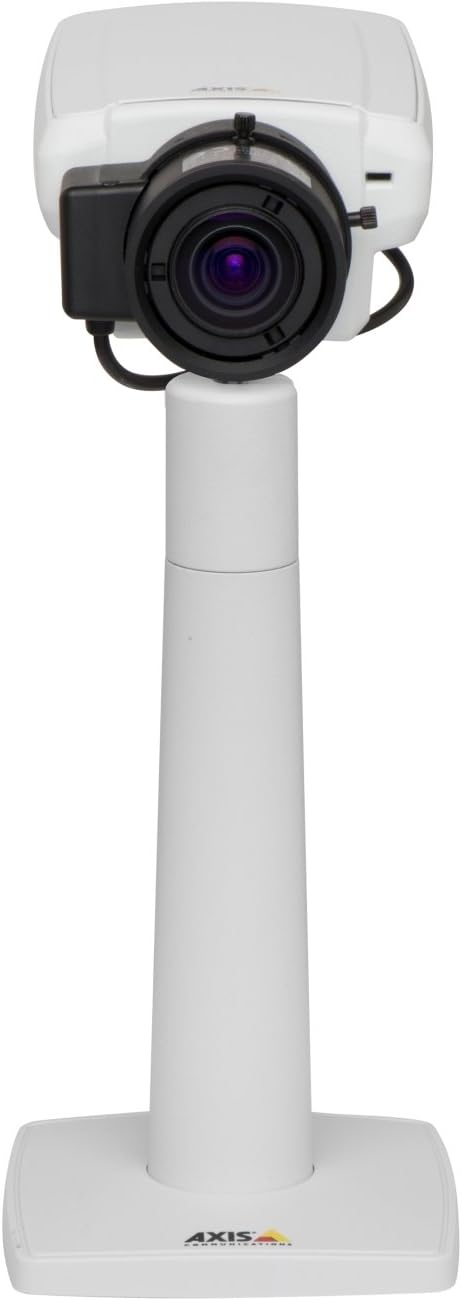
פיגורע 1: The Axis P1355 Surveillance Camera shown mounted on its stand. This image illustrates the camera's physical appearance and typical mounting configuration.
2. זיכערקייַט אינפֿאָרמאַציע
Please read all safety instructions before installing or operating the camera.
- Ensure the power source matches the camera's requirements to prevent electrical hazards.
- די אינסטאַלאַציע זאָל דורכגעפירט ווערן דורך קוואַליפֿיצירטע פּערסאָנעל אין לויט מיט די לאָקאַלע עלעקטרישע קאָודן.
- שטעלט נישט אויס די קאַמעראַ צו עקסטרעמע טעמפּעראַטורן, הומידיטי, אדער קאָראָזיווע סביבות.
- פֿאַרמײַדט דירעקטע אויסשטעלונג פֿון דער לענס צו שטאַרקע ליכט־קוואַלן, ווי די זון, ווײַל דאָס קען שעדיקן דעם בילד־סענסאָר.
- Disconnect power before cleaning or servicing the camera.
3. סעטאַפּ און ייַנמאָנטירונג
The Axis P1355 camera is designed for both indoor and outdoor use and supports various mounting options.
3.1 מאַונטינג
The camera is typically designed for wall mount installation. Ensure the mounting surface is strong enough to support the camera's weight (approximately 2 pounds). Use appropriate screws and anchors for the chosen surface.
- Select a suitable location for optimal surveillance coverage.
- זיכער באַפעסטיקט די מאַונטינג קלאַמער צו דער וואַנט.
- Mount the camera onto the bracket, ensuring it is firmly in place.
- Adjust the camera's angle for the desired field of view.
3.2 קאַנעקשאַנז
The Axis P1355 camera primarily uses wired connectivity for reliable data transmission and power.
- מאַכט קשר: Connect the provided power adapter to the camera's power input and then to a suitable electrical outlet. The camera operates on a corded electric power source.
- נעץ קאַנעקשאַן: Connect an Ethernet cable from the camera's network port to your network switch or router. This provides wired connectivity for video streaming and control.
- Wireless Connectivity (Optional/Configuration): While primarily wired, the camera supports Wi-Fi for certain configurations. Refer to the Axis product documentation for specific wireless setup instructions if applicable to your model variant.
4. אַפּערייטינג ינסטרוקטיאָנס
Once installed and connected, the Axis P1355 camera can be configured and operated via a network interface.
4.1 ערשטע צוטריט און קאָנפיגוראַציע
- Use the Axis IP Utility or a similar network discovery tool to find the camera's IP address on your network.
- עפענען א web בלעטערער און אַרייַן די קאַמעראַ'ס IP אַדרעס צו אַקסעס עס web צובינד.
- Log in using the default credentials (refer to Axis documentation for default username/password, typically 'root' and 'pass' or similar, which should be changed immediately).
- פֿאָלגט די אינסטרוקציעס אויף דעם עקראַן צו שטעלן אויף גרונטלעכע נעץ סעטטינגס, דאַטע/צייט, און באַניצער אַקאַונץ.
4.2 Video Monitoring and Features
- לעבן View: Access the live video feed through the web interface or compatible video management software.
- רעזאלוציע: The camera supports video capture resolutions up to 720p and effective video resolutions of 1080 pixels, with effective still resolution of 2 MP.
- Color and Monochrome Modes: The camera can operate in both color and monochrome (black and white) modes, automatically switching based on light conditions or configured manually.
- נאַכט זעאונג: Utilize the integrated night vision capabilities for surveillance in low-light or complete darkness.
- אָפּטיש פארגרעסער: Adjust the optical zoom for detailed views of specific areas.
- P-Iris Control: For models equipped with P-iris, this feature allows precise control over the iris position to optimize depth of field and lens resolution, enhancing image sharpness. This can be configured via the web צובינד.
- ווידעא פֿאָרמאַט: Video is typically captured in MP4 format.
- ווייַט קאָנטראָל: The camera supports remote control for various settings and adjustments.
5. וישאַלט
Regular maintenance ensures optimal performance and longevity of your Axis P1355 camera.
- רייניקונג: Gently clean the camera lens and housing with a soft, damp שטאָף. פֿאַרמײַדט אַברייסיוו רייניגער אָדער סאָלווענטן.
- Firmware דערהייַנטיקונגען: פּעריִאָדיש קאָנטראָלירן די אַקסיס קאָמוניקאַציעס webזייטל פֿאַר פירמווער דערהייַנטיקונגען. האַלטן די פירמווער דערהייַנטיקט גאַראַנטירט אַקסעס צו די לעצטע פֿעיִקייטן, זיכערהייט פּאַטשאַז און פאָרשטעלונג פֿאַרבעסערונגען.
- קאַבלע דורכקוק: Regularly inspect all cables for signs of wear or damage, especially for outdoor installations.
- ענוויראָנמענטאַל קאָנטראָל: זיכער מאַכן אַז די קאַמעראַ'ס אַפּערייטינג סביבה בלייבט אין די ספּעציפֿישע טעמפּעראַטור און הומידיטי ריינדזשאַז.
6. טראָובלעשאָאָטינג
This section addresses common issues you might encounter with your Axis P1355 camera.
- קיין מאַכט:
- וועריפיצירט אז דער מאַכט אַדאַפּטער איז זיכער פארבונדן צו ביידע די קאַמעראַ און אַ אַרבעטנדיק מאַכט ווענטיל.
- קאָנטראָלירן די מאַכט קאַבלע פֿאַר קיין שעדיקן.
- קיין נעץ פֿאַרבינדונג:
- Ensure the Ethernet cable is properly connected to the camera and the network switch/router.
- Check network switch/router status.
- Confirm the camera has a valid IP address and is on the same network segment as your viewינג מיטל.
- נעבעך בילד קוואַליטעט:
- ריין די אַפּאַראַט אָביעקטיוו.
- אַדזשאַסטירן פאָקוס און זום סעטטינגס דורך די web צובינד.
- Check lighting conditions; enable night vision or adjust exposure settings if necessary.
- Ensure P-iris control is correctly configured for optimal sharpness (if applicable).
- קענען ניט אַקסעס Web צובינד:
- Verify the camera's IP address.
- זייט זיכער אז אייער קאמפיוטער איז אויף דער זעלבער נעץ ווי די קאמערא.
- Try restarting the camera and your network equipment.
7. ספּעסאַפאַקיישאַנז
| שטריך | דעטאַל |
|---|---|
| סאָרט | אַקס קאָמוניקאַציע |
| מאָדעל נומער | AXIS P1355 |
| דרינענדיק / דרויסנדיק באַניץ | דרינענדיק, דרויסנדיק |
| קאַנעקטיוויטי טעכנאָלאָגיע | Wired (Wi-Fi capable for certain configurations) |
| ספּעציעלע שטריך | נאַכט זעאונג |
| מאַכט מקור | עלעקטריש מיט שנור (7.1 וואטס) |
| ווידעא קאַפּטורע רעסאָלוטיאָן | 720 פּ |
| עפעקטיוו ווידעא האַכלאָטע | 1080 פּיקסעלס |
| עפעקטיוו נאָך האַכלאָטע | 2 מפּ |
| פארגרעסער טיפּ | Optical Zoom (2.9x Optical) |
| קאָנטראָללער טיפּ | Iris (P-iris control) |
| מאַונטינג טיפּ | וואנט בארג |
| פּראָדוקט דימענשאַנז (L x W x H) | 3.07 X 5.94 X 1.69 אינטשעס |
| פּונקט וואָג | 2 פונט |
| אינטערנאַציאָנאַלע פּראַטעקשאַן שאַץ | IP54 |
| ווידעא קאַפּטורע פֿאָרמאַט | mp4 |
8. וואָראַנטי און שטיצן
For detailed warranty information and technical support, please refer to the official Axis Communications webזייטל אדער קאנטאקט זייער קאסטומער סערוויס גלייך.
פאַבריקאַנט: AXIS COMMUNICATION INC.
Webפּלאַץ: www.axis.com (ביטע באַזוכט די באַאַמטער website for the most current support resources, drivers, and documentation.)